Capturing Partner-Led Deals: Reseller Domains, Partner-Only Emails and Joint Calls on the Right Opportunity
Learn how reseller domains, partner-only emails, and joint calls map to the right Salesforce opportunity.


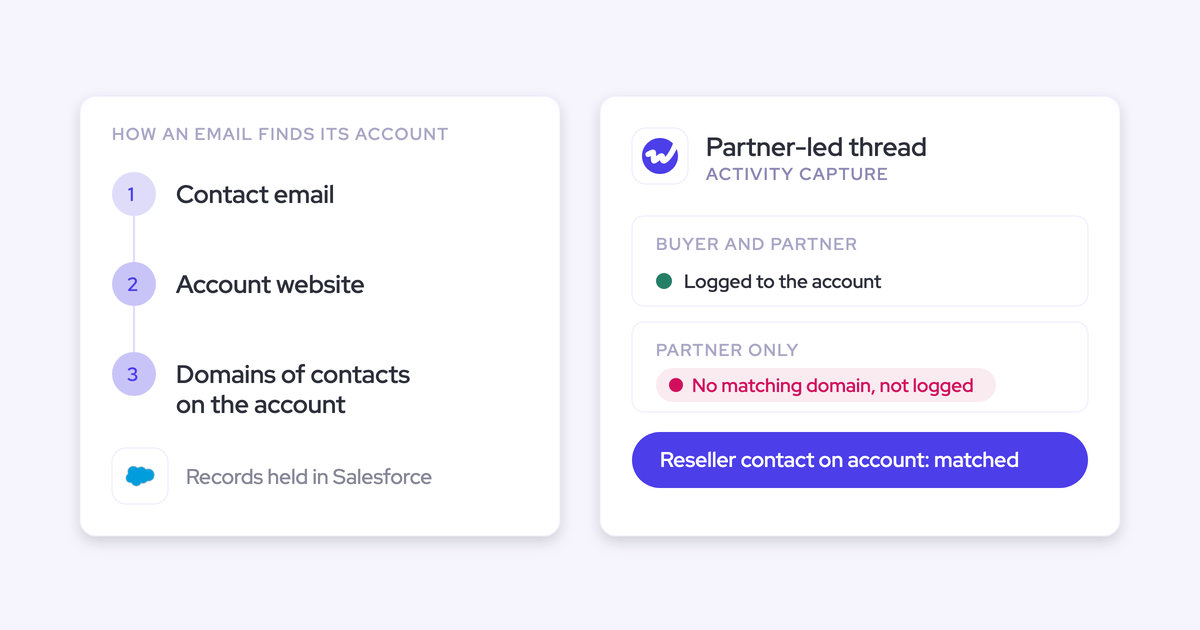

If you run partner deals, you already know a reseller's email domain points to the wrong company on purpose. So where partner activity lands in Salesforce comes down to your data model and your opportunity contact roles, not a smarter matching algorithm.
What matters is whether Salesforce holds a clean link from that partner contact to one open deal.
Weflow is the Revenue AI Orchestration platform for sales, customer success, and RevOps teams. Here's how Weflow Activity & Contact Capture handles partner emails and meetings:
- It lands on the deal automatically when a partner contact holds a role on exactly one open opportunity. If Weflow creates that role the first time it logs the partner's email to the deal, every later email from that partner follows.
- It lands on the account, visibly, when the case is genuinely unclear which deal the email belongs to. It stays there until a rep picks the deal once for the whole thread.
- It reaches only one deal even when a partner manager's email covers three. A Salesforce activity carries one WhatId, and no tool can change that.
In other words, getting partner activity onto the right opportunity is something you design for. Below, we walk through how each partner scenario plays out under each data model, and what we'd set up.
How Weflow Activity and Contact Capture decides where partner emails land
Weflow Activity & Contact Capture matches every email in a fixed order, and when the evidence doesn't settle which deal it belongs to, it logs to the account instead of guessing.
Here's the order, so you can rebuild it in a sandbox:
- Weflow looks up each address in the primary and secondary email fields on contacts, leads and any custom object you've enabled. A contact wins over a lead.
- It logs to the record that holds the address. If no person matches, and you've switched on the setting, it checks the sender's domain against account Website fields. A domain match can only ever reach the account.
- Next, it checks opportunity contact roles. A role on exactly one open opportunity wins.
- If the account has exactly one open opportunity, Weflow picks that one.
- If several are open, Weflow weighs the contact role, the opportunity owner, the mailbox owner, the account relationship and the stage.
- If that still doesn't settle it, the email logs to the account.
Weflow never writes to a closed opportunity, and it doesn't read the email's content either. We tested content-based matching and left it out because it wasn't accurate enough.
Two platform rules shape everything that follows. First, a Salesforce activity carries a single WhatId, so one email relates to one opportunity or to the account, never several.
Second, the first message in a thread sets the mapping for the whole conversation, so a rep's correction holds for every later reply.
Four ways to model partners in Salesforce for activity capture
There are four realistic ways to represent partners in Salesforce, and each one decides where partner activity can land before any capture tool runs.
It helps to compare them against the setup most teams have today: partners exist as contacts on their own account, nobody maintains their contact roles, and everything they send lands on the partner account.
Partner contacts on the end customer's account
This is the simplest path for capture, because the partner contact and the deal sit under the same account. If that account has one open opportunity, the partner's email lands on it with no help.
The catch is that partner people clutter the customer's contact list, and the model breaks the moment that partner works a second customer, since one contact can only sit on one account.
Implementation: Create or move partner contacts onto the end customer's account and accept the cleanup when they change deals.
Partner contacts on their own account with opportunity contact roles
Partners keep their real account, and the opportunity contact role becomes the bridge to the deal. A contact role works across accounts, so an agency contact can hold a role on an advertiser's opportunity.
This resolves automatically when the partner holds a role on exactly one open opportunity, and turns ambiguous when they hold roles on several.
Implementation: Keep partners on partner accounts and let Weflow create contact roles as it logs.
A partner custom object owned by the partner team
This path gives the partner team its own reportable record. Weflow can log activity to any custom object, either when the partner's address sits on the object or when a rep links the email to it from the Outlook add-in or Chrome extension.
To keep the object from flooding, turn on the owner restriction. Weflow then writes to the object only when its owner was on the thread, so a record owned by a partner manager collects only the conversations that manager was part of.
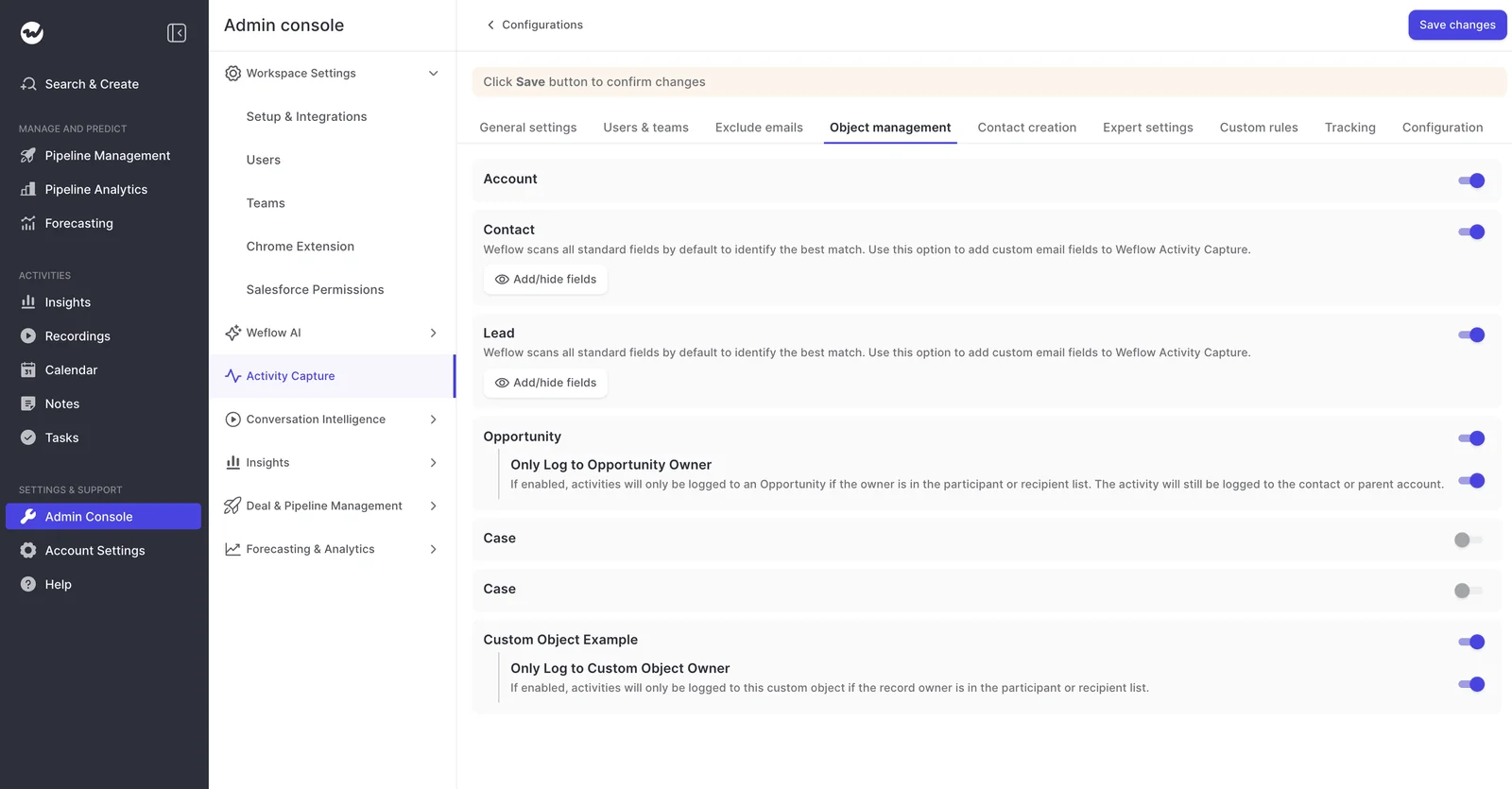
Implementation: Enable the object under Admin Console, Activity Capture, Object Management, turn on the owner restriction, and surface the object in the extension.
Partners excluded from capture and logged by hand
Exclusion keeps partner noise out completely. Weflow's custom rules can block logging based on any field, like account type = Partner, so you aren't limited to domain lists.
The downside is that partner influence only shows up if someone logs it by hand, which is the manual habit you're trying to escape.
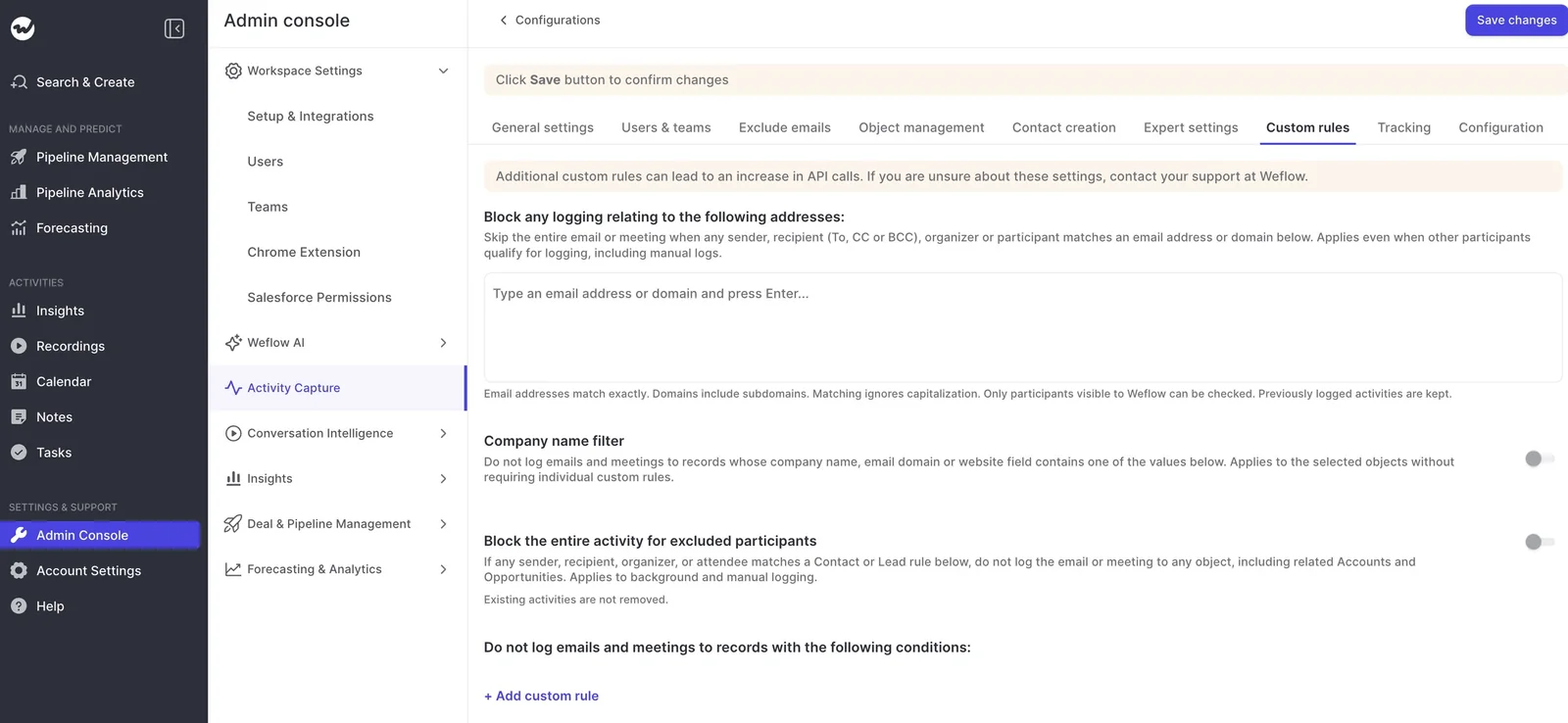
Implementation: Add a custom rule on the account type field and decide who logs partner activity by hand.
Where partner activity lands under each data model
Your data model decides whether partner activity reaches the opportunity, the account, a partner record or nowhere. Here's the short version before we get into the details:
| Partner scenario | What connects it to the deal | Where it lands without that link |
|---|---|---|
| Reseller or agency domain on an end-customer deal | The partner contact and its contact role | The partner's account |
| Partner-only thread | A contact role, a custom object link or one rep pick | The partner's account |
| Partner contact on several open deals | Weighted signals, then one rep pick per thread | The partner's account |
| Agency contact with several addresses | Secondary email fields on one contact | Scattered or duplicate contacts |
| Joint call with the partner in the room | The Event's mapping, set from the mail client | The account, with a recording that the deal timeline doesn't show |
Reseller and agency domains on an end-customer opportunity
Since a reseller's domain points at the partner, matching has to come from the contact and its contact role. Without them, the email lands on the partner account and the deal looks dead.
| Data model | Where a reseller's email lands |
|---|---|
| Partner contacts on the customer's account | On the deal if that account has one open opportunity or the contact holds one role. Otherwise on the customer account. |
| Own account with contact roles | On the deal if the contact holds a role on exactly one open opportunity. With several roles, weighted signals decide or it lands on the partner account until a rep picks. |
| Partner custom object | On the partner record when the address sits there or a rep links it. It reaches the deal only through a contact role or a rep pick. |
| Excluded and logged by hand | Weflow skips the records your rule matches. The deal sees it only if someone logs it. |
| Account-level capture only | On the partner's account, through the contact or a domain in a Website field. If neither exists in Salesforce, Weflow logs nothing. |
What to do about it: Make sure the partner contact exists and holds a role on the deal. Weflow can create that role for you the first time a rep maps an email to the opportunity.
Partner-only threads that never include the end customer
When the end customer isn't on the thread, only three things can connect it to the deal: a contact role, a custom object link or a rep pick. Once a rep picks, that choice holds for every later reply.
| Data model | Where a partner-only email lands |
|---|---|
| Partner contacts on the customer's account | On the deal when that account has one open opportunity or a single matching role. A partner who works a second customer breaks it. |
| Own account with contact roles | On the deal when the partner holds a role on exactly one open opportunity. Otherwise on the partner account until a rep picks once. |
| Partner custom object | On the partner record. With the owner restriction, only when the partner manager who owns it is on the thread. |
| Excluded and logged by hand | Nowhere, unless someone logs it. |
| Account-level capture only | On the partner account. The deal timeline shows nothing. |
One thing applies to every row: the partner manager has to be a Salesforce user enrolled in capture, because Weflow only reads enrolled users' mailboxes.
One partner contact holding roles on several open opportunities
No algorithm can fully resolve this case on its own. Weflow weighs the opportunity owner, the mailbox owner, the account relationship and the stage, and sometimes that's enough.
When it isn't, the email lands on the partner account and a rep picks the deal once for the thread.
| Data model | Where the email lands |
|---|---|
| Partner contacts on the customer's account | It works only if every deal sits under that one customer account. Weighted signals decide, otherwise the account. |
| Own account with contact roles | Weighted signals decide. If they don't settle it, the email lands on the partner account until a rep picks. |
| Partner custom object | On the partner record. The deal still needs a pick. |
| Excluded and logged by hand | Nowhere, unless someone logs it. |
| Account-level capture only | On the partner account. |
Starting a new thread resets the mapping, though, so if your partner managers keep one thread per deal, each thread can carry its own pick.
One agency contact using several email addresses
Because Weflow reads secondary email fields, all of a person's addresses resolve to one contact instead of creating duplicates.
So if you're wondering whether to create a contact per agency or just one, keep one contact and let contact roles carry the link to each deal.
"We try really hard to maintain data quality in our data structure, and we don't want to create duplicate contacts just because someone has two sets of emails that they use. Weflow covers this, which was a big saver for us."
— Erick Mahle, Vice President of Revenue Operations & Digital Transformation, Lendz Financial
There's one limit to plan around: a contact lives on one account. When an agency person moves to a new holding company, the contact stays wherever you last put it. Secondary fields stop duplicates, but your team still decides which account owns that person.
What to do about it: Add the extra addresses to the contact's secondary email fields before rollout, so new addresses resolve instead of spawning new contacts.
Joint calls with the partner in the room
Weflow logs every meeting as a Salesforce Event, whether or not anyone recorded it. If you do record, you also get a summary and field updates, which requires Weflow Conversation Intelligence.
Joint calls often go dark on the deal because two records follow different rules:
- The Event links to one record: One opportunity, or the account when several are open. This is what the opportunity activity timeline reads.
- The recording is a separate custom object: One recording can sit on several opportunities and the account at once.
- Corrections only move both from the mail client: Change the mapping in the Outlook add-in or Chrome extension, and the Event and recording both move. Change it inside the Weflow app, and only the recording moves.
That's why a rep can file a recording against a deal and still see the deal marked inactive. Making the correction from the mail client puts the Event on the opportunity timeline too.
Two more details decide whether partner attendees show up at all:
- Shared Activities: This Salesforce setting relates a meeting to every attendee, not only the primary contact. Many orgs have it off, and in a large org turning it on means a change request.
- Forwarded invites: People who join through a forwarded invite never appear on the seller's calendar event. Weflow doesn't create them as contacts until they join an email thread with the seller.
How to pick the right partner data model for your channel
A handful of facts about your channel decide which path fits, and you can check each one in your own org in an afternoon.
| Criterion and how to check it | What it favors and what it rules out |
|---|---|
| Open deals per partner contact: Pull a report of partner contacts by count of open opportunity contact roles. | Mostly one: contact roles resolve automatically. Mostly several: plan on a rep pick per thread, and rule out contacts on the customer account. |
| Partners working several end customers: Count partner contacts tied to deals on more than one account. | Any meaningful number rules out partner contacts on the customer's account. |
| Partner managers as Salesforce users: Check whether they hold licenses and sit in a capture configuration. | If they don't, their mailboxes aren't captured under any model. Their threads reach Salesforce only when an enrolled colleague is on them, or through manual logging. |
| The partner team needs its own record: Ask whether partner leadership reports on partners as entities, beyond deals. | Yes favors a partner custom object with the owner restriction, alongside contact roles. |
| Partner domains in Website fields: Run Activity Capture Health and look for accounts sharing a website domain. | Any hit means cleanup comes first. Every model inherits a bad Website field. |
| Rep clicks your team will tolerate: Ask your sales leaders directly. | Zero favors fully automated capture with account landings accepted. One per ambiguous thread favors hybrid mode. |
Teams are split on manual overrides. Some see a rep's correction as what makes capture trustworthy, while others see any click as admin work dressed up as automation.
For partner deals, we think a once-per-thread human pick is the honest answer for genuinely ambiguous cases.
Philipp Stelzer, our CPO and co-founder, puts advertising and hospitality at the top of the list of hard industries for opportunity mapping, because one contact often sits on several live deals at once. In those industries, manual selection is part of the answer.
Why we recommend contact roles plus one pick per thread
We recommend keeping partner contacts on their own account and letting Weflow create the opportunity contact role the first time it logs their email to a deal. Then run partner-facing teams in hybrid mode, so reps resolve each ambiguous thread once.
From there, add two layers only if you need them:
- A partner custom object with the owner restriction, if the partner team needs its own lane.
- A custom rule on account type, for partner noise you never want logged.
Here's how that holds up against the criteria:
- Partners on several deals: Contact roles settle the single-deal case, and a rep picks the rest once per thread instead of once per email.
- Partners across customers: Partner contacts stay on their real account, so a second customer doesn't break anything.
- Partner team reporting: The custom object gives partner managers a record that collects only their own conversations.
- Rep tolerance: Clicks happen only on ambiguous threads, and the pick sticks for every reply.
- Maintenance: It's configuration you set once, not a merge-rule set you keep growing with the business.
It also gets better the longer a deal is worked, since every role Weflow creates helps the next email from that partner resolve automatically. Merge rules don't improve on their own.
And when it fails, it fails visibly. An email on the partner account is one move away from correct, while a silent wrong match on a sibling deal ends up in reports before anyone notices.
Keep one caveat in mind. Since the first message sets the mapping for the thread, a wrong first match pulls the whole conversation onto the wrong record until someone moves it.
Set up partner capture in Weflow Activity and Contact Capture
Setup is a short sequence of one-time configuration steps. Here's the order we'd have your admin follow:
- Run Activity Capture Health and fix accounts that share a website domain before anything else.
- Assign hybrid mode to partner-facing teams, so reps see where an email will log and can re-map it.
- Turn on automatic opportunity contact role creation. The role value is fixed per configuration, and Weflow doesn't infer whether someone is a champion or an economic buyer.

- Populate secondary email fields for partners and agency people who use several addresses.
- If you want partner noise out, add a custom rule that excludes records where account type = Partner, and scope a separate configuration for the partner team (the same way teams split renewal and expansion lanes).
- If you use a partner custom object, enable it in Object Management with the owner restriction and surface it in the extension.
- Decide how to handle partner contacts that Weflow auto-creates on the customer account. Reassign them with a Salesforce flow, or have reps create partner contacts by hand from the extension.
- Turn on Shared Activities in Salesforce so joint meetings relate to every attendee.
- Test in a sandbox with a unique domain per test company and one clear contact role per opportunity. Don't use free-mail addresses: they match several test accounts at once and create ties that production data rarely has.
When you test, send to an address outside your company, since mail between two colleagues counts as internal and logs nothing. Also create, move, reschedule and delete a meeting, because update permissions tend to fail later than create permissions.
How to clean up partner activity already on the wrong account
Exclusion stops new mis-mapped activity, but only moving, re-syncing or deleting fixes the history.
Find partner domains hiding in account Website fields
Weflow treats any value in an account's Website field as a matching domain. A partner domain typed there routes that partner's mail from every connected mailbox onto one account.
That's a company-wide, historical exposure: anyone who can see the account can read that mail, including mail from colleagues who never touched the deal. Start with Activity Capture Health, which flags accounts sharing a website domain.
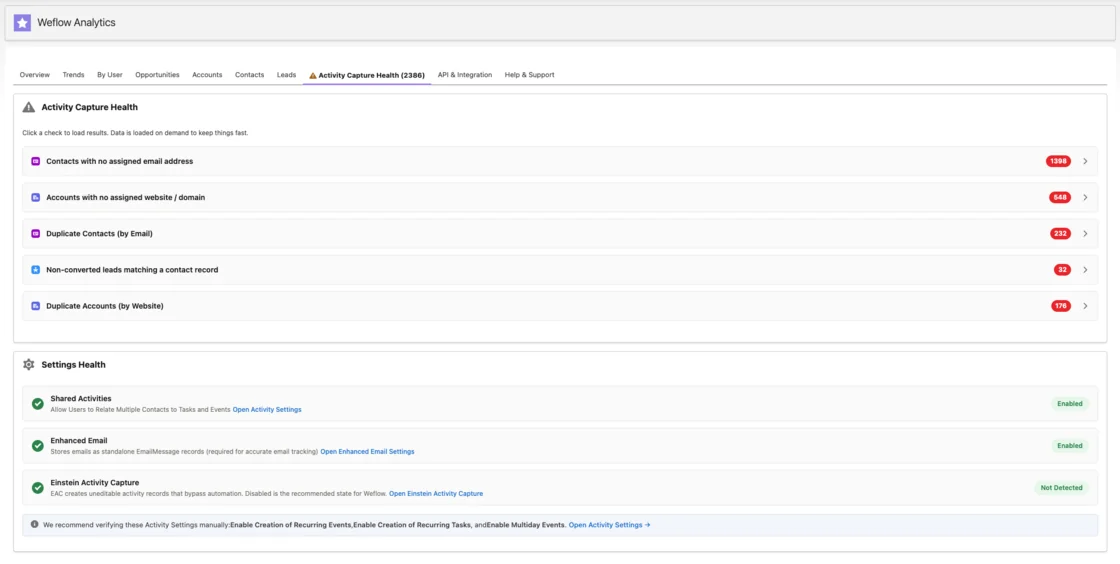
Then fix it in three steps:
- Correct the Website field on the affected account.
- Exclude the partner domain from the sync if you don't want it matched anywhere.
- Delete the activity already written to that account.
Move or re-sync history sitting on partner accounts
Weflow never moves logged activity on its own, even after you add a contact role. New emails from that partner will log to the opportunity, but earlier ones stay where they landed.
Reps or admins can move individual emails from the Outlook add-in or Chrome extension. For bulk fixes, exclude first, then re-sync or delete the affected history.
What partner capture still can't do, in Weflow or anywhere
Some of these gaps come from Salesforce, some from Weflow, and for some teams, staying on their current setup is the right call.
Gaps every Salesforce capture tool inherits on partner deals
- One email relates to one opportunity, because a Salesforce activity carries a single WhatId.
- A partner contact on several open deals needs a human pick when the signals don't settle it.
- Partner managers whose mailboxes aren't connected can't be read by any capture tool.
- Slack shared channels, WhatsApp and personal phones sit outside mailbox and calendar capture.
Where Weflow Activity and Contact Capture stops short for partners
- Weflow has no rule that prefers an end-customer account over a partner account, and no rule that picks the opportunity with the nearest close date.
- Weflow doesn't provide sourced versus influenced partner attribution.
- Weflow attaches auto-created partner contacts to the customer account already on the thread.
- Capture covers enrolled Salesforce users only. People who aren't Salesforce users get recordings through a separate Weflow Conversation Intelligence license.
When your Einstein Activity Capture flow is good enough
Salesforce Einstein Activity Capture (EAC) gives you a real lever here. Its Activities: Match Email to Records flow is editable in Flow Builder, and Salesforce's own example is preferring a customer account over a partner account. Apex adds custom tiebreakers and custom object matching.
If you have Apex capacity, you've already built that rule and you trust EAC's reliability, you may not need to switch.
The trade-off is contact creation: with Sync Email as Salesforce Activity on, the default since Summer '25, EAC's Contact Auto-Creation isn't available, so contact roles won't fill as a side effect.
Terret points to the same lever we do: partner deals match best when partner contacts sit in the opportunity's contact roles and opportunity names are unique.
Every serious tool ends up at the contact role, because that's where Salesforce keeps the link from person to deal.
What Weflow Activity and Contact Capture costs for partner teams
Weflow prices capture per user. To record joint calls, you'll need Weflow Conversation Intelligence, either on its own or as part of the Weflow Revenue AI Foundation bundle.
| Product and price | What it covers for partner deals |
|---|---|
| Weflow Activity & Contact Capture, $19 per user per month | Email and meeting capture, contact creation, automatic contact roles, the Outlook add-in and Chrome extension, custom object logging and custom rules |
| Weflow Conversation Intelligence, $39 per user per month | Recording, transcripts and summaries for joint calls, with one recording attachable to several opportunities |
| Weflow Revenue AI Foundation, $49 per user per month | Both products together, at roughly 16% less than buying them separately |
Every plan includes Ask Weflow AI Pro and Agent Builder Free. We bill annually with a 10-user minimum. Seats you add mid-term are charged pro rata to the end of the term.
FAQs RevOps teams ask about capturing partner-led deals
Will auto-created partner contacts land on customer accounts?
Yes. Weflow attaches an auto-created contact to the account already on the thread.
To keep partners off customer accounts, you can reassign them with a Salesforce flow, have reps create partner contacts by hand from the extension, restrict creation to existing accounts, or cap creation per event.
Can I report sourced versus influenced partner pipeline from captured activity?
Not directly. Sourced and influenced stay in your own Salesforce fields, and captured activity gives you the touch history on the deal, including partner emails and meetings, to sit next to them.
Can partner activity route to a Partner opportunity record type?
Yes. Weflow scopes capture configurations by user and by Salesforce field values, so a partner team can run its own configuration, the same way teams separate renewal and expansion lanes by opportunity type.
Can reps keep a confidential partner thread out of Salesforce?
Yes. In hybrid mode a rep can untick logging for a thread from the Outlook add-in or Chrome extension. Weflow also skips emails and events marked private.
For partners or accounts that must never be captured, an admin can exclude them centrally with a domain exclusion or a custom rule. Weflow doesn't detect sensitive content on its own, so the rep control relies on the rep noticing.
How does Weflow coexist with Einstein Activity Capture, Outreach or a PRM?
We recommend running one capture tool for email and calendar. Activity Capture Health checks for EAC, and we suggest switching it off, because it creates activity records your automations can't use.
With Outreach or Salesloft, you have two options:
- Compatibility mode holds Weflow's sync back about ten seconds and matches on the record ID, so the sequencer keeps logging without duplicates.
- Tracking patterns suppress sequencer emails entirely.
Your PRM keeps owning partner registration and attribution.
Does activity roll up across holding company and child accounts?
Partly. An account's Weflow activity timeline shows activity logged to its child records, like its opportunities, but it doesn't roll activity up a parent and child account hierarchy. If you need a holdco view, you'll build that roll-up in Salesforce.
Are partner conversations in Slack, WhatsApp or personal phones captured?
No. Weflow captures corporate email and calendar, recorded meetings and connected dialers. Slack shared channels, WhatsApp, SMS and calls from personal phones stay outside capture.
Taking this to your admin or your sandbox? Grab the free Salesforce Activity Capture Cheat Sheet, our one-page reference for how capture, mapping and contact roles work in Salesforce.