

Best Einstein Conversation Insights Alternatives for Salesforce Teams (2026)
Learn the best Einstein Conversation Insights alternatives for Salesforce teams, and when Weflow fits.


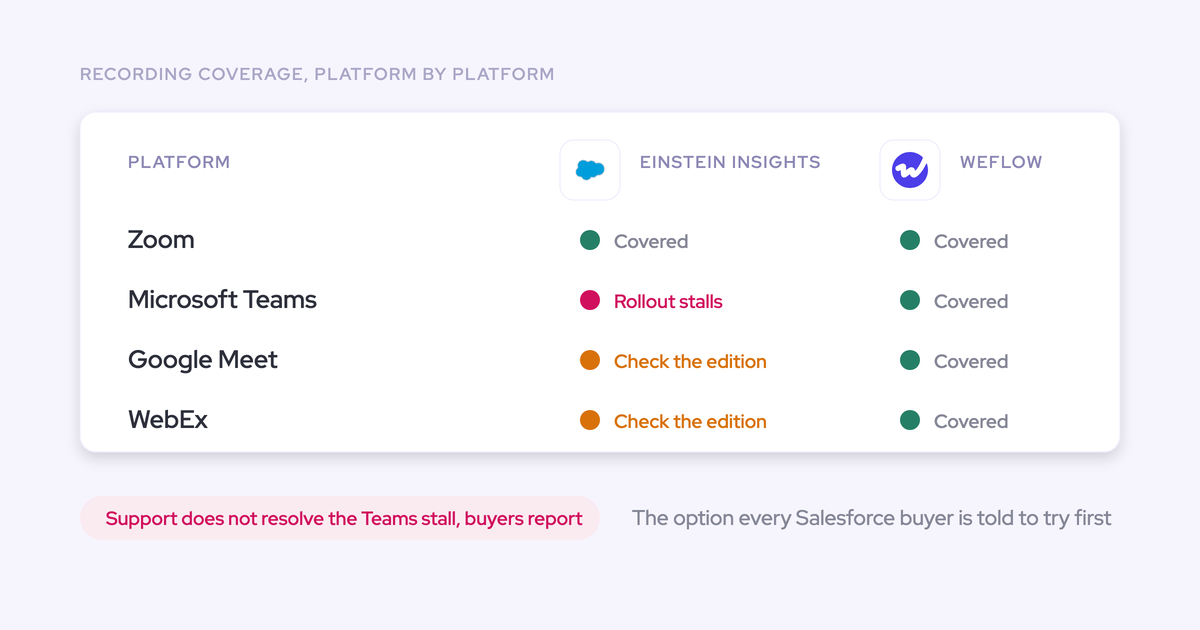

Einstein Conversation Insights (ECI) stopped being the safe default when Salesforce named Momentum the future of call recording and activity capture. Salesforce hasn't given a migration path, an end-of-life date or a pricing consequence. If ECI sits in your org today, you have three real options: keep it, wait for Momentum, or replace it.
Replace ECI with Weflow, a revenue AI orchestration platform built for Salesforce teams, if you want conversation intelligence you can buy on its own that writes every call into the Salesforce records your deal execution runs on. Stay on ECI if it's included in your edition, fully rolled out, and summaries are enough. Wait for Momentum only if you're committed to the Agentforce path.
Whichever path you pick, judge it by one test. Does a call end up as one correct meeting activity, with the right structured fields written to the right Salesforce records? That test is what "best" means in this article.
What Einstein Conversation Insights does well for Salesforce teams
ECI earns its place in a lot of orgs for structural reasons. It comes included through Sales Engagement, which Unlimited and Agentforce 1 Sales editions carry. For those teams it costs nothing extra to switch on.
It's also the pairing Salesforce designed. Einstein Activity Capture (EAC) syncs email and calendar, and Salesforce points customers to ECI for the spoken side. Together they're meant to give you written and verbal activity in one place.
ECI also brings in-person transcription into the Salesforce mobile app. The transcript syncs to ECI, and the call record is tied to the meeting event. If that combination is live in your org and doing what you need, that's a real reason to keep it.
Why RevOps teams leave Einstein Conversation Insights
Teams rarely leave ECI over a missing feature. They leave over five operational problems: rollout, roadmap, residency, duplicates and bundle gating.
ECI rollouts stall on Microsoft Teams while the license bills
The most painful version of ECI is the one you're paying for and nobody uses. We hear this story on sales calls more than any other ECI story. The Teams integration won't work, Salesforce support can't unblock it, and the license keeps billing.
The money hurts, but the bigger cost is confidence. A team that watched one rollout stall stops believing the next one will land. That's why your own Teams tenant is part of the test further down.
Salesforce named Momentum the future, with no migration path
Salesforce's own words put ECI on a superseded path.
Salesforce attaches its standard forward-looking statements disclaimer and tells buyers to buy on what's in market today. So read it as a stated direction. ECI isn't switched off.
It does change what "native" means. The native path for call recording now runs through a differently packaged product sold with Agentforce, instead of through the ECI already in your org. Salesforce hasn't published a migration path, an end-of-life date or a pricing consequence.
That leaves you stuck. You won't invest more in configuring ECI, and you can't justify a replacement without knowing what comes next. Every month of waiting is another month of call data nobody trusts enough to report on.
Turning on ECI stores some related data in the US
EAC data follows your org's region. Salesforce hosts it on Hyperforce, in either Oregon or Frankfurt.
Salesforce's help documentation adds one condition EU teams need to know. When Einstein Conversation Insights, Lead Scoring or Call Coaching is turned on, some related customer data is stored in the United States regardless of where your org lives.
If you chose a Frankfurt org to clear a European security review, that single setting reopens the conversation.
EAC, ECI and your engagement tool log the same meeting twice
When more than one tool writes a meeting to Salesforce, the same meeting lands as two records. An ECI org can easily have more than one writer:
- EAC for email and calendar.
- ECI for recorded calls.
- Often Outreach or Salesloft, logging activity for the sales team.
"We're using Einstein Activity Capture. We have an unlimited Salesforce license. So we have pretty decent capability. But you know, even if you customize it in Salesforce like there inevitably ends up being issues if two people join a meeting. It counts it as two meetings in a lot of cases"
A buyer on a call with us
The damage shows up in reporting. Meetings per rep and meetings per closed opportunity both inflate. The activity dataset looks richer and is quietly wrong, and nobody can say how much contact a deal has had without checking several places.
In-person recording and full ECI sit behind add-on bundles
ECI arrives inside Sales Engagement, which Salesforce lists at $50 per user per month, billed annually. Unlimited and Agentforce 1 Sales include it. On other editions, it's an add-on.
In-person meetings add another layer. Salesforce's In-Person Meeting Transcription needs all three of these:
- The Einstein for Sales add-on, which costs extra on Enterprise and Unlimited.
- Einstein Conversation Insights.
- The Seller-Focused Mobile Experience.
For a field team, that's three pieces to license and configure before a rep can record a face-to-face meeting.
What to test before you replace Einstein Conversation Insights
Every conversation intelligence tool transcribes well now, so the transcript won't separate them. Judge the Salesforce write-back and the rollout. That's where tools differ, and rollout is where ECI stalled for a lot of teams.
Run the Salesforce write-back test on your own calls
Run this on real calls from your own pipeline, not the vendor's demo org. A tool that passes does four things:
- It writes to the one meeting activity that already exists, instead of creating a second record.
- It links every participant to the right contact or lead in Salesforce.
- It relates the activity to the right account and the right opportunity.
- It fills structured fields like next steps or qualification criteria, instead of dropping a summary into a text box.
Most conversation intelligence vendors start from the recording and treat the Salesforce integration as an afterthought. A tool that fails these four checks leaves your CRM exactly where it started, however good its summary reads.
Prove it records Microsoft Teams calls in your tenant
Teams is where ECI rollouts stall, so make your Teams tenant part of the trial. Record real calls with your IT policies, consent rules and meeting settings in place.
Rollouts fail on integration and governance across the category. We've seen a planned Chorus rollout stop on Salesforce integration problems and IT security objections to voice printing. Bring IT into the trial, so their objections surface before the contract instead of after it.
Ask where transcripts and recordings are stored
Residency and ownership are the same question asked two ways. Ask every vendor three things:
- Which data lands in your Salesforce records, and which stays in the vendor's storage.
- Which region the vendor's storage sits in, and whether you choose it.
- What happens to that data when the subscription ends.
A transcript that lives in a vendor cloud leaves with the vendor when you cancel.
Ask what happens when the AI is confidently wrong
A field filled with a plausible but irrelevant value is worse than an empty one. A buyer put it plainly on a call about MEDDIC fields:
"If the metrics comes back and says they have 50,000 staff, that is a metric, but it's not relevant to what we're looking at in our sales process."
A buyer on a call with us
Once managers see a few answers like that, they stop trusting the fields and go back to asking reps in deal reviews. You've paid for the automation and the behavior hasn't changed. So ask each vendor how the tool behaves when the evidence isn't there, as well as when it fails.
Count the tools it removes, not the ones it adds
A replacement should make your stack smaller. If you swap ECI for another CI tool and keep EAC and your engagement tool's sync running, you've kept three writers on the same meetings.
The better question is whether one platform covers capture and conversation intelligence, so EAC's job goes away too.
Weflow Conversation Intelligence + AI Field Updates writes calls into Salesforce
Weflow is the Revenue AI Orchestration platform for sales, customer success, and RevOps teams. Weflow Conversation Intelligence + AI Field Updates is the part that replaces ECI, and what we sell is the structured write into your Salesforce records. The recording is the input.
Weflow AI Field Updates fill structured Salesforce fields from every call
Weflow AI Field Updates turn each call transcript into writes on Salesforce fields and objects. You start from more than 250 pre-built prompts covering MEDDIC, MEDDPICC, SPICED, BANT, Challenger, SPIN and Command of the Message. Then you map them to the fields your team reports on.
Field updates reach any standard or custom Salesforce field, except lookup relationships. They respect your validation rules, field dependencies, permissions and role hierarchy.
You choose how much control to keep:
- Manual review, where reps see the AI-suggested value beside the current Salesforce value.
- Fully automatic updates, straight to the record.

Field accuracy depends on how well each prompt is written. The time you put into prompt setup during onboarding shows up directly in the quality of your fields.
Your transcripts and summaries stay in your Salesforce records
Weflow writes the call summary and the full transcript to Salesforce records in your org. Your data stays in your Salesforce.
- You report on it like any other Salesforce data.
- It's permissioned like everything else in your org.
- It's still there if you stop paying us.
Video recordings stay in Weflow storage, because Salesforce file storage is expensive. You pull them through our public API into your own store if you want them elsewhere.
Weflow AI Playbooks say when evidence is missing instead of guessing
A Weflow AI Playbook reads the whole Salesforce record, including activities, meetings and recordings, instead of watching a single field. It refreshes every few hours and tracks methodology adherence like MEDDIC deal by deal.
Where nothing supports a criterion, the playbook says so. You'll see a line like "no relevant data on the economic buyer" where a guess would otherwise sit. Reps type notes into the same panel, and managers read per-letter status next to the deal's amount, time in stage and deal score.
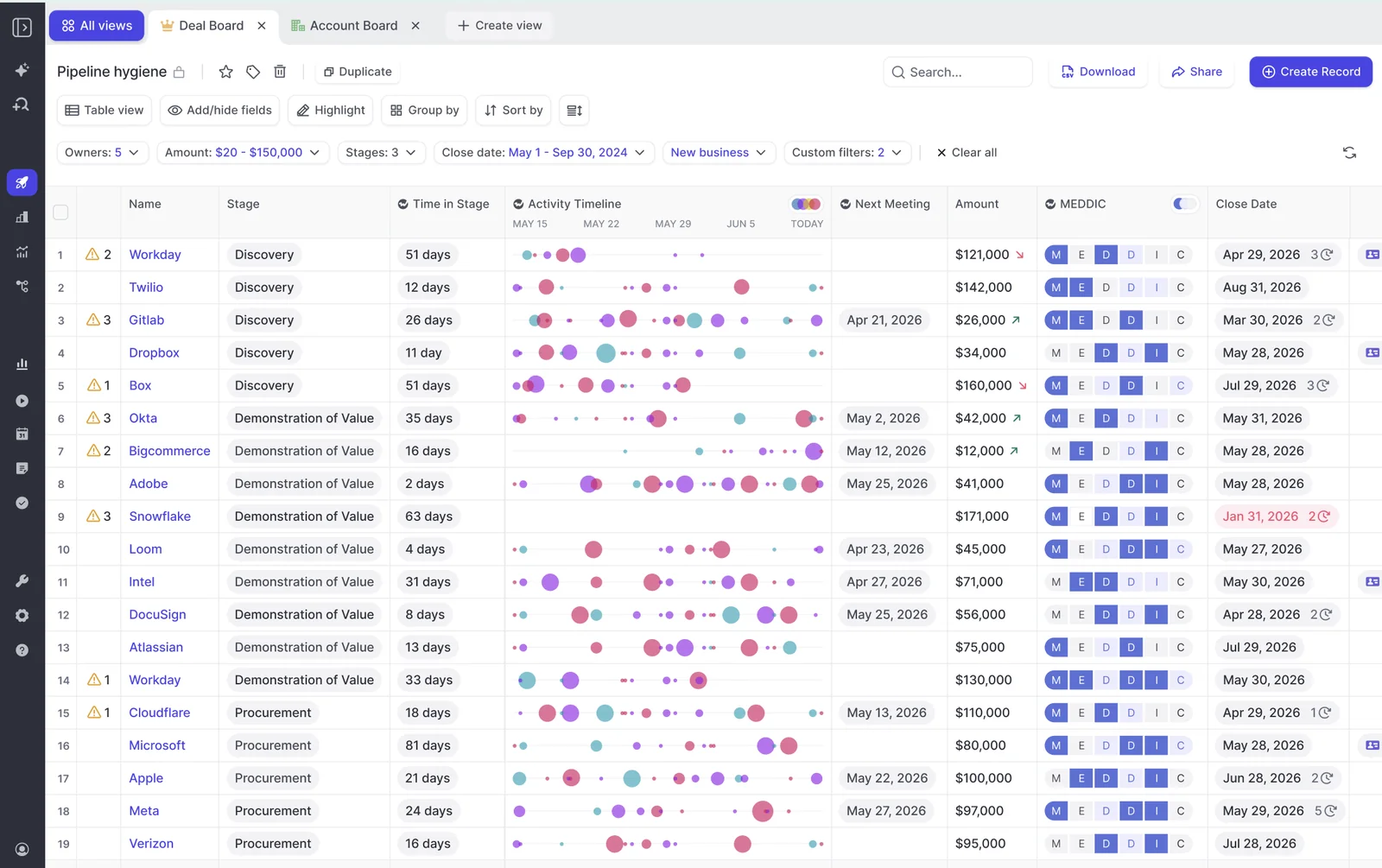
That's our answer to the confidently wrong problem. A criterion that says it's empty is something a manager can act on in the next deal review.
Weflow records Teams, Zoom, Meet and WebEx, with or without a bot
Weflow Conversation Intelligence records Zoom, Google Meet, Microsoft Teams and WebEx meetings. It transcribes in 96+ languages with automatic language detection.
If a bot joining the call is what your IT team or your buyers push back on, the Weflow desktop app for Windows and macOS records without one. It captures system audio, microphone and video on Zoom, Meet and Teams from the rep's machine. There's no bot to admit and no recorder in the attendee list.
Desktop recordings go through the same pipeline as bot recordings:
- AI field updates to Salesforce.
- Summaries and chapters.
- Follow-up emails and scorecards.
For consent, Weflow sends Teams attendees a pre-meeting email with an opt-in and opt-out link. It also posts an in-call chat message with a removal option that permanently deletes the recording data. Two recording paths mean a blocked bot doesn't stall the whole rollout.
Weflow Mobile Copilot records in-person meetings without extra add-ons
Weflow Mobile Copilot records in-person meetings from the rep's phone and syncs them to Salesforce. It's included in the Weflow Conversation Intelligence seat.
| To record in-person meetings | ECI | Weflow |
|---|---|---|
| Add-on license | Einstein for Sales add-on | None |
| Conversation product | Einstein Conversation Insights | Weflow Conversation Intelligence seat |
| Mobile setup | Seller-Focused Mobile Experience | Mobile Copilot, included in the seat |
| Where the transcript goes | Syncs to ECI, call record tied to the meeting event | Syncs to Salesforce |
Weflow hosts your data in your Salesforce region, EU included
Weflow is a German company hosted in Frankfurt. We spin up your instance in the region where your Salesforce is hosted, and you can override it to keep data in the EU or UK.
Residency is a configuration in Weflow, so moving it is never a migration project. ECI works differently: turning it on sends some related data to the US regardless of your org's location.
For teams selling into regulated European buyers, being able to say exactly where a recording lives is often what gets a tool through procurement.
What Weflow Conversation Intelligence costs per user
Weflow Conversation Intelligence costs $39 per user per month, billed annually, and you buy it on its own.
| Weflow Conversation Intelligence | ECI through Sales Engagement | |
|---|---|---|
| List price | $39/user/month, billed annually | $50/user/month, billed annually, unless your edition includes it |
| How you buy it | Standalone | Inside the Sales Engagement bundle |
| What the price covers | Recording, transcripts and AI Field Updates, plus the desktop app, Mobile Copilot, Ask Weflow AI Pro and the Agent Builder free tier (25 agent actions per month) | EAC, Sales Cadences, Work Queue, Lead Scoring, ECI, Buyer Assistant and Prospecting Center |
| In-person recording | Mobile Copilot, included | Needs the Einstein for Sales add-on and the Seller-Focused Mobile Experience |
Our plans have a 10-user minimum. There are no platform fees, no implementation fees and no usage charges on recordings, transcripts or AI processing.
If you want activity capture replaced too, Revenue AI Foundation bundles Weflow Activity & Contact Capture and Weflow Conversation Intelligence at $49 per user per month.
Where Weflow is not the right fit
- Weflow has no live in-meeting assistant and no real-time battlecards. The summary, field updates, follow-up email and coaching score all arrive after the call.
- Weflow works exclusively with Salesforce. There's no HubSpot, Dynamics or Pipedrive support.
- Weflow Conversation Intelligence records video meetings and in-person conversations. It doesn't capture VoIP phone calls today.
- Weflow is SOC 2 Type II certified. ISO 27001 is in progress and not yet certified, and Weflow isn't FedRAMP certified.
- Field update accuracy depends on prompt setup, so you need to plan onboarding time for it.
If any of those is a hard requirement for you, Weflow isn't your answer yet.
Other paths teams take instead of Einstein Conversation Insights
Each of these paths suits a specific kind of team. Here's who each one fits.
Stay on ECI if it's included, live and summaries are enough
Stay if all four of these hold:
- ECI is included in your edition.
- It's fully rolled out.
- It records reliably on your meeting platform.
- Your team needs little beyond call summaries.
In that case a switch buys you less, and Salesforce's forward-looking Momentum statement doesn't turn anything off. Keep the US storage condition in mind if you're an EU team, and watch for duplicates if EAC and an engagement tool also write meetings.
Wait for Momentum if you're committed to Agentforce
Wait if your company is committed to Agentforce and wants Salesforce's own data foundation under it. Salesforce positions Momentum as the capture and structuring layer beneath Agentforce Sales. It's sold inside Agentforce packaging, and Salesforce aims its general availability at Dreamforce, as a forward-looking plan.
You're waiting for a different category of product than ECI:
- It's built to run on top of recorders you already use, including Gong, Chorus, Clari Copilot and Attention.
- Its call analysis is its core strength.
- Its AI field updates are basic and its coaching insights are limited.
- It isn't sold as standalone conversation intelligence.
Waiting has a cost too: more months of call and activity data your team doesn't trust enough to report on.
Move to Gong if conversation analytics depth matters most
Gong invented the category and still has the deepest conversation analytics. If analytics depth is what you're buying, that's a real reason to go there.
The Salesforce write-back is where Gong gets harder:
- Gong's AI field updates work best on the full Gong platform. Teams using it only for conversation intelligence get a weaker version.
- Pushing call outcomes into Salesforce fields and adding smart trackers each cost more on top of the Gong license.
- Inside Salesforce, Gong shows up as an embedded tab on the opportunity, instead of as data in your fields.
Gong gives you the deepest conversation analytics. Weflow gives you the fastest path from conversation to CRM data.
Look at Attention if call analysis matters more than field writes
Attention is strong on conversation intelligence, and that's the core of the product. The trade-offs sit on the Salesforce side. Its AI field updates are basic, its coaching insights are limited, and you can't buy its conversation intelligence on its own. If call analysis matters more to you than structured field writes, it belongs on your list.
Add a notetaker like Fireflies if you only need summaries
Notetakers like Fireflies show up in the same stack reviews as Salesforce, Weflow and Gong. They record and transcribe, and for a team that only wants summaries, that's enough.
If you need structured write-back, run the four-point test before you assume CRM depth. A good summary in a text box doesn't fill your qualification fields.
Which Einstein Conversation Insights alternative fits your team
| Your situation | The path that fits |
|---|---|
| ECI is paid for but stalled on Microsoft Teams | Replace with Weflow, which records Teams with a bot or through the desktop app |
| You won't build on a path Salesforce has named a successor for | Replace with Weflow |
| You're an EU team and your security review flagged ECI's US storage condition | Replace with Weflow, with your instance in your Salesforce region or set to the EU or UK |
| EAC, ECI and an engagement tool all log the same meetings | Replace ECI and EAC with Weflow Revenue AI Foundation |
| ECI is included, live, and summaries are enough | Stay on ECI |
| You're committed to Agentforce and willing to wait | Wait for Momentum |
| Conversation analytics depth is your top priority | Move to Gong |
Rollout, roadmap, residency and duplicates don't improve by configuring ECI further, so if one of them is your problem, a different product is the fix. If none of them apply, staying is a defensible call.
What to plan before you switch off Einstein Conversation Insights
Five decisions shape whether the switch lands.
Settle how historical ECI recordings and transcripts come across
Your ECI call history is the asset your team is most afraid of losing. Buyers replacing a conversation intelligence tool want its migration path, cost and timeline settled before they sign, not after.
Start by deciding which history matters: calls on open opportunities, active renewals, and the recordings enablement uses for training. That list is usually much shorter than the full archive.
It's also the moment to decide where the next archive lives. With Weflow, summaries and transcripts land in your Salesforce records and video exports through the API, so the call history you build from here stays with you.
Decide whether Einstein Activity Capture goes too
If you keep EAC and add a separate CI tool, you keep two writers on every meeting, and duplicates follow. Replacing both at once is the cleaner move.
Weflow Activity & Contact Capture syncs emails, meetings and contacts from Outlook or Google into the right Salesforce records. Captured activity stays in Salesforce permanently, with historical backfill of up to 24 months available as an add-on.
Weflow Activity & Contact Capture and Weflow Conversation Intelligence come from one platform, so you avoid the duplicate meeting records two separate writers create.
Check what cancelling ECI actually saves on your license
Cancelling ECI doesn't always save money. If ECI comes through Unlimited or Agentforce 1 Sales, you pay for the edition either way.
The saving comes from specific lines:
- A Sales Engagement add-on you bought separately on Professional or Enterprise.
- An Einstein for Sales add-on bought for in-person transcription.
- Redundant capture licenses. Some Unlimited orgs buy capture licenses on top of the EAC they already hold, and nothing in Salesforce flags it.
Sales Engagement also carries cadences and the work queue. If your team uses those, the add-on stays either way. When the saving is small, the business case rests on what you gain: a rollout that lands, fields that fill, and data in your region.
Keep every team's access to call transcripts
Transcripts serve more than sales. Marketing reads them to see why a lead came in, and customer success mines them for feature requests and renewal signals. None of those teams bought the CI tool, and all of them notice when it goes.
With Weflow, each team keeps a way in:
- Salesforce: transcripts and summaries sit in Salesforce records, readable by anyone with the right permissions.
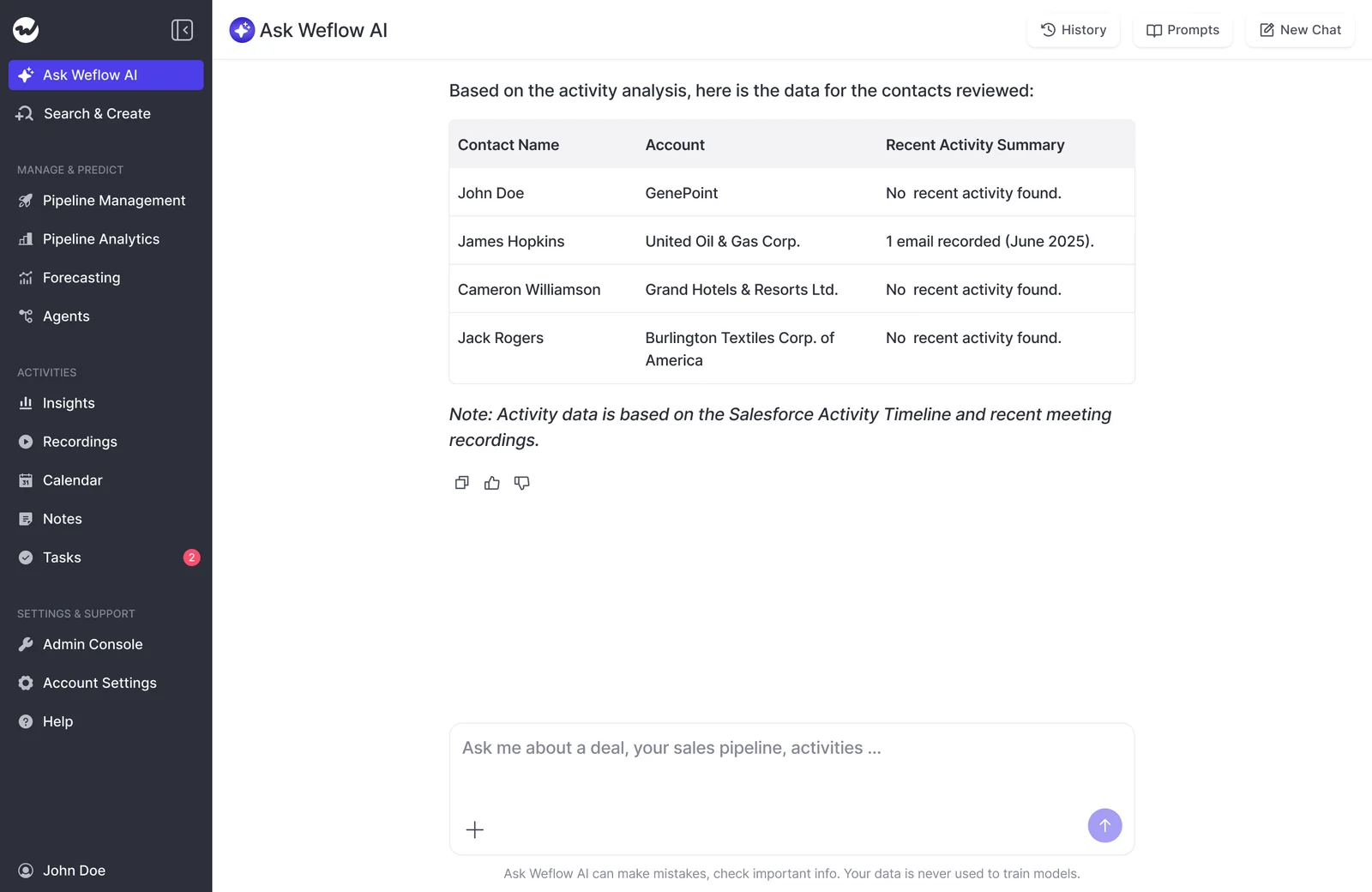
- Ask Weflow AI: natural-language questions across calls, activity, contacts and CRM data, inheriting Salesforce permissions.
- API: conversation data flows into Claude, ChatGPT or other AI tools.
- View-only licenses: stakeholders review recordings, summaries and transcripts without a paid seat, and those licenses are unlimited.
Plan a pilot that proves adoption in four to six weeks
A four to six week pilot proves adoption when you design it around adoption. Weflow's technical setup takes 30 to 45 minutes with your Salesforce admin and your Google Workspace or Microsoft admin. Most of the one to three weeks to full value goes into business logic: AI templates, permissions and team rollout.
- Pick fast-adopting champions across sales, customer success and leadership, so you learn how every team uses it.
- Set up recording so it doesn't depend on a rep remembering to press record, and give reps who can't use a bot the desktop app.
- Configure prompts for the fields you report on before the first pilot call.
- Score pilot calls against the four write-back checks: one meeting activity, the right contacts, the right opportunity, structured fields filled.
- Review field accuracy with managers every week, and tighten the prompts that miss.

See how Weflow captures activity, updates Salesforce fields from calls, and rolls up your forecast. Book a 30-minute demo.
Einstein Conversation Insights alternatives: FAQ
Is Salesforce discontinuing Einstein Conversation Insights?
Salesforce hasn't announced an end-of-life date for Einstein Conversation Insights. It has said Momentum will be the future of call recording and activity capture, with more promised at Dreamforce, and it labels that statement forward-looking. There's no stated migration path or pricing consequence for ECI customers.
Is Einstein Conversation Insights included in Salesforce Unlimited?
Yes. Einstein Conversation Insights comes through Sales Engagement, which Unlimited and Agentforce 1 Sales editions include. On other editions, Sales Engagement is an add-on listed at $50 per user per month, billed annually. In-person transcription also needs the Einstein for Sales add-on, which costs extra on Enterprise and Unlimited.
How do we avoid duplicate meetings with Outreach or Salesloft?
Duplicate meetings happen when two tools write the same meeting to Salesforce. Decide which tool owns meeting logging and turn off the overlapping sync. Weflow runs alongside Outreach and Salesloft in compatibility mode, so your engagement tool keeps its sequencing job while Weflow handles capture and conversation intelligence.
Which Salesforce fields and objects can Weflow AI Field Updates write?
Weflow AI Field Updates write call outcomes to any standard or custom Salesforce field and object, except lookup relationships. You start from 250+ pre-built prompts for methodologies like MEDDIC, MEDDPICC and SPICED. Updates respect your validation rules, field dependencies and permissions, and run in manual review or fully automatic mode.
What security certifications does Weflow hold?
Weflow is SOC 2 Type II certified and GDPR compliant. Weflow uses Zero Data Retention for AI processing and never uses customer data to train AI models. ISO 27001 is in progress, and Weflow isn't FedRAMP certified.
How long does Weflow keep call recordings, and can we export them?
Weflow keeps call recordings for as long as you subscribe, with no storage cap under fair use. You can have all recordings deleted automatically after a set period, such as every 30 days. Video exports through Weflow's public API, and summaries and transcripts already sit in your Salesforce records.
Does Weflow work with CRMs other than Salesforce?
No. Weflow is built for Salesforce teams and works exclusively with Salesforce. It doesn't support HubSpot, Microsoft Dynamics or Pipedrive.











