Einstein Activity Capture: How It Works, Setup and Limitations
Learn how Einstein Activity Capture works, how to set it up, its limits, and whether to replace it.



Einstein Activity Capture (EAC) syncs email, calendar events and contacts from Microsoft 365, on-premises Exchange or Google Workspace into Salesforce, but what happens to that data next depends on which storage mode your org runs.
Orgs that turned EAC on after Summer '25 run Sync Email as Salesforce Activity, which writes captured email as Task and EmailMessage records you can report and automate on.
Orgs that turned it on earlier, and never switched, still run legacy storage, where captured email lives outside Salesforce and streams into the activity timeline.
And right now, two changes make that difference matter:
- February 2027: EAC's legacy reporting retires with the Spring '27 release. Salesforce's recommended rebuild window runs from June to December 2026, so if you're on legacy storage, you're already in it.
- Momentum: Salesforce has named Momentum as the future of activity capture, and Momentum can't run in the same org as EAC.
Below, we'll walk through how EAC works in each mode, what setup involves, where it falls short, and the three paths you can take from here.
Full disclosure: we're the team behind Weflow Activity & Contact Capture, which many teams use instead of EAC, so we'll cover EAC on its own terms first.
What is Einstein Activity Capture?
Einstein Activity Capture is Salesforce's background sync for email, calendar events and contacts. It links each item to the right contacts, leads, accounts and opportunities.
EAC comes in a free Standard version and a full version that sits inside Salesforce's Sales Engagement add-on.
EAC only covers written activity. Spoken conversations are handled by a separate product, Einstein Conversation Insights (ECI), and AI agents live in Agentforce.
EAC's role in that stack is to feed the email it captures to Agentforce agents, such as Agentforce Lead Nurturing, as context.
Which version of Einstein Activity Capture is your org running?
Your org runs one of two storage models, and they behave very differently.
Here's how they compare:
| What you're checking | Legacy storage | Sync Email as Salesforce Activity |
|---|---|---|
| Who's on it | Orgs that set up EAC before Summer '25 and haven't switched | Every org enabling EAC since Summer '25, plus legacy orgs that switch |
| Where captured email lives | An EAC store on Hyperforce (AWS), streamed into the activity timeline | Task and EmailMessage records in your org |
| Flows and triggers | Can't read it | Can read it |
| Custom reporting | Only Salesforce's EAC reporting | Standard activity report types |
| SOQL, APIs and export | No | Yes |
| Activity 360, Activity Metrics, Activities Dashboard | Available until February 2027 | Not available |
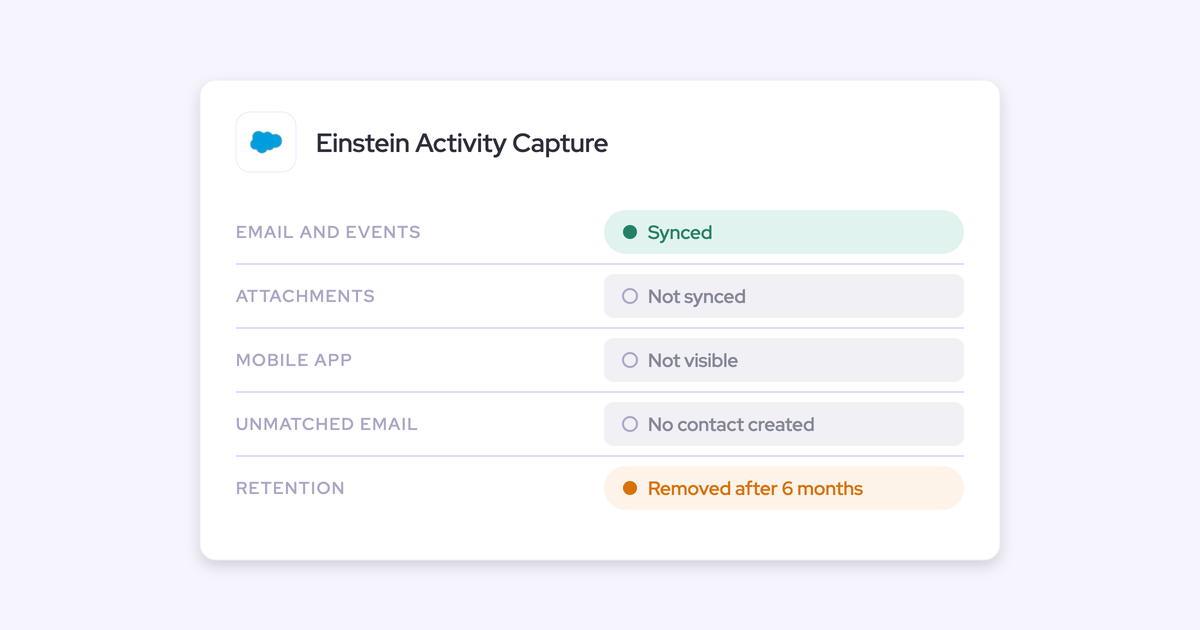
| Email attachments | Not stored | Not stored |
Not sure which mode you're on? Start with two questions:
- When was EAC enabled? Before Summer '25 means legacy, unless someone switched it.
- Do you have Activity 360 reports or an Activities Dashboard? If so, you're on legacy storage, since those features only exist for orgs that set them up before Summer '25.
Legacy storage keeps captured activity outside your Salesforce org
In legacy mode, EAC works as a sync-and-display layer: captured email sits on a separate Hyperforce server on AWS and streams into the activity timeline, but it never becomes a core Salesforce record.
That one design choice is behind most of the complaints admins have had for years:
- No flows or triggers can fire on it, because a flow can't query a record that isn't in the database.
- No custom reports beyond the reporting Salesforce provides.
- No export into Looker, Tableau or Power BI.
- No update to the standard Last Activity Date field.
If your reports never matched what reps said they did, this is usually why. As one sales ops leader put it:
"Einstein Activity Capture activities don't update the standard "Last Activity Date" field because they are stored externally and aren't recognized as native Salesforce activities. This was a huge issue for our reports"
— Irina Smirnova, Senior Sales Operations Manager at Blacklane
Sync Email as Salesforce Activity writes Task and EmailMessage records
Under Sync Email as Salesforce Activity, captured email becomes ordinary Salesforce data that reports, workflows, triggers, SOQL and the Salesforce APIs can all use.
So the common claim that "EAC doesn't store records" is no longer true for any org set up after Summer '25.
If you're on the new sync, the old reporting and automation complaints don't apply to you. You can build activity reports, trigger a flow when a meeting is logged, or pull the data into a BI tool.
What the new sync doesn't do is migrate the legacy reporting built on the old model. Salesforce is retiring those reports instead, so your admin has to rebuild them by hand.
Most of the limits below apply to both modes, though, because they come from how EAC matches, syncs and filters data, not where it stores it.
How Einstein Activity Capture syncs email, events and contacts
EAC runs three separate streams (email matching, event sync and contact sync), each with its own rules. Knowing those rules up front explains most of the surprises admins run into later.
How Einstein Activity Capture matches an email to Salesforce records
EAC decides where an email belongs using a flow called Activities: Match Email to Records, which runs four default actions in order:
- Find users.
- Find contacts and leads.
- Find accounts and opportunities.
- Create the email activity with its associations.
Note that cases aren't part of default matching.
If you need to change the matching logic, you have two options, and each suits a different kind of change:
- Flow Builder edits the default actions. Salesforce's example is preferring a customer account over a partner account.
- Apex handles rules the flow can't express: blocking certain emails from being logged, matching on custom email fields, relating email to custom objects, or adding your own tiebreaker.
Custom objects can only be matched through Flow or Apex, and Salesforce warns that complex matching rules can slow down sync.
On the plus side, when a rep fixes a wrong match on the email record in Salesforce, the flow won't overwrite that manual association.
How event sync works and which direction to choose
Event sync can run in one of three directions. The one you pick decides how fast changes land, and whether you'll see duplicates later.
| Direction | How it behaves and when to use it |
|---|---|
| Microsoft or Google to Salesforce | Salesforce's recommended setting. Changes typically sync within 5 minutes. Use it if your reps create meetings in their calendar, which most do. |
| Salesforce to Microsoft or Google | Salesforce changes take 15 minutes or more to reach the calendar. Only fits teams that create events inside Salesforce. |
| Both ways | When the same event changes in both places before sync runs, the external calendar wins. This setting also causes sync loops once a second capture tool writes events. |
EAC matches calendar events to existing Salesforce events by subject, date and time, or creates a new one if there's no match. Turn on the Relate Synced Events to Salesforce Records setting, and it relates events to contacts and leads automatically.
Anything it can't relate lands in each user's Unresolved Items list for manual matching.
A few limits also affect what you can report on:
- Custom fields on events don't sync.
- EAC syncs up to 50,000 events per user, and only events inside the filters you set.
- Each event syncs up to 50 attendees, matched to users, contacts and leads in that order. Unmatched attendees stay as plain email addresses.
- Sync can take a day or more when many users start at once.
How contact sync works, and why auto-creation stops under the new sync
Contact sync runs both ways between Salesforce and Microsoft or Google. When an account first connects, EAC creates records for contacts not yet in Salesforce, then creates or updates contacts as users send email and add calendar events.
There's a catch, though: Contact Auto-Creation isn't available under Sync Email as Salesforce Activity. So if contacts stopped appearing after you switched, that's why.
It also means the people on a deal can live in a rep's inbox without ever reaching your CRM, which leaves engagement reporting with nothing to attach to.
How to set up Einstein Activity Capture
Setting up EAC involves an admin step and a per-user step. According to Salesforce, missing any one of three things (the license, the permission set or the configuration) causes connection and access issues.
After the initial sync, expect captured data to take up to 24 hours to appear in standard reports.
Before you turn anything on, make sure you have these in place:
- Microsoft 365: Your Salesforce admin works with your Azure admin to consent to the connection.
- Google Workspace: Supports user or admin OAuth consent, plus a Marketplace app.
- On-premises Exchange: Authenticates through Microsoft Entra ID, a certificate-based service account, or per user. Hybrid deployments aren't supported.
- Lightning Sync: EAC and Lightning Sync can't run in the same org, so you'll need to pick one.
- Licenses: EAC can't run through a Salesforce integration user, so capture is tied to named user licenses.
What the Salesforce admin configures before anyone syncs
Here's the order the admin works in:
- Assign each user an EAC license and permission set.
- Build configurations. Each one decides which data is captured and how it flows, and you can add more for specific users or profiles.
- Add users to a configuration.
- Choose org-level OAuth, where you authenticate everyone, or user-level OAuth, where each user connects their own account.
- Connect Salesforce to the Microsoft or Google account.
- Set event sync direction and the filters for what syncs.
What each rep completes in their own EAC settings
Each user then finishes their own part:
- Connect their email and calendar, or accept the terms of service, depending on the authentication method.
- Customize their personal settings.
Choose your authentication method carefully: if you ever move to Momentum on user-level auth, every user has to delete their own connected account before Momentum can be turned on.
What Einstein Activity Capture costs and which editions include it
Standard EAC is free and capped at 6 months of retention. Full EAC keeps 24 months by default, and it comes inside the Sales Engagement add-on at $50 per user per month billed annually, unless your edition already includes it.
| What you're comparing | Standard EAC | Full EAC |
|---|---|---|
| Price | Free | $50 per user per month (also €50, £40 or A$70), billed annually, inside Sales Engagement |
| User cap | Free for up to 100 users | Paid per seat |
| Retention | Up to 6 months | 24 months by default |
| Reporting and insights | No Activity Metrics, Activity 360 Reporting or custom email insights | Activity Metrics, Activity 360 Reporting, Activities Dashboard, Einstein Email Insights, Recommended Connections |
| Where it's included | Starter, Pro Suite, Professional and Enterprise editions | Unlimited Edition and Agentforce 1 Sales Edition (now sold as Max) |
Four of full EAC's extras (Activity Metrics, Activity 360, the Activities Dashboard and Recommended Connections) retire in February 2027. After that, the only differences between Standard and full EAC are retention and Einstein Email Insights.
That said, Sales Engagement also bundles Sales Cadences, Work Queue, Lead Scoring, ECI, Buyer Assistant and the Prospecting Center, so check whether your team uses those before you cancel it.
If you're on Unlimited, it's worth running a license review too. Your edition already includes EAC, and some teams have bought extra capture licenses on top without realizing it.
Salesforce doesn't flag the overlap, so it usually only comes up during a stack review. In that case, the saving is the redundant license line, not the edition.
Why Einstein Activity Capture struggles when an account has several deals
EAC maps activity to the right opportunity reliably when an account has one open deal. But once an account has several (say, new business, an upsell and a renewal), EAC often has no way of telling which deal an email belongs to.
This happens in both storage modes, and in our experience, it's the limitation that does the most damage.
It comes down to three things:
- Matching follows contacts: EAC finds the contact first, then looks for related accounts and opportunities.
- Salesforce relates an activity to an opportunity or an account, not both: When the opportunity can't be determined, the activity falls back to the account.
- Opportunity contact roles are the signal, and they're usually empty: Nothing forces reps to fill them in, so most orgs have them half-populated at best.
Here's how that shows up in your org:
| What you see | What's causing it |
|---|---|
| Activity only on the account, never on the deal | No contact role points to one opportunity, so EAC falls back to the account. No warning appears. |
| The same thread on the renewal and the upsell | The contact sits on both opportunities, so the email surfaces on every record the contact is linked to. |
| Opportunity activity reports come back empty | Activity landed on the account in exactly the accounts with the most deals, which are usually the ones that matter most. |
The result? An account that looks busy and a deal that looks dead. As one RevOps director put it:
"I want to relate activities to the right contacts and opportunities reliably. Our solution is not doing that at this point."
Salesforce's fix involves Flow or Apex work, namely a custom tiebreaker in the Match Email to Records flow. Even then, it's not guaranteed: one customer's own development team tried to change the every-deal behavior and couldn't.
That said, contact roles are also an organizational problem, and no capture tool can fully fix them. If an account has two open deals and nothing in your org says which one a contact belongs to, any automated mapping has to guess.
So before you judge any tool, EAC included, check how well your contact roles are filled in. That sets the ceiling for all of them.
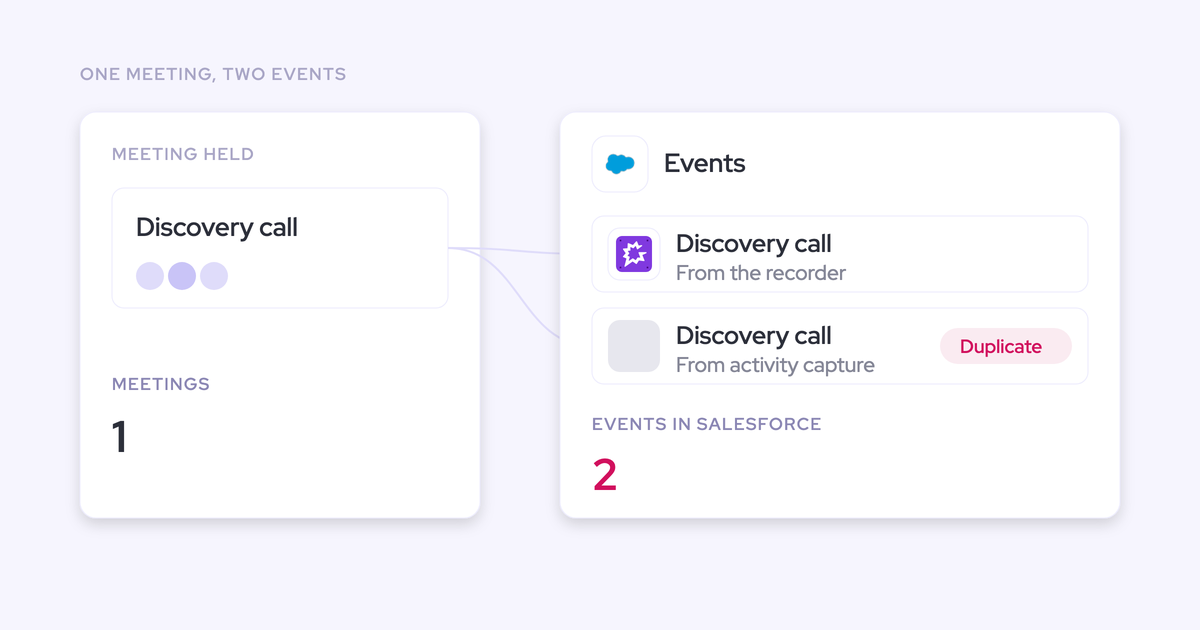
Why Einstein Activity Capture creates duplicate events in Salesforce
EAC duplicates come from six distinct causes, each tied to a specific setting or behavior. We recommend working through them in this order:
| Cause | What you see in Salesforce | What controls it |
|---|---|---|
| One Event per attendee | A meeting with two internal attendees counts as two meetings | How EAC writes meetings. Customization doesn't remove it. |
| Organizer outside any syncing configuration | Each syncing attendee gets a standalone copy where they're the organizer and other attendees don't show | Put organizers in a syncing configuration. Adding them later creates a new event, and duplicates appear if they then add attendees. |
| Two-way sync with a second capture tool | Two events per meeting, and sometimes repeated calendar notifications to customers | Set EAC event sync to one way, calendar to Salesforce. Removing the EAC permission from users isn't enough. |
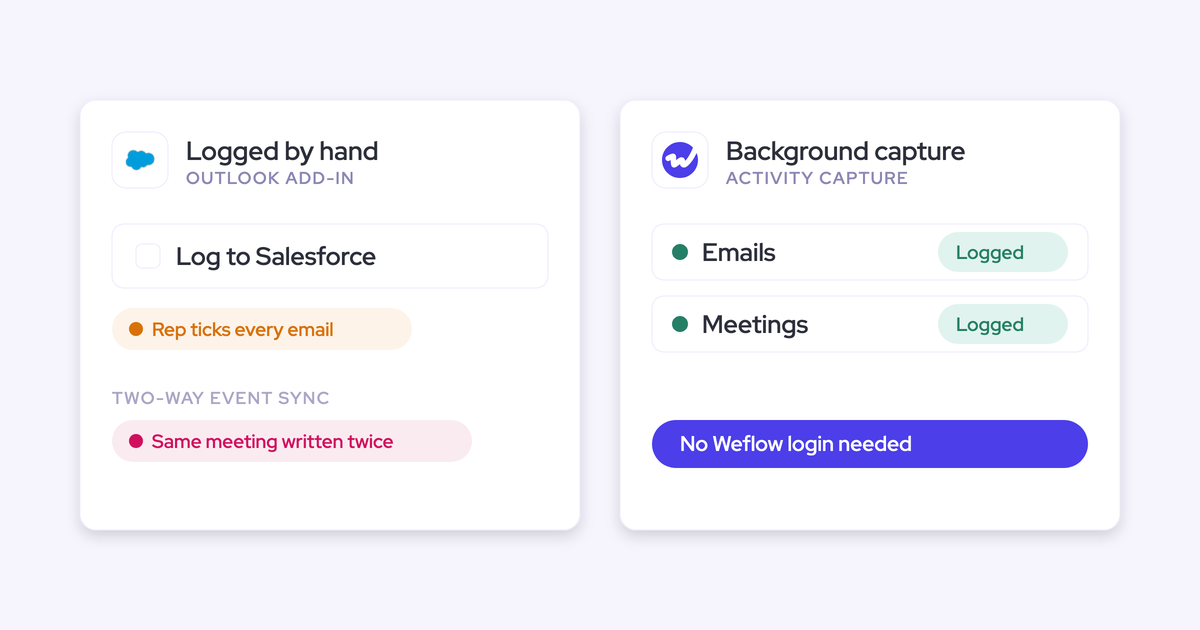
| Log Email button alongside automatic capture | The same email logged twice on the timeline | Tell reps not to use the manual Log Email button in the Outlook or Gmail side panel while automatic capture runs. |
| Sync resets | Duplicates after an admin resets sync | Expect a cleanup after every reset. |
| Attendee-less personal events | Breaks and reminders synced as external meetings, sometimes with a flood of emails per recurring series | Event sync filters. Some teams have switched event sync off entirely because of it. |
The sync loop hurts the most: each pass writes the event to Salesforce, pushes it back to the calendar, then logs it again. And duplicates that are already written don't clean themselves up.
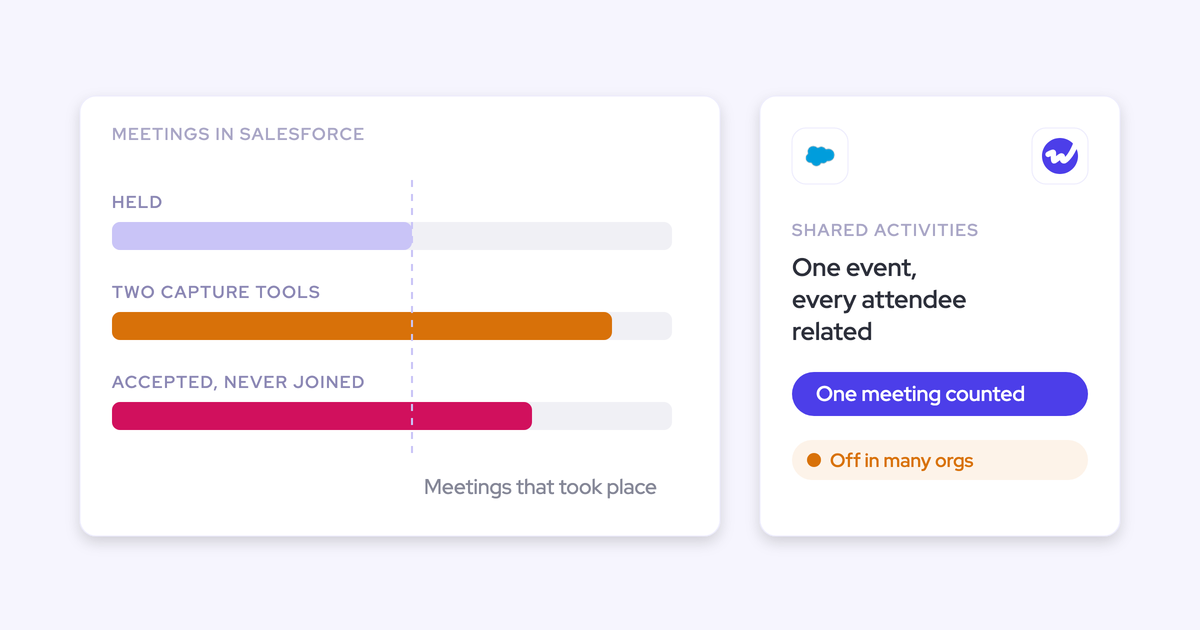
All six inflate meeting counts in coaching and capacity dashboards. We've seen a rep show thirteen meetings a week in one view and eight in another until the setting was fixed, and nobody could tell which number was right.
What Einstein Activity Capture leaves out of Salesforce
Even under Sync Email as Salesforce Activity, several coverage gaps remain, and some fail silently. Here's what's missing, and which storage mode each gap applies to:
| Gap | Storage mode | Salesforce's workaround |
|---|---|---|
| Email attachments aren't synced or stored, so a quote or contract never becomes a file on the opportunity | Both, including Sync Email as Salesforce Activity | Open the message in the connected inbox |
| Cases are excluded from default matching | Sync Email as Salesforce Activity (default matching) | Matching changes go through the Match Email to Records flow or Apex |
| Custom objects aren't matched by default | Sync Email as Salesforce Activity | Flow or Apex customization |
| Nothing logs when the same email address exists as both a user and a contact, which breaks community orgs | Seen on customer orgs; Salesforce doesn't document it by mode | None documented |
| Captured email and events aren't accessible in the Salesforce mobile app | Seen on customer orgs; Salesforce doesn't document it by mode | None. On Android, records show only the Activity History related list. |
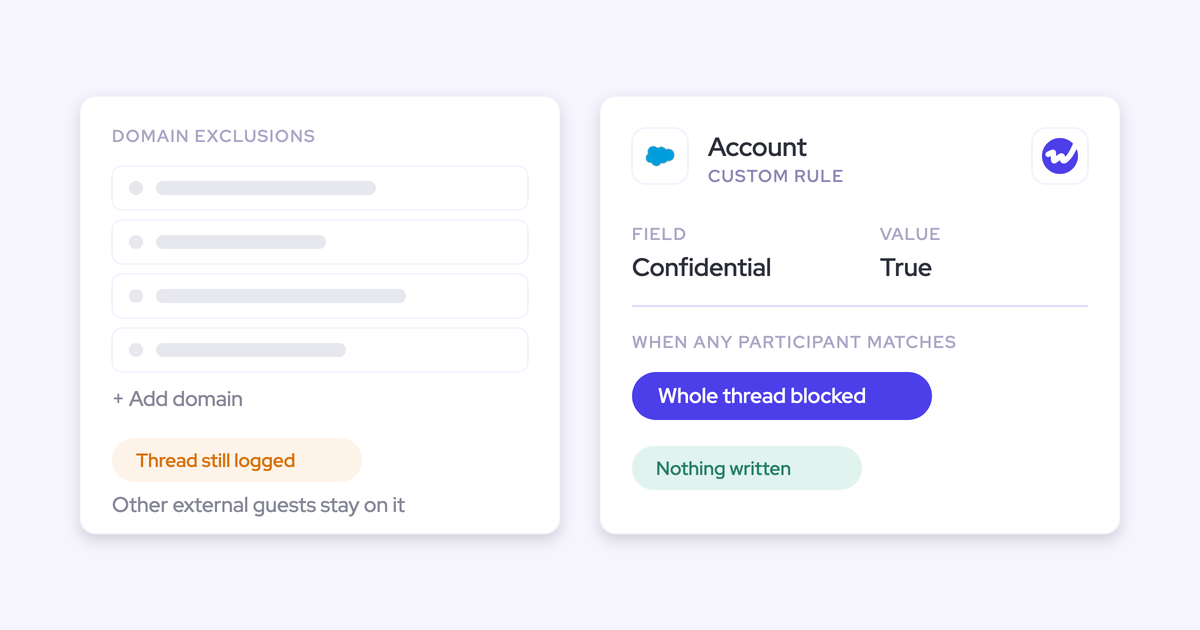
| No content-based filtering | Seen on customer orgs; Salesforce doesn't document it by mode | Exclude by address or domain only |
| Personal email, such as payslips, reaching the CRM | Seen on customer orgs; Salesforce doesn't document it by mode | Address and domain exclusions |
The content-filtering gap matters more than it looks. Sensitive messages usually sit on legitimate customer threads, so excluding a domain doesn't catch them, and you end up choosing between capturing everything or nothing.
Then there are silent disconnects. EAC connections drop without explanation, and repeated support cases don't fix it.
Each drop leaves a hole in the record that nobody notices until a manager asks why a live deal shows no contact, and the admin ends up taking the blame for a tool they may not have even picked:
"We relied on Einstein Activity Capture for years - but the reliability was very inconsistent. It would work, but then it wouldn't. I got tired of being asked, 'Why isn't Salesforce working?'"
Email aliases are the one gap that isn't EAC's fault. Because matching runs on the email address, a seller sending from three aliases ends up with three identities, and their activity either scatters or doesn't attach at all.
No capture tool can fix that; the real fix is moving your company onto one domain.
What breaks when EAC legacy reporting retires in February 2027
The Spring '27 retirement affects orgs on legacy storage. The good news is that your captured email and activity records survive as standard activity records. Everything built on the legacy reporting layer, however, doesn't.
Which reports, fields and components stop working in Spring '27
Four pieces go dark in February 2027:
| Component | What happens in February 2027 | What depends on it in your org |
|---|---|---|
| Activity 360 Reporting | The objects behind it (UnifiedEmail, UnifiedMeeting, UnifiedTask and their participant objects) retire, so saved reports return no data | Saved reports and dashboards built on those report types |
| Activity Metrics | Fields on accounts and opportunities stop populating and return null | Custom code, validation rules and reports that reference those fields, which fail or return empty results |
| Activities Dashboard | Stops loading, is no longer reachable from Setup, and its history isn't preserved | Anyone reading engagement trends from it |
| Recommended Connections | Components disappear from record pages and Seller Home | Reps using contact suggestions from email and meeting patterns |
Data from these reporting tools also feeds other Salesforce features, like Pipeline Inspection and ECI, so include those in your audit too.
How Salesforce expects you to rebuild EAC reporting, and by when
Salesforce doesn't offer a drop-in replacement. Instead, your admin rebuilds each retired piece using a native equivalent:
| Retired item | Salesforce's replacement |
|---|---|
| Activity 360 reports | Rebuild on the Tasks and Events or Activities with Accounts report types, with Email Message as the primary object |
| Activities Dashboard | Rebuild from activity reports grouped by owner, date and account, or in Tableau |
| Activity Metrics | Reports on Task and EmailMessage grouped by account or opportunity and filtered by task subtype. For real-time numbers, flows or scheduled jobs that write engagement scores into custom fields. |
| Recommended Connections | Custom invocable actions that suggest contacts from email and call data |
Here's the timeline Salesforce recommends:
- Audit usage by June 2026.
- Build replacements between June and December 2026.
- Validate them in a sandbox in January 2027.
If you haven't started your audit yet, you're already behind Salesforce's schedule, and the rebuild now has to compete with everything else in your Q4 queue.
One more thing before you start: switching to Sync Email as Salesforce Activity is what makes the new report types work, and it brings over up to six months of past email.
What Momentum means for your Einstein Activity Capture setup
Salesforce has named Momentum, a company it acquired, as the future of activity capture and call recording. But it hasn't published an end-of-life date, a migration path or any pricing changes for EAC.
Here's what Momentum said about what the acquisition means for EAC and ECI:
"Momentum will be the future of call recording and activity capture at SFDC. More to come about this at Dreamforce."
This uncertainty is what leaves most teams stuck. You don't want to invest in configuring something that may be replaced, but you can't justify a switch without knowing what the native path costs. The facts Salesforce has documented so far answer most of that.
Why Momentum and Einstein Activity Capture can't share one org
Momentum and EAC share the same infrastructure for syncing events and capturing email, so the version Salesforce released in October 2026 can't run alongside EAC.
It also means Momentum's event sync and email capture work just like EAC's, so the event behavior covered in this guide comes with you.
To switch over, you'll need to:
- Turn EAC off.
- Delete every connected account. With global authorization, turning EAC off removes them all. With user-level authorization, each user deletes their own, and Momentum can't turn on until every one is gone.
- Reset EAC.
- Disable Einstein Conversation Insights. Your ECI data also has to be migrated to the Salesforce Platform first, or Momentum can't run at all.
- Turn Momentum on.
Step four is the one to think hard about. Once Momentum is on, you can't re-enable ECI, and calls ECI already processed lose their video playback, metrics, transcripts, summaries and insights until that data moves to Momentum.
So if Momentum turns out to be missing a feature you relied on, there's no going back.
What you give up and pay when you switch to Momentum
The switch costs you in three places: contact sync, call intelligence coverage, and price.
| Capability | EAC and ECI today | Momentum |
|---|---|---|
| Contacts | Two-way address-book sync between Salesforce and Microsoft or Google | No address-book sync. Creates contacts from captured email and enriches existing ones. |
| Phone calls | Voice call support | Video calls only |
| In-person meetings | Transcription | Not available |
| Manual call upload | Available | Not available |
| Conversation Insights and Hub tabs | Available | Not available |
| Sales Signals and Conversation Search | Available | Not available |
| Call Summary related list and Call Highlights emails | Available | Not available |
| Sales Engagement actions triggered by call insights | Available | Not available |
| Service Cloud Voice insights | Available | Not available |
As for price, Momentum's availability depends on your edition:
| Edition | Momentum availability | Price |
|---|---|---|
| Max (formerly Agentforce 1 Sales Edition) | Included | $550 per user per month |
| Advanced | Announced, marked coming soon | $395 per user per month |
| Core | Announced, marked coming soon | $195 per user per month |
| Starter Suite and Pro Suite | Paid add-on | Quote only |
| Legacy Enterprise, Performance and Unlimited | Comes with the Agentforce for Sales add-on | From $125 per user per month on top of your edition |
Each Momentum license also includes up to 120 processed call hours a year, pooled across your org's licenses, and unused hours expire at the end of the contract.
If you're on legacy Enterprise or Unlimited, your pricing hasn't changed, but getting Momentum bundled in means moving to a new edition. For most teams, that's the real price of the native path.
Rebuild on EAC, switch to Momentum, or replace it?
Each path suits a different kind of org, and for some, staying on a well-configured EAC is a perfectly good choice. Here's how the three compare:
| What you're weighing | Rebuild on EAC | Switch to Momentum | Replace with a third-party capture layer |
|---|---|---|---|
| What you do | Move to Sync Email as Salesforce Activity, rebuild retired reports, tune the matching flow | Turn off and reset EAC, disable ECI, turn on Momentum | Turn off EAC and capture through a separate tool that writes to native objects |
| Who does the work | Your admin: reports, flows, Apex | Your admin, plus every user on user-level auth | Your admin and the vendor, with a parity run before cutover |
| What it costs | Free on Standard, or $50 per user per month for full EAC via Sales Engagement | An edition move, or Agentforce for Sales from $125 per user per month on legacy editions | The vendor's seat price |
| What you keep | Your current setup and contact sync | A native path tied to Salesforce's roadmap | Control over mapping, exclusions and objects, independent of one vendor's product decisions |
| What you lose or risk | Multi-deal mapping, duplicates and coverage gaps stay | ECI features, with no way back; same event sync mechanics | A migration project, and Salesforce prompting reps to connect email |
| Fits when | Your org matches the profile below | You're moving to Max anyway and only record video calls | Multi-deal accounts, custom objects, attachments or compliance exclusions matter to you |
A well-configured EAC may be all you need if all of these are true:
- You're already on Sync Email as Salesforce Activity.
- Most accounts run one open opportunity at a time.
- You don't need attachments or custom objects.
- You don't rely on the reports retiring in February 2027.
If any of those don't apply, it's worth keeping in mind what our co-founder says about the category:
"I sometimes show Activity Capture as this kind of checkbox item a lot of companies offer, but very few do very well. So, yeah, the devil is really in the detail as always."
If you're considering the third path, the best way to decide is a parity run that checks whether anything gets lost, not which tool has more features. We cover how to run one in the FAQ below.
How Weflow Activity & Contact Capture replaces Einstein Activity Capture
Weflow is a Revenue AI Orchestration platform for sales, customer success and RevOps teams, and Activity & Contact Capture is its foundation.
It writes emails, meetings and contacts into native Salesforce objects, which our conversation intelligence, deal intelligence and forecasting tools then build on.
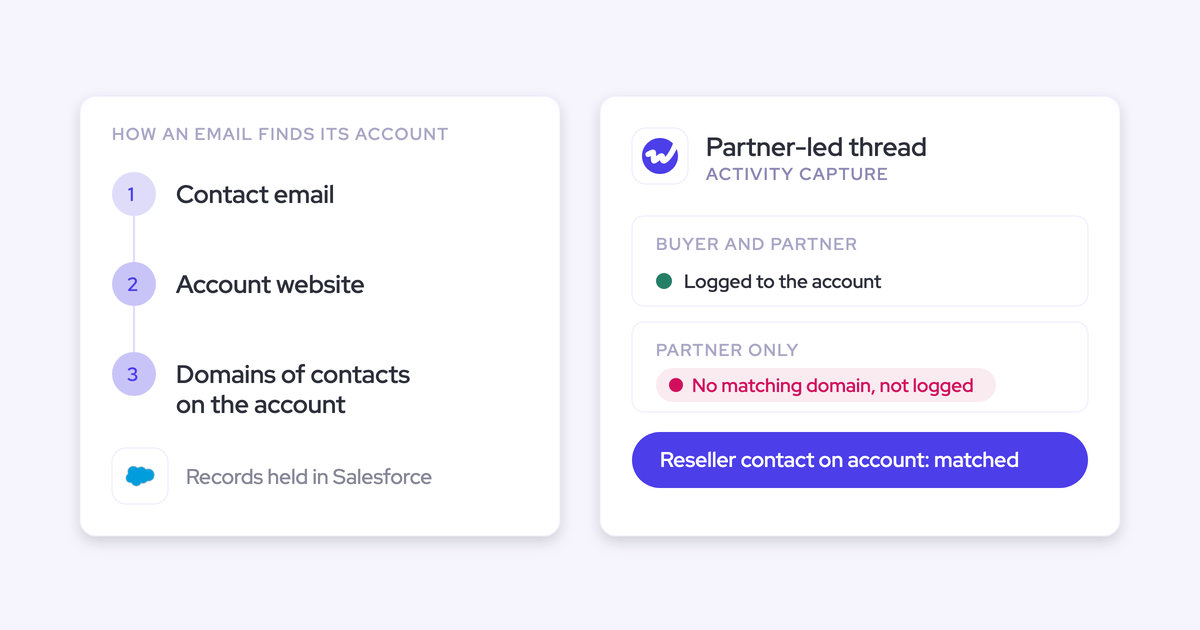
The architecture differs from EAC's right from the start. Weflow captures email server-side, through a central app installed in Microsoft Entra or Google Workspace, and writes to Salesforce through a dedicated integration user.
That means capture doesn't depend on a rep's personal connection staying up. It covers email sent from a phone, browser or desktop client the same way, and sellers don't need to do anything.
"Most of our team doesn't even know we have Weflow for activity capture. That was a big attraction for me: I didn't need them to set it up or learn anything new."
How Weflow maps email to the right opportunity
Alongside automated capture, Weflow offers an Outlook add-in and a Chrome extension that show reps which Salesforce record an email or meeting is about to log to, and let them change it.
We think that's the honest answer to the multi-deal problem: when a contact sits on two open deals, no algorithm can know which one an email belongs to, so we let the rep choose instead of guessing silently.
Weflow remembers the correction for the rest of the thread, so reps only fix it once, not on every email.
Once logged, activity never moves on its own: if a contact becomes a contact role on a new opportunity, their new emails log there, while their earlier activity stays put until a rep or admin moves it.
The account timeline still shows everything, too. An email logged to one opportunity also appears on the account, so managers can see activity across all of an account's deals in one place.
How Weflow logs meetings without duplicate events
Weflow writes one parent Event per meeting, plus a child Event for each attendee, so every meeting only counts once. Here's how that compares with EAC on the duplicate causes we covered earlier:
| Situation | Einstein Activity Capture | Weflow |
|---|---|---|
| A meeting with several attendees | One Event per attendee | One parent Event plus child Events per attendee |
| An email logged manually and automatically | The Log Email button can log it twice | Checks the message ID before writing, so it never logs a second copy of anything it or its Outlook add-in already logged |
| Emails a sequencer already logged | No deduplication against other tools | Compatibility mode skips them, with presets for Outreach, Salesloft, Apollo and Clay |
| Calendar sync direction | Two-way sync loops once a second tool writes | Two-way is available, but we recommend one way, calendar to Salesforce, because the Salesforce-to-calendar direction is unreliable |
Weflow also skips emails reps send from Salesforce's own composer, since Salesforce already logs those as Email Messages (this check relies on the EmailMessage object being active).
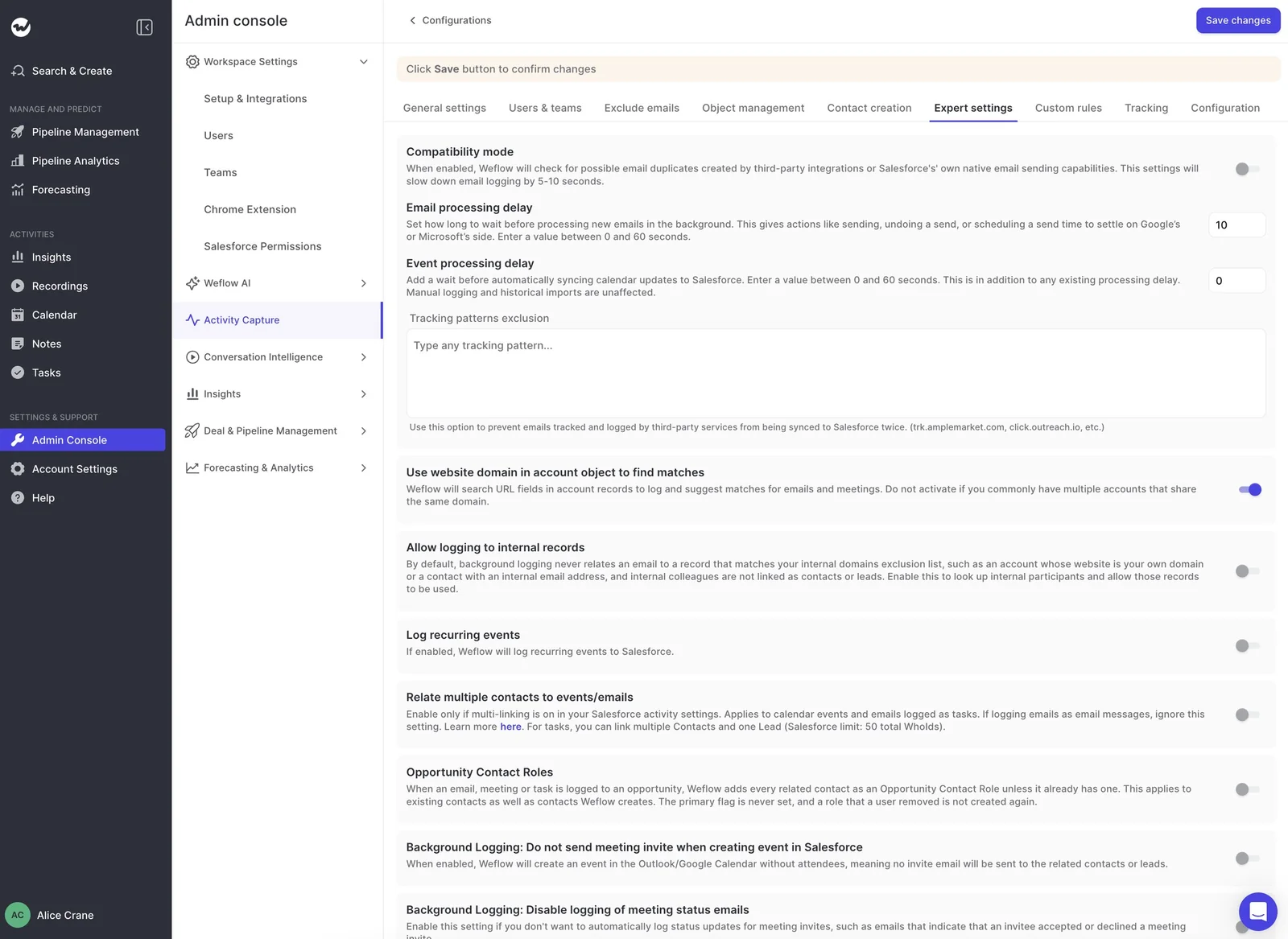
And if your sequencer uses a branded custom tracking domain, add it to the Tracking patterns exclusion list, or its emails will log twice.
What Weflow lets admins exclude and configure per team
Weflow's configuration options cover the gaps EAC leaves to Flow, Apex or nothing at all:
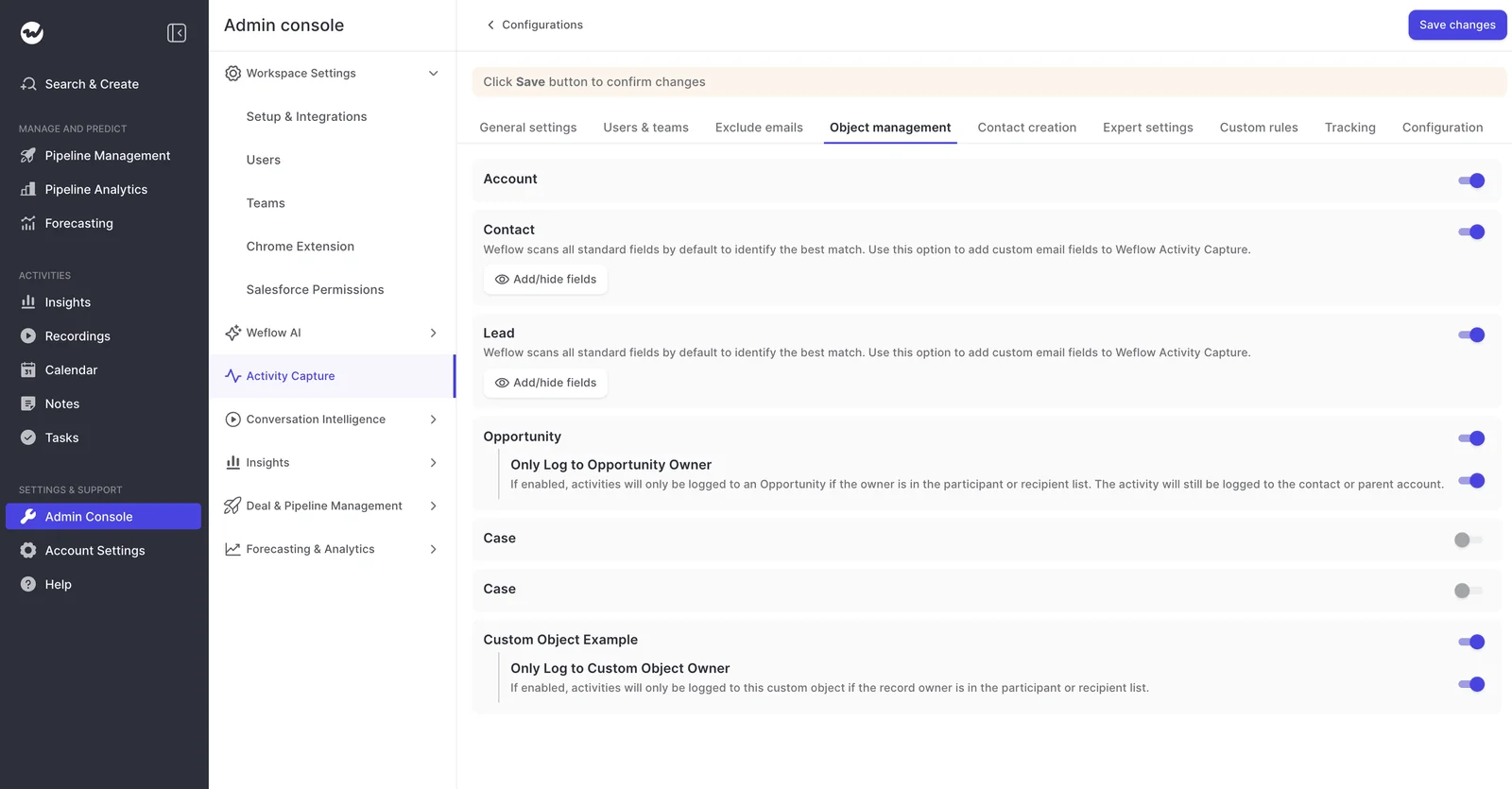
- Custom rules block logging based on any account or contact field, not just a domain. You can exclude an account flagged confidential, a contact marked personal, or every account in a billing country.
- Configuration is set per team, per user and per object, so a sales team and a CS team can log to different objects without one team's rules leaking into another's.
- Activity logs to custom objects without Flow or Apex. Roughly 20 to 30 percent of our customers log to custom objects alongside standard ones.
- You choose whether email lands as an EmailMessage or a Task.
- Weflow stores attachments, with a size cap you set.
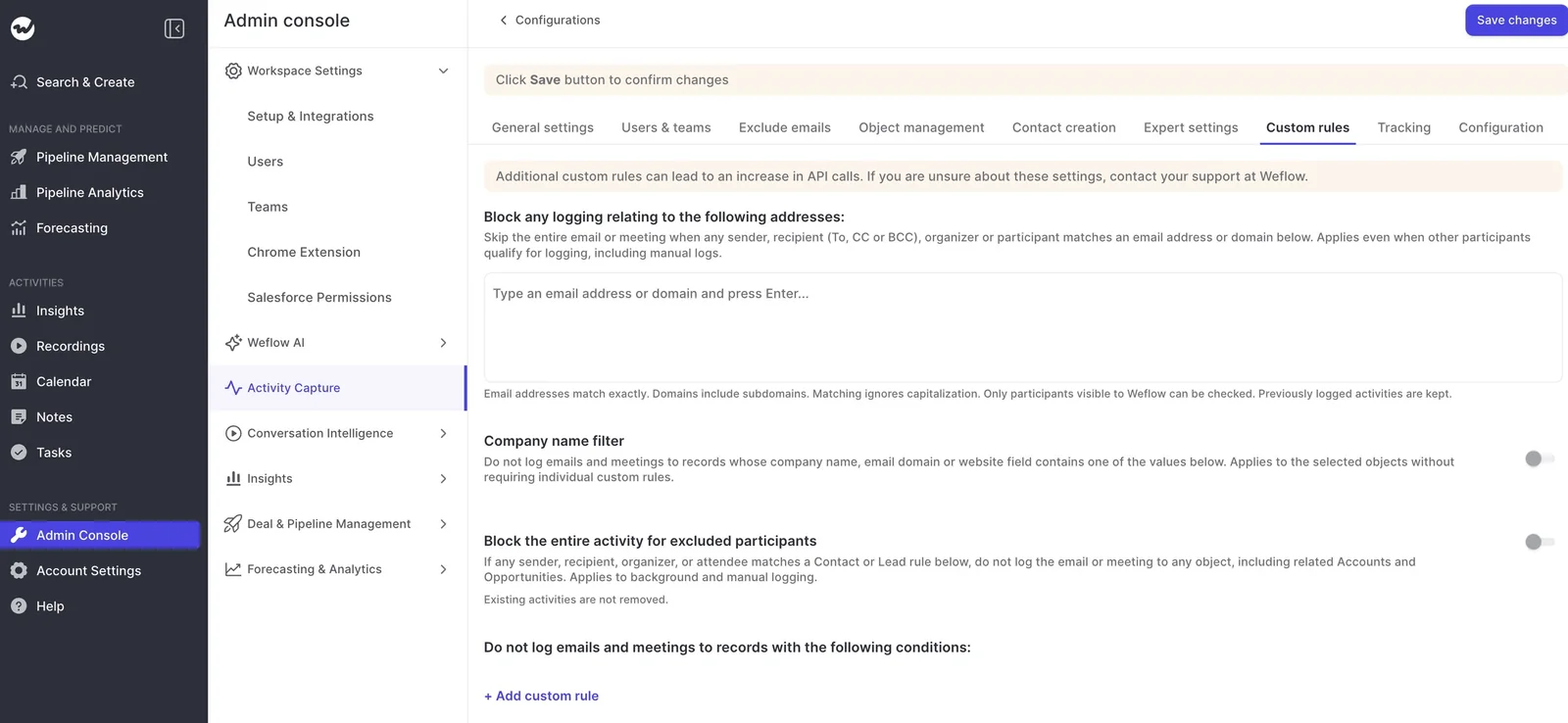
Blacklane uses custom exclusion rules to keep B2C contacts out of Salesforce in a B2B2C motion, something EAC's address and domain exclusions can't express.
What Weflow Activity & Contact Capture costs, and where it stops
Weflow Activity & Contact Capture costs $19 per user per month, billed annually, with a 10-user minimum (compared with $50 for full EAC through Sales Engagement). Ask Weflow AI and Agent Builder are included.
That said, here's what Weflow can't do
- Running beside EAC is a transition, not an end state: It works only after EAC's event sync is set one way, and even then race conditions occur, so we strongly advise turning EAC off.
- Weflow works only with Salesforce.
- We can't fix email aliases or empty contact roles: Weflow can add Opportunity Contact Roles when it creates contacts, but it can't tell which of two open deals a contact belongs to when nothing in your org says so.
If you want to audit your setup before choosing a path, grab our free Salesforce Activity Capture Cheat Sheet. It gives you a checklist to run against your org, whichever tool you end up using.
FAQ: Einstein Activity Capture
Where is Einstein Activity Capture data hosted?
EAC data is hosted on Hyperforce on AWS, in either the United States (Oregon) or Germany (Frankfurt), depending on where your Sales Cloud or Service Cloud data lives.
If Lead Scoring, Call Coaching or ECI is turned on, some related data is stored in the United States regardless.
Does Salesforce keep EAC data after your retention period ends?
Yes, in de-identified form. Salesforce keeps de-identified data derived from EAC activities for up to two years and uses it for machine learning models and third-party data enrichment.
That's separate from your retention setting, so activity can disappear from the timeline while the derived data stays with Salesforce.
Can Einstein Activity Capture run through a Salesforce integration user?
No, EAC is tied to named user licenses. That matters because an integration user separates capture from any individual employee and keeps permissions in one place, which is why many admins replacing EAC treat it as a must-have.
Can I test Einstein Activity Capture in a sandbox first?
Yes, but a single user can't sync across several orgs at once, so remove each test user from the sandbox configuration before adding them to a production configuration. Otherwise, their sync will conflict between the two orgs.
How do I prove a replacement captures everything EAC did?
Run the new tool on its default settings, with no templates or custom use cases, and judge it on whether anything gets lost.
Since two tools on the same user create duplicates, move users fully to the new tool, then backfill the period EAC covered using a sync-back that checks message IDs.
Compare the result against your saved EAC reports, and check in with the reps who complained most about EAC.
Why do reps see "email not connected" warnings after replacing EAC?
Salesforce prompts each user to connect their own mailbox and shows a warning if they haven't. The prompt doesn't know that capture is running at the tenant level, so you'll still see it even when everything's set up correctly.
Tell reps not to connect anything in Salesforce, and point them to the Outlook add-in or Chrome extension instead, which shows that each message was logged and to which record.