A five-quarter trend and a diligence question have one thing in common: they're both about the past. And you can only answer them with history someone saved before anyone asked.
The catch is that Salesforce only keeps the current state of each deal. So if nobody saved what the pipeline looked like on day 35 of last Q2, there's no way to get it back now.
That's why board and diligence reporting really comes down to one decision: when you start keeping history, and who maintains it. You have four options:
- Rebuild the pack by hand from Salesforce exports every quarter.
- Snapshot opportunities into a data warehouse or BI tool.
- Report from a tool that retains pipeline snapshots and forecast history. This is the path we built Weflow Deal Intelligence & Forecasting for.
- Narrow the pack to what you can produce and stand behind.
Which board pack lines can pipeline snapshots actually cover?
Pipeline snapshots cover the pipeline and forecast lines of the pack: coverage, pipeline created, movement, slipped deals and forecast accuracy. Ramp, headcount, churn and GRR still come from your HR and finance systems, whichever path you pick.
Boards ask for a five-quarter board pack, the last four closed plus the one in progress, because a single quarter can always be explained away. As John McMahon puts it:
"I like to see a five quarter report. So I like to see, you know, here's the last four quarters, and then here's what we're tracking for this quarter, or when it closes at the end of the quarter and you go to the board meeting, you can see the last five quarters. And those trends are really hard to argue with. Something's happening or something's not happening. You just can't lie. You can't get away from it. There's a story there."
Even if the meeting only covers three or four topics, a PE operating team will read the whole pack line by line. Every line has to hold up, so it helps to know exactly where each one comes from.
| Pack line | Where it comes from | Can pipeline history supply it? |
|---|---|---|
| Pipeline coverage at the start of each quarter | CRM, as it stood on day one | Yes. This line needs a snapshot because Salesforce has overwritten day one. |
| Pipeline created per quarter | CRM | Yes, with a caveat for deals migrated from acquired companies |
| Pipeline movement and slipped deals | CRM, compared between two dates | Yes. This is what snapshots exist for. |
| Forecast accuracy, call versus actual | Forecast submissions plus CRM closed won | Yes, if the calls were stored at the time |
| Bookings against plan | CRM closed won, plus the plan | Mostly in Salesforce already. History adds what was forecast against it. |
| Win rate, stage conversion, sales cycle, ASP | CRM | Yes |
| Productivity per rep, new logos per rep | CRM bookings plus HR tenure | Partly. Bookings yes, tenure no. |
| Quota attainment across ramped reps | CRM, quota plan and HR tenure | Partly. Attainment yes, ramp status no. |
| Headcount by ramp stage, actual ramp time | HR | No |
| Actual versus planned sales capacity | HR plus the annual plan | No |
| GRR, NRR, churn | Finance and billing | No. Renewal bookings yes, retained revenue no. |
| CAC and CAC payback | Finance | No |
Keep an eye on the mixed lines. Productivity per rep, for example, joins CRM bookings to HR tenure, and that join usually happens in someone's spreadsheet. That's where the board's version starts drifting from the system.
The pipeline lines may be a minority of the pack, but they're the ones that explain what's happening:
"You have your kind of lagging indicators that often I think are the number one metrics discussed in the board meeting. Right? Like, net new ARR, MRR, GRR, but they don't tell you why."
Why Salesforce can't show last year's pipeline after the fact
Salesforce can't show last year's pipeline because it stores only the current state of each opportunity.
When a rep moves a close date or cuts an amount, the old value is gone, unless that field has history tracking switched on. And calculated and roll-up fields can't be tracked at all.
Here's what a board or diligence team typically asks, and what Salesforce actually has to answer it.
| What the board or diligence asks | What Salesforce has kept |
|---|---|
| Where are we at day 35, compared with day 35 of the last three quarters? | Today's values only |
| Which deals called for this quarter slipped into next quarter? | The new close date, plus the old one only if history tracking was on |
| What did the pipeline look like in Q2 last year? | Nothing you can rebuild as a full picture |
| How close was last quarter's forecast to what closed? | Closed won, with no record of the call unless someone saved it |
| When was this deal's amount cut, and by how much? | Only for tracked fields, never for formula or roll-up fields |
| How much of the quarter's starting pipeline actually closed? | Not the starting pipeline, because it's been overwritten |
What to weigh when choosing how to keep pipeline history
For a PE-backed team, this decision comes down to cost and constraints rather than feature lists. Here are the six criteria that matter:
- When history starts: Can the path answer a question about a quarter that ended before you chose it? Some paths start the day you build them, while others import history that already exists.
- Who maintains it: Name the person who keeps it running after the next RevOps cut and after the analyst who built it leaves.
- Time to live: Measure it against your real deadline. If headcount cuts land next quarter and the path goes live after that, you're left with neither the people nor the system.
- Whether the sponsor's tool standard allows it: If a path means replacing a tool the sponsor has standardized on across the portfolio, it may be off the table, however good it is. A path that runs alongside that standard usually isn't.
- Where the history lives: Your own warehouse, a vendor's cloud or a shared drive. Each one changes what you keep if you leave.
- How the output reaches executives: Most CROs and board members won't log in to another tool. They want the pack, or a PDF in their inbox on Monday.
Four ways to produce a five-quarter pipeline trend
Each path is the right call for some teams. The main differences are when history starts and who handles the upkeep.
| Criterion | Rebuild by hand | Warehouse or BI snapshots | Tool that retains snapshots | Narrow the pack |
|---|---|---|---|---|
| When history starts | Whenever someone saved last quarter's export | The day the snapshot job starts | Go-live, plus whatever the tool imports | No new history. You report only what exists. |
| Who maintains it | The analyst who builds the pack, every cycle | A data engineer or BI owner | The vendor runs the snapshots. RevOps owns the configuration. | RevOps, with light effort |
| Time to live | Already live | A build project, then a wait while history accrues | Weeks, with forecasting slower than other modules | The next board cycle |
| Sponsor's tool standard | No conflict | Usually sits outside it | Can collide with a standardized forecasting seat | No conflict |
| Where history lives | Spreadsheets on someone's drive | Your own warehouse | The vendor's side | Nowhere new |
| How it reaches executives | Pack or PDF, built by hand | BI dashboards, or exported into the pack | Tool views, then into the pack | The same pack, smaller |
Rebuild the board pack by hand from Salesforce exports
Rebuilding by hand doesn't cost anything new, and it works for any line that lives in Salesforce today. It's also where most PE-backed teams we speak with are right now, often with a forecasting tool upstream that isn't presentable to the board.
"what I started providing to the board and the executive team every week is basically I'm taking data out of the forecasting tool and having it reformatted into a better format visually for emails."
The cost just shows up elsewhere:
- It often takes a skilled person a week before every reporting date.
- The board's numbers live in a spreadsheet, so the version leadership reads drifts from the version in the CRM.
- It can't produce a past state that nobody saved.
- Fits when: Your pack is mostly current-quarter lines, someone has saved quarterly exports for over a year, and that person isn't on the reduction list.
- Breaks when: The board asks for movement within a quarter, diligence asks about a quarter nobody exported, or the analyst leaves.
Snapshot opportunities into a data warehouse or BI tool
A warehouse snapshot job gives you the most control. The history sits in your own stack, you decide which fields get snapshotted, and you can build the day-35 comparison exactly as your board wants it.
The trade-off is that a management question turns into a data engineering project, complete with warehouse spend, a job to monitor and an owner.
Under PE ownership, that owner is often the person at risk. We've seen a sponsor cut a RevOps team from 26 people to eight or nine, while the reporting load stayed exactly the same.
- Fits when: You have a data team, a warehouse-first rule that everything lands in your own stack, and time for history to build up.
- Breaks when: The person who owns the job is cut, or a diligence question lands on a quarter from before the job started.
Report from a tool that retains pipeline snapshots
With this path, you're essentially buying the history. The tool snapshots your opportunities on a schedule, with no warehouse job. Several forecasting tools also import existing Salesforce history, so your trend doesn't start at zero on day one.
In exchange, you give up some control:
- The history lives on the vendor's side, not in your stack.
- The tool's reporting views decide what you get out of the box. Anything else you build from exports.
- Your sponsor's standard may already own the forecasting seat.
- Fits when: RevOps is shrinking, you need history quickly, and nobody owns the forecasting seat at portfolio level.
- Breaks when: The sponsor standard rules out a new forecasting tool, or your rule is that every number has to sit in your own warehouse.
Narrow the board pack to what you can stand behind
Reporting less is a perfectly legitimate choice. A small metric set reported the same way every meeting can be more credible than a broad pack built on reconstructed history.
"you may have a different narrative for every meeting, depending on what story you want to tell or what strategy you're employing and how the numbers support that. And you can do that with narrative and the different things that you call out, but the metrics should largely be the same and consistently reported every meeting."
Boards notice the difference: changing the metrics to fit the story reads as hiding, while cutting to what you can defend reads as discipline.
- Fits when: The pack has grown past what your team can produce honestly, and the board cares more about consistency than breadth.
- Breaks when: Diligence starts. Narrowing the pack doesn't create history, so a question about last year's pipeline still has no answer.
Four PE situations that change which path fits
Ownership structure often decides the path before features do. If any of these four situations applies to you, it outweighs the general advice above.
When acquired companies were merged into one Salesforce org
Migrated deals inflate pipeline created. Any report keyed on the Salesforce Created Date counts every migrated opportunity as new on the day it was migrated, and since Created Date is set at insert, you can't change it.
"I inherited a mess. When I say a mess. Salesforce data is just bad data right now as a result of about five companies being purchased by the PE firm."
This affects every path, including a hand rebuild, and Weflow's pipeline waterfall also counts new pipeline from Created Date. You have three ways to fix it:
- Send us a file with the original created dates, and Weflow will overwrite them in its own copy of the data as a backend change.
- Filter the view to qualified stages, so only qualified pipeline counts.
- Use short windows. For the last 7 or 14 days, the problem disappears because the snapshot itself becomes the starting pipeline.
What to do: Before you trend pipeline created, find out which deals came in by migration and pick one of these fixes.
When your sponsor has standardized on Clari
If your sponsor has standardized on Clari and loves it, keep the forecasting seat.
Clari earns that loyalty here. Its dashboards give leaders one data set to take into a board meeting, it keeps a week-by-week history of forecast calls, and its trend view compares the pipeline with the same point last year, which Weflow doesn't offer yet.
A sponsor's standard is a constraint to work within. In that setup, Weflow fits next to Clari for activity capture and conversation intelligence, not for the forecast.
What to do: Stay with Clari for forecasting and make sure its history covers the pack's pipeline lines.
When the board's real question is recognized revenue
Bookings history won't settle an argument about revenue run rate and the provisions against it. If that's the debate in your boardroom, a sales-side forecasting tool answers a question nobody is asking.
Kluster is built for this. It forecasts recognized revenue alongside bookings, runs revenue recognition for fixed-fee, bookings-based and usage-based contracts, and logs every forecast change in an audit trail.
Weflow doesn't do financial planning or revenue recognition.
What to do: If the board debates revenue rather than bookings, look at finance-side tooling first.
When diligence needs frozen copies of past board packs
Kluster also builds board packs from its forecasts and KPIs, and lets you freeze the numbers and keep past packs for audit and due diligence.
This matters because auditors and investors reconcile against what you reported, not against what the CRM says today. Weflow has no equivalent here.
What to do: If you expect diligence to reconcile against past packs, use a tool that freezes them, or keep a dated copy of every pack you send.
Our recommendation: Start storing pipeline history before anyone asks
Whichever path you choose, start storing history this quarter. Almost everything else here can be undone: you can switch tools, rebuild a dashboard or reshape the pack. But a quarter you didn't capture is gone for good.
For a typical PE-backed Salesforce team with a shrinking RevOps function, a tool that retains snapshots usually comes out ahead:
- When history starts: It imports what Salesforce already has instead of starting cold.
- Who maintains it: The vendor runs the snapshots, so nothing breaks when an analyst leaves.
- Time to live: Weeks, not a build project.
A hand rebuild doesn't hold up over five quarters, though it's a fine stopgap for one more board meeting.
In short:
- If RevOps is shrinking and nobody owns the forecasting seat: Report from a tool that retains snapshots.
- If you have a data team and a warehouse-first rule: Build the warehouse snapshot job, and start it now.
- If the sponsor standard or a revenue-first board decides it: Stay where you are, and narrow the pack to what that tool supports.
How Weflow Deal Intelligence & Forecasting keeps your pipeline history
Weflow is the Revenue AI Orchestration platform for sales, customer success, and RevOps teams, built for Salesforce teams. Weflow Deal Intelligence & Forecasting keeps the pipeline and forecast history your pack's pipeline lines need, with no warehouse job.
Hourly snapshots from go-live, plus up to two years imported from Salesforce
From go-live, Weflow snapshots every opportunity hourly and keeps those snapshots for as long as your contract runs, regardless of what Salesforce tracks.
For the period before go-live, Weflow imports up to two years of history from Salesforce field history tracking (falling back to opportunity history). That means five quarters can be there on day one for any fields Salesforce tracked.
One thing to note: the import uses the field mapping in your forecast configurations, so we set those up first and run the import second. Until then, the history-based charts stay empty.
| What you get | Before go-live | After go-live |
|---|---|---|
| Source | Salesforce field history, then opportunity history | Weflow's own hourly snapshots |
| How far back | Up to two years | For the length of your contract |
| Custom fields | Only where Salesforce history tracking was on | Every field Weflow snapshots |
| Used by | Pacing, waterfall and forecast accuracy for the earlier period | The same views from go-live onward |
We stop at two years on purpose. Over a longer span, sellers, products and sales motions change too much for older history to help.
The pipeline waterfall names the deals that slipped, moved or were lost
The Weflow pipeline waterfall reconciles your starting pipeline to your ending pipeline through seven buckets:
- Created
- Increased
- Pulled in from a later period
- Pushed out of the period
- Lost
- Decreased
- Won
You can drill into each bucket to see the opportunities behind it, with whichever fields you want. That's how you answer the board when a quarter that opened strong ends thin.
It also changes the conversation about deals that keep slipping.
Those deals show up by name in the pushed-out bucket, period after period. And because the waterfall is built from snapshots rather than current state, it exposes the chronic slippage a live pipeline report hides.
A deal created and closed inside the same window appears twice: once as an addition and once as a subtraction.
Every chart also runs per forecast motion, so new logo, renewal and expansion each get their own view. When diligence asks about growth by motion, you have a segment-level answer on the bookings side.
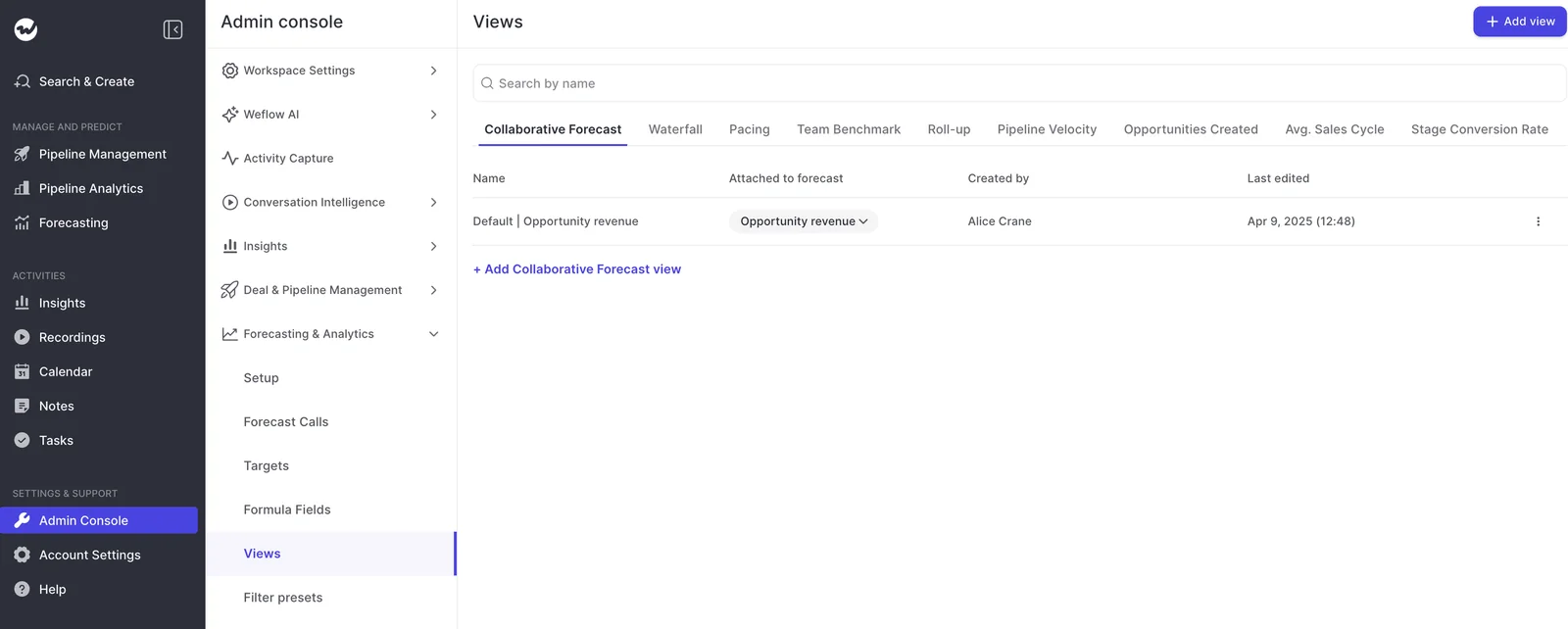
Forecast accuracy tracking shows how your past calls actually landed
Weflow tracks forecast accuracy per period for each rep, manager and team, out of the box and with no setup.
Your admin picks the field accuracy is measured against, such as Closed Won, so you can still measure yourself if you forecast on something else.
Every forecast submission is versioned: the amount, the opportunities included, who submitted it, when, and the comment.
Over five quarters, that becomes a record of your team's judgment, and you can see whether a rep's call moved during the quarter or never moved at all.
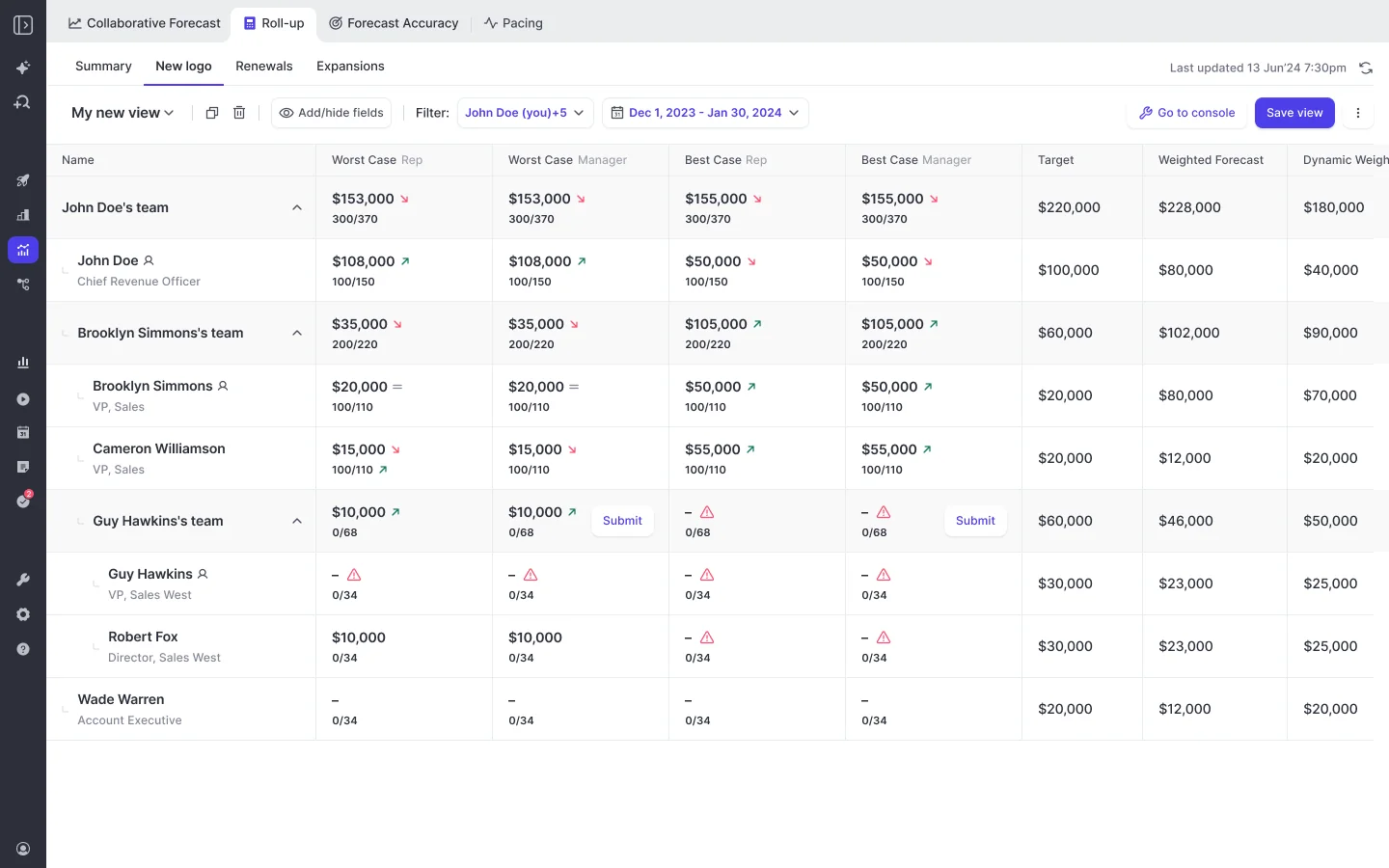
This matters most once finance starts running its own number. A quarter-by-quarter track record of how close sales' calls landed is the evidence you bring to that conversation.
Three forecasts side by side give the board a second opinion
Everyone knows a rep's call reflects mood as much as measurement, including the board. That's why Weflow runs three forecasts in parallel, so you can set the team's call next to two numbers that don't depend on the rep.
| Forecast | What it's built from | The question it answers |
|---|---|---|
| Weighted forecast | Stage win rates recalculated from a rolling window of recent history, such as the last 90 or 180 days | What does the pipeline support, based on how deals have been converting lately? |
| Rep and manager roll-up | Each person's submitted calls, rolled up the hierarchy | What does the team say it will close? |
| AI projection | More than fifty deal-level signals and up to two years of history, returned as a low, middle and high range | Where does history say the quarter lands? |
| The gap between them | All three side by side | Where do you need to dig in before the board meeting? |
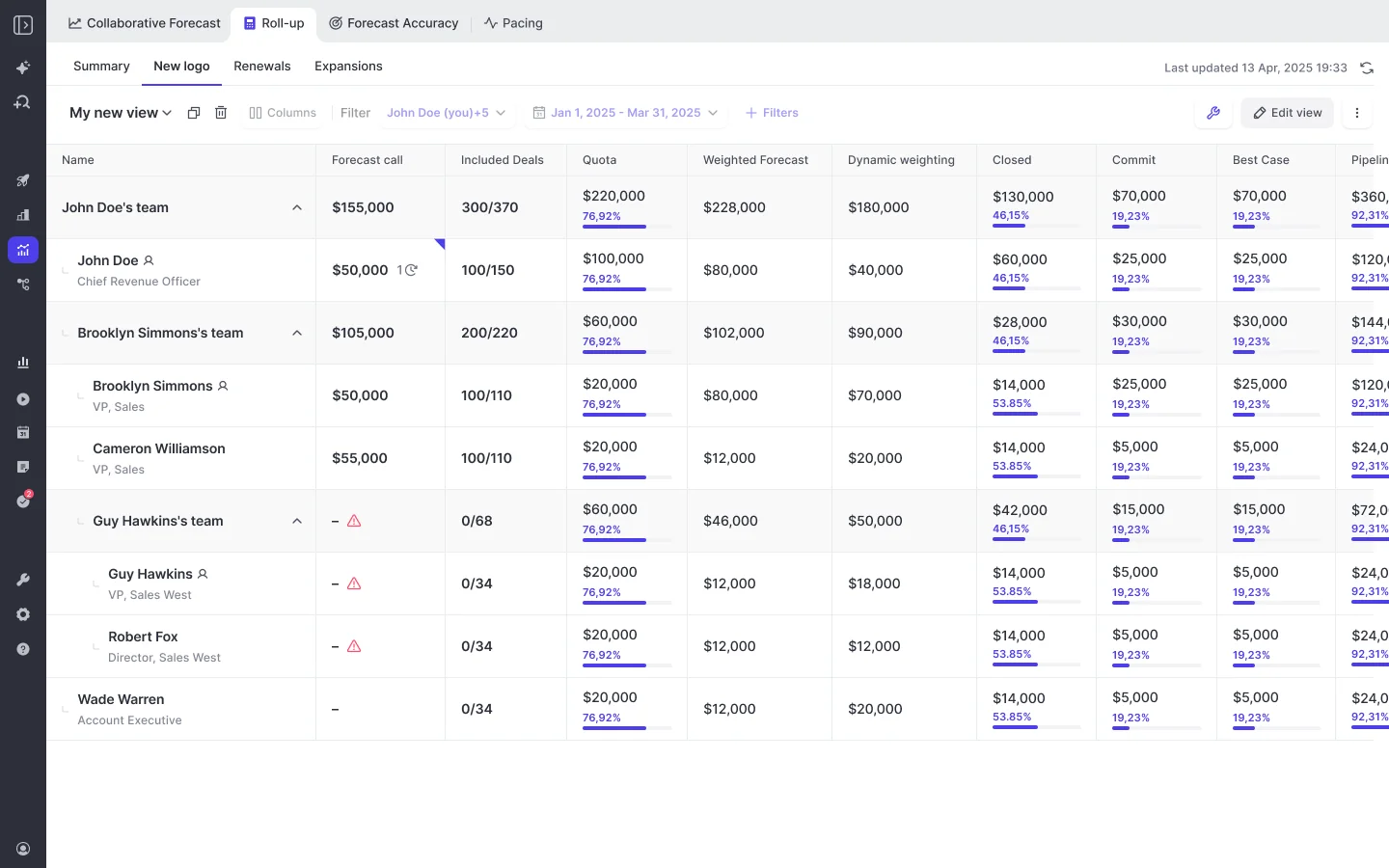
The AI projection needs at least six months of opportunity history. When it isn't confident in a range, it shows none and says why.
What Weflow doesn't do for board reporting yet
Here's where Weflow falls short today, plus the workaround where there is one:
- No same-point-in-quarter trend view: Weflow keeps the snapshots, but "this quarter versus the same week last quarter" is a comparison you make by hand.
- No target-versus-trend chart and no funnel report: The waterfall, team benchmarks and stage conversion are separate views, not one central dashboard. Our dashboard layer is thinner than Clari's.
- No board-pack builder and no frozen packs: You still assemble the pack. Keep a dated copy of each one you send.
- Pipeline history lives on Weflow's side: Activity and contact capture writes to your Salesforce, but the hourly opportunity snapshots don't.
- Submitted forecasts aren't written back to Salesforce: You can read them over the MCP connector, and API access is planned. If your rule is that every number lands in the CRM, the forecast is the one number that doesn't today.
- Agent Builder lookups read Salesforce live, not snapshots: An agent can send a scheduled pipeline brief. It can't assemble a five-quarter trend from history.
- Custom-field history before go-live exists only if Salesforce tracked it: Otherwise, that field's history starts at go-live.
How long Weflow forecasting takes to go live
Implementation is free, and we run onboarding ourselves instead of handing it to a partner. It's run as a project against a mutual action plan, with named owners on both sides, across three phases:
- Technical implementation: A 45 to 60 minute call with your Salesforce admin and mail admin to connect the systems.
- Configuration: Team structure and hierarchy, forecast configurations, fields, warnings and templates. Most of the time goes here.
- Role-based rollout: Separate training for leadership and reps.
Going live typically takes two to three weeks. Forecasting takes longer than capture or conversation intelligence because it encodes your operating cadence: who submits, how often, at deal or manager level, and against which quota.
Once the history import has run, the AI projection is ready within 48 to 72 hours.
If your RevOps team is being cut, our managed service option means we do the heavy lifting, and your team just answers questions and grants access.
"I made a deliberate choice to let Weflow own end-to-end onboarding rather than pull my team off revenue-generating work."
— Scott Jones, SVP of GTM Revenue Intelligence & Enablement at KORE Wireless
What Weflow Deal Intelligence & Forecasting costs
- $39 per user per month, billed annually.
- Minimum 10 users.
- Ask Weflow AI Pro and Agent Builder Free (25 agent actions per month) are included.
- Implementation is free.
- A paid three-month pilot is available for forecasting. It's contractually the first three months of a multi-year agreement, with an opt-out at the end.
Some PE sponsors already recommend Weflow into their portfolio companies, so your operating partner may have seen it before.
How to start keeping pipeline history this quarter, path by path
Whichever path you pick, your first move is to start capturing history now. Each path has one first step and one owner.
| Path | First step and owner | When the first usable trend exists | Risk to watch |
|---|---|---|---|
| Any path | Your Salesforce admin turns on field history tracking for every field you'll trend, this week | Field-level history builds from that day | Tracking covers only the fields you switch on, and never formula or roll-up fields |
| Rebuild by hand | Your RevOps analyst saves a dated full pipeline export at the start, middle and end of every quarter | After four saved quarters | One missed export leaves a permanent gap |
| Warehouse or BI snapshots | Your data engineer schedules a daily opportunity snapshot job | Five quarters after the job starts | The job's owner leaves and nobody notices it failing |
| Tool that retains snapshots | Your RevOps lead agrees the forecast configurations so the history import can run | On day one, for fields Salesforce tracked | Migrated deals inflate pipeline created until you fix their dates |
| Narrow the pack | Your CRO agrees a fixed metric set with the sponsor's operating partner | The next board meeting | Diligence asks about the past and nothing was stored |
Still deciding which metrics to trend? Our B2B SaaS Metrics & Benchmarks Cheat Sheet gives you the metric set and benchmarks to choose from before you lock the pack.
FAQ: Board and diligence reporting from pipeline snapshots
Can we compare day 35 of this quarter with day 35 of past quarters without a warehouse?
Not as a built-in view in Weflow. Weflow keeps the hourly snapshots and the imported history, so the data for the comparison exists. Today, you compare the snapshots by hand.
Can executives get the numbers by email or PDF instead of logging in?
Yes, for a current view. Agent Builder can run on a schedule and email results with a PDF attached, like a Monday pipeline brief. It reads Salesforce live rather than snapshots, though, so it won't build the five-quarter trend for you.
Does closed won from reps who have left stay in the roll-up?
Yes. Since release 3.30, the roll-up keeps inactive users who hold opportunity values, so their closed won stays in the top-level number.
One caveat: the inactive users switch brings in every deactivated user in the org, and you can't yet narrow it down to departed sellers.
Does the AI projection account for newly hired, still-ramping reps?
Not yet. The projection scores each deal partly on its owner's conversion history, and new reps don't have much. The team-level range absorbs this, but read a single new rep's numbers with that in mind.
Can we pilot Weflow forecasting before committing to a full contract?
Yes, through the paid three-month pilot mentioned above. We offer it because forecasting can't be proven in a two-week trial: the roll-up has to run for a full cycle before you can judge it.