

Best Revenue Intelligence Tools for Teams Under 200 Employees (2026)
Compare 2026 revenue intelligence tools for teams under 200 and choose Weflow, Gong, Clari, or Avoma.



If you run RevOps on Salesforce at a company this size, shortlist by the problem you need solved first:
- Weflow: capture, conversation intelligence and forecasting in one product, at a published price, without a setup project.
- Gong: your budget stretches and the deepest conversation analytics matter most.
- Clari (now sold as Salesloft): your leadership already runs on its forecast roll-ups.
- Avoma: you're on HubSpot, or you need the lowest published price.
- Attention: you're building AI agents and want the widest MCP access.
- Jiminny: you're coaching-first, want a built-in dialer, and often run HubSpot.
We didn't rank these tools by feature count. Every vendor claims the same outcomes, and you've heard them all in the first five minutes of a demo.
We judged each one by what it costs a small team to get complete data into Salesforce. That comes down to four questions:
- Is the price public?
- Who does the setup?
- Do reps have to do anything?
- Does call and email data land in Salesforce, or stay in the vendor's app?
Weflow wrote this comparison, so read it knowing that. Weflow is the Revenue AI Orchestration platform for sales, customer success, and RevOps teams, and we name our own limits in every section where they matter. You can see how the products fit together on the Weflow Revenue AI Orchestration platform overview.
The six revenue intelligence tools compared side by side
On the same ten capabilities, these tools split sharply on three things: where email lands, who does the setup, and whether the price is public.
| Capability | Weflow | Gong | Clari (Salesloft) | Avoma | Attention | Jiminny |
|---|---|---|---|---|---|---|
| Recording video meetings | Notetaker on Zoom, Teams, Meet and Webex; desktop app records without a bot | Zoom, Meet, Teams, Webex and seven more; botless only on Zoom | Zoom, Teams, Meet, Webex; recordings under two minutes skipped | Bot on Zoom, Meet, Teams and four others; Webex via cloud recording | Bot by default on Zoom, Meet, Teams, or a desktop app | Bot on Zoom, Meet, Teams; desktop and mobile apps |
| Automatic email capture | Server side through one central app; lands in Salesforce with no rep action | Server-side import; exports to Salesforce once an admin turns it on, from that day forward | Logs what reps "Loft," through each rep's own CRM connection | Syncs for Revenue Intelligence seats; logs to Salesforce as Tasks | Per-user mailbox connection; emails stay in Attention unless you build a workflow | Per-user sync; emails stay in Jiminny, never logged to Salesforce |
| CRM field updates from calls | Every field type except lookups; auto-write or review set per field | Up to 20 extractors, existing fields only, overwrites values | MEDDPICC and BANT via sync, no review step | Mapped to opportunity and account fields; no custom objects, no review step | Prompt per field, auto sync by default; writes prose when nothing is found | AI CRM Filling on deals, accounts, contacts, leads, tasks; auto or review |
| Deal risk warnings | 50+ signals, custom rules; warnings stay in Weflow | Eight fixed warnings; timing adjustable, no custom ones | Deal Gaps: admin-built rules on any deal field | AI risk score per opportunity, keyword alerts | Risk agent on conversations, custom deal indicators | Eight triggers, thresholds set per team |
| Forecast submissions and roll-ups | Baseline and best case tied to named deals; not written to Salesforce | Per-category submissions roll up, with trend and accuracy reports | Roll-up up to eight levels; tied to the Salesforce hierarchy | Submissions roll up; one forecast configuration per org | Forecast grid; overrides and history not documented | Not offered |
| CI setup and rollout | Weflow runs onboarding at no charge; recording set by team; typically 2–3 weeks | About four weeks, 6–12 with paid services; partners for smaller customers | Copilot onboards rep by rep | Org-wide connections, central recording rules; $1,000 optional onboarding | Each rep links their own calendar; drafted config for admins | Every rep signs in to mail, calendar and Salesforce |
| Integrations | Salesforce, Google, Microsoft, Zoom, Slack, Outreach dialer; no native warehouse connector | About 450 in its marketplace, about 30 dialers | Data layer syncs Salesforce, Dynamics, Snowflake, Databricks and more | 26 native integrations plus Zapier | Workflow steps into Slack, Gmail, Notion, Snowflake and more | About 20 dialers, several CRMs, Zapier |
| Access from AI assistants (MCP) | Read-only connector: transcripts, summaries, playbooks, forecast calls | Three record-scoped tools, insights only, metered credits | Read-only, beta, paid add-on; summaries, not transcripts | Connector with 11 read and 3 write tools, on higher plans | 68 read-write tools, raw transcripts, no consumption charge | Read-only connector on Scale and Grow tiers |
| Raw data access | REST API bulk export in JSON or CSV; recordings to your own storage | API capped at 10,000 calls a day; Data Cloud sold separately | REST and Export APIs; Snowflake and Databricks sync | REST API and webhooks, 60 requests a minute | Transcripts via MCP; workflows push to Snowflake or any API | REST API with an admin-only org key |
| Pricing | Published: $19 to $79 per seat, 10-user minimum | Not published; Foundation plus applications plus credits | Not published; quote only, no trial | Published: $19 to $39 per seat plus $29 add-ons | Not published | Not published; flat per-seat fee, no credits |
The full cost breakdown sits in the pricing section below, and the shortlist tables sit in the decision section.
What "under 200 employees" means in revenue seats
None of these vendors sizes customers by headcount, and none restricts itself by employee count. They price and gate on seats: the people who record calls, capture email, or submit a forecast.
So the useful number for you is your revenue seat count, not your company size. These are the thresholds that decide fit:
- Weflow: 10-user minimum per product or bundle. Our reference pricing is built around roughly 62 seats, and the meaningful volume discount starts around 30 to 40 seats. View-only licenses are unlimited and free.
- Avoma: 10-seat minimum. Startup caps at 25 recorder seats and Organization at 100. Viewer seats are free and unlimited.
- Gong: the proposal form starts by asking your team size in bands of 1 to 50, 51 to 1,000, 1,001 to 9,999, and 10,000 plus. Free Collaborator accounts can view calls but get no AI and no MCP access.
Clari, Attention and Jiminny publish no seat thresholds.
Five tests for choosing revenue intelligence on a small team
Transcription is a commodity now. Every tool on this list records and summarizes a call well enough.
The value sits in what happens after the transcript, and whether that data reaches the Salesforce records you own. That matters more every quarter, because any AI you build later can only read what's actually in Salesforce.
These five tests measure that, and each one maps to columns in the table above.
Is the price published before you book a demo?
Only Weflow and Avoma publish per-seat prices. For the other four, you build the business case after a sales call.
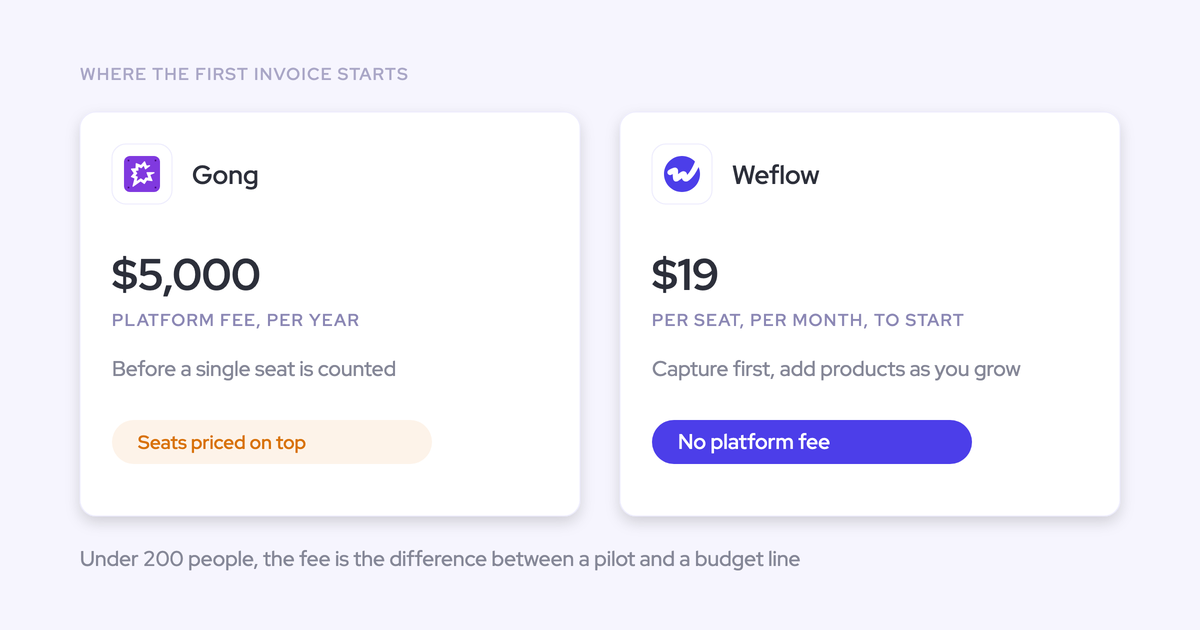
"If someone charges you five thousand dollars as a platform fee and then one hundred, two hundred dollars per user per month, that's nowadays not acceptable anymore."
How to check it in a trial:
- Find the per-seat price for the capabilities you actually need, not the entry tier.
- Read AI pricing for the second number: a consumption charge on top of the seat is a bill that grows as adoption succeeds.
- Ask whether there's a platform fee, an implementation fee, or a separate charge for data export.
Maps to: Pricing column.
Who runs the setup, and how many RevOps hours it takes
On a RevOps team of one to three, the setup project competes with your whole backlog. A vendor that runs onboarding itself costs you fewer hours than one that hands you to a paid partner.
How to check it in a trial:
- Ask who runs onboarding: the vendor, or a third-party partner.
- Ask whether onboarding is included or quoted on top.
- Check whether recording is configured by team or rep by rep.
We run Weflow onboarding ourselves at no charge, with a managed-service option where we do the heavy lifting. Recording is configured by team, and a team updates automatically as people join or leave.

Maps to: CI setup and rollout column.
Do reps have to install or connect anything themselves?
Anything that depends on rep action gets discounted. This is what we hear on calls when a buyer describes tools that ask reps to install and connect things:
"But I'm like, they're not going to. They're not going to do it."
How to check it in a trial:
- Ask whether an admin connects Google Workspace or Microsoft 365 once, centrally, or whether each rep connects their own mailbox and calendar.
- Ask whether each rep needs their own CRM connection for logging to work.
- Ask what happens to a rep who never finishes setup: is their data missing, and does anything tell you?
Maps to: Automatic email capture and CI setup and rollout columns.
Does call and email data land in Salesforce?
If the data stays in the vendor's app, your reports, your forecast and your own AI don't see it. It also stays behind when you leave. An ex-Gong buyer put it plainly on a call with us:
"You can never leave them because you don't own any of the data."
How to check it in a trial:
- Where are emails written: native Salesforce objects, or the vendor's store?
- Which field types can the AI write to: picklists, dates, numbers, multi-select, custom objects?
- Does it overwrite a field or build on it, and is there a review step?
"Look at the Salesforce integration, trial it. That is often something that most CI providers don't start with. They see it as an afterthought."
Maps to: Automatic email capture and CRM field updates columns.
Can your own Claude or ChatGPT reach the data?
Buyers now expect to point their own assistant at their revenue data. The differences between vendors here are large.
How to check it in a trial:
- Is access read-only or read-write?
- Does it return transcripts, or only the vendor's summaries?
- Is it metered per request, or rate-limited?
- Does an API or export reach the raw data for your warehouse?
Maps to: Access from AI assistants (MCP) and raw data access columns.
Weflow: capture, conversation intelligence and forecasting on Salesforce
Weflow covers activity capture, conversation intelligence, AI field updates and roll-up forecasting in one product. Everything it captures and generates lands in native Salesforce objects, except the forecast and warning layer, which we cover below.
How Weflow performs on all ten compared capabilities
Weflow is sold as three modules: Weflow Activity & Contact Capture, Weflow Conversation Intelligence, and Weflow Deal Intelligence & Forecasting. Every plan includes Ask Weflow AI and the free tier of Weflow Agent Builder.
| Capability | What Weflow does |
|---|---|
| Recording video meetings | The notetaker joins every external meeting on Zoom, Teams, Meet and Webex from the calendar, with no rep action. The desktop app records without a bot, including softphone calls on tools like Aircall or RingCentral. |
| Automatic email capture | Capture runs server side through one central app in Google Workspace or Microsoft 365, on any device. Emails and meetings land on native Salesforce objects, mapped to the right account, opportunity, contact or lead. |
| CRM field updates from calls | AI field updates write to every Salesforce field type except lookups, including picklists, dates, numbers and multi-select. You set auto-write or review per field, and methodology fields build up over the deal instead of being overwritten. |
| Deal risk warnings | 50+ deal signals, plus warnings you build with AND/OR rules on opportunity fields or computed fields like days inactive and close-date pushes. |
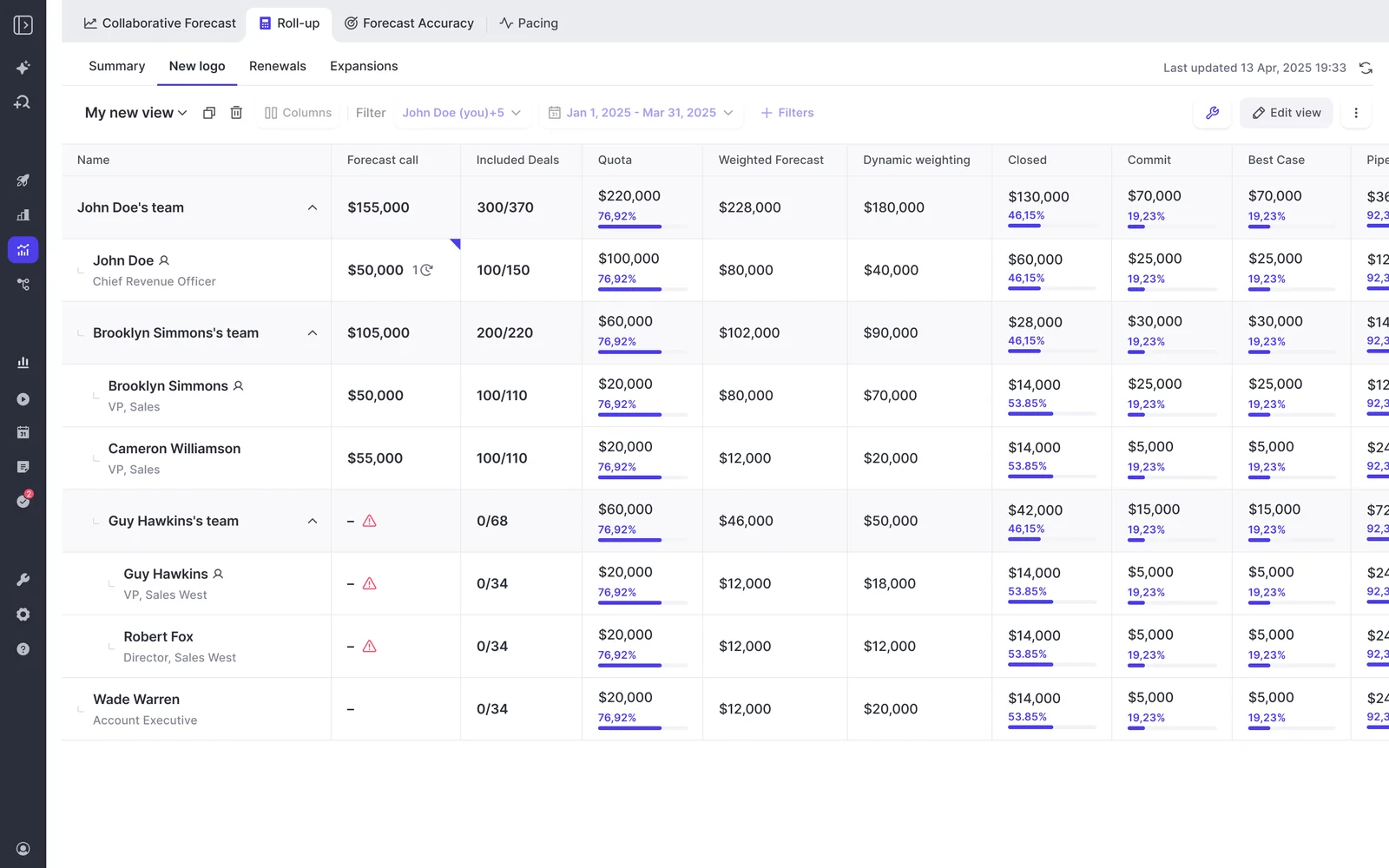
| Forecast submissions and roll-ups | Reps submit a baseline and best case tied to named deals. Calls roll up the hierarchy, managers override with logged rationale, and every version is kept. |
| CI setup and rollout | One technical session with your Salesforce and mail admins, then typically two to three weeks. The fastest recorded rollout took three days. |
| Integrations | Native with Salesforce, Gmail, Google Calendar, Outlook, Zoom, Teams, Meet, Slack and the Outreach dialer. Warehouses like Snowflake or BigQuery are reached through the API. |
| Access from AI assistants (MCP) | An official read-only connector gives Claude and ChatGPT playbooks, call summaries, transcripts, forecast calls and pipeline metrics. An admin switches it on and decides separately whether transcripts are included. |
| Raw data access | The REST API bulk-exports transcripts, metadata, scores and signals as JSON or CSV. Recordings export to your own cloud storage. |
| Pricing | Published per seat. See the pricing section below. |
The captured data is what makes the rest work. AI deal summaries, MEDDPICC playbooks, coaching scorecards and the forecast all read the same activity and conversation record in Salesforce.
Where Weflow stops and which teams it fits
These are the places Weflow isn't the answer, or isn't there yet:
- Weflow works only with Salesforce. HubSpot teams should look at Avoma, Jiminny or Attention.
- Gong has deeper conversation analytics.
- Our MCP connector is read-only. Attention's is read-write and far broader.
- Forecast submissions and deal warnings live in Weflow and don't land in Salesforce fields, so you can't report on them in Salesforce dashboards.
- No sequencing and no dialer. You run Outreach, Salesloft or Apollo alongside us.
- A 10-seat minimum and a 12-month term, with no mid-term seat reduction.
Best for: Salesforce teams that want one platform for capture, conversation intelligence and forecasting, a published price, and onboarding run by the vendor.
KORE Wireless evaluated Gong and chose Weflow because, in the words of their case study, "the value didn't justify its price compared to Weflow." Weflow owned their onboarding end to end.
"I made a deliberate choice to let Weflow own end-to-end onboarding rather than pull my team off revenue-generating work. That's exactly the kind of partnership leverage I was looking for."
— Scott Jones, SVP of GTM Revenue Intelligence & Enablement, KORE Wireless
"A lot of folks in the RevOps community pointed me to Weflow. The demo was strong, the pricing was right - it was an easy decision."
— Erick Mahle, Vice President of Revenue Operations & Digital Transformation, Lendz Financial
Gong: the deepest conversation analytics, if budget allows
Gong invented this category and still has the deepest conversation analytics. It's also the safe purchase: nobody expects to be blamed for choosing Gong. Where it hurts a small team is the layered cost and the setup load.
How Gong performs on all ten compared capabilities
| Capability | What Gong does |
|---|---|
| Recording video meetings | Records on Zoom, Google Meet, Microsoft Teams, Webex and seven other providers, on any plan. Recording without a bot works only on Zoom. |
| Automatic email capture | Imports email server side from each mailbox, keeping only messages that match a CRM record. Export to Salesforce as tasks or events starts once a tech admin enables it, and only from that day forward. |
| CRM field updates from calls | AI Data Extractor writes into existing CRM fields and overwrites values when newer information appears. A workspace can publish at most 20 extractors, and only a business admin creates them. |
| Deal risk warnings | AI Deal Monitor has exactly eight Gong-defined warnings, such as ghosted, no power and stalled in stage. You can switch them on or off and adjust timing, but you can't define new ones. |
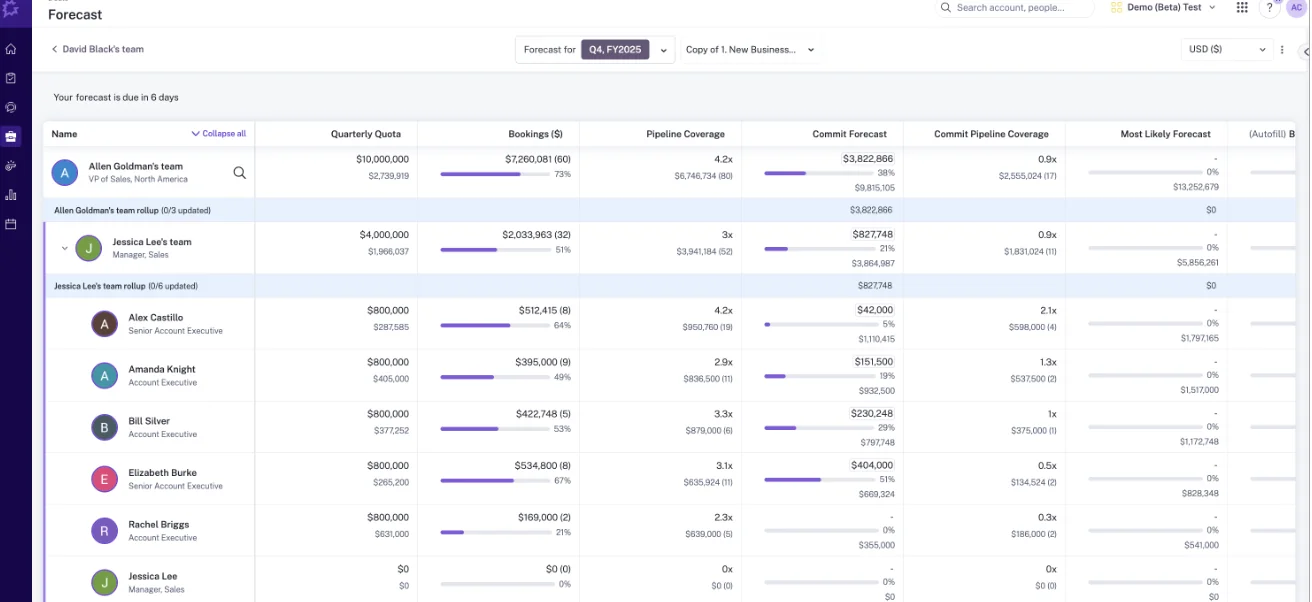
| Forecast submissions and roll-ups | Reps submit per forecast category with notes, and managers see team totals up and down the hierarchy. Gong Forecast adds a trend chart and an accuracy report. |
| CI setup and rollout | About four weeks on average, or 6 to 12 weeks with professional services. Smaller customers are often routed to third-party partners. |
| Integrations | About 450 integrations and partner solutions in the Gong Collective, and calls imported from about thirty dialers. |
| Access from AI assistants (MCP) | Three record-scoped tools that return AI insights, never raw transcripts. Read-only, and every request draws metered credits. |
| Raw data access | The API returns transcripts, trackers and scorecards, capped at 3 calls a second and 10,000 a day. Warehouse delivery needs Data Cloud, a separate purchase. |
| Pricing | No published prices. A mandatory Foundation licence, paid applications on top, a platform fee, and pooled AI credits. |
Where Gong stops and which teams it fits
Gong's deal boards, coaching and integration breadth are real strengths. For a small team, these are the limits:
- No published prices, so the business case waits on a proposal.
- Cost stacks up: Foundation, plus applications for forecasting or coaching, plus AI credits pooled at 2,000 per paid core seat per year.
- Setup runs for weeks, often through paid packages or partners.
- Field extraction caps at 20 extractors, writes only to existing fields, and overwrites.
- Eight fixed deal warnings.
- The MCP server returns insights only, never transcripts.
Best for: teams with the budget for the deepest conversation analytics, coaching and deal boards, and who value the brand nobody questions.
Clari (now Salesloft): mature forecasting, rep-by-rep setup
Clari and Salesloft have operated as one company under the Salesloft brand since 1 September 2026. Clari Forecast continues as the forecasting product line. The forecast roll-up and inspect views are genuinely mature, and many buyers use them as the benchmark a replacement has to match.
How Clari performs on all ten compared capabilities
| Capability | What Clari and Salesloft do |
|---|---|
| Recording video meetings | Covers Zoom, Teams, Meet and Webex. Salesloft Conversations skips recordings under two minutes, and the Copilot Zoom bot records only while the organiser is present. |
| Automatic email capture | Salesloft logs the emails and invites a rep sends as Lofted. Logging runs on each rep's own CRM connection, so a rep whose connection drops stops logging. |
| CRM field updates from calls | Salesloft Deals writes MEDDPICC and BANT values from transcripts into CRM fields through its sync, with no documented review step. |
| Deal risk warnings | Deal Gaps are rules a team admin builds on any deal field, like days in stage or an empty next step, with thresholds for "needs attention" and "at risk." |
| Forecast submissions and roll-ups | Submissions roll up a hierarchy up to eight levels deep, managers can submit on behalf of reps, and history exports to CSV. Leaders see only the level directly below them, and the forecast is tied to the Salesforce hierarchy. |
| CI setup and rollout | Each rep joins Copilot individually: invited, signs up, connects their calendar, records a voice fingerprint and installs the desktop app. |
| Integrations | The Salesloft data layer syncs with Salesforce, Dynamics, Snowflake, Databricks, Gmail, DocuSign, ZoomInfo and LinkedIn. |
| Access from AI assistants (MCP) | The Salesloft MCP server is read-only, in beta and needs the paid Agentic add-on. It returns call summaries, not raw transcripts. The Copilot connector reaches call data only, and a separate Clari Forecast MCP server gives assistants forecast data. |
| Raw data access | REST and Export APIs plus a Copilot API, CSV forecast history, and Salesloft sync to Snowflake and Databricks. |
| Pricing | No published seat prices, no free trial. Both pricing pages lead to a Talk to Sales booking page. |
Where Clari stops and which teams it fits
- Quote-only pricing with no trial. Our estimate from deals is $120 to $180 per user per month, plus $15,000 to $50,000 in professional services. Treat both as estimates.
- Copilot onboards rep by rep, and email logging depends on each rep Lofting and staying connected.
- The forecast is tied to the Salesforce hierarchy.
- Buyers tell us the products still run as separate applications after the merger.
Best for: leadership teams that already run on Clari's roll-ups and inspect views, especially if you're already on Salesloft.
Avoma: published low prices, deal features as add-ons
Avoma publishes its prices, sets up org-wide, and works with HubSpot as well as Salesforce. It grew outward from the meeting, so its center of gravity stays on the call, and the deal and forecast depth sits in paid add-ons.
How Avoma performs on all ten compared capabilities
| Capability | What Avoma does |
|---|---|
| Recording video meetings | A bot records Zoom, Meet, Teams, BlueJeans, GoToMeeting, Lifesize and UberConference. Webex records through Webex cloud recording when the user is the organizer. |
| Automatic email capture | Syncs Gmail and Outlook for members with the Revenue Intelligence add-on, and can log to Salesforce as Tasks. Admins can connect Google Workspace or Microsoft 365 once for the whole org. |
| CRM field updates from calls | Smart Topic notes write automatically into admin-mapped fields on opportunities and accounts. No custom objects and no review step before the sync. |
| Deal risk warnings | An AI risk score per opportunity from meetings, emails and CRM updates, keyword alerts by deal stage, and agent templates for risk detection. |
| Forecast submissions and roll-ups | Reps and managers submit per pipeline and period, managers roll up, and every change is kept. One forecast configuration per organization. |
| CI setup and rollout | Admins connect Google Workspace, Microsoft 365 and Zoom once and set recording rules centrally. Onboarding with an Avoma expert is an optional $1,000. |
| Integrations | 26 native integrations across conferencing, CRMs, dialers, Slack, Teams chat and ClickUp, plus Zapier. |
| Access from AI assistants (MCP) | A connector for Claude and ChatGPT with 11 read tools and 3 write tools. It needs the Organization or Enterprise plan, or the API Access add-on. |
| Raw data access | A REST API and webhooks for meetings, transcripts, notes and scorecards, limited to 60 requests a minute, on Organization and above. |
| Pricing | Published: $19, $29 or $39 per recorder seat, with $29 add-ons for Revenue Intelligence and Conversation Intelligence. |
Where Avoma stops and which teams it fits
- Email sync, field updates, deal risk and forecasting all need the $29 Revenue Intelligence add-on. Scorecards and trackers need the $29 Conversation Intelligence add-on.
- No custom objects for field mapping.
- Field writes happen without a review step.
- One forecast configuration per organization, so new logo and renewal can't run as separate forecasts.
- The API is limited to 60 requests a minute.
Best for: small, budget-conscious teams on HubSpot or Salesforce that want a published low price and org-wide setup.
Attention: AI agents and open MCP, emails kept inside
Attention has the widest agent and MCP surface in this group. Its workflow builder includes code steps and HTTP requests, and its MCP server hands external agents raw transcripts with no consumption charge. Where it falls short for us is the activity record in Salesforce.
How Attention performs on all ten compared capabilities
| Capability | What Attention does |
|---|---|
| Recording video meetings | A notetaker bot records Zoom, Meet and Teams by default, or a desktop app records from the rep's computer. The desktop app doesn't support Teams in a browser or Meet in Edge on Mac. |
| Automatic email capture | Captures Gmail and Microsoft 365 email for each user who connects a mailbox, and stores it in Attention. Logging those emails to Salesforce is a workflow your team builds. |
| CRM field updates from calls | A written prompt per field writes into any mapped Salesforce or HubSpot field. Automatic sync is the recommended default. New fields fill only on future calls, and a field with no finding gets prose explaining the absence. |
| Deal risk warnings | A Deal Risk Monitor agent scans conversations for risk phrases, and admins define custom deal indicators. The risk alerting comes from conversations. |
| Forecast submissions and roll-ups | A forecast grid with user-entered, deal roll-up and CRM-computed columns. Manager overrides, submission history and hierarchy roll-up aren't documented. |
| CI setup and rollout | The bot joins from calendars each rep links in their own settings. Admins get drafted scorecards and field configs when they connect a CRM, and enterprise customers get a custom setup in a week. |
| Integrations | Google, Outlook and Zoom calendars, Zoom Phone and Aircall imports, two-way Slack, and workflow steps in Salesforce, HubSpot, Notion, Snowflake and more. |
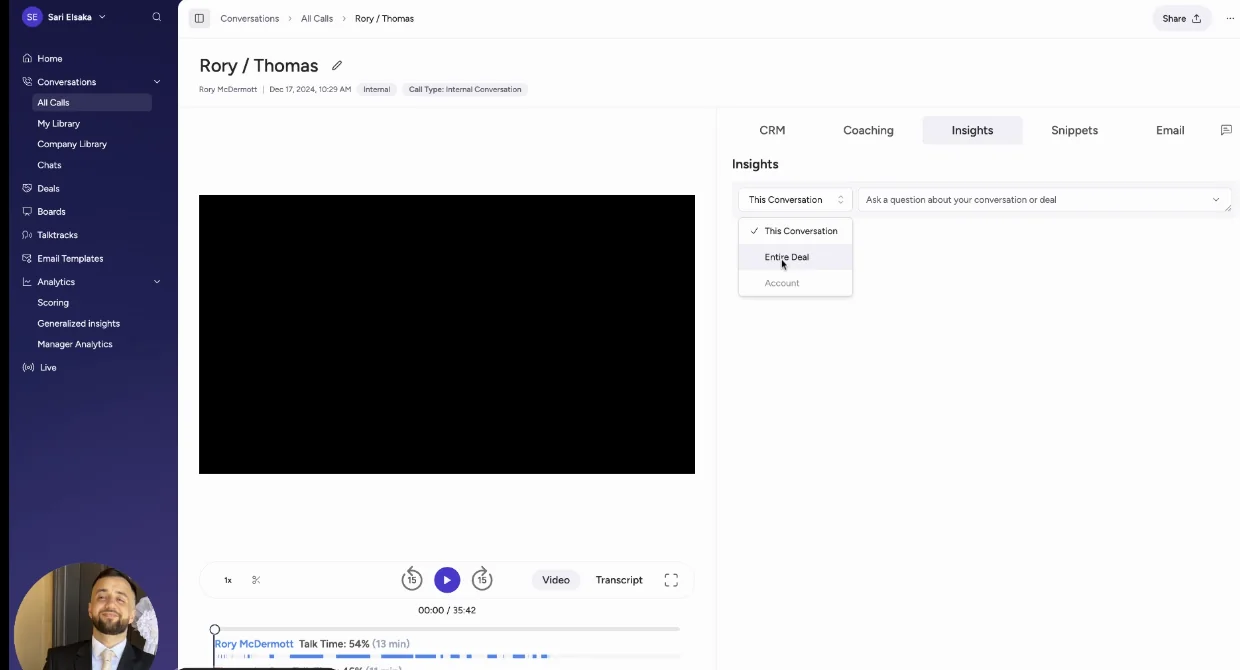
| Access from AI assistants (MCP) | A read-write MCP server with 68 tools that returns raw transcripts, runs analysis across up to 25 calls, and reaches Attention's Super Agent. Rate-limited, with no consumption charge. |
| Raw data access | Raw transcripts through MCP, API keys for programmatic use, and workflows that push to Snowflake or any API. |
| Pricing | Not published. |
Where Attention stops and which teams it fits
- No published pricing.
- Emails stay in Attention's store unless you build a workflow to log them.
- Calendars connect per rep, so recording coverage depends on every rep finishing setup.
- The forecast grid is partial.
- On automatic sync, prose about missing information lands in free-text fields and reads as populated data in reports.
Best for: teams whose real goal is automating the work that comes out of sales calls with agents, and who want read-write MCP access with no metering.
Jiminny: coaching-first calls with a built-in dialer, no forecasting
Jiminny is built for coaching. It has live in-call coaching, its own dialer with SMS, and support for Salesforce, HubSpot, Dynamics and several other CRMs. It has no forecasting, and emails never reach Salesforce.
How Jiminny performs on all ten compared capabilities
| Capability | What Jiminny does |
|---|---|
| Recording video meetings | A notetaker bot records Zoom, Meet and Teams from the calendar. A desktop app, a mobile app and uploads cover other cases. |
| Automatic email capture | Reads each user's mailbox every 15 minutes once that user switches on sync, keeping emails that match CRM records. Those emails stay inside Jiminny and are never logged to Salesforce. |
| CRM field updates from calls | AI CRM Filling writes into Salesforce or HubSpot fields on deals, accounts, contacts, leads and tasks, triggered by a call, email or stage change, automatically or after review. |
| Deal risk warnings | Deal Insights flags risk with eight triggers, like no recent activity or a single-threaded deal. Each team sets its own thresholds. |
| Forecast submissions and roll-ups | Not offered. Deal Insights is a table of CRM deals used for pipeline reviews. |
| CI setup and rollout | Every rep signs in with their own Microsoft or Google account, and connects their own Salesforce login unless admins pre-authorise them. |
| Integrations | About 20 third-party dialers plus its own, Google and Microsoft 365, several CRMs, and Zapier. |
| Access from AI assistants (MCP) | A read-only connector for Claude and ChatGPT on the Scale and Grow tiers, scoped to what each user can see. |
| Raw data access | A REST API opened with an org-level key only admins can generate, suggested for feeding a warehouse or BI tool. |
| Pricing | No published prices. A flat per-seat fee with no platform fee or credits. |
Where Jiminny stops and which teams it fits
- No forecasting.
- Emails are never logged to Salesforce.
- Every rep signs in to connect mail and calendar.
- No published prices.
Best for: coaching-first teams on HubSpot or several CRMs that want live coaching, a built-in dialer and a flat seat fee.
What each tool costs, including what sits beyond the seat
Two vendors publish prices: Weflow and Avoma. The other four quote privately, and they differ most on what sits on top of the seat.
| Tool | Published list price | Pricing model | What costs extra |
|---|---|---|---|
| Weflow | $19 to $39 per module, bundles at $49, $59 and $79 per user per month, billed annually | Per seat, 10-user minimum, 12-month term | Only Agent Builder beyond the free 25 actions a month. No platform or implementation fee. |
| Gong | None | Per-user licence plus a platform fee that scales with users | Applications on top of Foundation, AI credits, professional services packages, Data Cloud |
| Clari (Salesloft) | None | Quote only, no trial | Estimated $15,000 to $50,000 in professional services (estimate) |
| Avoma | $19, $29 or $39 per recorder seat, billed annually | Per recorder seat, 10-seat minimum, free viewers | $29 add-ons each for Revenue Intelligence and Conversation Intelligence; optional $1,000 onboarding |
| Attention | None | Negotiated contract | No published credits or metered AI |
| Jiminny | None | Flat per-seat fee per tier | Dialer minutes above the allowance |
Compare Weflow and Avoma list prices seat by seat
Weflow's three bundles each add a layer:
- Weflow Revenue AI Foundation ($49): Activity & Contact Capture and Conversation Intelligence, with Mobile Copilot, Ask Weflow AI and Agent Builder.
- Weflow Revenue AI Business ($59): Foundation plus Deal Intelligence: deal boards, AI deal and account scoring, warnings and buying committee intelligence.
- Weflow Revenue AI Enterprise ($79): Business plus pipeline analytics and forecasting.
Here's what the same capabilities cost at list, per seat per month:
| What you need | Weflow | Avoma |
|---|---|---|
| Recording, email capture and AI field updates | $49 (Revenue AI Foundation) | $48 (Startup plus Revenue Intelligence), $58 on Organization |
| The above plus coaching scorecards and trackers | $49 (Revenue AI Foundation) | $77 (Startup plus both add-ons), $87 on Organization |
| The above plus deal risk warnings | $59 (Revenue AI Business) | $77, $87 on Organization |
| The above plus roll-up forecasting | $79 (Revenue AI Enterprise) | $77, $87 on Organization |
Avoma is cheaper at list if you only need recording, email and field updates on fewer than 25 seats. Once you add coaching, the two converge. Our case against Avoma at that point is depth: custom objects, a review step per field, and separate forecasts for new logo, renewal and expansion.
Two more things change the Weflow total:
- Different teams can sit on different bundles. At roughly 62 seats, capture plus conversation intelligence lands around $36,000 a year and the full platform around $58,000. Putting most reps on a lower bundle and only managers on the full platform brings the same 62 seats to roughly $45,000.
- Discounts stack. Bundle, volume and multi-year discounts apply, with the volume breakpoint starting around 30 to 40 seats.
What Gong, Clari, Attention and Jiminny charge beyond the seat
Without list prices, compare structure:
- Gong: Foundation is mandatory, and forecasting, coaching, engagement and Data Cloud are applications on top. Seats count per application, so one person on Foundation and Forecast Essentials is two seats. Each paid core seat adds 2,000 AI credits a year to a shared pool, and MCP and API requests draw from it. Implementation comes as professional services packages, and Data Cloud runs about $5,000 a year.
- Clari (Salesloft): quote only, with no trial. Forecasting, AI agents and the dialer are add-ons to the Advanced and Elite packages, and MCP access needs the Agentic add-on.
- Attention: no published pricing and no documented credits. The MCP server runs on rate limits instead of consumption charges.
- Jiminny: one flat fee per seat per tier, with no platform fee, add-on modules, onboarding fee or credits. Each user gets 1,350 dialer minutes per 30 days, then 2 cents a minute.
What happens to your call history when you switch
History is the real cost of switching. Years of calls live inside the tool you're leaving, and that's why teams renew tools they don't like.
Weflow imports Gong, Chorus and Jiminny recordings with an API key and re-links each one to its Salesforce record. If the provider's API doesn't carry the Salesforce association, we run our own lookup to match it. Gong history migrates at no charge and typically takes about a week.
| What you're moving | Where it can go | What it takes |
|---|---|---|
| Gong recordings, transcripts and metadata | Weflow | An API key; no charge, about a week; re-linked to Salesforce accounts |
| Chorus recordings | Weflow | An API key; re-linked to Salesforce records |
| Jiminny recordings | Weflow | An API key; re-linked to Salesforce records |
| Clari forecast calls | Weflow | Clari's API or a CSV; forecast configurations are rebuilt |
| Recordings from another tool | Attention | Its Import Conversation API endpoint, from a file URL |
| Past recordings as files | Avoma | Uploads one at a time; bulk imports may carry a one-time fee |
Which tool to shortlist for your team's situation
Match the tool to the first problem you need solved and the stack you already run. Plenty of these answers aren't Weflow.
Shortlist by the problem you need solved first
| If your first priority is | Trial these |
|---|---|
| Capture, conversation intelligence and forecasting in one product on Salesforce | Weflow |
| The deepest conversation analytics and coaching | Gong |
| Mature forecast roll-ups your leadership already knows | Clari (Salesloft) |
| AI agents acting on calls, with read-write MCP | Attention |
| Coaching, live in-call help and a built-in dialer | Jiminny |
| The lowest published price | Avoma |
Shortlist by the CRM and stack you already run
| Your situation | What it means |
|---|---|
| You run HubSpot | Look at Avoma, Jiminny or Attention. Weflow works only with Salesforce. |
| You keep a sequencer like Outreach | Weflow runs alongside it. Compatibility mode reads the sequencer's tracking pattern and skips those emails, so only one tool logs them. |
| Your PE sponsor standardized a forecasting tool | Land capture and conversation intelligence next to it with Weflow Revenue AI Foundation. Better Salesforce data makes the incumbent forecast better too. |
See how Weflow captures activity, updates Salesforce fields from calls, and rolls up your forecast. Book a 30-minute demo.
What changed in revenue intelligence during 2026
If you last compared these tools a year ago, these changes affect your shortlist:
- Clari became Salesloft. The merger closed in December 2025, and the Clari brand retired on 1 September 2026. Renewing any Clari product is now a Salesloft relationship.
- Clari Copilot replaced Salesloft Conversations as the conversation layer inside Salesloft, starting with new customers in mid-2026.
- Gong moved AI onto credits. Customers received allocations in late May 2026, and AI cost now moves with usage on top of the seat.
- Attention widened its agent surface. Since April 2026 its Super Agent reads Salesforce and HubSpot accounts, and its MCP server has grown to 68 read-write tools.
- Salesloft's MCP server dropped transcript retrieval. Assistants now get generated summaries instead of what was said.
- Avoma and Jiminny shipped MCP connectors for Claude and ChatGPT.
- Weflow added a desktop app that records meetings and softphone calls without a bot joining, included with a Conversation Intelligence seat.
How we built this comparison as a Weflow team
We rated all six tools on the same ten capabilities, in the same order. Each verdict comes from vendor documentation, pricing pages, help centers, release notes and our own evaluation calls.
Where a figure is our estimate rather than a published number, we've marked it as an estimate. Clari's pricing and services figures are the clearest example.
We're Weflow, and we built this with a point of view. That's why every Weflow section lists our limits next to our strengths. The honest next step is to trial your shortlist against your own Salesforce data.
FAQ: choosing revenue intelligence for a small team
What does Weflow cost at our seat count, and can teams use different bundles?
Weflow costs $19 to $39 per module or $49 to $79 per bundle, per user per month, billed annually with a 10-user minimum. Different teams can sit on different products or bundles. At roughly 62 seats, capture plus conversation intelligence lands around $36,000 a year, the full platform around $58,000, and a mixed setup around $45,000.
Do Gong, Clari, Attention and Jiminny publish their prices?
No. All four quote privately. Gong adds a platform fee and AI credits, Clari (Salesloft) is quote-only with no trial, Attention publishes nothing, and Jiminny sells a flat per-seat fee with no platform fee or credits.
Is implementation included, and who runs it?
At Weflow, yes: we run onboarding ourselves at no charge, and a managed-service option exists. Gong sells professional services packages and routes smaller customers to partners. Avoma charges $1,000 for optional expert onboarding. We estimate Clari's services at $15,000 to $50,000.
What do reps have to set up themselves in each tool?
In Weflow, reps don't connect mailboxes or install anything. Each licensed user signs in once before the notetaker joins their meetings. The other tools differ:
- Clari Copilot: each rep signs up, connects a calendar, records a voice fingerprint and installs the desktop app.
- Attention: each rep links their own calendar and email.
- Jiminny: every rep signs in to mail, calendar and usually Salesforce.
- Avoma: admins can connect Google Workspace or Microsoft 365 for the whole org.
- Gong: a tech admin can connect Google Workspace company-wide.
Can we keep our Gong or Chorus call history and Salesforce links?
Yes. Weflow imports Gong and Chorus recordings with an API key and re-links them to Salesforce records, running its own lookup where the provider's API doesn't carry the link. Gong history migrates at no charge.
Can our own Claude or ChatGPT query the data, and is it metered?
Weflow's MCP connector is read-only, included in the seat, and not metered. It reaches playbooks, summaries, transcripts and forecast calls. The others:
- Gong: meters every MCP request against credits.
- Attention: read-write with no consumption charge.
- Salesloft: needs a paid add-on.
- Avoma: needs a higher plan or the API Access add-on.
- Jiminny: on its Scale and Grow tiers.
We run HubSpot. Which of these tools still fit?
Avoma, Jiminny, Attention and Gong all support HubSpot. Weflow doesn't: it works only with Salesforce.
Does Weflow work alongside Outreach or Salesloft without duplicate logging?
Yes. Compatibility mode reads the sequencer's tracking pattern in the email body and skips those messages, so only one system writes them to Salesforce. Outreach dialer calls come into Weflow as recordings.
One gap: email sent from a separate deliverability subdomain isn't captured. Capture picks up the thread once the buyer replies to the rep's primary address.
How accurate are AI field updates from calls?
We don't publish a field accuracy figure. Accuracy depends on how well each prompt is written, which is why we ship more than 250 pre-built prompts and work through them during onboarding.
You also choose per field what writes automatically. An unambiguous field like a website can auto-write while an interpretive one like the champion waits for review. Many buyers set their bar against an empty field, not a perfect one:
"If it is only 90% accurate, then I will take it, I will work with it."
Which tools offer a trial with our own data?
These trial terms are published:
- Weflow: a 14-day free trial with guided onboarding.
- Avoma: a 14-day trial of the Organization plan with all add-ons.
- Jiminny: a 14-day trial with no card.
- Attention: markets a self-serve start where you connect your stack and test before upgrading.
- Clari (Salesloft): offers no free trial.
What are Weflow's contract terms for seats and term length?
Weflow contracts run 12 months, with no shorter term. Seats added mid-term are charged pro rata to the end of the term. You can't reduce seat count mid-term, but you can reassign a seat when someone leaves.
Where does Weflow store our data, and does it train AI on it?
Weflow stores your data in the region where your Salesforce instance sits, so a European org keeps its data in Europe. Video recordings are the exception: Weflow holds them and streams them back.
Customer data is never used to train AI models, and AI processing runs under Zero Data Retention. Weflow is SOC 2 Type II certified and GDPR compliant, and we're working toward ISO 27001 with a target date of December 2026.











