Best RevOps AI Tools for Revenue Teams in 2026: A Category Map
Learn which RevOps AI tools fit each job in 2026, including Revenue AI options for Salesforce.



If you've been handed an AI transformation mandate and a consolidation mandate in the same quarter, another ranked list isn't going to help you. What you need is the category mapped by job, so you can slot the tools you already pay for into it and see where two of them are doing the same work.
This is what the stack usually sounds like when we get on a call:
So this article organizes the landscape into four jobs, in the order an AI rollout actually has to sequence them: activity capture, conversation intelligence, deal and pipeline intelligence with forecasting, then agents and orchestration. Twelve tools, the honest leader named in each bucket, and a plain statement of where each one is the wrong choice.
Full disclosure before you read on: we build Weflow, the Revenue AI Orchestration platform for sales, customer success, and RevOps teams, built for Salesforce teams. It's entry one because it spans three of the four buckets, not because it wins every row. Its limits sit in their own section, stated as plainly as anyone else's.
The four jobs a RevOps AI tool actually does
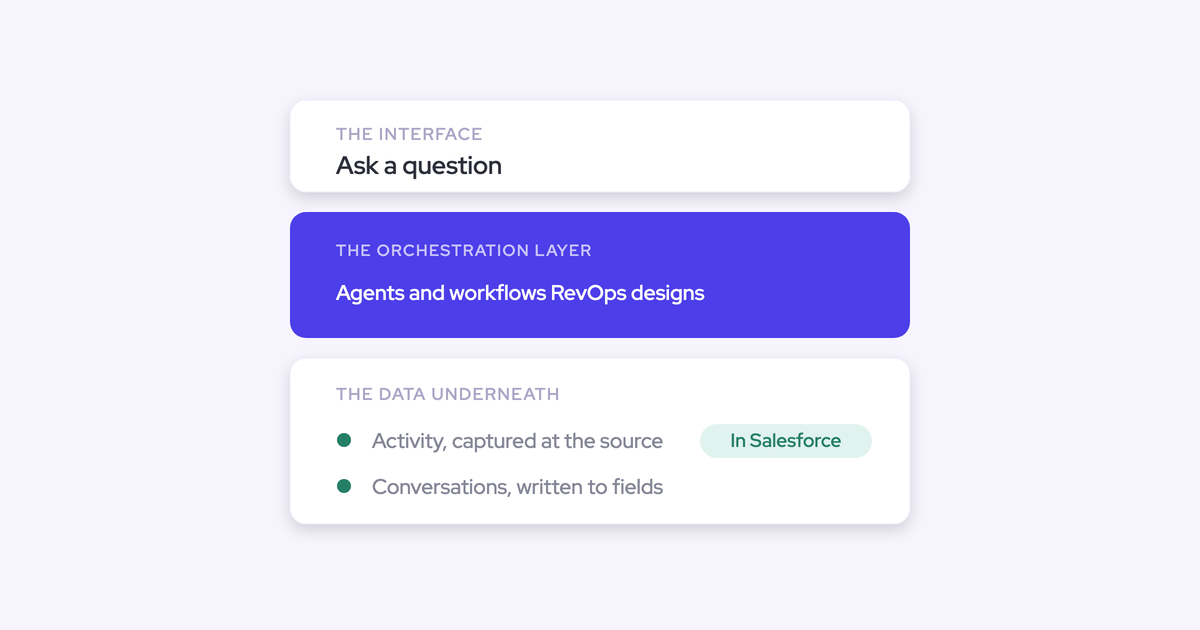
Every tool in this category does one of four jobs, and the four sit in a fixed order because each layer's output is the next layer's input.
Capture decides what data exists. Conversation intelligence decides whether the qualification picture is real or remembered. Deal intelligence computes signals from both. Forecasting and agents sit on top of all of it.
Reverse that order and you get what most teams have: an agent pilot reading fields nobody filled in.
"If you could just hook Claude into Salesforce and it gives you the truth. I mean, in theory, if it's a system of truth, it should be able to do it. But the reality is it just doesn't work. And so I think you have to be really good at the data foundation, your custom data structure, like the quality of the data, and then also the consolidation unification. That is basically the infrastructure."
— Philipp Stelzer, Co-founder and CPO, Weflow
| Job | What it does | What breaks downstream without it | Representative tools |
| Activity and contact capture | Gets emails, meetings, and the people on them into CRM records automatically | Every engagement score, activity report, and deal signal is computed on a fraction of what happened. Reps log between a quarter and a half of activity by hand, so most of the work is invisible | Weflow Activity & Contact Capture, Salesforce Einstein Activity Capture, Revenue Grid |
| Conversation intelligence | Records and transcribes calls, then turns what was said into structured CRM fields | MEDDIC, next steps, and the procurement contact get typed the night before the forecast call, from memory. The champion left two months ago and the CRM doesn't know | Gong, Weflow Conversation Intelligence, Attention, Fireflies, Granola, Revenue.io |
| Deal and pipeline intelligence, forecasting | Days in stage, close-date pushes, waterfall, pacing, roll-up, prediction, accuracy tracking | No benchmark, so every deal gets defended and none get killed. No pipeline history, so nobody can answer what changed since last month | Clari, Weflow Deal Intelligence & Forecasting, Salesforce native forecasting |
| AI agents and orchestration | Agents that read the revenue data and push an action to the person who owns it | Pilots that never add up to anything. The signal gets recorded and waits for a human to notice it | Salesforce Agentforce, Weflow Agent Builder and Ask Weflow AI, Clay (adjacent, on the outbound side) |
Best RevOps AI tools at a glance
Where the data lives is the column most feature grids leave out, and it's the one that decides what you can do with the tool in three years.
| Tool | Job it does | Where the data lives | Pricing | Best for |
| Weflow | Capture, conversation intelligence, deal intelligence and forecasting, agents | Native Salesforce objects you own (EmailMessage, Event, Task, any standard or custom field except lookup relationships). Video exported through the API to your own cloud storage | Published: $19 / $39 / $39 per user per month, bundles $49 to $79. Minimum 10 seats, AI usage bundled | Salesforce teams paying three vendors for one data spine |
| Salesforce Einstein Activity Capture | Activity capture | Shown in the Salesforce timeline, not stored as records in the core database, so you can't report on it or export it to Looker or Power BI | Free up to 100 users, around $50 per user per month above that | Small Salesforce teams that need timeline visibility and no reporting |
| Revenue Grid | Activity and email sync | Writes activity into Salesforce | Quote-based, no published figure we'll cite | Teams replacing a native add-in and scoring capture only |
| Gong | Conversation intelligence, deal analytics | Gong's own data layer. It does log activity to Salesforce, but the intelligence and the working surface stay in Gong | Not published. Buyers report several calls before a number, at roughly twice Weflow's level | Teams that need the deepest conversation analytics and will work in a second interface |
| Attention | Conversation intelligence | Salesforce, via basic field updates | Pricing not shared | Teams buying conversation intelligence alone, as part of a wider suite purchase |
| Fireflies | AI notetaker | Fireflies' cloud. Transcripts reach Salesforce only if you configure that sync | Published self-serve tiers, low per-seat cost | Teams that want cheap recording coverage now and will fix write-back later |
| Granola | AI notetaker | The app. Nothing reaches the CRM by default | Self-serve pricing available | Individuals. It's personal tooling, not a RevOps data layer |
| Revenue.io | Dialer, real-time in-call coaching | Salesforce-native, call activity in Salesforce | Not published | Phone-heavy inside sales motions |
| Clari | Forecasting, deal intelligence | Clari's cloud, reading from and overlaying Salesforce | Not published | Enterprise orgs running roll-ups across 1,000+ reps |
| Salesforce native forecasting | Forecasting | Salesforce, with no pipeline history retained | Included with Sales Cloud | Teams whose forecast is one number per rep per quarter |
| Salesforce Agentforce | AI agents | Salesforce | Consumption-based, priced per action | Salesforce shops with clean data and budget for metered usage |
| Clay | Signal orchestration and enrichment (outbound) | Clay's cloud, pushing enriched records into the CRM | Self-serve pricing available | Outbound. Keep it, it isn't competing with the capture-to-forecast spine |
How to evaluate RevOps AI tools before shortlisting
Write the requirements down before you take the first call. Everyone in this category demos well, and the failures show up in month four.
Five criteria decide the purchase, and each one has a way to test it inside a two-week pilot.
| Criterion | Why it matters | How to assess it |
| Data ownership | If the activity, transcripts, and extracted fields live in a vendor cloud, you can't report on them in your own BI, feed them to your own models, or leave without losing them | Ask which Salesforce object each activity and each AI field lands on. Then build a Salesforce report on it yourself during the trial, and ask what you keep the day you cancel |
| Rep adoption and disruption | You've already paid for a tool that demoed well and died at six months. Adoption is a scored criterion now, not a hope | Pilot with one team of five to ten. Count logins in week three, not week one. Ask whether a rep can see and correct the record an activity mapped to |
| Time-to-value for a small team | A tool that needs a project team you don't have is not a candidate, whatever it does | Ask who does implementation and what's live on day one. Capture and conversation intelligence prove out in two weeks. Forecasting needs closer to three months, because it only proves itself across enough cycles to compare called against actual |
| Pricing transparency | Published seat pricing is a proxy for how the vendor will behave at renewal. Consumption pricing moves the budget risk onto you | Count the calls before you get a number. Then ask what the bill does if usage doubles next quarter |
| Real AI capability, or a relabeled feature | Transcription and summaries are commoditized. The differentiator is whether the conversation becomes structured data in the system of record | Feed it a real recorded call and check the field-level output against what was actually said. Ask to see the admin screen where fields get mapped, and who can override what it writes |
Weflow: capture, conversation intelligence, and forecasting in one platform
Weflow automates Salesforce data capture and uses AI to generate deal, pipeline, forecast, and coaching intelligence, sold as three modular products rather than one bundle you have to swallow whole.
It leads this list for a structural reason, not a promotional one: it's the only entry here that spans capture, conversation intelligence, and forecasting, which is the exact overlap a consolidation mandate is pointed at.
Quick specs:
- Products: Weflow Activity & Contact Capture $19, Weflow Conversation Intelligence $39, Weflow Deal Intelligence & Forecasting $39 per user per month, billed annually.
- Bundles: Revenue AI Foundation $49, Revenue AI Business $59, Revenue AI Enterprise $79 per user per month.
- Usage: AI is bundled into the seat. Unlimited recordings, transcripts, and Ask Weflow AI prompts, no token metering. Agent Builder is priced per workspace, with a free tier of 25 agent actions a month included in every plan.
- Gate: Salesforce only. Minimum 10 seats, free view-only licenses (up to one per recording license).
- Rollout: 30 to 45 minutes of technical setup with a Salesforce admin and your Google or Microsoft admin, then two to three weeks to full value. Evaluations run as a 14-day trial with implementation included.
What Weflow does well
- Data ownership. Everything Weflow captures and generates lands in native Salesforce objects, so your own reports, automations, and warehouse can read it. Sign-in is through Salesforce OAuth only, so there's no second identity for IT to deprovision.
- Capture mapping you can correct. Capture is automatic, and a browser and Outlook extension lets a rep see and change which Salesforce record an activity mapped to. That matters the moment an account carries two open opportunities, which is where fully automated capture engines quietly guess wrong. Weflow also creates missing contacts and sets opportunity contact roles, and respects your existing validation rules, field dependencies, and permissions.
- Conversation to CRM field. Weflow writes AI field updates into any Salesforce field from what was said on the call, with a side-by-side view of the suggested value against the current one, in review or automatic mode. Over 250 pre-built prompts cover MEDDIC, MEDDPICC, SPICED, BANT, Challenger, and SPIN. Blacklane runs 96% of MEDDIC fields populated in Salesforce.
- Deal signals without CRM tech debt. Days in stage and total close-date push count are tracked automatically, so you don't build and maintain custom fields to get them. Warnings are rules you author against your own slippage patterns, and they surface inside the forecast submission screen, at the moment a rep decides what to commit. IDnow cut slipped deals by 60% with them.
- Forecasting that rolls up. Deal-by-deal submissions per rep, automated roll-up across the Salesforce role hierarchy, an AI prediction to compare against the team's call, and forecast accuracy tracked by rep and manager. Zeotap forecasts within ±7%.
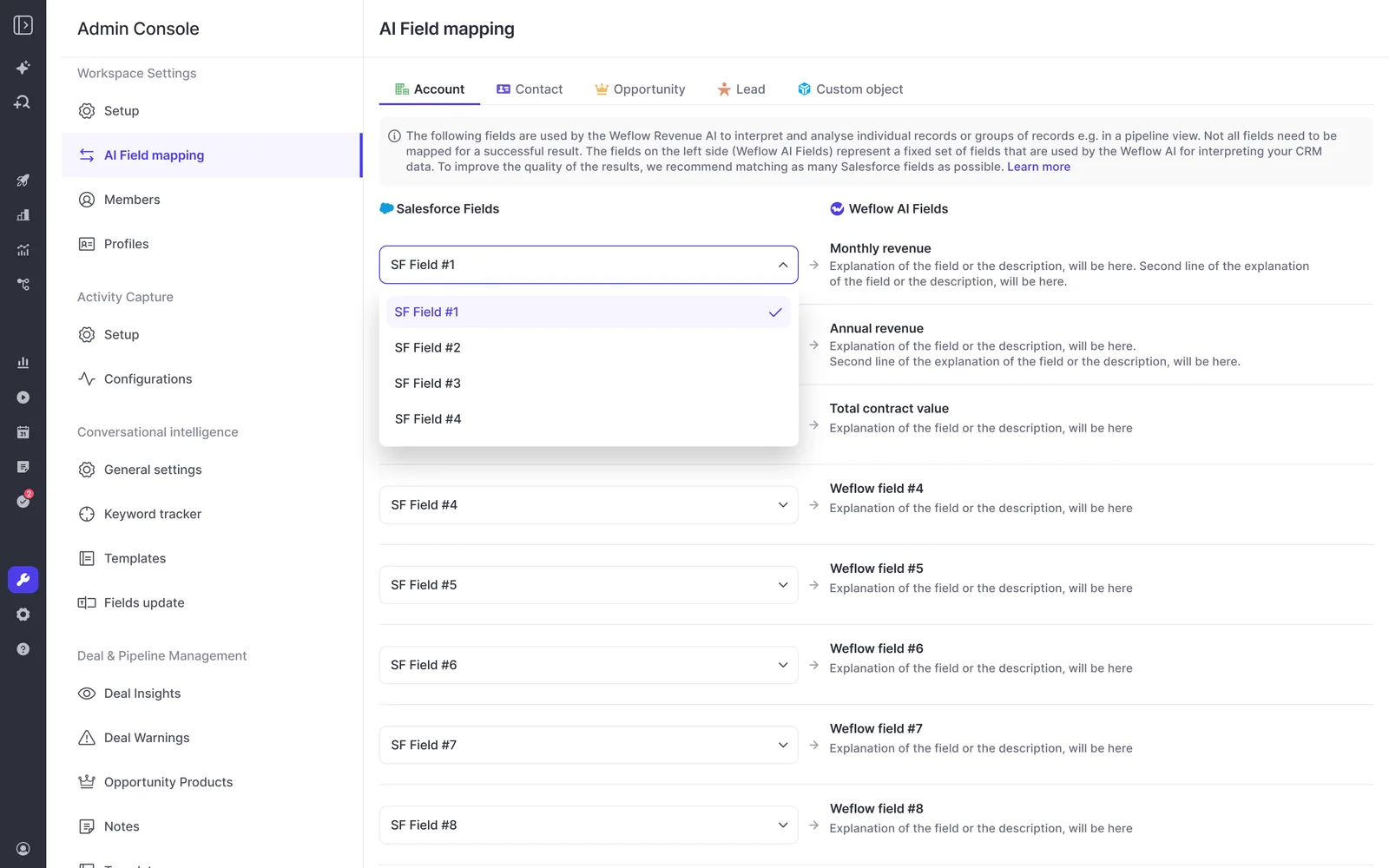
The screen RevOps ends up caring about most is the mapping console: an admin pairs each Salesforce field with the AI field allowed to write it, so nothing lands in your org you didn't approve.
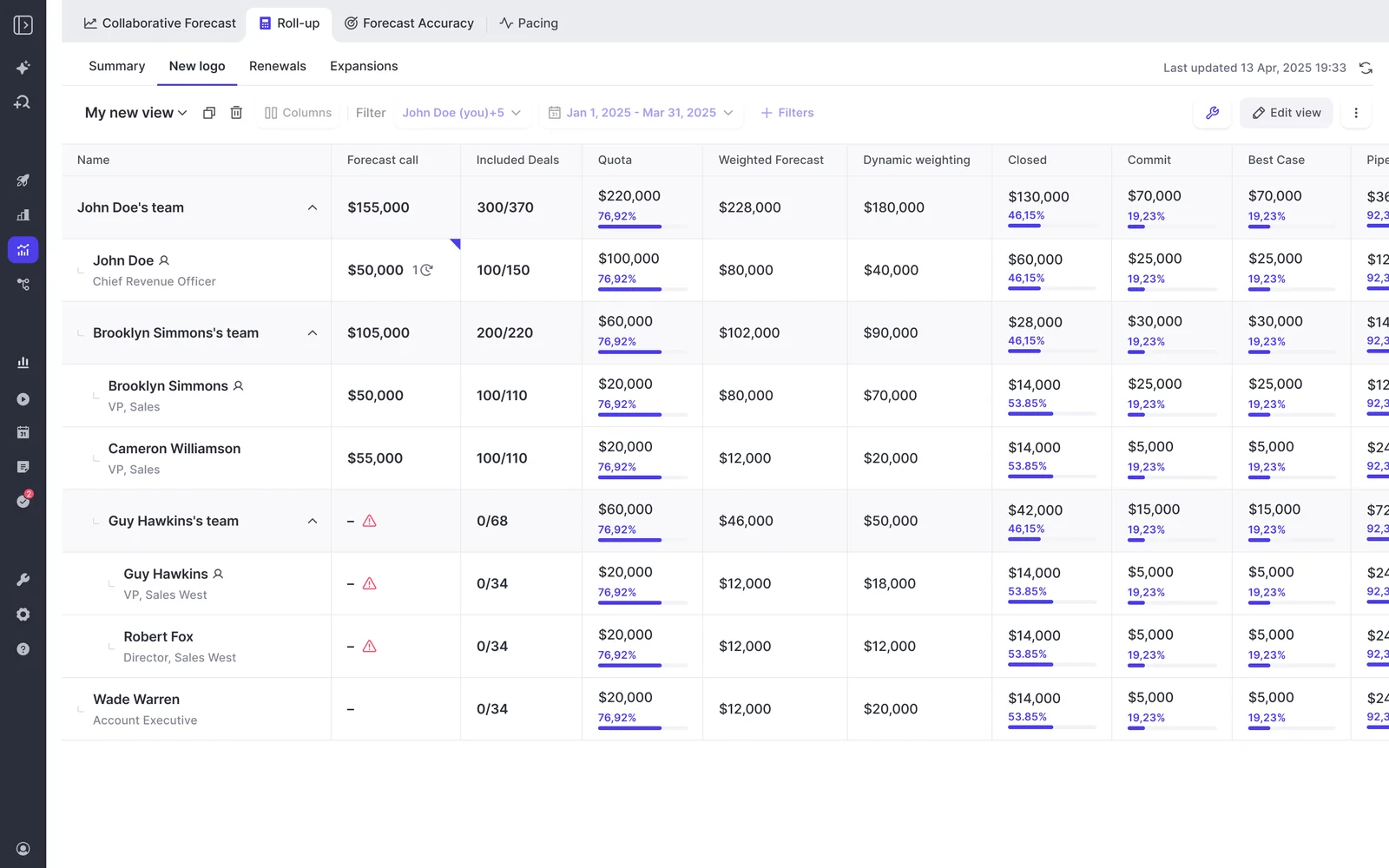
On the forecasting side, the roll-up shows submission state per rep and per team, so you can see who hasn't called their number rather than chasing it in Slack.
One customer proof point worth more than the feature list: United Fintech saw a 3x increase in captured activities after switching, and checked it by hand because they assumed the data was wrong.
"We thought it was just wrong data - but we looked manually and realized this is the amount of insight we were missing before."
— Rugile Pudzevelyte, Senior Revenue Operations Manager, United Fintech
Where Weflow falls short
- Salesforce only. Weflow is built entirely on the Salesforce API. If you run HubSpot, Dynamics, or Pipedrive, we're not a candidate at all, and a group where half the operating companies run another CRM can only deploy on the Salesforce side.
- Not FedRAMP certified. SOC 2 Type II, HIPAA, GDPR, and CCPA are in place, ISO 27001 is in progress. US government contractors that mandate FedRAMP should stop here.
- No VoIP or phone capture. No SMS either. If your motion is a rep on a dialer all day, the conversation layer covers your video meetings and misses the calls.
- Coaching is post-call. Every recorded meeting gets scored against your methodology and a manager can override the score, but there are no real-time in-call prompts.
- Gong's conversation analytics run deeper. Gong invented this category and its account-level methodology views are the real thing. Weflow answers that with AI playbooks that score a deal across every interaction and Ask Weflow AI scoped to an account, but on raw analytics depth Gong is ahead.
- Clari's enterprise roll-ups are more mature. Above roughly 1,000 reps, Clari's roll-up mechanics have been proven in more orgs than ours. At that scale, that's a fair reason to stay.
- The roll-up doesn't weight by stage probability. It sums the amount field you choose, so if you think in probability terms you either forecast on a weighted field or use the separate weighted pipeline view and the AI projection for likelihood.
Best activity capture tools for Salesforce teams
This is the layer you fix first, and the three questions that decide it are always the same: what gets created, how an activity finds the right opportunity, and whether the resulting records are yours to report on.
One warning before you bake off: don't point two capture engines at the same inbox at once. They'll compete over the same emails and produce duplicates, and you'll blame the new tool.
Salesforce Einstein Activity Capture
Einstein Activity Capture is the capture tool that arrives with Salesforce, and for a small team that only needs activity visible on the timeline, it's a reasonable free start.
What it does well:
- Free up to 100 users, with no procurement cycle and no new vendor.
- Background logging with no rep behavior change at all, and activity visible on the record timeline.
Where it falls short:
- Activity isn't stored as records in the core Salesforce database. You get one canned report you can't customize, you can't build your own, and you can't push the data to Looker, Tableau, or Power BI. Teams read that, correctly, as not owning their own activity data.
- It maps activity to an opportunity through opportunity contact roles, one of the least maintained objects in any CRM, and it only maps reliably when an account has exactly one open opportunity. Run new business, upsell, and renewal as separate opportunities under one account and activity falls back to the account.
- No contact creation, no attachment logging, and no admin choice of whether an activity lands on the email message or the task object.
- It runs with no user interface, and the Outlook and Gmail add-in is a separate service that isn't connected to it. So a wrong mapping stays wrong and no correction ever feeds back.
- Weak on mobile, which is where field reps actually work, and the free tier steps to around $50 per user per month past 100 users. Both of those arrive exactly when you scale.
"Our experience with Salesforce Einstein Activity capture is not very good. We haven't really got the value out of what they've provided. We've been constantly resetting it."
Best for: teams under 100 users who need timeline visibility and will never report on activity.
Revenue Grid
Revenue Grid is a dedicated activity and email sync tool for Salesforce, and it's the alternative we most often get evaluated against head to head on capture alone.
What it does well:
- Writes activity into Salesforce rather than a vendor timeline, which puts it ahead of Einstein Activity Capture on the ownership criterion.
- Focused on one job, which makes it straightforward to score against a written requirements list.
Where it falls short:
- It's a capture tool. Conversation intelligence, deal signals, and forecasting are separate purchases, so it doesn't answer a consolidation mandate.
- Pricing isn't published, so budget conversations start with a call.
Best for: teams whose only gap is email and activity sync, and who are keeping their intelligence layer as it is.
Best conversation intelligence and AI notetaker tools
Transcription stopped being a differentiator. Any team can get a recording and a decent summary for very little money.
What separates this bucket now is what happens to the conversation after the call: whether it becomes structured field writes in Salesforce, or a transcript in a second portal nobody joins to the deal record.
Gong
Gong created this category and still has the deepest conversation analytics in it. Credit where it's due: if analytics depth is your top criterion, Gong is the right answer.
What it does well:
- Account-level methodology summaries across every call on an account, not just call by call. That's what a manager reviewing a long cycle actually needs, and teams that had it feel the loss if they move to something that only summarizes single calls.
- Deal boards and analytics that sales leaders genuinely like using, plus activity logging to Salesforce, so capture on its own isn't the reason teams leave.
Where it falls short:
- The intelligence lives in Gong's own data layer, and the working surface is Gong's interface rather than Salesforce.
- Field mapping into Salesforce is where buyers tell us it gets painful, and what lands is often raw text rather than structured field values.
- Pricing isn't published, and the price level is a legacy of a period when transcription was genuinely expensive. The same capability costs materially less to build today, which is why Weflow can sit at roughly half of it without thinning the product.
- At Gong's scale, a mid-market customer's feature request effectively never gets actioned.
"We had our third call with Gong because they refused to tell us pricing until now."
Best for: teams that want the deepest call analytics available and accept a second system of record to get them.
Attention
Attention's conversation intelligence is genuinely strong, and it shouldn't be dismissed as a notetaker with a nicer badge.
What it does well:
- Advanced conversation intelligence as its core, built for that job rather than bolted on.
Where it falls short:
- AI field updates are basic and coaching depth is limited, so the layer above the transcript is thinner than the marketing suggests.
- Capture is call-centric. It doesn't capture emails and contacts from Outlook or Google Workspace, calendar-event-to-opportunity mapping is unreliable, and there's no extension for a rep to fix a mapping.
- No roll-up or collaborative forecasting, no forecast accuracy measurement, and limited pipeline analytics. And conversation intelligence isn't sold standalone.
Best for: teams buying conversation intelligence as a specialist capability, with capture and forecasting solved elsewhere.
Fireflies
Fireflies does what it says at a price that's hard to argue with, which is why it ends up in stacks without anyone deciding to buy it.
What it does well:
- Cheap, broad recording coverage with published self-serve pricing, so a team can get every meeting recorded this week.
Where it falls short:
- The recordings and transcripts pile up in Fireflies. We regularly meet teams with a year or more of call history sitting outside the CRM, which means none of it is available to the deal record, the forecast, or your reporting.
- It doesn't write structured fields into Salesforce, so the qualification picture still depends on a rep typing it in.
The honest note: that history isn't wasted. If the transcripts are synced into Salesforce in a structured form, Weflow reads them through the API without having recorded the call, so you can keep the archive and still buy the capture and deal layers.
Best for: teams that need recording coverage now and will solve write-back as a second step.
Granola
Granola wins on friction, and that's exactly why reps reach for it: no bot to admit into the meeting, no link to find, no login.
What it does well:
- The lowest-friction way for an individual to walk out of a meeting with usable notes. It's genuinely good at that.
Where it falls short:
- Nothing reaches the CRM by default, so every meeting captured this way is a conversation the deal record and the coaching data never see.
- Reps default to it whenever a CRM-connected recorder fails to join a call, which is how capture coverage degrades silently. If you see Granola spreading across your team, treat it as a signal that your recorder is failing to join meetings.
Best for: individuals. It's personal tooling, not a RevOps data layer.
Revenue.io
Revenue.io is the Salesforce-native dialer in this list, with real-time in-call coaching, and it covers the motion the capture-first platforms cover least.
What it does well:
- Live in-call coaching prompts, which neither Gong nor Weflow does. Both of us coach after the call.
- Reps stay inside Salesforce, plus local presence dialing and HIPAA and TCPA support for regulated phone motions.
Where it falls short:
- Its center of gravity is telephony and inside sales, so it's not the tool for a video-meeting-heavy enterprise motion.
- Pricing isn't published.
Best for: phone-heavy inside sales teams who want the dialer and the coaching in one place, inside Salesforce.
Best deal intelligence and forecasting tools
This is the layer where you're most likely already paying for something your team barely opens.
In practice, forecasting tools are judged on a handful of views: the pipeline waterfall, the pacing view, and where the quarter stands against the same day in previous quarters. Everything else in the interface tends to go unused, and adoption, not features, is where these tools die.
Clari
Clari has the most mature enterprise roll-up engine in this category. Above 1,000 reps, that maturity is a real reason to stay.
What it does well:
- Roll-ups across deep hierarchies, and the three views teams genuinely use: waterfall, pacing, and the quarter-over-quarter comparison. That last one is the hardest thing on this list to replace, because it requires snapshotting pipeline state over time.
Where it falls short:
- Deployments go stale. A half-implemented instance with no internal owner ends up lightly used, and we regularly meet RevOps teams rebuilding the forecast dashboard straight off Salesforce data because they don't trust Clari's version.
- Clari's forecast views often aren't usable as executive reporting, so the deck for the CFO gets rebuilt in a BI tool anyway.
- It sits as an overlay on Salesforce. If a calculation isn't in Salesforce, Clari can't do much with it, which means the work lands back with you.
- Clari Capture maps activity server-side by email domain, so emails get missed when a contact isn't on the right account, and activity gets misattributed on accounts with several open opportunities. The engagement timeline looks right and the mapping underneath it often isn't.
- Clari Copilot, which came in by acquisition, doesn't write AI field updates into Salesforce fields and doesn't do methodology coaching scorecards.
- Renewals are usually the motion nobody ever implemented.
Best for: enterprise orgs above roughly 1,000 reps with a named internal owner for the tool.
Salesforce native forecasting
Native forecasting is the real incumbent in most stacks, alongside the spreadsheet, and it's already paid for.
What it does well:
- Included with Sales Cloud, inside the system reps already work in, with nothing to roll out.
Where it falls short:
- Salesforce keeps no record of what the pipeline looked like last month. The field is overwritten and no history is kept, so "which deals slipped" and "how are we doing at day 35 versus day 35 last quarter" are unanswerable after the fact unless you stand up a warehouse and snapshot opportunity data into it.
- No pipeline waterfall, and quota management lives somewhere other than the forecast.
That gap is the entire reason a third-party forecasting layer exists as a category rather than as a feature request.
Best for: teams whose forecast process is one number per rep per quarter, with no need to explain what moved.
Best AI agent and orchestration tools for RevOps
Agents are the glue, not the material. They pay off on top of a data layer you trust, which is why this bucket is last in the rollout order and first in the mandate.
"If you think about your go to market tech as your material or your wood, your agentic workflows, your LLMs, all of those things can be the glue to bring those things to life for you. I think people looking to replace the material with AI, they're going to fail, or they're not going to scale, or they're going to risk compliance and security and audit and governance in their business. But those companies who can figure out, hey, here's the good mix that I can bring those agentic workflows through my go to market tech stack, those are the ones who are going to find the signal through that noise and are going to propel themselves to grow."
— Navin Persaud, VP of RevOps at 1Password
Salesforce Agentforce
Agentforce is the platform incumbent's agent play, native to the CRM you already run, and that counts for something in a procurement conversation.
What it does well:
- Sits inside Salesforce with no new vendor, no new security review, and no new identity to manage.
Where it falls short:
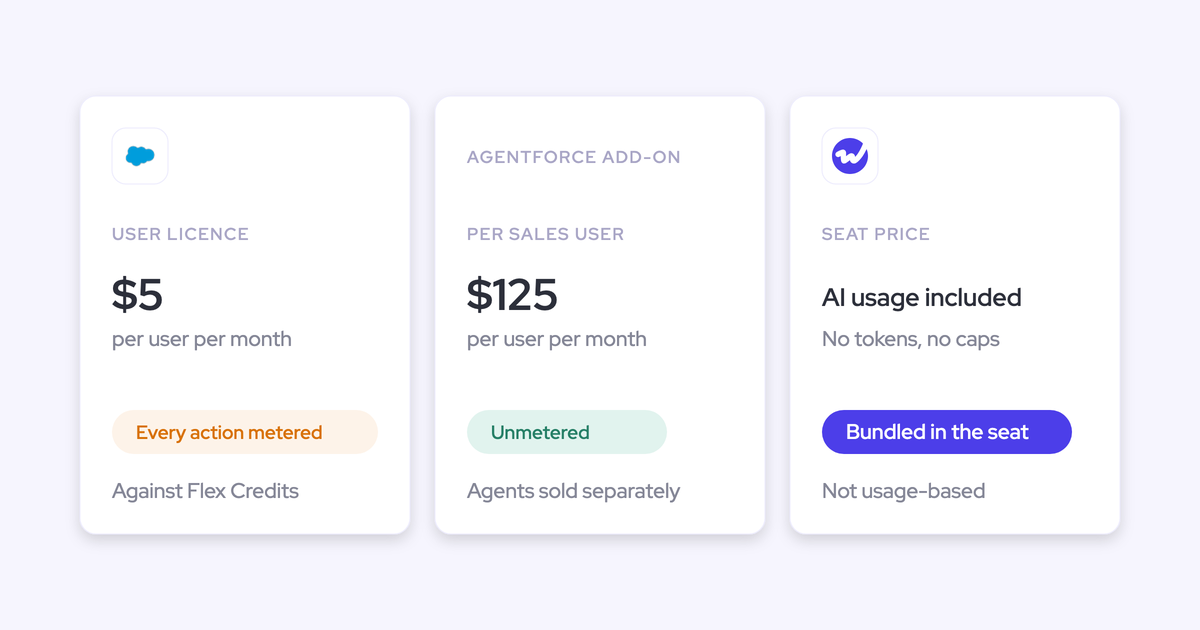
- Consumption-based pricing means the budget risk sits with you. Every additional action is billable, which makes agents something you ration rather than something you roll out. Weflow's answer is a seat price with AI bundled and no metering, plus Agent Builder priced per workspace with 25 free agent actions a month in every plan.
- Output inherits the quality of the org underneath it. If activity isn't landing on the right opportunity and MEDDIC fields are empty, an agent reading them produces bad answers faster.
Best for: Salesforce shops with a clean data foundation already in place and tolerance for a metered bill.
Clay
Clay is on this list because it's the one entry we don't compete with, and leaving it out would make the map dishonest.
What it does well:
- Signal orchestration and enrichment on the outbound side, combining signals, data, and campaigning into one motion. Modern outbound is hard to make work without something in this class.
- Published self-serve pricing, so you can start without a procurement cycle.
Where it falls short:
- It's a different job. Clay doesn't capture your inbound activity, score your calls, or roll up your forecast, and it isn't trying to.
Best for: outbound. Keep it. This is a row on your audit that reads "no change."
Which RevOps tools to consolidate and which to keep
Consolidation is a situation call, not a principle. A working best-of-breed stack that your team actually logs into should not be ripped out to satisfy a slide.
Find your row:
| Your situation | What we'd do | Why |
| Paying separately for capture, conversation intelligence, and forecasting on Salesforce | Collapse into one platform | You're paying three seat charges for one data spine, and the seams between them are where the mapping breaks. Revenue AI Enterprise covers all four layers at $79 per user per month |
| Clari renewal approaching, low adoption, RevOps rebuilding the forecast dashboard in BI | Replace it, or keep it and fix the capture underneath | Clari reads activities from Salesforce, so one capture engine feeding clean Salesforce activity improves Clari too. Running two capture engines in parallel creates duplicate activities. That's the failure mode, not the coexistence |
| Happy Gong shop that only needs a forecast | Keep Gong, add the deal and forecasting layer | Don't rip out a tool with real adoption. Buying forecasting for roughly $39 per user per month is a smaller internal fight than a second forecasting contract at enterprise pricing |
| Einstein Activity Capture hitting its limits: past 100 users, activity not reportable, contacts never created | Replace the capture layer | The cost step and the reporting wall arrive at the same moment you scale, which is the worst time to re-platform the data your leadership reports on |
| Fireflies or Granola spreading across the team with no CRM write-back | Consolidate recording into the layer that writes fields | A transcript archive nobody joins to the deal record adds a portal, not a capability. Existing history can stay usable if the transcripts are synced into Salesforce in structured form |
| Outreach, Salesloft, or Apollo running sequences | Keep them | Partners, not competitors. Weflow runs alongside them in compatibility mode. Just know that sequencers log to the task object, which discards from and to, so reply rate can't be calculated from that data |
| Clay running outbound signal and enrichment | Keep it | Different job, and it's the leader at that job |
| Not on Salesforce | Skip every Salesforce-only tool here, including us | Weflow is built entirely on the Salesforce API. There's no HubSpot or Pipedrive version, and there won't be one soon |
| A best-of-breed stack your team uses daily and trusts | Change nothing this quarter | Consolidation that reduces adoption costs more than the licenses it saves |
When you do consolidate, sequence it in data-foundation order: capture, then conversation intelligence, then deal and pipeline intelligence, then forecasting. KORE Wireless ran exactly that, as a five-phase rollout, after evaluating Gong.
Capture is the lightest lift because it asks nothing of a rep and starts working the day you enable it. Forecasting comes last because it isn't really a tool project, it's an operating cadence, and it needs sales leadership in the room.
If you want the whole landscape on one page while you do the audit, our Revenue Technology Landscape 2025 cheat sheet maps the categories and the vendors in each, free to download.
What changed in the RevOps AI landscape this year
Three shifts explain why this list looks nothing like a 2024 roundup.
Transcription and summarization became commodities. When every tool records and summarizes well, none of that is a reason to buy. Differentiation moved up a layer, to whether the call produces a methodology score, a field write, and a deal-level conclusion inside the CRM your business already reports on.
Agent orchestration landed in RevOps job descriptions. Not as a trend piece, as a line in the role.
"What I find really, really interesting is that suddenly we see responsibility for orchestrating agents as part of the job description of revenue operations."
— Alexander Müller, Founder at Revenue Enablement
The buying mood swung from best-of-breed to platform-centric. Every RevOps leader is now being asked to justify every tool, and the ask we hear most often is blunt:
One more thing changed underneath that. AI coding assistants made a working prototype cheap, so RevOps leaders now build a rough forecasting tool over a weekend before taking a vendor call, then price the vendor against the cost of maintaining their own. The prototype was never the hard part. The snapshotting, the hierarchy roll-up, the permissions, and the integrations are, and they have to keep working while you also run the business.
How we evaluated these RevOps AI tools
We build one of the tools on this list, so here's exactly what went into every entry.
- Published pricing and documentation where a vendor publishes it. Where a vendor doesn't, we say "not published" rather than repeating a number we can't stand behind.
- What we see on evaluation and switch calls. The competitor limits here are ones we've watched break in real Salesforce orgs, not review-site summaries: the multi-opportunity mapping failures, the stale forecasting deployments, the duplicate activities when two capture engines run at once.
- The five criteria above, applied to every tool: data ownership, rep adoption, time-to-value for a small team, pricing transparency, and whether the AI writes into the system of record or into a portal.
- Adoption weighted as heavily as capability, because the tool nobody logs into is the most expensive line on your renewal.
Weflow is entry one because it spans three of the four categories, and its limits are listed in its own section at the same level of detail as everyone else's. If your row in the consolidation table says keep what you have, that's the answer we'd give you on a call too.
Frequently asked questions about RevOps AI tools
Can I run a new capture tool alongside Outreach or Einstein Activity Capture?
Yes, with configuration, and it's the normal state during a transition. Weflow's compatibility mode handles a sequencer that already logs email: you name the other tool's sending domain, Weflow delays its own sync by roughly ten seconds, checks the message for that tool's tracking pattern, and skips it if it finds one. For Einstein, set event sync to one direction, calendar into Salesforce, or you'll get a loop that writes every meeting twice. One capture engine is the clean end state.
Will automated activity capture make my Salesforce data worse?
It will if the tool creates records without checking. The first question to ask any vendor is not what it creates, it's what stops it creating: whether it respects the duplicate rules you already have, whether it checks for an existing lead or contact before adding one, and whether it only attaches people to accounts that exist. Then ask whether a rep can correct a wrong mapping, because one activity on the wrong opportunity costs you the credibility of the whole rollout.
Can a RevOps team of one or two roll out a revenue AI platform?
Yes, if implementation comes with it. Weflow's technical setup is 30 to 45 minutes with a Salesforce admin and your Google or Microsoft admin, and trials run for 14 days with white-glove implementation included at no cost, on your own Salesforce and your own activity. Capture and conversation intelligence prove out inside those two weeks. Forecasting doesn't, because it only proves itself across enough cycles to compare what was called against what closed, so plan closer to a quarter for that piece.
In what order should capture, conversation intelligence, and forecasting roll out?
Capture first, then conversation intelligence, then deal and pipeline intelligence, then forecasting. Capture asks nothing of reps and everything downstream is computed from it. Conversation intelligence lands next because reps get an immediate personal win in summaries and follow-ups. Reverse the order and you're designing a forecast process on top of activity data that's missing half of what happened, which is how tools end up unused.
Is Weflow a fit if my team is not on Salesforce?
No. Weflow works only with Salesforce and is built entirely on the Salesforce API, so HubSpot, Dynamics, and Pipedrive teams should rule us out now rather than at the demo. If that's you, evaluate the CRM-agnostic tools on this list, and weight the same criteria: where the data lands, whether you can report on it, and whether the AI writes into your system of record or into someone else's.