No single person owns CRM data quality, which is exactly why the question never gets settled. "Data quality" is really seven different failures, from untracked activity to duplicates to inconsistent qualification, and each one needs its own owner.
Here's the split that holds up:
- RevOps owns the standard, the definitions and the system.
- Reps own the judgement fields: stage, close date, and what a contact's role means on the deal.
- Managers enforce those fields in deal reviews.
- Nobody does clerical entry (logging activity, creating contacts, attaching contact roles) by hand, because no ownership model has ever made that work stick.
This guide gives you an operating model you can take to your CRO. The clerical layer is the part you can take off people entirely, and we built Weflow Activity & Contact Capture to do that work.
Why CRM data quality has no single owner today
CRM data quality is a bundle of jobs handed to people with different incentives and partial views. Nobody's acting in bad faith. The structure creates the blame cycle on its own, and three things keep it going.
CRM data entry loses to selling, every time
Picture a rep with a forecast call on Thursday and a deal going sideways. The CRM is going to wait, and from where they sit, that's the right call.
"no training in the world will bring people to fill out data quality, and I understand it. I was selling myself for many years."
That's why training never fixed the problem. It assumes reps don't know how to log, but they do. Manual logging through an add-in is simply a tax: find the record, select it and click for every message, thirty or forty times a week.
So the gaps aren't random. They show up wherever the deal got busy, which is exactly where you need the record most.
Reps, managers, admins and RevOps each hold one piece
Every role in the blame cycle controls one slice of the outcome, so nobody can fix the whole thing on their own:
| Role | What they get told | What they actually control |
|---|---|---|
| Reps | "Log everything, every time." | Their own deals, and only when they have time |
| Managers | "Chase your team." | What they inspect in one-on-ones and deal reviews |
| Salesforce admin | "Fix the fields." | Validation rules, page layouts, automation |
| RevOps | "You own the CRM." | Definitions, tooling and reporting, but not the input |
When something leaks, everyone has a partial view and nobody has the job.
The teams that fix this assign owners to outcomes rather than processes. Here, that means giving every failure mode a named owner.
Validation rules raise completion rates, not data accuracy
Mandatory fields push reps to type whatever clears the rule. Prospects have told us about reps inventing a "compelling event" just to get past the red asterisk and move the stage. Another team told us only 52% of their fields get filled, even though they're mandatory.
And a wrong field is worse than an empty one. An empty field is at least honest, while a filled one gets read by reports, forecasts and now AI as if it were true.
"it's worse to have basically incomplete, inconsistent, or inaccurate data than to have no data at all because then you have this illusion of like, oh, I have data and I can trust the data"
If you've tightened your rules and watched quality stay flat, you've seen this firsthand. A rule can check that something was typed, but not whether it's true.
Seven ways CRM data fails, and who should own each
CRM data fails in seven recurring ways, each with its own natural owner and fix:
| Failure mode | What it looks like in Salesforce | Who owns it | The fix that holds |
|---|---|---|---|
| Activity not tracked | A deal looks quiet for two weeks while the rep says they met the buyer yesterday | Automation, with RevOps owning the configuration | Email and calendar capture that runs server-side with no rep action |
| Contact data decay | One contact on a deal that has five people on the thread, plus titles and employers that went stale | Automation for creation, RevOps for the enrichment policy | Automatic contact creation with guardrails and enrichment |
| Inconsistent qualification | "Qualified" means something different to each rep, so team-to-team conversion compares two definitions | RevOps defines, reps apply, managers enforce | Written stage entry and exit criteria that reps can see |
| Duplicates | The same person exists three times, and the same meeting is logged twice | RevOps, or a steward for the existing backlog | A duplicate check before any record gets created, plus a cleanup for what's already there |
| Records not updated to standard | Close dates in the past, stages that lag the deal, empty next steps | Reps, with managers enforcing | Inspection in every deal review, against the written criteria |
| Unstructured data never usable | What the buyer said lives in transcripts, email bodies and personal notes, never in fields | RevOps designs the extraction, automation runs it | AI extraction from conversations into Salesforce fields |
| Competing systems of record | Outreach logs for sales, Einstein for CS and Gong holds the meetings, so the same activity lands two or three times or not at all | RevOps | One capture layer across teams, with the overlapping logging switched off |
Notice that three of the seven are typing jobs no human has ever done reliably at scale.
Which Salesforce fields should sales reps own?
Reps should own the fields that need their judgement about the deal, not the clerical entry that records what already happened. That's the line between ownership you can hold someone to and ownership that was never realistic:
| Field or task | Owner | Why |
|---|---|---|
| Opportunity stage | Reps own it | It's a judgement against criteria, and only the rep has seen the deal up close |
| Close date | Reps own it | It's a prediction about the buyer, not a record of an event |
| Next step | Reps own it | It's a commitment the rep makes and a manager can hold them to |
| Contact role meaning (champion, economic buyer, decision maker) | Reps own it | A tool can attach the person to the deal but can't judge their influence |
| Forecast category | Reps own it, managers review it | It's the rep's call and the manager's inspection point |
| Logging emails | Remove from reps | Thirty to forty a week, every week, with no judgement involved |
| Logging meetings | Remove from reps | The calendar already knows the meeting happened |
| Creating contacts for new people on a thread | Remove from reps | Reps almost never add new participants by hand |
| Attaching contacts to opportunities as contact roles | Remove from reps | It's bookkeeping that follows from who is on the correspondence |
This keeps accountability intact. Reps still answer for the five fields that tell you what the deal is, and stop answering for dozens of weekly entries that only record what happened.
It also makes enforcement fair. You can hold a rep to a close date, but not to remembering every email from a busy Tuesday.
Three ownership models for CRM data quality
You have three realistic ways to assign ownership, and each one covers a different set of the seven failures.
Reps own their Salesforce data, with enforcement and bonus at risk
- How it works: Leadership gives each rep a data quality score on their Salesforce records and enforces it from the top. A practice that's spreading among RevOps agency clients puts about 25% of the bonus at risk when the score drops below a threshold. Tools like Scratchpad's Hygiene Monitor support this by scoring records against rules an admin writes, such as an empty next step or a close date in the past, and ranking reps and teams on a leaderboard.
- Where it works: Enforcement beats training because it changes the incentive instead of repeating the instruction, and it works best on the judgement fields from the table above.
- Where it breaks: It still scores completion against rules, so it inherits the red-asterisk problem. Clearing the score also eats into selling time, and that hits the reps with the most customer activity hardest.
A data steward or cleanup project owns the data
- How it works: You hire a data steward or admin, or run a defined cleanup project to merge duplicates, close dead opportunities, fix account websites and rebuild the contact base.
- Where it works: A cleanup fixes the backlog, and no capture tool does that for you. If you inherited an org merged from five acquisitions, someone has to reconcile it.
- Where it breaks: The same inputs refill the problem the week after the cleanup ends. And headcount is the one thing RevOps rarely gets, especially now that small teams are carrying an AI mandate on top of their existing workload.
RevOps owns the standard and automation does the entry
- How it works: RevOps defines stages, criteria and capture rules, reps own the judgement fields, and managers enforce them in deal reviews. Emails, meetings, contacts and contact roles get captured automatically.
- Where it works: It removes a job instead of moving it to someone else, so the clerical failures stop recurring.
- Where it breaks: Automated capture exposes the mess you already had, often in the first month. It also needs a defined process. If nobody agreed on what a stage means, capture just records that confusion more completely.
How the three models compare on accuracy, cost and effort
Here's how the three stack up on six criteria:
| Criterion | Reps own it, with enforcement | Steward or cleanup | RevOps standard plus automated capture |
|---|---|---|---|
| Accuracy versus completion | Raises completion; accuracy depends on rules reps can game | Accurate at the moment of cleanup, then decays | Activity and contacts reflect what happened; judgement fields still depend on reps |
| Rep selling time | Highest cost: reps do all entry plus clearing the score | Reps keep the same entry burden | Lowest cost: reps handle only judgement fields |
| RevOps headcount and effort | Rule-writing and score management | A hire, or a project that pulls RevOps off roadmap work | Setup and ongoing governance of capture rules |
| Durability when people leave | Fades when the enforcing leader changes | Ends when the steward or project ends | Capture keeps running; configuration needs a named owner |
| Failure-mode coverage | Records not updated to standard; partly inconsistent qualification | Duplicates; contact decay, for a while | Activity not tracked, contact creation, contact roles and competing systems of record; definitions stay with RevOps |
| Speed of visible improvement | Scores move within weeks, accuracy more slowly | Visible at project end | Activity coverage moves as soon as capture runs, after a first month that surfaces old problems |
Why we recommend removing the entry job, not reassigning it
We recommend the third model because clerical entry is the one job no ownership model has made stick.
Removing it is the only change that improves accuracy without adding headcount or taking selling time, while judgement, definitions and enforcement stay with people, where they belong.
We learned this from our own product. Weflow started as a Notion-like workspace for Salesforce users, but it still depended on people typing. Those manual workflows didn't get adopted, so we moved to automating capture.
There's one condition, though. If your real gap is undefined strategy, stages or qualification criteria, fix that first, because capture will just record undefined things faster.
"And if you think about it, data in what I just laid out is intentionally fourth. And the reason why a lot of executives don't trust the data is because they haven't spent the time flushing out their go to market strategy, updating their processes, building that into their tech stack, and understanding what the data is."
There's a career payoff, too. A RevOps team that spends the quarter cleaning up after people gets treated as a tooling and reporting function. Taking the low-value entry work off the table frees up time for the analysis that earns you a seat in strategy conversations.
How Weflow Activity & Contact Capture removes rep data entry
Weflow is the Revenue AI Orchestration platform for sales, customer success and RevOps teams on Salesforce. Weflow Activity & Contact Capture is the product that handles the entry work in the third model.
The entry job goes away, RevOps keeps control of the rules, and your data stays in your Salesforce.
Emails and meetings log to Salesforce with no rep clicks
Weflow syncs email and calendar server-side from Google Workspace or Microsoft 365 into Salesforce, so reps have nothing to click. Emails land on Task or Email Message (your choice), and meetings land on Event, so your own reports and automations can read them.
Every external meeting logs as a Salesforce activity whether or not anyone recorded it. Recording adds a summary on top, but the activity timeline stays complete even when the recorder wasn't admitted.
Weflow skips calendar entries with no other attendees and no meeting link, plus any events and emails the user marks private, so a rep's dentist appointment stays out of Salesforce.
What Weflow never writes, moves or touches in Salesforce
These boundaries hold regardless of how you configure capture:
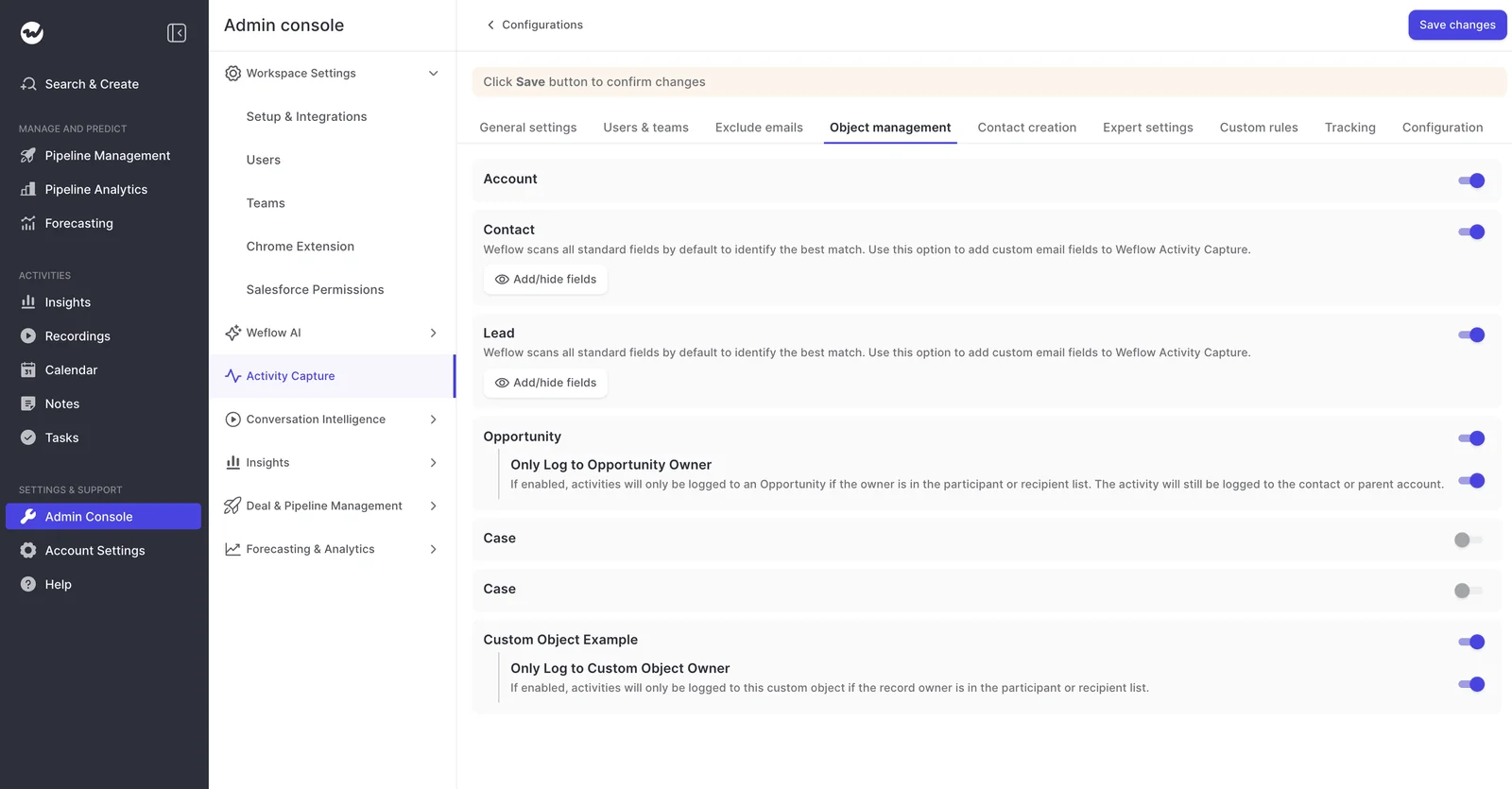
- Weflow never creates leads, accounts or opportunities. It creates contacts only.
- Weflow never reads email content to decide which deal an email belongs to.
- Weflow never logs activity to a closed opportunity.
- Weflow never moves activity on its own once it's logged. Only a rep or admin moves it.
- Weflow doesn't log to your company's own internal records by default. An expert setting allows it if you keep your own people or account in Salesforce.
- Weflow never sets the primary flag on an opportunity contact role.
- Weflow doesn't recreate a contact role that a user removed.
How Weflow creates contacts without flooding Salesforce with junk
Weflow creates a contact when a rep emails a new person in the To or CC field (never BCC) and attaches that contact to the matched account and opportunity. You set the guardrails:
- You can restrict creation to accounts that already exist in Salesforce, so no orphan contacts appear.
- You can cap contacts per event, so a two-hundred-person webinar creates no contacts while the activity still logs to the account or opportunity.
- Weflow looks up the address in real time across contacts, leads and custom objects, including secondary email fields, before creating anything. If the person already exists as a lead, the activity attaches to that lead.
- You can block standard prefixes such as invoice, billing, no-reply and support, plus any address or domain on your block list.
- A separate setting stops reps creating contacts by hand from the Outlook Add-In and Chrome Extension.
- Reps can clear the creation tick on a single email in the extension before sending.
Keep in mind there's no review queue where an admin approves new contacts before Weflow writes them. And with creation limited to existing accounts, an email from a domain that matches no account creates no contact and sends no notification.
How Weflow writes opportunity contact roles as deals progress
When Weflow logs an email to a contact and an opportunity, and that contact has no role on the opportunity, Weflow can create the opportunity contact role automatically. That way, contact role coverage builds up as a side effect of normal correspondence.
Mapping also gets more accurate over time, since every later email from that contact resolves to the opportunity through the role.
There are two settings for this. One covers only the contacts Weflow creates, and the other (in expert settings) covers every related contact, new or existing.
Either way, the role value is a single default your admin sets. Naming someone champion or economic buyer stays with the rep, in line with the split above.
How Weflow decides which opportunity an email belongs to
Weflow matches on the email address and the Salesforce relationships around it, in a fixed order:
- It looks up the address in primary and secondary email fields and logs to the contact, lead or custom object that holds it.
- It checks whether that person has an opportunity contact role.
- If the account has exactly one open opportunity, it logs there.
- If several are open, it weighs the contact role, who owns the opportunity, who owns the mailbox, the account relationship and the stage.
- It skips closed opportunities entirely.
If that evidence doesn't settle the deal, the email goes to the account rather than to a guess, because a wrong deal log is easy to fix and a wrong deal log isn't. Once a rep corrects a match, Weflow honors that correction on every later reply in the thread.
You can also limit logging on an opportunity or custom object to conversations its owner took part in.
How Weflow shows whether a gap is the tool or your data
When a rep says capture is broken, it's usually a CRM problem the tool just made visible.
Weflow flags the data conditions that break capture, inside Salesforce:
- Duplicate accounts and duplicate contacts.
- Unconverted leads that already have a matching contact.
- Contacts with no email address.
- Accounts sharing the same website domain, which stops capture telling two accounts apart.
- Capture settings that aren't configured correctly, plus checks on Shared Activities, Enhanced Email and Einstein Activity Capture.
- Skipped and errored emails and meetings, with a CSV download for admins.
For a single complaint, open the rep's email in the Outlook Add-In or Chrome Extension to see why it did or didn't log. Common reasons include a contact on the wrong account, a contact missing from the opportunity, or an address with no matching account.
That turns the conversation with the rep, or with a leader asking "is the data accurate?", into a discussion about a specific record instead of an argument about the tool.
What Weflow Activity & Contact Capture leaves to your team
These parts of ownership stay with people, and each maps back to an owner in the seven-failure table:
- Weflow doesn't infer whether a contact is a champion or an economic buyer. Reps own that judgement.
- Weflow doesn't merge duplicates that already exist. Your steward or cleanup project owns the backlog.
- Weflow doesn't capture texts or WhatsApp. If deals move to the phone, managers ask about it in deal review.
- Weflow doesn't resolve one person sending from several email aliases. Consolidating onto one domain is an organizational fix RevOps drives.
- Weflow doesn't define your stages or qualification criteria. RevOps owns those definitions.
Weflow pricing and fit: Salesforce-only, bundles from 10 users
Weflow works only with Salesforce and fits mid-market and enterprise B2B teams with established RevOps, at companies with roughly 50 to 1,500 Salesforce seats.
Pricing is published:
- Weflow Activity & Contact Capture is $19 per user per month on its own.
- Revenue AI Foundation adds Conversation Intelligence for $49 per user per month.
- Revenue AI Business adds Deal Intelligence for $59.
- Revenue AI Enterprise adds Forecasting for $79.
All plans are billed annually with a 10-user minimum. Final pricing is quote-based with volume discounts, and there are no implementation fees. Technical setup takes 30 to 45 minutes with your Salesforce admin and your Google Workspace or Microsoft admin.
How to move your team to the new ownership model
Changing ownership is a sequence: pick the order, baseline, give managers their role, get sign-off, and prepare for what surfaces.
Should you clean up Salesforce first or capture first?
In most cases, capture first. Cleaning up first sounds like the careful choice, but it has a cost nobody mentions: the conversations you never recorded are gone for good, and no later cleanup recreates them.
Starting capture early doesn't lock you into messy data, either. Weflow can sync back email and calendar history after a cleanup, up to 24 months as an add-on, and it recovers any email or meeting that failed to sync.
Accounts created later also pick up earlier emails to people at that company automatically.
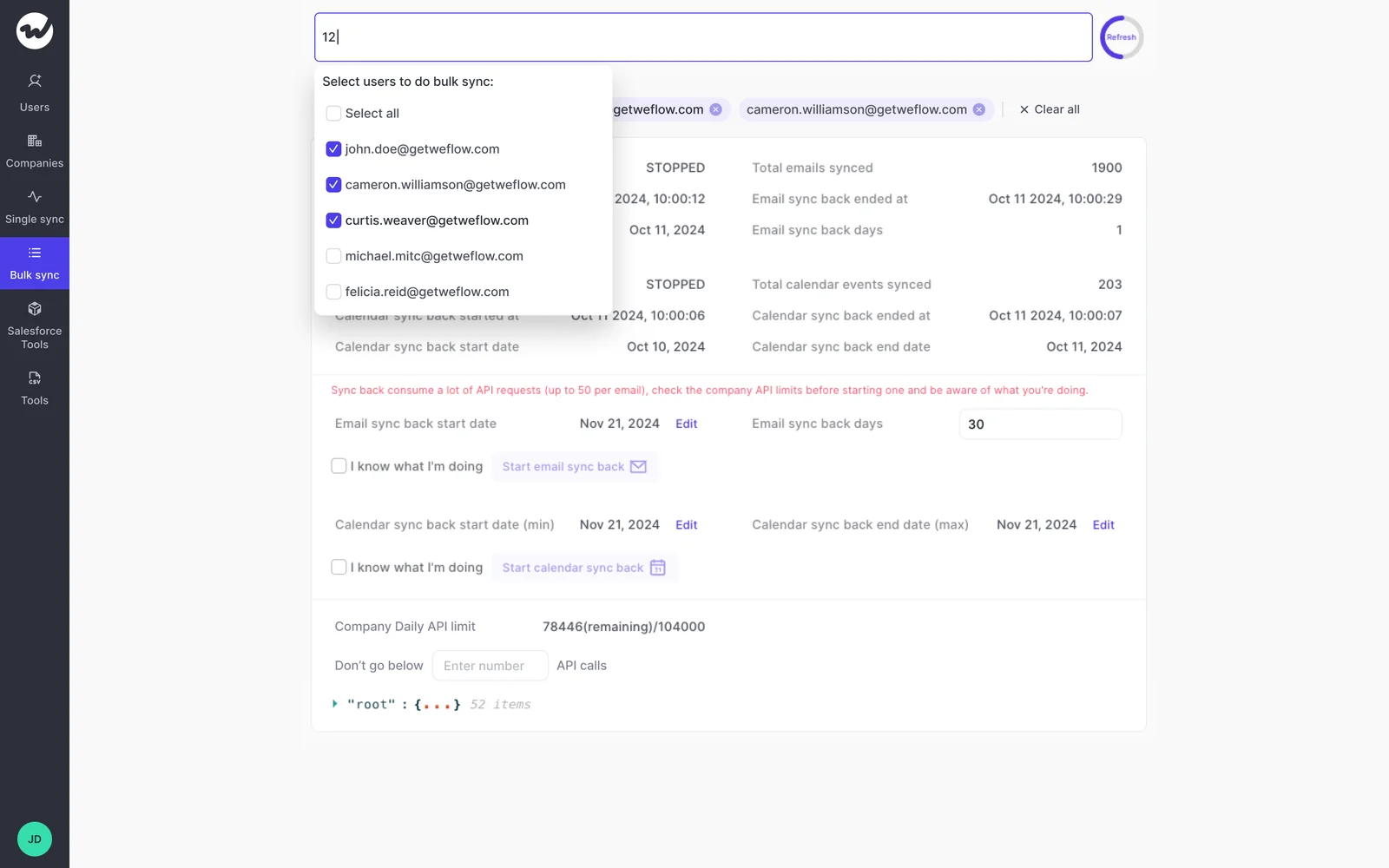
Capture also tells you what to clean, since the duplicate and shared-domain flags give your cleanup a starting point.
Baseline your data quality before anything changes
Without a baseline, you can't show the improvement afterwards.
"One of the steps that I always skipped early on in my career that I wish I could go back and fix was not baselining things."
Track these metrics:
- The share of open opportunities with any logged email or meeting in the last 30 days.
- The share of open opportunities with only one contact role.
- The count of duplicate accounts, duplicate contacts and contacts with no email address.
- Completion of your judgement fields, plus a manual spot-check of ten deals for accuracy.
- The count of open opportunities with a close date in the past.
- The number of tools currently writing activity into Salesforce.
Make data quality a standing item in deal reviews
Managers enforce the judgement fields as part of the regular operating cadence, not by policing logging. In each review, check:
- Whether the stage matches the written exit criteria.
- Whether the close date is in the past or has been pushed more than once.
- Whether the champion and economic buyer are named on key deals.
- Whether the next step is specific and dated.
- Whether the deal is single-threaded, based on who appears on the correspondence.
- Whether a quiet deal is actually quiet, or has moved to channels capture can't see.
Get the CRO to sign off on who owns what
RevOps evaluates and runs the process, the CRO decides, and finance holds the budget. Here's the order that gets you there:
- Bring the seven-failure map with an owner on every row.
- Bring your baseline, so the CRO sees the current number before the proposal.
- Brief sales leadership, CS, finance and the data team before the decision meeting, in their own terms.
- Put the ownership split in writing, including who owns the capture configuration.
"If we can prove that with data and then always bring it back to the customer experience, we can't argue with data and we can't argue with our buyer and customer experience."
— Laura Cross, Vice President and Principal Analyst at Forrester
Expect month one to surface the mess you already had
Automated capture surfaces duplicates, contacts on the wrong parent account, and reports that no longer match what people remember, all of which selective manual logging had hidden.
Whoever ran those reports for years will watch the numbers move and assume the new tool broke them.
So tell leadership before go-live that this will happen, and why. Then use the built-in diagnosis to separate old problems from new ones, record by record.
"We thought it was just wrong data - but we looked manually and realized this is the amount of insight we were missing before."
— Rugile Pudzevelyte, Senior Revenue Operations Manager at United Fintech
United Fintech saw a 3x increase in captured activities and manually confirmed they were real interactions.
Blacklane went from roughly 20% of activities unrecorded under manual logging to 96% of leads, accounts and opportunities with emails, meetings and key contacts logged.
Which CRM data ownership model fits your revenue team?
Pick the model that matches where your team is today:
- Choose rep-owned with enforcement if your capture problem is already solved and your gap sits in judgement fields like stage and close date. A scored hygiene model with real consequences will move those.
- Choose a steward or cleanup if you inherited a merged org with a duplicate backlog that blocks everything else. Run it alongside capture, so the backlog doesn't refill behind the steward.
- Choose RevOps standard plus automated capture if you run Salesforce, your stages and criteria are defined, and your reps are losing selling time to logging. This is the model we recommend for most teams in that position.
- Fix strategy and process first if nobody can say what a qualified opportunity is, or stages mean different things to different teams. Any tool you add will record that confusion more completely.
If you're weighing the third model, look at the guardrails, the matching order and the diagnosis yourself. Walk through the product yourself, no call required.
FAQ: CRM data ownership
Should RevOps or sales ops own CRM data?
RevOps should own the data standard and the system. Definitions, capture rules and Salesforce governance need one owner across sales, CS and marketing, and RevOps is the function that sees all three.
Who owns the activity capture configuration when the admin leaves?
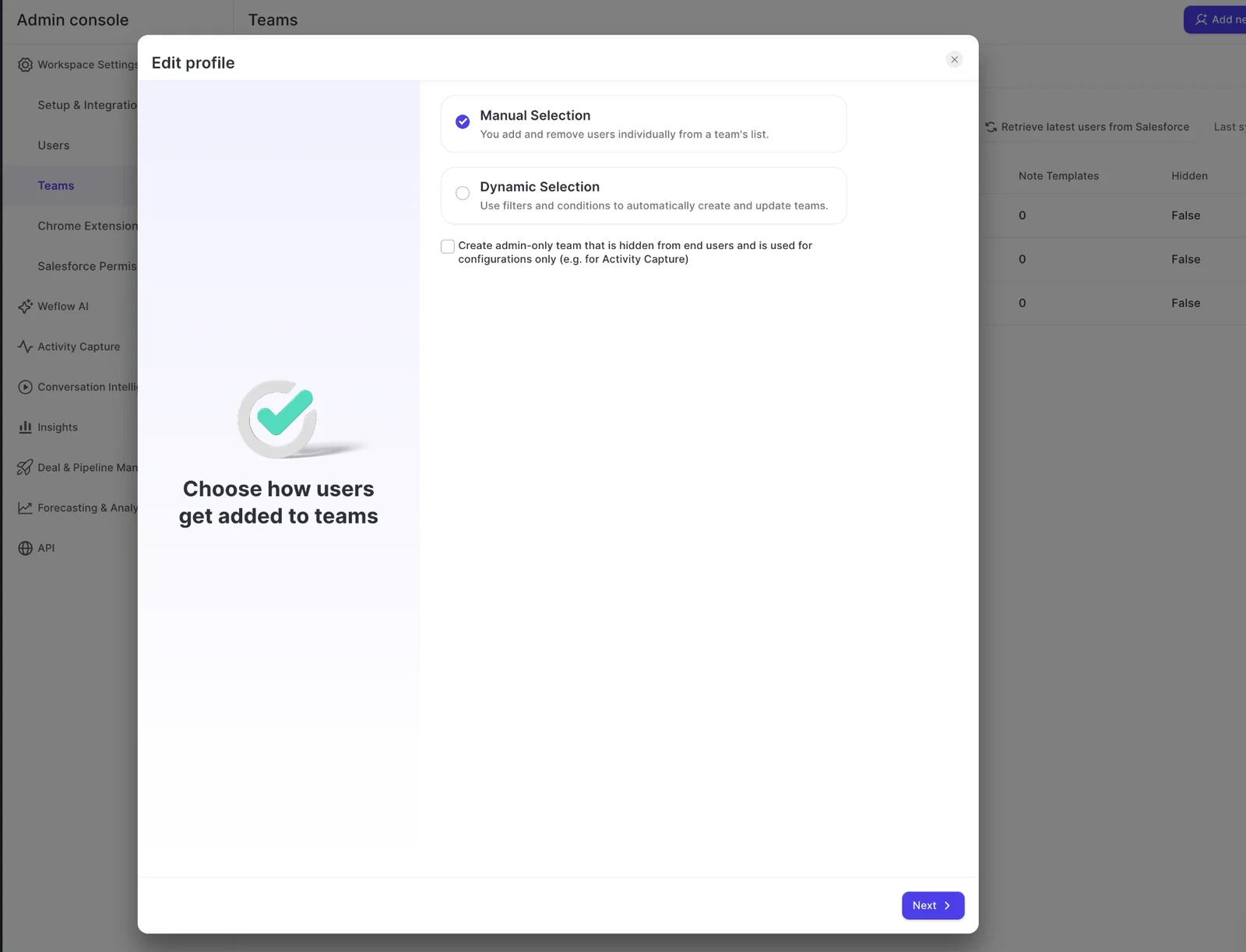
Name one owner in RevOps, in writing, before anyone leaves. Weflow scopes capture by configuration per team, per user and per object, so an inherited setup shows who is captured and how, and the settings health check flags anything misconfigured.
How do validation rules affect automatic contact creation?
If a validation rule requires a field that enrichment can't fill for that person, the contact won't save. Weflow enriches contacts before writing them, though, so required fields like title or phone often fill.
If your rules can't change, for example because contacts feed billing or subscription systems, you can either relax the rule for the integration user or create the contacts enrichment couldn't complete by hand.
We already log activity with Outreach, Einstein or Gong. What gets switched off?
Your sequencers can keep running. Weflow's compatibility mode has presets for Outreach, Salesloft, Apollo and Clay and skips emails they already logged. If your sequencer uses a custom tracking domain, add it to the tracking patterns list so those emails don't log twice.
Einstein Activity Capture should be turned off. Weflow's own settings check recommends disabling it, because it creates uneditable records that bypass automation and race with other capture.
Gong can stay for conversation analytics, where it goes deep. But it doesn't create Salesforce contacts when it finds a new person, so contact capture still needs a separate layer.
Could we build this ourselves with Claude and call transcripts?
You can prototype transcript-based field updates quickly with Claude connected to Salesforce. The hard part is everything underneath:
- Reliable capture from every mailbox.
- The matching order across several open deals.
- Duplicate checks across secondary email fields.
- Coexistence with your sequencer.
- Backfill when a sync fails.
- Someone to maintain all of it.
Should activity capture run through our data warehouse instead?
No. A warehouse doesn't replace the CRM as the system reps work in every day. Activity captured into Salesforce already flows to your warehouse through the existing sync, so routing it through the warehouse first adds months and no new data.
Does Weflow work if part of the company runs a different CRM?
Yes, on the Salesforce side. In a group where some companies run Salesforce and others run HubSpot or another CRM, Weflow deploys where Salesforce runs, and the rest of the group keeps its current setup.