Why Reps Create Opportunities Late, and What Automatic Activity Capture Changes
Learn why reps open Salesforce opportunities late and what automatic activity capture changes.


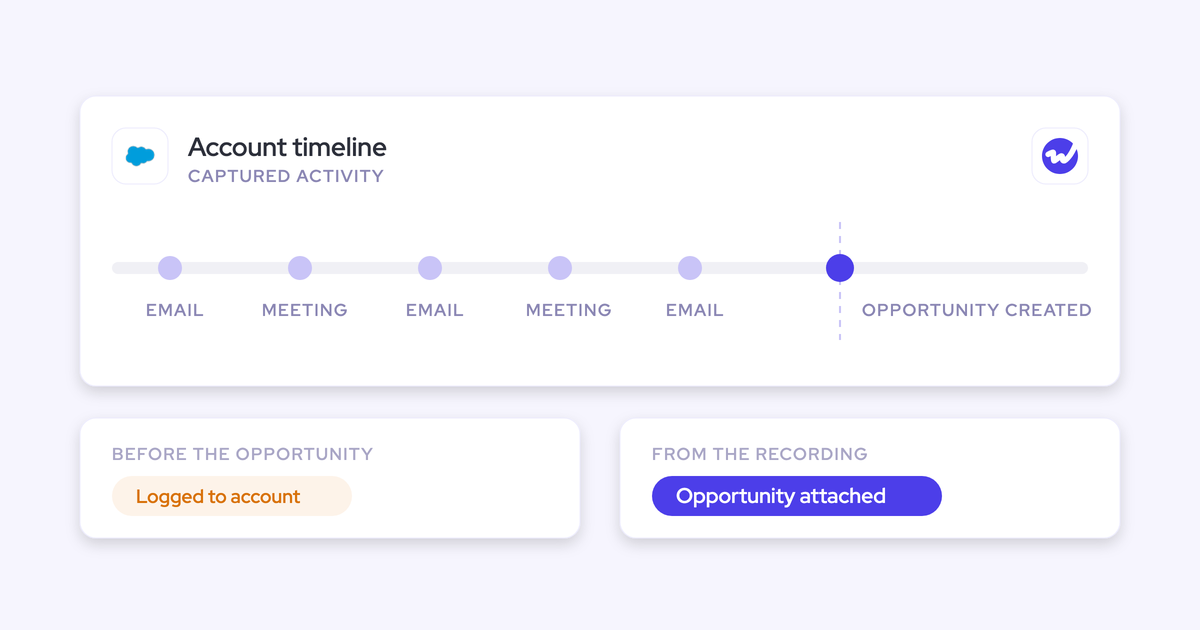

Your reps open opportunities late on purpose, and from where they sit, it makes sense. You judge a deal by its activity, and that activity only shows up if the rep logs it by hand.
So an early opportunity looks dead for weeks, and opening it near the end saves them a hard one-on-one.
The trouble is, the cost lands on you. Your cycle length, stage conversion and coverage numbers only measure the part of the deal that went well. Everything before that happened out of sight, where you couldn't coach it.
What changes the incentive is activity that reaches the deal without the rep lifting a finger. With automatic Salesforce data capture, the emails and meetings that follow an opportunity land on it automatically, so opening early stops being risky.
Capture won't open the deal for the rep, though, and it won't move old emails onto it. Those gaps need two fixes from you as the manager, and we cover both below.
What late opportunity creation looks like in your pipeline
You can usually spot late opportunity creation in a normal pipeline review. If several of these rows sound familiar, that's what you're looking at.
| What you see in Salesforce | What it usually means |
|---|---|
| Opportunities created and closed won within days | The rep worked the deal for weeks before the record existed |
| Sales cycle length that looks impressively short | Cycle length only counts the days after the record was opened |
| Thin early-quarter coverage, then the number "appears" | The deals existed all quarter, just not in Salesforce |
| No discovery calls or first meetings on closed deals | The early conversations happened before the opportunity was created |
| One contact on a deal that closed with a full buying committee | The committee formed before anyone recorded it |
Argus Media described the pattern in one line:
"Sales would come in and put their deal in right at the end of the process, and we wouldn't see any of the earlier conversations and early sales cycle"
Why reps wait to open the opportunity in Salesforce
Reps wait because opening early costs them something and opening late costs them nothing. The chain runs like this:
- Logging is patchy, so activity reaches the opportunity only when the rep logs it.
- You judge deals by the activity attached to them: days inactive, last touch, deals at risk.
- An early deal looks dead for weeks while the real work happens in the rep's inbox.
- A dead-looking deal earns a hard one-on-one.
- So the rep opens it late, and the record only exists for the part that went well.
Nobody in that chain is doing anything wrong, and each step makes sense on its own. Put together, though, they give you a pipeline that hides its own beginning.
Activity-based deal inspection makes an early deal look dead
Your inspection habit is part of the system. Days inactive and last touch are sensible ways to spot stalled deals, and most managers we talk to ask for exactly that view: show me the deals at risk, with no activity in 30 days.
The catch is what those views read. If the rep emailed the prospect six times last week and logged none of it, the deal shows as inactive.
Heavy stage-gate forms give reps another reason to wait
Stage-gate paperwork pushes reps in the same direction. When opening or advancing a deal triggers a block of criteria-for-success questions, reps hold the deal back to dodge the form.
One team told us their stage questions take so long that some reps keep deals in lower stages just to avoid them.
Capture won't fix this one, because it's a process problem. If the form is why reps wait, shorten it or fill it from evidence. Weflow Conversation Intelligence can write qualification fields from what was said on the call, which takes the typing out of the gate.
Without a written opening rule, each rep picks their own timing
Most teams never write down when a rep should open an opportunity. Without that rule, timing follows each rep's self-interest, and two reps working similar deals can create them weeks apart.
That makes your cohorts impossible to compare.
"So I think in most sales pipelines, the reality is that that isn't managed very well. And then you look at your close rate or your cohorts, and they're all over the place."
— Janis Zech, Co-founder & CEO, Weflow
The same pressure pushes some reps to open thin deals
You probably have the opposite problem in the same pipeline, too. Under pressure, some reps open deals that don't meet the criteria. New AEs do it most, since a thin pipe earns them a hard conversation and a full one doesn't.
"Or you're bringing in new people, new AEs to the business, and they wanna create their pipeline, they wanna fill their pipe, and they rather take too much than too little, so you need to guide people in the way that you want the business to run."
Late deals and padded deals look like opposite failures, but they share one root: you're judging deals on what the rep chooses to put into Salesforce.
Capture handles the late half, and an opening rule handles the padded half.
What late opportunities do to cycle length, conversion and coverage
Late creation skews the metrics your forecast runs on, and it makes them look better than they really are.
| Metric | What you think it measures | What it measures when deals open late |
|---|---|---|
| Sales cycle length | Time from first real conversation to close | Time from record creation to close, usually the last few weeks |
| Stage conversion | How deals move through every stage | Mostly deals that were already winning when they were entered |
| Win rate | Share of real opportunities you win | Share of deals reps felt confident enough to put in Salesforce |
| Pipeline coverage | Pipeline you have against quota | Pipeline reps chose to show: thin early, full late |
| Deal coaching | Your chance to shape a deal | A review of decisions already made |
Argus Media put the result bluntly:
"We were using the system to close out deals rather than using it as a genuine CRM"
Every forecast you submit sits on these numbers. If cycle length is understated, your benchmark for "this deal is running late" is off too. And out-quarter coverage only shows up once the window to build pipeline has closed.
Why logging reminders and many capture setups don't fix it
Pushing reps harder doesn't remove the incentive, and neither does partial automation. Either way, the early deal still looks empty.
Chasing reps for updates makes them hide deals longer
Telling reps to log more is the obvious response, and you've probably tried it. Teams we talk to are blunt about how that goes:
"We are trusting sellers that they are logging tasks in Salesforce, but that's also not widespread practice."
In fact, chasing makes it worse. Every reminder raises the cost of having an early, quiet deal on the board, and that cost is what made the rep wait in the first place. So the more you chase, the later deals show up.
Many automatic capture setups still leave the opportunity empty
Having a capture tool isn't the same as having activity on the deal. We keep seeing three failure patterns:
- Nothing logs until a contact or lead exists, and then only new emails do: With Sync Email as Salesforce Activity on, Einstein Activity Capture doesn't log email that matches no record. Once someone creates the contact or lead, it syncs only emails sent after that point.
- History backfills only when the mailbox first connects: Outreach backfills email history at mailbox connection, so a prospect created later never gets the emails exchanged before they were added.
- Activity lands on the contact, not the opportunity: Sales engagement tools such as Outreach and Salesloft associate activity with the person so you can tell someone was emailed, but not which deal the email moved.
Any one of these leaves the early opportunity looking dead, and the incentive to wait stays put.
How one deal looks before and after automatic activity capture
It's easiest to see the difference on a single deal. The rep does the same work in both columns; the only change is whether activity has to be logged by hand.
| Deal moment | Before: hand-logged activity | After: automatic activity capture |
|---|---|---|
| First emails | The rep emails the prospect. Nothing reaches Salesforce. | The emails log to the account. There's no opportunity yet. |
| First meeting | The discovery call happens. The rep doesn't log it. | The meeting logs to the account as an event, recorded or not. |
| Opportunity opened | The rep waits, because an empty opportunity draws questions. | The rep opens it at the first qualified conversation, because the deal won't sit empty. |
| New stakeholder joins | The buyer adds a finance lead to the thread. Salesforce still shows one champion. | The finance lead becomes a contact and can be added as a contact role on the opportunity. |
| Your one-on-one | You see nothing until late in the quarter. | You see the deal, its meetings and its people while there's still time to coach. |
| Closed won | The opportunity existed for days, so cycle length looks short. | The opportunity spans the deal from qualification, so cycle length reflects the real cycle from that point. |
There's one limit in the After column: emails sent before the opportunity existed stay on the account and don't move onto the deal on their own.
How Weflow Activity & Contact Capture keeps an early deal visible
Weflow is the Revenue AI Orchestration platform for sales, customer success, and RevOps teams. We built Weflow Activity & Contact Capture so activity reaches Salesforce without depending on the rep.
Emails and meetings land on the deal with no rep action
Weflow captures email and calendar activity through a tenant-level connection to Microsoft 365 or Google Workspace, which your admin sets up once..
Reps don't need to opt in, install anything or click to log. Even a rep who never opens Weflow still has their mailbox captured.
Once the opportunity exists, the emails and meetings that follow land on it. Meetings log as Salesforce events whether or not anyone recorded them, and a recording adds a summary on top.
That's what makes "days inactive" trustworthy: when a deal looks quiet, it is quiet.
"Most of our team doesn't even know we have Weflow for activity capture. That was a big attraction for me: I didn't need them to set it up or learn anything new."
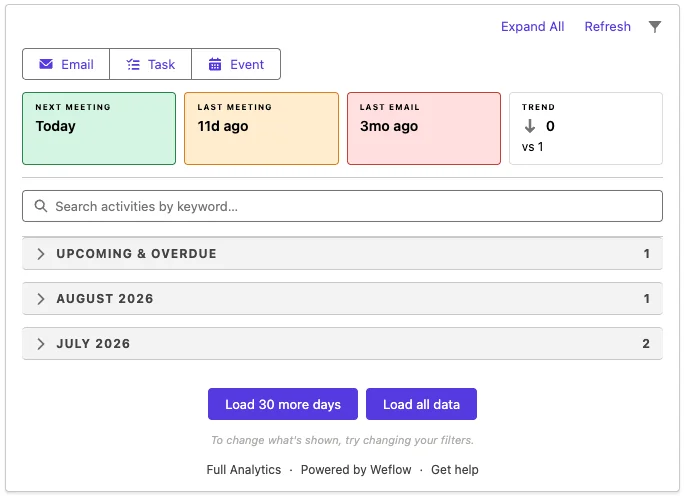
On the Salesforce record, the Weflow Activity Timeline shows the next meeting, the last meeting, the last email and the activity history by month:
Weflow picks the right opportunity when an account has several
If you inspect one deal while the activity lands on its sibling, the deal still looks dead. To avoid that, Weflow maps each email by the address and the Salesforce relationships around it, in a fixed order:
- With one open opportunity on the account, Weflow picks it.
- With several open, Weflow weighs the contact role, the opportunity owner, the mailbox owner, the account relationship and the stage.
- Weflow never logs to a closed opportunity.
- When those signals don't settle it, Weflow logs to the account rather than guessing.
- When a rep corrects the match in the Outlook add-in or Chrome extension, the correction holds for every later reply in that thread.
The account fallback is deliberate. Salesforce relates an activity to either an opportunity or an account, so every tool has to pick one.
An email on the account is easy to move, but an email on the wrong deal makes a live deal look quiet and a dead one look busy, and nothing flags it.
New stakeholders show up as contact roles on the opportunity
When a buyer adds new people to a thread and the rep replies, Weflow creates them as Salesforce contacts from the To and CC lines and can attach them to the opportunity as contact roles.
Most admins restrict contact creation to accounts already in Salesforce, which keeps junk records out.
For you, that means the deal shows the buying committee as it forms. Instead of one champion on paper, you see who's actually on the thread, early enough to ask who's missing.
Admins switch on contact role creation in the Activity Capture settings:
Where earlier emails go when the opportunity comes later
It depends on which record gets created late. Weflow decides where each email logs based on Salesforce as it stands at that moment, and once an email is logged, it stays there unless someone moves it.
| Situation | Where the earlier emails end up |
|---|---|
| The account doesn't exist in Salesforce yet | Weflow logs nothing for those people, because there's no record to match them to |
| The account is created after the rep emailed | The earlier emails log to the new account automatically, with no re-sync |
| The opportunity is created after the rep emailed | The earlier emails stay where they were logged, usually the account |
| Emails sent after the opportunity exists | They land on the opportunity |
The late-account case is where Weflow differs from setups that log only new emails, like Einstein Activity Capture, or backfill only at connection, like Outreach.
Nektar does something similar with what it calls "data time travel": it holds activity until the account exists, then links past conversations to it.
The late-opportunity case is a real limit, because the early emails stay on the account. You can still see the full history in one view, since the account timeline shows the account's own activity alongside activity logged to its opportunities.
But those early emails aren't on the deal itself.
What automatic activity capture won't change for you
Capture closes the logging gap, but it leaves a few others open:
- Weflow never creates opportunities: Opening the deal stays the rep's call.
- Chat, texting and personal phones stay outside capture: WhatsApp, SMS, Microsoft Teams chat, Google Chat, Slack channels and calls from a rep's own mobile number don't reach Salesforce. A deal running there still looks quiet.
- Procurement and RFP portals stay outside capture: Work inside the buyer's portal reaches the record only if someone enters it.
- Stakeholders at companies not yet in Salesforce are skipped: With contact creation restricted to existing accounts, Weflow creates no contact for them and nobody gets notified.
- People who join through a forwarded invite don't become contacts right away: They're created once they join an email thread with the rep.
- Process drivers stay: If reps wait because of a heavy stage-gate form or a missing opening rule, capture alone won't change when they open.
Two fixes you own as the sales manager
Capture removes the penalty for opening early. These two fixes take care of the remaining reasons to wait.
Write an opening rule and measure pipeline from a qualified date
Start by writing down when a rep opens an opportunity and what counts as qualified. A workable rule covers:
- The trigger to open, such as the first conversation where the buyer confirms a problem worth solving.
- Which stage means qualified.
- The few fields a rep must fill at that point. Keep the list short, or it becomes the next form reps avoid.
- Who checks new opportunities against the rule, and how often.
Then date pipeline from the qualified date, not the created date. Many teams keep a separate qualified date, often the day a deal reaches stage two, and measure pipeline created, coverage and cycle length from there.
That gets you two things:
- Opening early no longer inflates new pipeline.
- Thin deals opened to look busy don't count until they qualify.
Pipeline history is the other half. Salesforce doesn't keep a history of how your pipeline moved, so Weflow Deal Intelligence & Forecasting takes hourly opportunity snapshots, which power the waterfall and the close-date push counts.
Ask whether the CRM missed something before asking why it's quiet
When a deal goes quiet, start with the data, not the rep. Mallory Lee describes how she opens that conversation:
"I'm not gonna go to the rep and say, you're seven days late on following up with so and so. I'm gonna ask them like, hey, did HubSpot miss something here? And sometimes it does. It just misses something. Or your connector gets shut off or your Chrome needs to update."
That opener does three things:
- It catches real gaps, like a deal running on text or a prospect whose account isn't in Salesforce yet.
- It keeps reps honest about early deals, because a quiet deal is no longer an accusation.
- It makes normal early-stage quiet safe, so reps have no reason to hide the deal.
| Instead of saying | Try asking |
|---|---|
| "This deal's been inactive for two weeks." | "Did the CRM miss something here, or has it gone quiet?" |
| "Why is there nothing logged on this?" | "Is this one running somewhere capture can't see, like text or a portal?" |
| "You're seven days late on that follow-up." | "What's the next step the buyer agreed to?" |
For the full playbook on running this in your weekly pipeline review, get our Free Guide: Deal Insights & Pipeline Management Best Practices.
FAQ: Late opportunity creation and automatic activity capture
Is late opportunity creation the same as sandbagging?
No, but the two are related. Sandbagging understates the forecast on a deal you can already see, while late creation hides that the deal exists at all. Both come from judging reps on what they choose to put into Salesforce.
Do reps have to install, click or log anything?
No. Your admin switches capture on centrally, and it runs on the server connection to the mailbox. The Outlook add-in and Chrome extension are optional, for reps who want to see or correct a match. ADVISA runs Weflow fully automated with no Outlook add-in.
Call recording works differently: we enroll reps for recording only after a training session.
Will reps read automatic activity capture as surveillance?
Capture logs the customer emails and meetings reps would otherwise be asked to log by hand. Events and emails a rep marks private stay out, and admins can block specific addresses and domains.
Beyond that, it comes down to how you use the data: if quiet deals start with "did the CRM miss something?", reps will see capture as help.
What happens to stakeholders at a company not yet in Salesforce?
Weflow skips them until the account exists, but the rep can create them from the Outlook add-in or Chrome extension. Once the account is created, Weflow logs the earlier emails to it automatically.
Can I repair the opportunity history I already have?
Capture improves the record from the day it goes live and existing opportunities keep their created dates. If you need the past too, Weflow offers historical sync-back of up to 24 months as an add-on, which brings past email and meeting activity into Salesforce.
For measurement, start dating pipeline from a qualified date going forward.
Does Weflow double-log alongside Outreach or Salesloft?
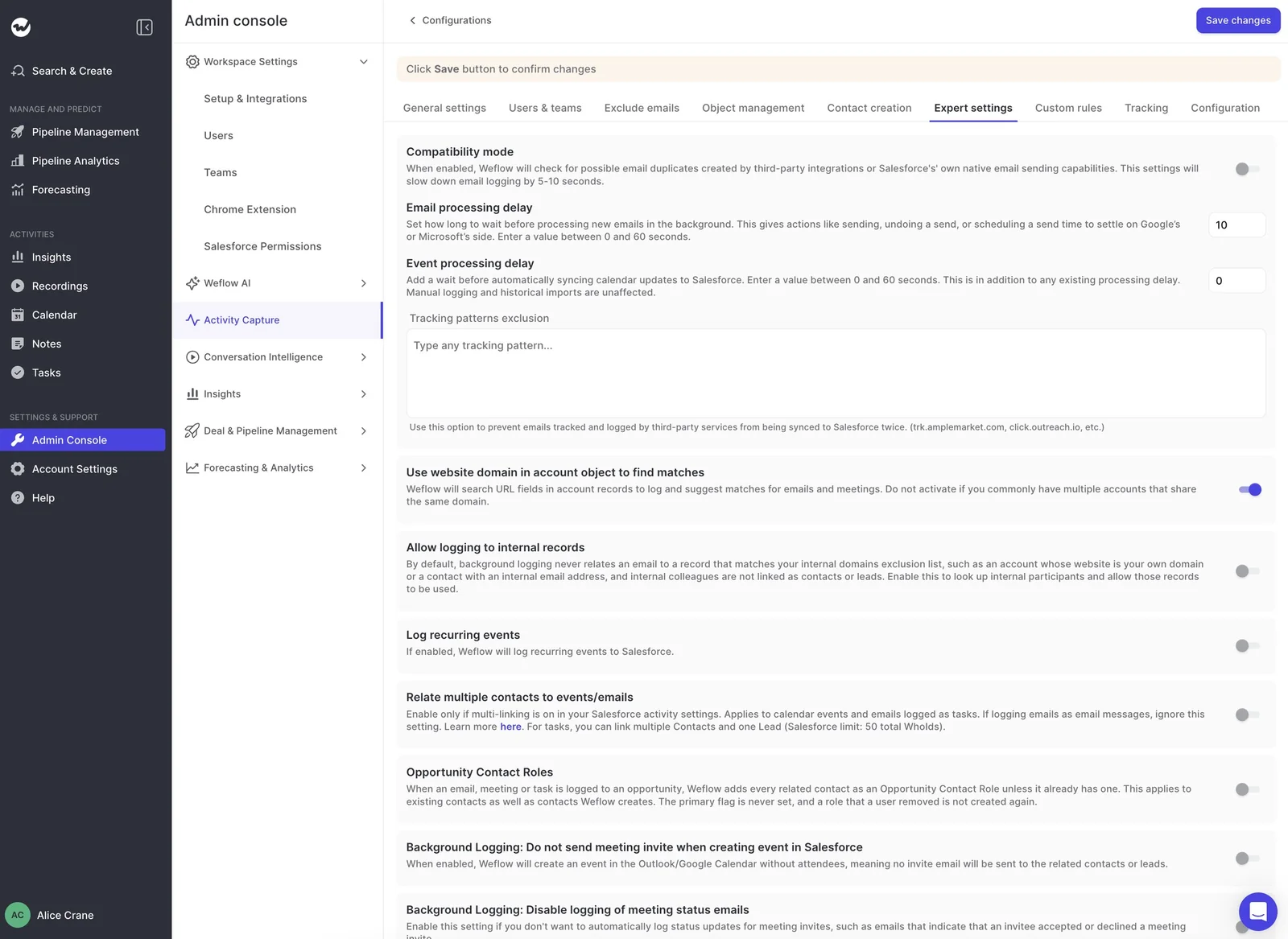
No. Weflow runs alongside engagement platforms through compatibility mode. Its tracking patterns exclusion lists the engagement tool's tracking domains, such as click.outreach.io, so an email the engagement tool already logged doesn't land in Salesforce twice.
How long does Weflow Activity & Contact Capture take to go live?
The technical setup takes 30 to 45 minutes with your Salesforce admin and your Google Workspace or Microsoft admin. Capture goes live as soon as the logging rules are configured.
Most teams reach full value within one to three weeks, including rule tuning and team rollout.
What does Weflow Activity & Contact Capture cost?
Weflow Activity & Contact Capture costs $19 per user per month, billed annually, with a 10-user minimum. It includes Ask Weflow AI Pro and Agent Builder Free with 25 agent actions per month.
Call recording is part of Weflow Conversation Intelligence. The Weflow Revenue AI Foundation bundle, at $49 per user per month, pairs Conversation Intelligence with capture.