

Chorus vs Attention for Mid-Market Conversation Intelligence (2026)
Decide on Chorus vs Attention for mid-market conversation intelligence: coaching, Salesforce writes.


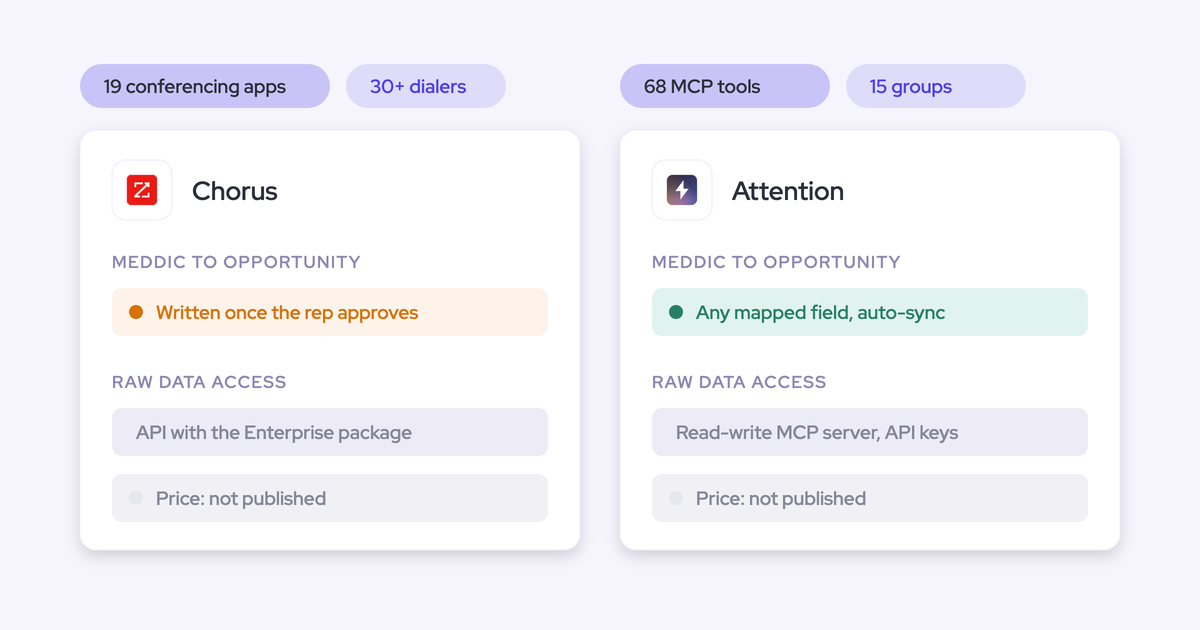

Chorus and Attention are both credible, and they break in different places.
- Chorus is the maintained incumbent. Its coaching programs are the best-built of the three. It writes structured qualification values for only four frameworks, and only after a rep approves each update.
- Attention is the fast, agent-first challenger. It writes to your fields automatically on its recommended setting, and it keeps your emails in its own store instead of Salesforce.
Both record calls well, so recording quality won't settle this. What settles it is what lands in your Salesforce record after the call, who reviews it, and whether you can trust it. If your team runs manager-led coaching and depends on ZoomInfo data, renewing Chorus is a defensible outcome. If you have a strong RevOps team and want to build agents on call data, Attention is ahead of the field.
There's a third answer for teams whose problem turns out to be the record rather than the recorder. Weflow is the Revenue AI Orchestration platform for sales, customer success, and RevOps teams, built for Salesforce teams. Weflow Conversation Intelligence + AI Field Updates writes call outcomes into your own Salesforce fields and lets you choose auto-write or review one field at a time. It also puts emails and calls on the same deal. We publish our prices, and below we show where we're ahead of both tools and where we aren't.
How Weflow, Chorus and Attention compare across nine capabilities
The three tools look similar on recording. They split on four things:
- What gets written into Salesforce
- Who reviews it before it lands
- How far an AI assistant can reach the data
- Whether you can see a price
| Capability | Weflow | Chorus | Attention |
|---|---|---|---|
| Recording video meetings | Notetaker is auto-scheduled from the calendar onto Zoom, Teams, Meet and Webex (Webex is switched on per workspace). A recording health dashboard attributes each failure. | Auto-joins business meetings once calendars sync. Meeting Import pulls native Zoom, Teams and Meet recordings without a bot. No language auto-detection. | Bot by default, or a desktop app on Apple Silicon Macs. The desktop app doesn't support Teams in a browser or Meet in Edge. |
| CRM field updates from conversations | Writes every Salesforce field type except lookups. Auto-write or review is set per field. Methodology fields amend instead of overwriting. | Drafts MEDDIC, MEDDPICC, BANT or SPIN values into mapped opportunity fields, written only after rep approval. Other content goes to a Task and Chorus's own objects. | One prompt per mapped field, with automatic sync as the recommended default. Fields with no finding get prose about the absence. New fields fill forward only. |
| Coaching scorecards | Every recorded call is scored automatically against team templates, with manager override. Scores roll up per call, opportunity and rep. | Managers score questionnaires 1 to 5 per question, run as dated coaching initiatives with leaderboards and weekly trends. | Natural-language criteria with weights, tested against a past call before saving. Pre-built MEDDIC, BANT and SPICED. |
| Keyword and competitor trackers | Custom trackers roll up by rep, team and region. Your existing tracker set carries over. | Basic and Boolean trackers run on every past and future call, with a win/loss ratio per topic. | AI call labels defined in plain language and applied to future calls. Live battlecards in the desktop app. |
| Deal risk warnings | 50+ deal signals plus custom AND/OR rules on opportunity and computed fields. Warnings are Weflow fields and don't reach Salesforce reports. | Twelve Momentum Signals alerts on activity, CRM data and conversations, six with adjustable thresholds, plus daily alerts. | Deal Risk Monitor scans conversations for risk phrases, and custom deal indicators show in Deal View. Alerting reads calls, not the CRM record. |
| Integrations with other tools | Salesforce, Gmail, Outlook, Google Calendar, Zoom, Teams, Meet, Slack and the Outreach dialer. No dialer catalogue. Salesforce only. | 19 conferencing providers, 30+ dialers, Salesforce, HubSpot, Dynamics, Clari and Gainsight. Slack and Zapier need Enterprise. | 200+ claimed. Workflow steps act in Salesforce, HubSpot, Slack, Snowflake, Notion and more. Imports Zoom Phone and Aircall calls. |
| Access from AI assistants (MCP) | Official read-only connector covering playbooks, summaries, transcripts, forecast calls and pipeline metrics. Admins control transcript access with a separate toggle. | ZoomInfo's MCP server answers from Chorus calls, emails and transcripts. Usage spends ZoomInfo credits. | Read-write server with 68 tools that returns raw transcripts, with no consumption charge. Org-level keys carry full organization access. |
| Raw data access outside the tool | REST API bulk-exports transcripts, scores and signals as JSON or CSV, with no enterprise-tier gate. No native warehouse connector. | API access requires the Enterprise package. | Transcripts, scorecards and insights through MCP and API keys. Workflows push to Snowflake or any API. |
| Pricing | Published. Weflow Conversation Intelligence is $39 and Revenue AI Foundation is $49 per user per month, with a 10-seat minimum, billed annually. | Not published. Custom quote through sales. | Not published. Pricing goes through a demo. |
Read the table through the field-updates row first. That's the row your forecast, your reports and your own AI will run on.
Why teams leaving Chorus shortlist Attention
By the time a Chorus renewal reaches your desk, you've usually noticed two things. Chorus hasn't moved much in a while, and someone has already pitched you Attention.
What ZoomInfo is investing in instead of Chorus
ZoomInfo sells Chorus as one engagement feature inside its data platform. On ZoomInfo's own site, Chorus sits under Solutions, then Engagement, then Conversation intelligence. The products ZoomInfo leads with are Copilot as its AI sales agent, GTM Studio for signal-triggered workflows, and the ZoomInfo MCP server over its data.
Chorus itself ships no AI agents. ZoomInfo runs its agents in GTM Workspace, and ZoomInfo sells forecasting there too. The Chorus product page still carries the pre-acquisition pitch.
Your read is right: Chorus is a maintained asset, not a bet. That doesn't make it a bad product. The coaching and deal surfaces still work well, and nobody on your team will complain that the recorder stopped recording.
What Attention's agent-first pitch actually promises
Attention positions itself as AI that works the pipeline for the rep. It proposes the next move on a deal, the rep approves it, and Attention executes it: a follow-up drafted from the call, outreach to other buyers on the deal, a nudge on a stalled one. It describes legacy tools as recorders that transcribe and dashboards that report, while Attention acts.
That pitch is real. Attention has the most agent-accessible conversation store in this comparison and a workflow builder that runs code.
The question for you is narrower. Does "AI-native" change what reaches your Salesforce record, or only what happens inside Attention?
Judge them on what lands in your Salesforce record
Transcription is a commodity now. Buyers open demos with us by saying every vendor sounds the same, and they're right about the recording layer.
What differs is the record. Once a dashboard has told a manager that a working rep was inactive, the whole reporting surface gets discounted, including the parts that were accurate. One RevOps leader put it to us this way:
What is the value of this inactivity column when it is not showing me the truth? Their next comment is going to be, the tool does not work.
The other trap is split data. When calls sit in one AI tool and emails in another, every deal question gets asked twice.
I don't want separate tools collecting data and duplicating meetings inside Salesforce. If I want to question the state of a deal, all the information should be in one place, no matter how many activity capture or conversation recording tools I use.
So run the trial on your own Salesforce org and test the record, not the app. These are the six questions we'd put to all three tools:
| Question to ask | What to check in the trial |
|---|---|
| Which fields and field types get written? | Whether picklists, numbers, dates and multi-selects fill, or only free text |
| Is review per field, or all-or-nothing? | Whether a website can auto-write while the champion field waits for a person |
| What happens when nothing relevant was said? | Whether the field stays empty, keeps its old value, or fills with prose |
| Does email reach the same record as calls? | Whether a champion named only in email shows up on the opportunity |
| Does a recorded meeting create a duplicate activity? | Meeting counts per rep before and after the tool is switched on |
| Can you see why a recording failed? | Whether a lobby problem is separated from an opt-out and a platform error |
Where Weflow Conversation Intelligence + AI Field Updates fits, and stops
We built Weflow around the record: per-field control, every field type, and emails and calls on one deal. We also have real limits on live assistance, MCP writes, reporting on warnings and integration breadth, and we'll state each one where it applies.
What Weflow records and writes into Salesforce after each call
Weflow's notetaker is auto-scheduled onto every external meeting from the calendar connection, so recorded is the default state. Nobody has to remember to invite a bot.
- Platforms: Zoom, Microsoft Teams, Google Meet and Webex. Zoom needs local recording enabled by the Zoom admin plus host approval. Teams and Meet bots have to be admitted from the lobby. Webex is switched on per workspace.
- Recording health: The admin console shows meetings recorded, attempts, skips and an error rate. It separates a recorder that was never admitted, a meeting whose link changed after the invite, and a genuine platform error.
- Languages: Weflow auto-detects 96 languages. The follow-up email is written in the meeting language, and the CRM summary in your workspace language.
- Desktop app: Windows and macOS (Apple Silicon and Intel) record without a bot, through the same pipeline. The rep starts these recordings, and the rep owns consent for them.
Within 30 to 60 seconds of the call ending, the summary is written onto the Salesforce Event with a link to the recording. That's one Event per meeting, updated in place, with the recording stored as its own custom object. Janis explains why this matters for your meeting counts:
"If you record a meeting, it's not another meeting. It's the same meeting."
Weflow AI Field Updates then write what was said into your fields:
- Field types: Picklists, numbers, dates, multi-selects and text, on standard and custom objects. Only relationship lookups are out of scope.
- Review control: Auto-write or review is set per field. The account address can update itself while the Stage change waits for a person.
- Methodology fields: MEDDIC, MEDDPICC, SPICED, BANT or your own framework, from 250+ pre-built prompts. When a methodology field already has content, Weflow adds to it instead of overwriting it with the latest call.
- Salesforce rules: Validation rules and field dependencies still apply. A blocked stage change stays blocked until its required fields are filled.
Here's the prompt editor where you set a field to write automatically or wait for review:

Per-call updates only see one conversation. For fields that build up over a deal, Weflow AI Playbooks score the whole opportunity against your methodology. They read every email, meeting, transcript and field, refresh on a schedule and write back to Salesforce. This is the case that convinced one team we worked with:
On one of our test opportunities, the champion was never talked about on the call, and the decision maker was never talked about on the call either. All of this came through email. If we only captured the calls, that information would never get captured.
These are the limits you'll hit:
- Custom objects need setup by Weflow support.
- A failed write to Salesforce can't be replayed. The content survives on the recording object, but the write to the Event or field doesn't retry.
- A calendar Event can link to only one opportunity, because Salesforce allows only one. The recording can sit on several.
- Playbooks fill opportunities created or changed after setup. Older deals stay empty until they're regenerated.
How Weflow scores every call and tracks competitor mentions
You don't lose coaching coverage by leaving Chorus. You lose the manager-run program format, which we cover in the Chorus section.
- Automatic scoring: Every recorded call is scored against the team's template (MEDDIC, MEDDPICC, Challenger, or one you write), and a manager can override the score.
- Three levels: Scores roll up per call, per opportunity and per rep across months. You can see that a rep is strong on metrics and weak on champion identification, and coach that specific gap.
- Meeting types: Weflow classifies each call (discovery, demo, negotiation and your own types), so a renewal call gets a different scorecard than a discovery call.
- Trackers: Custom keyword trackers on competitors, pricing and objections roll up by rep, team and region. New trackers run across past recordings, and your existing tracker set carries over from the old tool.
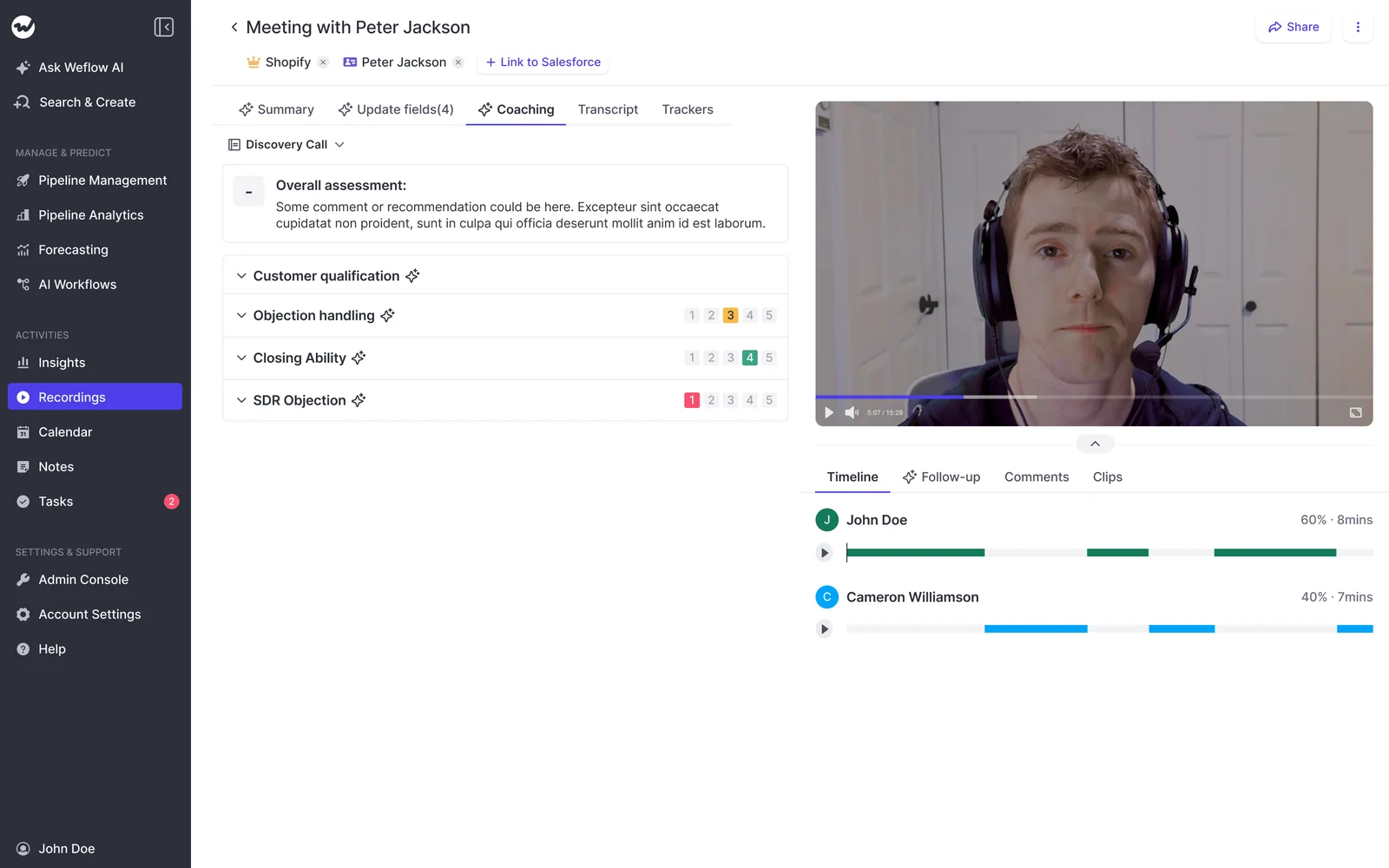
Weflow has no live in-meeting assistant and no real-time battlecards. The summary, field updates, follow-up email and coaching score all arrive after the call.
How Weflow deal warnings work, and where reporting stops
Weflow deal warnings live in Weflow, so you can't put them in a Salesforce report or a BI dashboard without extra work. The workaround is an agent that writes the assessment into a Salesforce field you create. It works, but you have to build it. Weflow fields carry a W in the interface, so you can see what will and won't reach a report.
The warnings themselves are part of Weflow Deal Intelligence & Forecasting, not Conversation Intelligence:
- 50+ pre-built deal signals
- Custom rules with AND/OR logic on any opportunity field except text
- Rules on computed fields such as days inactive, close-date pushes and time in stage
You write the rules for your own sales cycle. Fourteen days of silence means something different on a 60-day cycle than on a 12-month one.
How Weflow connects to your stack, AI assistants and raw data
- Integrations: Weflow connects natively to Salesforce, Gmail, Google Calendar, Outlook, Zoom, Teams, Meet, Slack and the Outreach dialer. The desktop app records softphone calls on tools like Aircall and RingCentral because it captures system audio. There's no dialer catalogue to match Chorus. Weflow works only with Salesforce.
- MCP: The official connector is read-only. It gives Claude, ChatGPT and other assistants your playbooks, summaries, transcripts, forecast calls and pipeline metrics. An admin switches it on per workspace, uses a separate toggle to decide whether assistants see full transcripts or only summaries, and can see every connected user. Per-rep breakdowns cap at 25 owners.
- Raw data: The REST API bulk-exports transcripts, metadata, scores and signals as JSON or CSV into Tableau, Looker or a warehouse, and keeps an exportable audit log of field write-backs. It isn't gated behind an enterprise tier. There's no native Snowflake, Databricks or BigQuery connector, so the API is the route there.
Weflow pricing is published, and we cover it side by side in the pricing section below.
What Chorus does well, and where it stops short
Chorus is a competent incumbent with the best coaching program model and the broadest integration catalogue in this comparison. It stops at four-framework field writes that need rep approval, sync that teams tell us they can't trust, no language detection, and an API tied to Enterprise.
What Chorus writes into Salesforce, and why reps must approve it
On recording, Chorus is solid:
- Once calendars sync, Chorus joins business meetings automatically. It identifies them by a conferencing link plus an external attendee.
- Meeting Import pulls native Zoom, Teams and Meet recordings after the call, with no bot. Teams imports usually arrive within 30 minutes to an hour.
- Chorus doesn't detect the spoken language. It transcribes in each user's preset default, so a call in another language comes out jumbled until someone reprocesses it. Summaries and next steps are always in English.
What reaches Salesforce is where you feel the limits:
- Qualification fields: Meeting-Based CRM Updates drafts MEDDIC, MEDDPICC, BANT or SPIN values into opportunity fields an admin maps, set to overwrite or append. Nothing is written until the rep clicks Approve Update, and there's no option to skip approval. A SPICED or custom-framework team still fills its fields by hand.
- Activity: Each meeting becomes a Task or Event carrying the attendees, topics discussed and next steps, 30 to 60 minutes after the call.
- Chorus objects: With the managed package installed, the full transcript lands on a Chorus Engagement record, and each tracker hit becomes a child Moment record. Six pre-built reports and custom report types sit on top. Chorus doesn't write to your own custom objects.
- Corrections: Reassigning a recording to the right opportunity inside Chorus doesn't update the CRM or tasks already written.
The tracker path to Salesforce depends on the managed package. Chorus's own tracker screen tells admins to ignore the Push to CRM column if the package isn't installed:
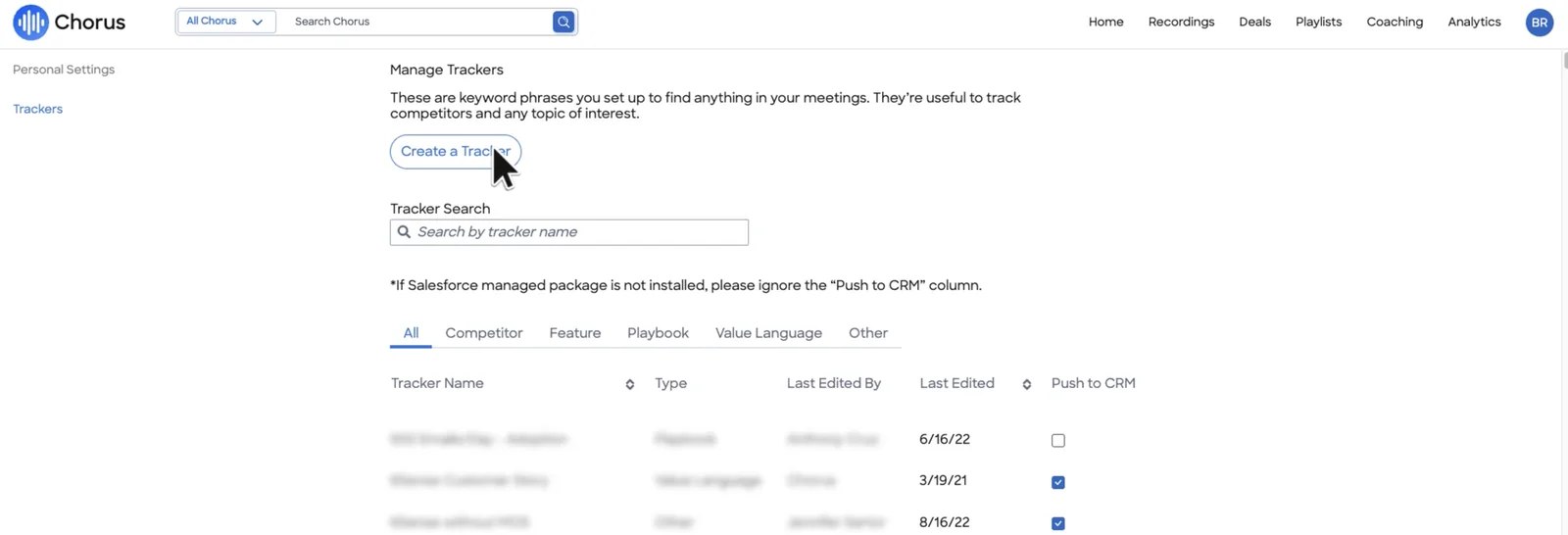
Sync reliability is the trust problem. On one call, a team told us that fifteen meetings produced two records logged against the right contact. Reps who were working looked inactive on the dashboard their managers judged them by.
Why Chorus coaching initiatives and trackers are still its strength
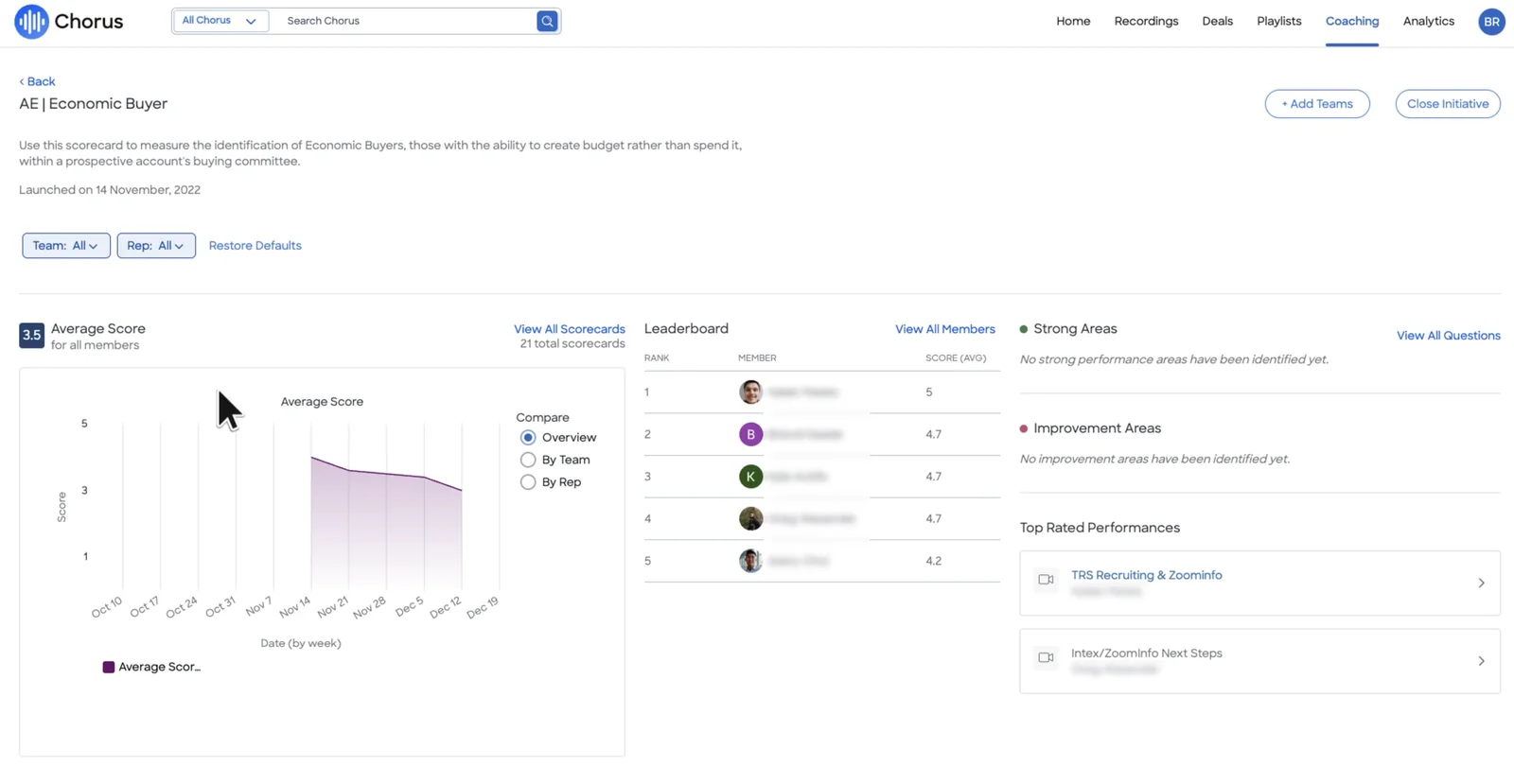
This is the part of Chorus you'd genuinely give up. Chorus runs coaching as a program with a start and an end. Enablement launches a scorecard as a dated initiative against named teams, such as an AE economic buyer card or an SDR business pain card.
Managers rate calls 1 to 5 per question, with AI recommending which calls to score. Each initiative gathers a leaderboard, a weekly trend by team or rep, and system-identified strong and weak areas. If your managers run structured development cycles, that format fits how they already work.
This is what a Chorus coaching initiative looks like in the product:
The trackers are mature too:
- Basic trackers take keywords, phrases and an ignore list. Advanced trackers take Boolean AND/OR syntax.
- Each tracker applies to every past and future call, with a preview of the first 50 matches before you save.
- Categories are Competitor, Feature, Playbook and Value Language, with a speaker filter and a positive, negative or neutral label.
- Analytics shows how often a topic comes up, at which stage, and its win/loss ratio.
- Smart Playlists fill themselves from saved criteria.
How Chorus Momentum Signals flag deal risk
Chorus Momentum Signals flags at-risk deals with twelve alerts built on activity, CRM data and conversations. The alerts appear in the Deals view:
- Activity and engagement: No activity in 10 days, no prospect engagement in 7 days, fewer than 2 active contacts, a slow rep or a slow buyer.
- Deal shape: Stuck in stage, single-threaded, decision makers absent late, no demo in the cycle.
- Conversation: Late-stage competitor mentions, negative buyer sentiment, and a close date within 14 days with no pricing discussion.
- Adjustable: Six alerts have thresholds you can change, such as days, contacts or which seniority counts. You can also build daily email alerts on any tracker, filtered by rep, stage and amount.
Chorus doesn't snapshot the pipeline, so period-over-period movement can't be reconstructed there.
How Chorus connects to dialers, ZoomInfo MCP and its API
- Integrations: This is the broadest catalogue in the comparison: 19 conferencing providers, 30+ dialers including Outreach, Salesloft, Aircall and Dialpad, three cloud CRMs, Clari, Gainsight and single sign-on. Dialer imports load the last seven days on connection. ZoomInfo enriches every participant with contact and org-chart data.
- MCP: Since July 2026, ZoomInfo's MCP server answers account questions from Chorus recordings, emails and transcripts, with citations. It ships as a first-party connector in Claude, ChatGPT and other clients. Usage spends ZoomInfo credits, and the training prohibition relies on a setting in your own AI client.
- Raw data: API access comes with the Enterprise package, and so do the Zapier and Slack integrations. Below Enterprise, you have neither an agent builder nor the API to build around it.
Chorus publishes no price. The pricing section below includes the benchmark we work from.
What Attention does well, and where it stops short
Attention leads on agents, prompt-tested scorecards, live battlecards and the widest MCP surface here. On the record itself, it relocates the problem instead of fixing it.
What Attention writes into Salesforce when auto-sync is on
Recording works two ways:
- A notetaker bot joins as a participant by default.
- A desktop app records from the rep's Mac with no bot. It runs on Apple Silicon only and needs four macOS permissions, including Full Disk Access.
- The desktop app can't get the meeting link for Teams in a browser or Meet in Edge, so automatic recording and CRM export don't run for those meetings.
- A network drop ends a desktop recording, and the app doesn't restart it automatically.
For field writes, an admin writes an extraction prompt per field (free text or picklist) and maps it to Salesforce or HubSpot. Then:
- Review: Automatic sync is the recommended default, so nobody sees a value before it lands on the opportunity. Manual sync gives reps a per-field checklist instead.
- Empty findings: When a call has nothing on a field, Attention writes prose about the absence. On one demo call, the Economic Buyer field read that the conversation didn't identify the decision maker. Every report and every downstream AI treats that as filled data.
- New fields: Mapping is manual and forward-only. Add a Salesforce field and it stays blank on past calls, with no error if someone forgets to map it.
- Deal scope: A field can be scoped to the deal, so it summarizes every call linked to the opportunity. This is a genuinely useful option.
- Email: Attention imports emails into its own store and ties them to accounts and deals. They aren't Salesforce activities.
How Attention's prompt-written scorecards and call labels work
Attention's scorecard builder is well designed. For each criterion, you write what a low score and a high score look like, optionally a midpoint, and set a weight. Then you test that wording against a real past call before you save it. That test loop saves weeks of guessing.
- Pre-built MEDDIC, BANT and SPICED frameworks, plus drafted scorecards and field setups when you connect a CRM
- Scorecards target specific teams and call tags, so discovery calls get the discovery rubric
- The scale is set per scorecard, so scores from two scorecards aren't comparable unless you keep scales consistent
- AI call labels, such as a Competitor category, replace keyword trackers and apply to future calls
- The desktop app shows a live transcript and live talk-track and battlecard prompts during the call
All of this performs as well as the prompts your RevOps team writes or accepts. A strong RevOps team gets a sharp system quickly. A thin one starts from drafts it has to judge.
How Attention flags deal risk from conversations
Attention's Deal Risk Monitor scans conversations for risk phrases and notifies sales managers. Admins can add their own Score and List indicators that show on each deal in Deal View, and the deal score updates from rep behavior and buyer engagement on calls.
The documented risk alerting reads calls. Attention's call-level analysis uses CRM fields to choose which calls to read, not as material to analyze. A slipping close date with no call about it doesn't raise a flag there. The Super Agent is the exception: it queries Salesforce accounts, pipeline and imported email when you ask it directly.
How Attention's MCP server and workflows reach your data
- Integrations: Attention claims 200+ integrations. Its workflow steps act inside Salesforce, HubSpot, Gmail, Google Docs and Sheets, Slack, Notion, Linear and Snowflake. Workflows include loops, HTTP requests and custom Node.js or TypeScript code, and they can call OpenAI or Anthropic directly. Code in a workflow is software that someone has to maintain.
- MCP: A read-write server with 68 tools across 15 groups, nine of them destructive. It returns raw, searchable transcripts, runs analysis across up to 25 calls, and reaches Attention's Super Agent. Usage is rate-limited with no consumption charge, and calls run under the caller's own permissions.
- Raw data: Transcripts, scorecard results and insights are available through MCP and API keys. An org-level API key carries full organization access with no user binding. The Salesforce integration user needs Modify All Data, which overrides sharing rules.
Here's Attention's workflow builder with its Slack summary template:
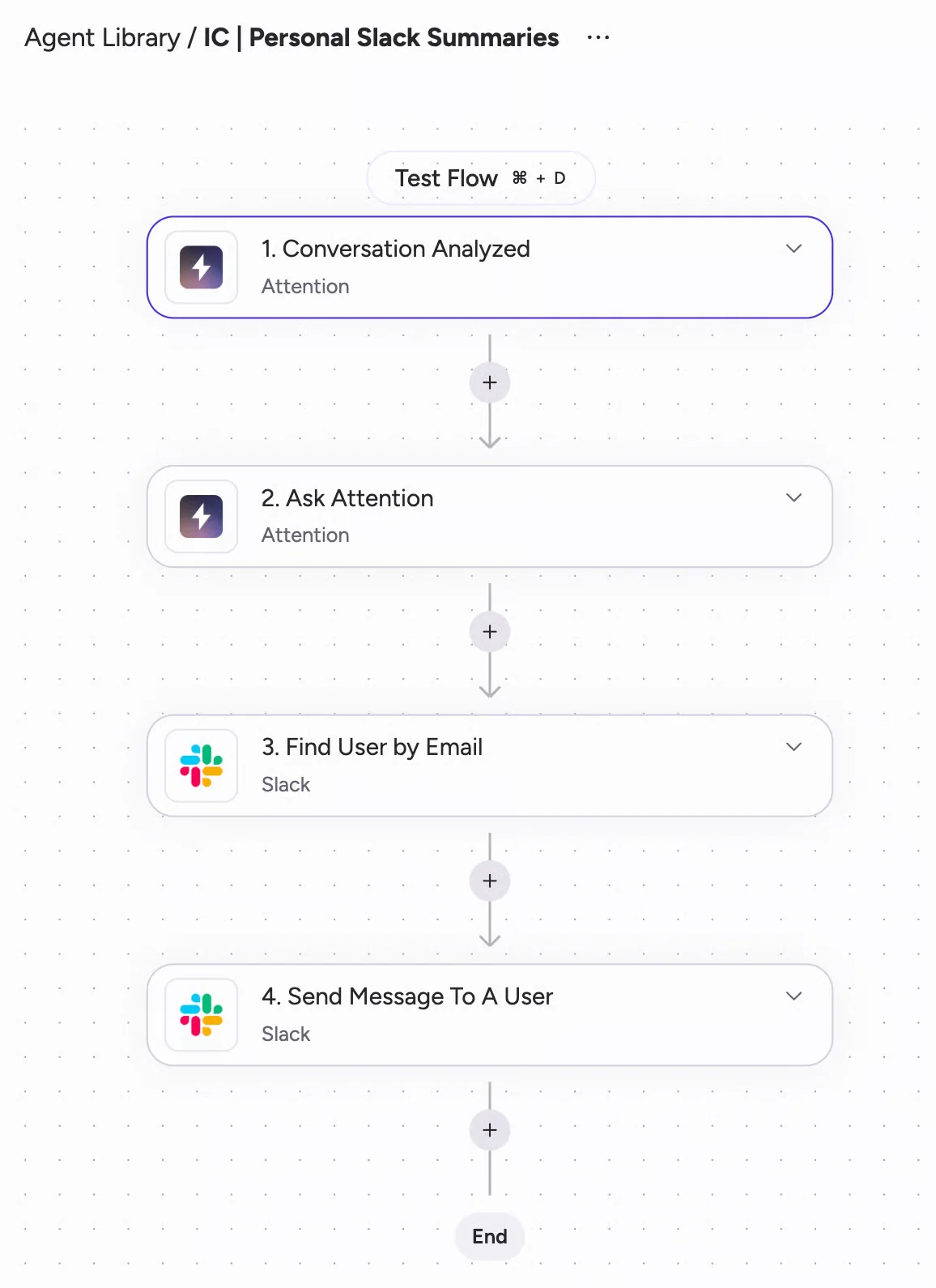
Attention publishes no price. The pricing section below covers what that means for your business case.
What Weflow, Chorus and Attention cost, and who publishes prices
Only Weflow publishes prices. For Chorus we have a benchmark, and for Attention there's no figure we'd stand behind.
| Pricing detail | Weflow | Chorus | Attention |
|---|---|---|---|
| Pricing model | Per seat. Agent Builder is the only consumption-priced product. | Custom plans across Basic, Revenue Intelligence and Enterprise packages | Custom contract, with no published credits or metered AI |
| Published list price | Weflow Conversation Intelligence: $39 per user per month. Revenue AI Foundation with Weflow Activity & Contact Capture: $49. | Not published. Benchmark only: about $8,000 a year for a base with three seats, plus about $1,200 per extra seat. | Not published |
| Minimum seats and term | 10 seats, 12-month term, billed annually | The benchmark base includes three seats | Not published |
| What costs extra or is gated | Agent Builder beyond the free 25 actions a month: $299 for 500 actions, $999 for 2,500 | API, Zapier and Slack need Enterprise. ZoomInfo MCP spends credits. | MCP is on every plan and rate-limited |
| How you get a real number | List prices on our site, with volume discounts from roughly 30 to 40 seats | Quote through ZoomInfo sales | Demo booking |
Ask Weflow AI, summaries and AI field updates are included in the Weflow seat, with no usage caps. MCP metering also differs: ZoomInfo's MCP spends the same credit pool the platform already meters, while Attention and Weflow don't charge for assistant traffic.
How to switch off Chorus without losing call history
Your library and trackers can move. Whether the switch sticks depends on your reps.
Moving your Chorus recording library and tracker set
Weflow imports your recordings and transcripts through the leaving vendor's API at no cost. It takes about one to two weeks, depending on volume. The imported transcripts stay searchable by Ask Weflow AI, so a question about how an objection was handled last year still gets an answer. Attention also offers an import endpoint.
We'd run the cutover in this order:
- Library: Start the import early. It runs through Chorus's API, and Chorus ties API access to the Enterprise package.
- Trackers: Carry your tracker set over so competitor and objection trends don't restart from zero.
- Backfill: Weflow Activity & Contact Capture pulls up to 24 months of emails and meetings into Salesforce. Conversations that were never recorded can't be recovered, so don't leave a gap between Chorus going off and Weflow going on.
- Test writes: Test field and summary writes against every object your activities map to before rollout, because a failed write doesn't replay.
- Sign-ins: Have every licensed user sign in once. The notetaker won't join meetings for a licensed user who has never logged in, even though their activity capture runs.
Getting reps to accept another tool change
RevOps decides on cost, sync and data. Reps decide on parity and on what peers went through. If they've just absorbed one new tool, expect resistance, whatever the next one does. An admin put it plainly on a call with us:
We just got another new tool called Attention, and I know that in our team there is some resistance to more tools. I want to be super clear when I get them to start using Weflow, and see that I can sell it to them with confidence.
These are the moves we see work:
- Phase it: Capture and conversation intelligence go first, because they give reps summaries and field updates without asking anything of them. Pipeline and forecasting follow once that has stuck.
- Start small: A pilot group of five to ten people, with a short session and a recording for other time zones.
- Use real data: Our 14-day trial runs on your own Salesforce, set up by our implementation team, so reps see their own deals on day one.
- Let the product handle consent: A notice posts in the meeting chat and guests can opt out, so reps don't have to announce the recording.
- Name an owner: Prompts, scorecards and field mappings go stale without one person inside the team who owns them.
Choose Chorus, Attention or Weflow based on your real problem
Choose Weflow if:
- Your problem is the Salesforce record: half-empty qualification fields, duplicate meetings, and emails outside the deal
- You want auto-write or review set field by field, across every field type except lookups
- You run SPICED or a custom methodology and want it filled from calls and emails
- You want a published seat price and an API with no tier gate
- Not if: you need live battlecards, a read-write MCP server, a large dialer catalogue, or a CRM other than Salesforce
Choose Chorus if:
- Your managers run coaching as dated programs with leaderboards and weekly trends
- Your team relies on mature Boolean trackers and Momentum Signals alerts
- You value ZoomInfo enrichment and ZoomInfo's MCP answering from your calls
- You need broad dialer and conferencing coverage
- Not if: your qualification fields need to fill without rep approval, or your team sells in languages other than English
Choose Attention if:
- You have a strong RevOps team that will write and maintain prompts, workflows and code
- You want live battlecards during calls
- You want the widest MCP surface, with raw transcripts and write access
- Not if: your security review will object to auto-sync without review, public snippet links, or Modify All Data on the integration user
See how Weflow captures activity, updates Salesforce fields from calls, and rolls up your forecast. Book a 30-minute demo.
Questions RevOps leaders ask before replacing Chorus
How much does Attention cost?
Attention doesn't publish pricing. It's custom-priced for mid-market and enterprise, and pricing questions go to a demo booking. Its workflow builder and MCP server have no published rate card either, and MCP usage is governed by rate limits rather than credits.
How much does Chorus cost for a 20-seat team?
ZoomInfo doesn't publish Chorus prices. The benchmark we work from is about $8,000 a year for a base with three seats, plus about $1,200 a year per additional seat, which puts 20 seats near $28,000 a year. That's a benchmark, not a quote. It covers conversation intelligence only, and API, Zapier and Slack access sit in the Enterprise package.
What does Weflow cost with and without Activity & Contact Capture?
Weflow Conversation Intelligence on its own is $39 per user per month. Weflow Revenue AI Foundation adds Weflow Activity & Contact Capture for $49 per user per month. Both bill annually on a 12-month term with a 10-seat minimum, and both include Ask Weflow AI and the free Agent Builder tier.
Is Chorus bundled into our ZoomInfo contract?
ZoomInfo sells Chorus as an engagement product inside its platform, on custom plans. Some Chorus-connected features sit on the ZoomInfo side, such as the MCP conversation tool, which spends ZoomInfo credits. If your Chorus seats are on the same order form as your ZoomInfo data, leaving Chorus is part of your ZoomInfo renewal conversation.
Can we bring our Chorus recordings and trackers to Weflow?
Yes. Weflow imports your recordings and transcripts through the leaving vendor's API at no cost, in about one to two weeks depending on volume. Your tracker set carries over too, so keyword reporting doesn't restart from zero.
Do we lose live battlecards if we don't pick Attention?
Yes. Weflow has no live in-meeting assistant or real-time battlecards, and Attention's desktop app ships both. With Weflow, everything arrives after the call: the summary, field updates, follow-up email, coaching score and tracker hits. Our view is that a rep reading battlecards isn't listening, but it's a real difference.
Which Salesforce objects does each tool write to, and do we get duplicates?
Chorus writes a Task or Event per meeting, plus its own Engagement and Moment objects through the managed package. Attention writes extracted values to the fields you map and keeps imported emails in its own store. Weflow writes one Event per meeting with the summary on it, plus a recording custom object, and Weflow Activity & Contact Capture writes emails into Salesforce. Duplicates appear when a separate recorder and a separate capture tool each write the same meeting.
How does each tool handle recording consent on Microsoft Teams?
Customers tell us Chorus consent works well on Zoom and poorly on Teams. One Teams-based customer built its own integration to download recordings instead. Weflow offers opt-out, opt-in and manual flows, a chat notice with a stop link, and a pre-meeting email on Teams. Attention's desktop-app consent notice is in beta and enabled per organization on request, and its high-quality capture mode shows nothing to other Teams participants.
What will our security review flag in Attention's defaults?
Expect five items:
- Snippet links share as public URLs unless someone ticks the restriction
- Automatic CRM sync writes values without review
- The Salesforce integration user needs Modify All Data
- The desktop consent notice is in beta
- Org-level API keys carry full organization access
Each one is defensible on its own. Together, they describe a product built for teams that move fast.
Does Weflow train AI models on our call data?
No. Weflow never uses customer data to train AI models, and AI processing runs with Zero Data Retention. Weflow is SOC 2 Type II certified and GDPR compliant. Your instance runs in the region where your Salesforce is hosted, and you can override that to keep data in the EU or UK.
Can we pilot on real calls if legal objects to customer data?
Yes. The trial runs on your own Salesforce org, and your legal team can negotiate deletion terms with ours before the pilot starts. We agree pricing and success criteria up front too. A sandbox proof of concept is available, but reps rarely work from a sandbox, so it produces few real calls.
Can our own AI assistant reach the call data, and with what permissions?
Weflow's MCP connector is read-only. An admin turns it on per workspace, decides with a separate toggle whether assistants see transcripts or only summaries, and sees every connected user. Attention's server is read-write and runs under the caller's identity, except for org-level keys. ZoomInfo's MCP answers from Chorus calls under your ZoomInfo licence and spends credits.
Does Weflow work with HubSpot or only Salesforce?
Only Salesforce. Weflow is built for Salesforce teams and doesn't support HubSpot, Dynamics or other CRMs.











