

Best Jiminny Alternatives for Salesforce Activity and Email Capture (2026)
Compare Jiminny alternatives for Salesforce activity and email capture, including Weflow.


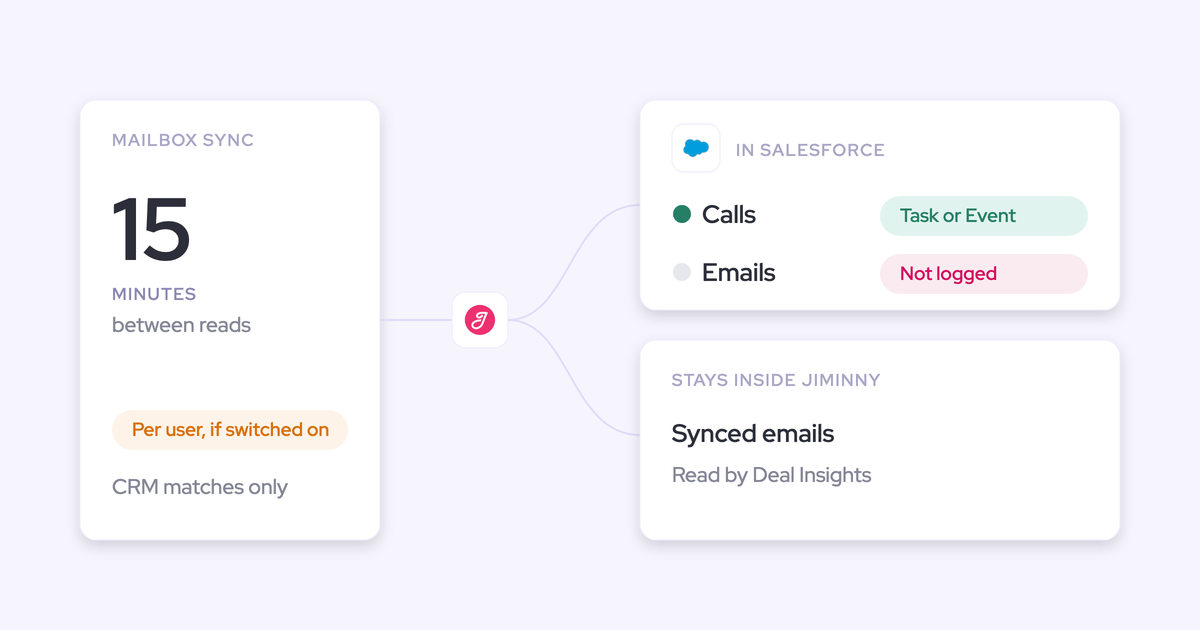

Jiminny records your calls, but it doesn't put your email into Salesforce. It reads each rep's mailbox, and the synced emails stay inside Jiminny for Deal Insights. It matches email only to records that already exist in the CRM. Every rep also has to switch on sync and complete their own sign-in.
The result is predictable. Your activity timeline, Last Activity Date and any flow built on activity run on recorded calls alone.
You have two honest options:
- Keep Jiminny and add a capture layer. Jiminny keeps coaching and the dialer. A capture tool such as Weflow Activity & Contact Capture writes email, meetings and contacts into your own Salesforce records. Nektar.ai, Revenue Grid and Einstein Activity Capture also fit this path.
- Consolidate onto one platform. Weflow Revenue AI Foundation or Gong handles both recording and capture in one place.
What Jiminny does well, and why Salesforce misses your email
Jiminny is a strong coaching-first conversation intelligence tool. It isn't a Salesforce email capture layer, and most of the frustration we hear comes from teams that assumed it was.
What Jiminny does well for coaching-first revenue teams
Before any criticism, here's what you'd be giving up if you left entirely:
- Jiminny works across Salesforce, HubSpot, Microsoft Dynamics 365, Pipedrive, Zoho, Copper, Close and Bullhorn. That makes it a natural fit for teams on HubSpot or on more than one CRM.
- Jiminny offers live in-call coaching with real-time whisper, which most post-call tools don't.
- Jiminny Voice gives reps a built-in dialer and SMS inside Salesforce or HubSpot. Each user gets 1,350 minutes per 30 days.
- Jiminny sells each tier as one flat per-seat fee, with no platform fee, add-on modules or usage credits.
- Jiminny logs recorded calls to Salesforce as Tasks or Events with configurable fields. The host can reassign a call that was logged to the wrong record, and Jiminny moves the activity in Salesforce.
It also has a read-only MCP connector for Claude and ChatGPT on its Scale and Grow tiers.
Why Jiminny email stays inside Jiminny, not Salesforce
You can see each of these mechanics in your own org today:
- Jiminny uses synced email for Deal Insights and never writes it to Salesforce. It matches emails to Salesforce records only inside Jiminny.
- Jiminny keeps only emails whose sender or recipients match an existing Account, Contact or Lead. A new stakeholder's email doesn't count until someone creates the record.
- Email sync runs per user on delegated permissions. An admin can switch a user's sync on, but only the rep can complete the Microsoft or Google sign-in.
- Jiminny creates contacts only from external meeting participants who actually joined. It never creates them from email, from dialer calls, or from invitees who didn't show.
- Jiminny publishes no prices, so you can't build a like-for-like comparison without a quote.
Opportunity mapping isn't on this list on purpose. Jiminny's call mapping handles contact roles and lets the host reassign a call. Email simply never gets that far.
The per-user sign-in is the one that stings most in practice. This is how one Sales Ops lead described chasing reps through setup steps:
"A lot of the other ones are like, oh, like get them to like install the thing and do the setup. But I'm like, they're not going to. They're not going to do it. It's just like herding cat."
Five Salesforce tests to run on any Jiminny alternative
A capture replacement is judged on one question: did we lose anything? Run these five tests with nothing configured. Leave templates, scorecards and custom use cases off until parity is proven.
| Test | What to check | How to test it in your org |
|---|---|---|
| 1. Coverage without rep action | Does capture run for a user who never signs in or installs anything? | Enroll one user who never logs in. Send email from their phone, browser and desktop client, then count what lands. |
| 2. Record type written | Which object holds email (EmailMessage or Task) and meetings (Event), and can Last Activity Date, reports and flows read it? | Build a quick record-triggered flow on the object. Send a test email and watch the flow fire and Last Activity Date move. |
| 3. Contacts from email | Does a stakeholder who only appears on a thread become a contact, and get a contact role? | CC someone at a customer who isn't in Salesforce, reply, then look for the new contact and opportunity contact role. |
| 4. Renewal plus expansion | Where does an email land when one contact sits on two open opportunities, and how does the rep correct it? | Email the shared contact on a renewal-plus-expansion account. Move it to the right deal and see whether the next reply follows. |
| 5. History | How far back can email and meetings be backfilled, and at what cost? | Backfill the trial period and count how many emails and meetings arrive that Salesforce never held. |
Test 2 decides whether the data is usable at all. As our co-founder puts it:
"If you haven't stored an object or record into the core Salesforce database, then you cannot do automations with it."
— Philipp Stelzer, CPO & Co-founder of Weflow
AI summaries and scorecards come after these five tests. Every AI output reads the captured data, so a gap in capture becomes a gap in the AI.
How Jiminny and five alternatives compare on Salesforce capture
Only some of these tools write email to Salesforce with no rep action, create contacts from email and give reps a correction path on multi-opportunity accounts. The sections below expand every cell.
| Capability | Weflow | Jiminny | Gong | Revenue Grid | Nektar.ai | Einstein Activity Capture |
|---|---|---|---|---|---|---|
| Automatic email capture | Server side through one tenant-level app; no rep sign-in | Per-user sync and sign-in; email never written to Salesforce | Server-side import; Salesforce export runs forward from the day it's enabled | Server-side Sync Engine on 30-minute cycles by default | Admin-level background read; about an hour, up to 9, to reach Salesforce | Background from the connected account; org-level or per-user OAuth |
| Activity stored as native CRM records | Email as EmailMessage or Task (admin choice); meetings as Event | Recorded calls as Task or Event; email stays in Jiminny | Tasks or Events once an admin enables export; transcripts stay in Gong | Email as Task or EmailMessage; meetings as Event | Email as Task; meetings as Event | Task and EmailMessage since Summer '25; meetings as Event |
| Automatic contact creation | From To and CC on send; capped and enriched; never leads | Only from meeting participants who joined | Inactive Flow template; call participants only | Available but off by default | From email and meetings by domain; limiting rules in Harvest | Contact Auto-Creation unavailable under the Summer '25 default |
| Choosing the right opportunity | Fixed precedence, account fallback; rep re-maps the thread in the add-in | Contact role, host ownership, one company-wide rule; host reassigns calls | Admin rules; can associate up to 20 deals; calls moved inside Gong | Only when the rep owns the deal and the contact holds a role | ML score, account fallback, learns from manual reversals | Contact role first, then account tiebreakers; rep fixes it on the email record |
| Recording video meetings | Weflow Conversation Intelligence: Zoom, Teams, Meet, Webex | Zoom, Meet and Teams bot; desktop and mobile recording | Zoom, Meet, Teams, Webex and seven other providers | Teams and Zoom only, in the $149 tier | Doesn't record | Doesn't record; that's Einstein Conversation Insights |
| Integrations with other tools | Salesforce, Google, Microsoft, Zoom, Slack, Outreach dialer; API for warehouses | Eight CRMs, about 20 dialers, Zapier | About 450 listings in its marketplace | Microsoft 365, Exchange, Google; third-party APIs in a paid package | Salesforce, Snowflake, Google, Microsoft, Zoom | Office 365, Exchange, Google Workspace; Salesforce's own products |
| Access from AI assistants (MCP) | Read-only connector; at parity with Jiminny | Read-only connector on Scale and Grow | Three record-scoped tools; insights only; metered credits | MCP server since July 2026, connected manually | None of its own; through Salesforce's MCP | None of its own; Salesforce Hosted MCP Servers on Flex Credits |
| Raw data access outside the tool | REST API bulk export in JSON or CSV | REST API with an admin-generated org key | API capped at 10,000 calls a day; Data Cloud sold separately | No public API for captured activity; Salesforce API instead | Delivery to Snowflake | Reports and APIs on synced records; its own store isn't exportable |
| Pricing | Published: $19 capture, $49 with conversation intelligence | Not published; flat per-seat tiers | Not published; per-user licence plus platform fee | Published: $30, $49 and $149 tiers | Quoted; backfill at $8 per user per month of history | Standard in editions; full version via a $50 add-on or Unlimited |
Weflow: email, meetings and contacts written to your Salesforce
Weflow is the Revenue AI Orchestration platform for sales, customer success, and RevOps teams. It's built for Salesforce teams, and everything it captures lands in native Salesforce objects you own.
Weflow Activity & Contact Capture answers each Jiminny gap directly. Here's how it behaves on the nine capabilities:
| Capability | What Weflow does |
|---|---|
| Automatic email capture | Captures server side through one tenant-level app in Microsoft Entra or Google Workspace. Every enrolled user is captured on any device, including users who never log in. Weflow logs only mail that matches a Salesforce record, and it doesn't capture personal accounts or mail sent from a separate deliverability subdomain. |
| Activity stored as native CRM records | Writes email as EmailMessage or Task, chosen per configuration, and meetings as Event. About nine in ten customers pick EmailMessage; Task suits teams whose reporting already runs on tasks. |
| Automatic contact creation | Creates contacts from To and CC recipients when the rep sends, not BCC. You can cap contacts per event, restrict creation to existing accounts and create the opportunity contact role automatically. Contacts arrive enriched. Weflow never creates leads. |
| Choosing the right opportunity | Follows a fixed precedence: contact role, opportunity owner, mailbox owner, account relationship and stage. It never logs to a closed opportunity and falls back to the account when the evidence doesn't settle it. A rep re-maps once in the Outlook add-in or Chrome extension and the choice applies to the whole thread. |
| Recording video meetings | Recording sits in Weflow Conversation Intelligence, not in the capture seat. It covers Zoom, Microsoft Teams, Google Meet and Webex, plus a desktop app that records without a bot. |
| Integrations with other tools | Native integrations with Salesforce, Gmail, Google Calendar, Outlook, Zoom, Teams, Meet, Slack and the Outreach dialer. There's no native Snowflake, Databricks or BigQuery connector, so teams use the API to move data into a warehouse. |
| Access from AI assistants (MCP) | A read-only MCP connector for Claude, ChatGPT and other assistants, switched on per workspace with a separate transcript toggle. This is at parity with Jiminny, not a differentiator. |
| Raw data access outside the tool | A REST API bulk-exports transcripts, metadata, scores and signals as JSON or CSV. The activity records themselves already sit in your Salesforce. Jiminny also offers a REST API, so this is parity too. |
| Pricing | Published. Weflow Activity & Contact Capture is $19 per user per month; Weflow Revenue AI Foundation, which adds Weflow Conversation Intelligence, is $49. |
The object choice is one setting in the capture setup, next to calendar sync direction:

The renewal-plus-expansion case is where the add-in earns its place. The rep sees which account, opportunity and contacts an email will log to, and changes the opportunity from the inbox:
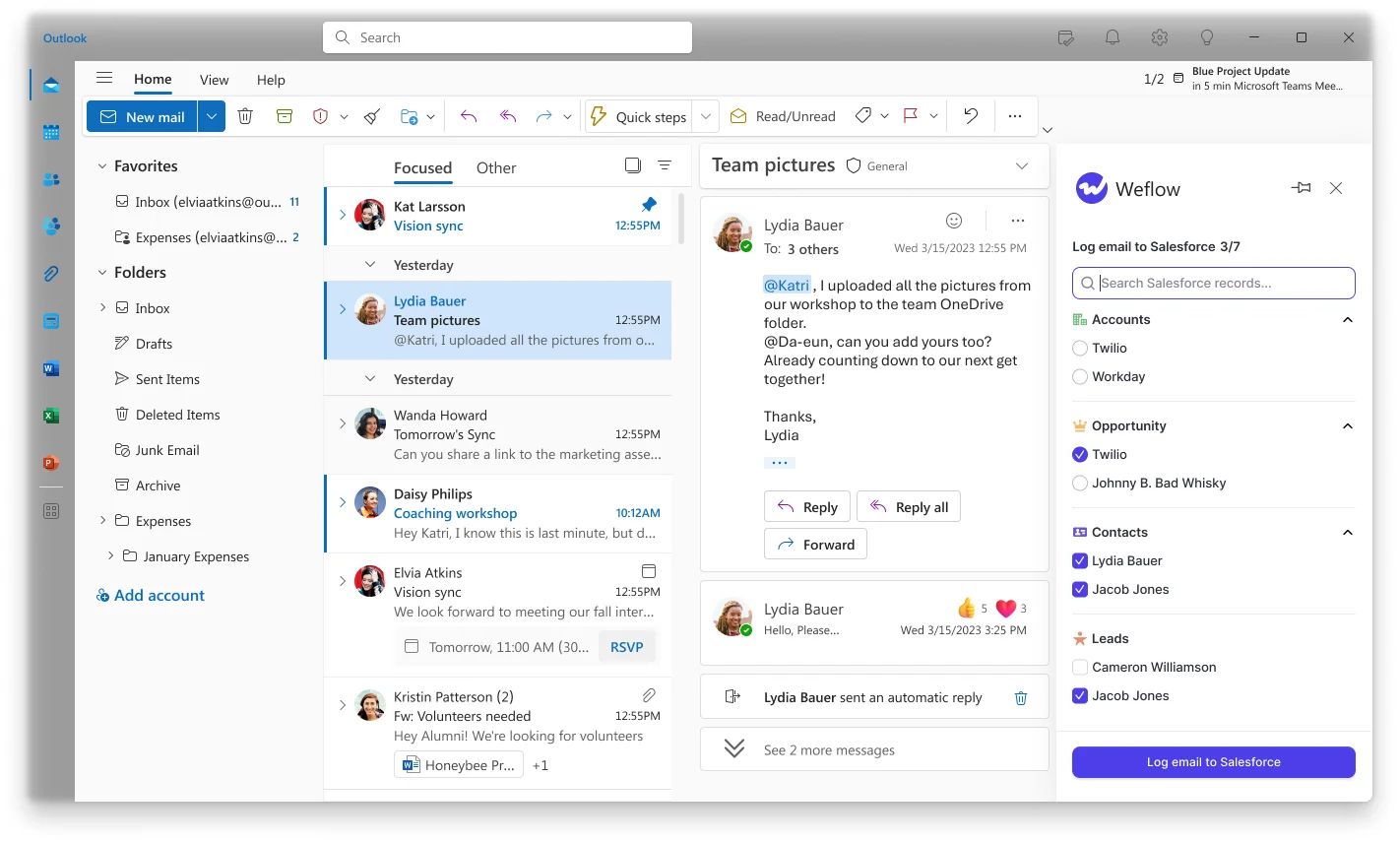
We built it this way because server-side capture alone can't tell which of two open deals a shared contact is emailing about. The rep is the only person who knows, so the add-in asks them once and remembers it for the thread.
Who should pick Weflow instead of Jiminny
- Salesforce teams that want email, meeting and contact capture plus conversation intelligence in one platform, with everything written to their own Salesforce records.
- Teams where email coverage has stalled on rep sign-in, because Weflow captures users who never log in.
- Teams with renewal and expansion running on the same accounts, who need a correction path reps will actually use.
Where Weflow stops as a Jiminny replacement
- Salesforce only. Teams on HubSpot or several CRMs should stay on Jiminny.
- No dialer and no live in-call coaching. Teams that rely on Jiminny Voice or real-time whisper lose both.
- No lead creation. Inbound teams that run on leads keep whatever creates them today.
- 10-user minimum per product or bundle.
- One configuration per mail tenant. Groups running several tenants after acquisitions configure each one separately.
- One opportunity per email. There's no nearest-close-date rule, so renewals teams usually get their own configuration filtered on opportunity type.
Gong: deep conversation analytics, forward-only email export to Salesforce
Gong is a conversation intelligence platform that records and analyzes calls in its own cloud. It's sold as a mandatory Gong Foundation licence with applications on top.
Gong has the deepest conversation analytics in the category, and it deserves that credit. Its call page, for example, breaks a recording into the topics discussed along the timeline:
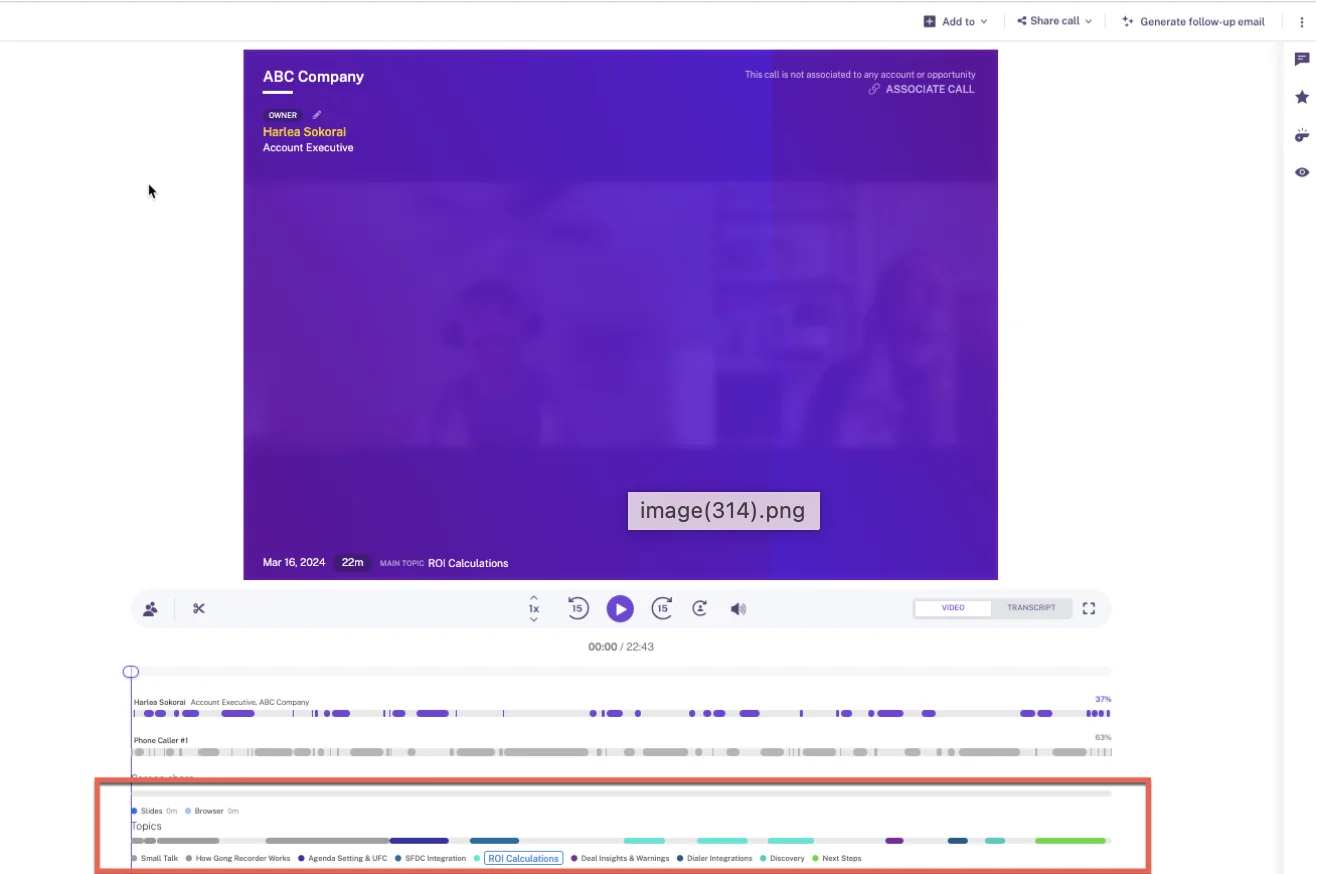
The Salesforce capture side is where it's weaker:
| Capability | What Gong does |
|---|---|
| Automatic email capture | Imports sent and received email server side, company-wide or user by user. It exports to Salesforce once a tech admin enables it, and only from that day forward. |
| Activity stored as native CRM records | Exports meetings, calls and emails as Tasks or Events, but only activity with a participant matching an existing contact or lead. Call transcripts stay in Gong. |
| Automatic contact creation | Gong's own sync doesn't create Salesforce contacts. An inactive Flow template, once an admin activates it, creates contacts or leads for call participants only, never from email. |
| Choosing the right opportunity | Admin rules narrow by deal filters, owner, contact role, deal team and a date field. If several deals remain, Gong associates all of them up to 20. Any user can move a call to another opportunity inside Gong. |
| Recording video meetings | Records Zoom, Google Meet, Microsoft Teams, Webex and seven other providers, on any plan. |
| Integrations with other tools | The Gong Collective lists about 450 integrations and partner solutions, and Gong imports calls from about thirty dialers. |
| Access from AI assistants (MCP) | Three record-scoped tools that return AI insights, not transcripts. The server is read-only and draws metered credits. |
| Raw data access outside the tool | The API returns transcripts, trackers and scorecards, capped at 10,000 calls a day. Warehouse delivery needs Data Cloud, a separate purchase of about $5,000 a year. |
| Pricing | No published prices: a per-user licence plus a platform fee that scales with users, quoted through a custom proposal. |
Who should pick Gong instead of Jiminny
- Larger teams whose first priority is the deepest conversation analytics available.
- Teams that need the widest integration marketplace, including dialers and meeting platforms beyond the big four.
Where Gong falls short as a Salesforce capture layer
- Email export to Salesforce runs forward only from the day it's enabled.
- There's no native contact creation, and the Flow template covers call participants only.
- There's no mailbox add-in to correct which record an email maps to.
- There's no historical email or calendar backfill.
- Transcripts stay in Gong rather than in your Salesforce.
- AI usage is metered in credits, pooled at 2,000 per paid seat per year.
- Prices aren't published.
Revenue Grid: capture-first sync for Outlook-heavy Salesforce teams
Revenue Grid is a Salesforce activity capture tool: an Outlook add-in or Gmail extension plus a server-side Sync Engine. It's one of two vendors on this list with published list prices.
| Capability | What Revenue Grid does |
|---|---|
| Automatic email capture | The Sync Engine saves inbound and outbound email with non-blocklisted addresses, whether or not the sidebar is open. Auto-saved email arrives in 30-minute sessions by default, stretching to 60 or 120 minutes on quiet mailboxes. |
| Activity stored as native CRM records | Email saves as completed Tasks or, with Enhanced Email, as EmailMessage records; meetings save as Events. Linking one email to several records creates clones, up to ten per email. |
| Automatic contact creation | Can create contacts, leads or accounts for unknown participants, but both creation modes are off by default. It doesn't create contact roles. |
| Choosing the right opportunity | An auto-saved email links to an opportunity only when the rep owns it, it's open and a contact on the email holds a contact role on it. |
| Recording video meetings | A Teams notetaker, a Dial-In Agent and connected Zoom recordings. Its documentation names only Teams and Zoom, and recording sits in the Ultimate tier. |
| Integrations with other tools | Connects to Microsoft 365, Exchange on premises and Google Workspace. Third-party API integrations such as Teams and Slack come inside a paid customization package. |
| Access from AI assistants (MCP) | An MCP server launched in July 2026 for ChatGPT, Claude, Copilot and custom agents. Customers connect it manually. |
| Raw data access outside the tool | No public API for captured activity. Captured records sit in Salesforce, so you reach them through Salesforce's API. |
| Pricing | Published: Activity Capture 360 at $30, Knowledge Capture at $49, Ultimate at $149 per user per month, on a yearly commitment. |
Who should pick Revenue Grid instead of Jiminny
- Capture-first, Outlook-heavy teams that want a published price for a capture-only tier.
- Teams keeping Jiminny for coaching that are comfortable with a 30-minute sync cycle.
Where Revenue Grid falls short on timing and opportunity mapping
- Auto-saved email waits for a sync session, so same-hour alerts on email activity don't work.
- Opportunity linking depends on rep ownership plus a maintained contact role, which is the weak point on renewal-plus-expansion accounts.
- Contact creation is off by default.
- Only six days of Inbox and Sent history sync on activation; older history is a custom service that may carry a fee.
- Meeting recording and AI deal features sit in the $149 Ultimate tier.
- Implementation is a one-time fee.
- Without an admin-authorized service account, each rep authorizes Salesforce and their mailbox with their own login.
Nektar.ai: a background Salesforce data layer beside Jiminny
Nektar.ai is a background data service for enterprise Salesforce teams. It has no rep interface, doesn't record calls and positions itself as the layer underneath conversation intelligence tools rather than a replacement for them. That makes it a credible fit for the keep-Jiminny path.
| Capability | What Nektar.ai does |
|---|---|
| Automatic email capture | Reads email through admin-level Google Workspace and Microsoft 365 connections, with nothing for reps to install. It captures an email only when a participant is an existing contact or lead or shares a company domain with one. Delivery typically takes about an hour, up to 9 hours. |
| Activity stored as native CRM records | Writes email as Tasks and meetings as Events, plus contacts, contact roles and activity relations. Data passes through Nektar's own graph first. |
| Automatic contact creation | Creates contacts from email and meeting participants under the account whose domain matches, filling name, title and phone from signatures. Rules that limit creation sit in the Harvest package. |
| Choosing the right opportunity | An ML affinity score picks the opportunity. When the choice is ambiguous, Nektar logs to the account, and it remembers when a manual edit reverses one of its decisions. |
| Recording video meetings | Doesn't record. It reads attendance and, where available, transcripts that Zoom, Teams and Meet already hold. |
| Integrations with other tools | Salesforce, Snowflake, Google Workspace, Microsoft 365 and Zoom, with meeting data read from Teams and Meet. |
| Access from AI assistants (MCP) | No MCP server of its own. Assistants reach its data through Salesforce's MCP once it's written into Salesforce. |
| Raw data access outside the tool | Delivers captured data to Snowflake, including a headless option with no user interface. |
| Pricing | Quoted per organization. The only published figure is the backfill add-on at $8 per user per month of history. |
Who should pick Nektar.ai alongside Jiminny
- Enterprise Salesforce teams that want a background data layer with no rep interface at all.
- Teams with a data or BI function that wants captured activity delivered into Snowflake.
Where Nektar.ai falls short on speed, recording and pricing
- A new email or meeting typically takes about an hour to reach Salesforce, up to 9 hours, and longer when contacts have to be created first.
- It doesn't record, so it adds nothing if you ever move off Jiminny.
- Automatic opportunity contact roles are in the Harvest package, not Bloom.
- Matching is a probability score, so an admin can't read or adjust the rules behind a wrong match.
- It doesn't deduplicate against other capture tools running on the same users, so those have to be switched off.
- Prices are quoted, and backfill costs $8 per user for every month of history.
Einstein Activity Capture: already in your edition, with real limits
Einstein Activity Capture is Salesforce's own background capture feature, and you may already own it. It's described here for current setups: since Summer '25, it stores email as Task and EmailMessage records in your org. Many older complaints about it describe pre-Summer '25 setups.
| Capability | What Einstein Activity Capture does |
|---|---|
| Automatic email capture | Captures sent and received email in the background from the connected Microsoft or Google account. An admin connects the whole org, or each rep connects their own account. |
| Activity stored as native CRM records | Since Summer '25, stores email as Task and EmailMessage records and meetings as Event records. Email is also held on Salesforce's Activity Platform for up to 30 days. |
| Automatic contact creation | Contact Auto-Creation and Contact Suggestions are unavailable under the Summer '25 default. Email from an unknown address isn't logged until someone creates the contact or lead. |
| Choosing the right opportunity | Matches through the contact's opportunity contact role first, then account-level tiebreakers such as close date and owner. A rep corrects the match on the email record, and the matching flow keeps that change. |
| Recording video meetings | Doesn't record. Salesforce handles calls in Einstein Conversation Insights, licensed separately. |
| Integrations with other tools | Connects to Office 365, on-premises Exchange and Google Workspace, and works with Salesforce's own Inbox, Conversation Insights and Agentforce. |
| Access from AI assistants (MCP) | No MCP server of its own. Salesforce Hosted MCP Servers reach the records it writes, and they're intended for customers with Flex Credits. |
| Raw data access outside the tool | Synced Task and EmailMessage records are reachable through reports, SOQL and APIs. The activity data held in its own store isn't exportable. |
| Pricing | Standard comes with Starter, Pro Suite, Professional and Enterprise editions. The full version comes with Unlimited or through the Sales Engagement add-on at $50 per user per month. |
Who should stay with Einstein Activity Capture
- Teams that already hold it through their edition and have simple account structures, typically one open opportunity per account.
- Teams that only need email and calendar in Salesforce and never need new contacts created from email.
Where Einstein Activity Capture falls short on contacts and mapping
- No contact auto-creation under the current default, so new stakeholders on a thread stay out of Salesforce.
- No attachments: a quote or contract sent by email never becomes a file on the opportunity.
- Customers on our calls report connections that drop with no explanation.
- Customers also describe messy matching when a contact sits on several open opportunities.
- Salesforce has named Momentum as the future of call recording and activity capture, without giving a migration path for Einstein Activity Capture.
What each alternative costs and which vendors publish prices
Weflow and Revenue Grid publish list prices. Einstein Activity Capture is priced through editions and a listed add-on. Jiminny, Gong and Nektar.ai quote.
| Tool | Pricing model | Published list prices | What costs extra | Minimums and terms |
|---|---|---|---|---|
| Weflow | Per seat, AI usage included in the seat | Weflow Activity & Contact Capture $19; Weflow Conversation Intelligence $39; Weflow Deal Intelligence & Forecasting $39; Weflow Revenue AI Foundation $49; Weflow Revenue AI Business $59; Weflow Revenue AI Enterprise $79 (per user per month) | Agent Builder, priced per workspace: free tier with 25 actions a month, $299 for 500, $999 for 2,500 | 10-user minimum, 12-month terms billed annually |
| Jiminny | Flat per-seat fee per tier; no platform fee, modules or credits | None | Jiminny Voice minutes above 1,350 per 30 days, at 2 cents a minute | 14-day free trial with no card |
| Gong | Per-user licence plus a platform fee that scales with users | None | Applications on top of Foundation, AI credits beyond the pool, Data Cloud at about $5,000 a year | Custom proposal; Foundation is mandatory |
| Revenue Grid | Per user per month by tier, sold through a quote | $30 Activity Capture 360; $49 Knowledge Capture; $149 Ultimate | One-time implementation fee; history beyond six days may carry a fee | Yearly commitment; 14-day trial |
| Nektar.ai | Per user per month, quoted per organization with volume tiers | None per user | Backfill at $8 per user per month of history, charged once | Quoted; sold to organizations with 50 or more Salesforce seats |
| Einstein Activity Capture | Included in editions; full version via edition or add-on | Sales Engagement add-on at $50 per user per month | The full version on editions that don't include it | Standard is free for up to 100 users and keeps at most 6 months of activity |
Where a vendor publishes no price, you need a quote before any like-for-like comparison is possible.
Should you keep Jiminny and add a capture layer?
Four things decide the fork: your CRM footprint, how much your reps rely on the dialer and live coaching, how leadership reads "another tool", and how attached reps are to Jiminny.
| Your situation | Best fit |
|---|---|
| You run HubSpot or several CRMs | Stay on Jiminny; Weflow and Nektar.ai work only with Salesforce |
| Reps depend on Jiminny Voice or live whisper | Keep Jiminny and add a capture layer |
| Salesforce only, leadership wants fewer tools, no dialer reliance | Consolidate onto Weflow Revenue AI Foundation or Gong |
| Renewal and expansion run on the same accounts | Weflow Activity & Contact Capture, for the thread-level correction path |
| Outlook-heavy, want a published capture-only tier | Revenue Grid Activity Capture 360 |
| Enterprise team that wants no rep interface and data in Snowflake | Nektar.ai beside Jiminny |
| Already hold Einstein Activity Capture, one open deal per account | Einstein Activity Capture |
When keeping Jiminny and adding capture is the right call
Keep Jiminny when your reps like it, use the dialer and lean on live coaching. Let a capture layer own email, meetings and contacts in Salesforce, and leave recording where it is.
Your capture-layer options:
- Weflow Activity & Contact Capture at $19 per user per month
- Nektar.ai, quoted
- Revenue Grid Activity Capture 360 at $30 per user per month
- Einstein Activity Capture, if your edition already includes it
This path also defuses the optics problem. You're adding one narrow layer, not replacing something the team likes.
When consolidating onto one Salesforce platform is the right call
Consolidate when you're Salesforce-only, leadership wants fewer tools and nobody relies on the dialer or live whisper. The options are Weflow Revenue AI Foundation at $49 per user per month, which pairs capture with Weflow Conversation Intelligence, or Gong.
Be ready for the executive reaction. This is how one operations leader heard it from their EVP when a proposal swapped one tool for two:
"I am not sure I want to deprecate one tool to bring on two. The optics of that are never going to look good."
Consolidation answers that directly, because one platform replaces Jiminny rather than sitting next to it.
How to trial a capture layer beside Jiminny
The two fears in a side-by-side trial are duplicate meetings and an unfair comparison. Both have concrete answers.
Stop Jiminny and a capture tool writing the same meeting twice
Two tools each creating an Event is the classic source of duplicate meetings.
"This is often a problem when you have multiple providers for CI and AC. They basically both create an event object, which creates a duplicate."
— Janis Zech, Co-founder and CEO of Weflow
Here's how to keep one Event per meeting:
- Leave Jiminny's existing-Event behavior on. Jiminny looks for an event that already exists for the meeting and writes into it. It's on by default, and Jiminny support switches it off only on request.
- Let Weflow create the Event. Weflow logs meetings from the calendar in real time and creates one Event per meeting, so the record exists before Jiminny logs the call.
- Set calendar sync one way, from the calendar to Salesforce. That's the direction we recommend, and it's the one capture needs.
- Run capture only. On the keep-Jiminny path you don't need Weflow Conversation Intelligence, so no second notetaker joins the call.
- If Einstein Activity Capture is also on, set its event sync to one direction, from calendar to Salesforce. Left bidirectional, it writes the same meeting twice.
- During the trial week, run an Events report per rep and look for pairs with the same subject and start time.
Run a fair parity test when Jiminny never logged email
Email has no Jiminny baseline in Salesforce, so the test is built differently for meetings and for email.
- Enroll a trial group on defaults, with no templates or custom use cases.
- For meetings, compare Weflow's Events against the Tasks and Events Jiminny already logged for the same users and period. Expect Weflow to show more: Jiminny logs recorded calls, while Weflow logs every external meeting whether or not it was recorded.
- For email, use Jiminny's Team Insights email activity for each rep as the closest reference point, and compare it to the EmailMessage or Task records Weflow wrote.
- Move the group fully to Weflow and backfill the trial period. What the backfill adds is the measure of what Salesforce was missing.
- Count the contacts created from email recipients. Jiminny never created these, so every one is a stakeholder you couldn't see before.
- Run a qualitative check with the reps who complained most about missing activity.
Before you start, the Activity Capture Health view inside Salesforce shows data conditions that make capture fail quietly, such as duplicate accounts sharing a website and contacts with no email address:

Fixing those first means a gap in the trial points at capture, not at your data.
How to move Jiminny recordings and history into Weflow
If you consolidate, the question is what happens to the archive and to the email history Jiminny never wrote to Salesforce.
Import Jiminny recordings and re-link them to Salesforce records
- You share a Jiminny API key with us. We run the import on our side, with no manual export or file upload. If no API key is available, a raw file export can work, and our team evaluates it first.
- We link each recording to the right account, opportunity or contact. Where Jiminny's API carries the Salesforce association, we use it; where it doesn't, our own lookup service matches the recording.
- We reprocess the library, so your history is searchable and scoreable in Weflow instead of sitting as a pile of files.
- You carry over your existing tracker set, so keyword reporting doesn't restart from zero.
Backfill the email history Jiminny never wrote to Salesforce
Weflow backfills up to 24 months of email and calendar history as standard, and up to 3 years on a custom basis. Here's how that compares:
| Tool | How far back | Conditions |
|---|---|---|
| Weflow | Up to 24 months standard; up to 3 years custom | Covers emails, meetings and contacts |
| Gong | None | No historical email or calendar backfill |
| Revenue Grid | Six days of Inbox and Sent on activation | Older history is a custom service that may carry a fee |
| Nektar.ai | Up to 18 months | $8 per user per month of history, charged once |
| Einstein Activity Capture | Up to six months | When switching on Sync Email as Salesforce Activity |
If you want the parity run and the Jiminny import set up on your own org, start with a walkthrough. See how Weflow captures activity, updates Salesforce fields from calls, and rolls up your forecast. Book a 30-minute demo.
Questions Sales Ops asks about replacing Jiminny's email sync
Does Jiminny log emails to Salesforce?
No. Jiminny logs recorded calls to Salesforce as Tasks or Events, but synced email stays inside Jiminny for Deal Insights. It matches email only to records that already exist, and sync depends on each rep switching it on and signing in.
What do we lose if we move off Jiminny completely?
You lose Jiminny Voice (the dialer and SMS), live in-call coaching with whisper, and support for HubSpot and other CRMs. Weflow has no dialer; its desktop app records softphone calls that run through the computer, such as Aircall or RingCentral, when the rep starts the recording. Weflow also never creates leads.
What does Weflow need from Salesforce and our mail admin?
Weflow needs a managed package, a dedicated integration user and one tenant-level workspace app in Microsoft Entra or Google Workspace. The technical setup takes 30 to 45 minutes with your Salesforce admin and your Google or Microsoft admin. Nothing is read until users are enrolled, so you can finish setup while legal review is still open.
How does Weflow handle custom objects and Contact validation rules?
Weflow logs to custom objects, configured per team and per object. Around a fifth to a third of our customers log to custom objects alongside standard ones. A Contact validation rule can block automatic creation when enrichment can't fill a required field, and the options are relaxing the rule for the integration user or creating those contacts by hand.
How do we keep leadership, HR and NDA mail out of Salesforce?
You have four controls:
- Manual mode per team, typically assigned to leadership, so nothing logs unless someone chooses to log it.
- Custom rules that block logging against any Salesforce record based on a field value, such as a confidential flag.
- Internal-domain exclusion, so employee-only threads never log.
- A rep-level untick in the Outlook add-in or Chrome extension for a single thread.
What contract terms and minimums come with Weflow?
Weflow runs on 12-month terms with a 10-user minimum. Seats added mid-term are pro-rated to the end of the term. Seats can't be reduced mid-term, but you can reassign them when someone leaves. Bundle, volume and multi-year discounts apply.
What should our security review check before Weflow reads mailboxes?
Login runs only through your Salesforce authentication and whatever SSO your org already enforces, so there's no separate Weflow password. Enrolment is the switch that starts any reading. Our support team sees how Weflow decided to log or skip each email, but not the email's content. Weflow is SOC 2 Type II certified and GDPR compliant, uses Zero Data Retention for AI processing, and never uses customer data to train AI models.











