Deal Risk Warning Tools Compared: Weflow, Gong, Chorus, Aviso and Clari (2026)
Compare deal risk warning tools: Weflow vs Gong vs Chorus vs Aviso vs Clari on alerts and signals.


A deal marked "closing this month" that's been silent for two months looks just like a live deal in your roll-up. If you've ever found that out in the last week of the quarter, you already know why you want a tool that flags at-risk deals for you.
All five tools here do that. Where they differ is in three things you're probably already asking vendors about: what the warning watches, whose thresholds it uses, and where the flag shows up. Here's the quick version:
- Gong has the strongest out-of-the-box warnings drawn from calls, but there are only eight, and they're Gong's definitions, not yours.
- Chorus comes with twelve ready-made risk alerts, and you can adjust the thresholds on six of them.
- Aviso and Salesloft Deal Gaps (the warning layer on the merged Clari and Salesloft platform) let you build your own rules.
- Weflow Deal Intelligence & Forecasting lets you build your own rules too, but those rules can also see captured activity, close-date pushes, days in stage and methodology evidence from calls. Reps see the flags as well as managers, right inside the forecast submission screen.
Below, you'll find a side-by-side table, four questions to bring into any demo, and a closer look at each tool. Full disclosure: We're Weflow, so keep that in mind when you read our entry.
Weflow, Gong, Chorus, Aviso and Clari compared side by side
The table shows where they split: who owns the rule, how the flag reaches people, what data you can get out, and what it costs.
| Capability | Weflow | Gong | Chorus | Aviso | Clari (Salesloft) |
|---|---|---|---|---|---|
| Deal risk warnings | Your own AND/OR rules on opportunity fields, computed activity fields and AI Playbook results; 50+ deal signals | Eight Gong-defined warnings; switch on or off and tune timing, no custom warnings | Twelve ready-made alerts, six with adjustable thresholds | Nudges on stalled stages, falling WinScore and single-threading; teams can create their own | Salesloft Deal Gaps: admin-built rules on any deal field with yellow and red thresholds |
| Rules-based alerts and workflows | Scheduled agents deliver to Slack, email or PDF; no real-time push per warning | Streams notify by Slack or email; automation rules via webhook or Zapier; deal board digest email | Tracker and keyword alerts by daily email; Slack and Zapier need Enterprise | Email digests, mobile and push nudges; admin-defined Slack trigger rules | Automation and Plays run in Salesloft; no action path without Salesloft |
| Buying committee mapping | Contacts auto-created and attached to the opportunity, per-contact engagement; no role inference | Engaged contacts on both sides over 21 days, with suggested contacts | Engaged contacts with last touch, ZoomInfo org charts, suggested contacts | Relationship map with seniority and engagement per contact | Relationships tab plus Auto Buying Group Capture in Salesloft |
| AI deal scoring | 0 to 100 nightly, trained on your closed deals, explained per deal; needs about six months of history | Likelihood score with its signals; a percentile rank, needs a Forecast seat | No likelihood-to-close score | Daily WinScore win probability with its factors | Salesloft Deal Engagement Score reads only Salesloft-logged activity |
| Integrations with other tools | Salesforce, Google and Microsoft email and calendar, Zoom, Teams, Meet, Slack, Outreach dialer; Salesforce only | About 450 marketplace listings; Salesforce, HubSpot and Dynamics | 19 conferencing tools, 30+ dialers; Salesforce, HubSpot and Dynamics | 200+ claimed connectors, mostly set up by Aviso's team; multiple CRMs | Data layer syncs Salesforce, Dynamics, Snowflake, Databricks; Deals is Salesforce only |
| Access from AI assistants (MCP) | Read-only connector: playbooks, summaries, transcripts, forecast calls, pipeline metrics | Three record-scoped tools, insights only, metered in credits | ZoomInfo MCP answers account questions from Chorus conversations | No MCP server for outside assistants | Three separate narrow servers; no transcripts through Salesloft's |
| Raw data access outside the tool | REST API bulk export as JSON or CSV; no native warehouse connector | Rate-capped API; warehouse delivery needs Data Cloud | API only with the Enterprise package | No public API; file exports only | REST and export APIs; data layer syncs to Snowflake and Databricks |
| Pricing | Published: $39 standalone, bundles at $59 and $79 per user per month, annual, 10-user minimum | No published prices; Foundation license plus applications, platform fee, AI credits | No published prices; custom plans across three packages | No published seat price; agents billed at $1 to $1.50 per outcome | No published seat prices; pricing page leads to Talk to Sales |
The Clari column describes Salesloft Deal Gaps and scoring on the merged Clari and Salesloft platform, not a Clari-native feature.
Four questions to ask before you trust a deal risk warning
Every tool on a feature list "has deal warnings." These four questions help you find out whether those warnings will actually catch your slipping deals, and they work in any demo.
Which signals does the deal warning actually watch?
A warning can read three kinds of input: fields a rep typed, activity the system captured, or what was said on calls.
Each tool mixes them differently, and that mix decides which slipping deals you'll catch.
Most managers we talk to describe the same gap:
"It's so hard to effectively manage deals in Salesforce because you can't see a deal might be closing this week or this month or whatever, but it might have had no activity on it for two months. And it's very difficult to track that in Salesforce."
So when you talk to vendors, ask which of these signals their warnings can use:
- Fields: Stage, amount, close date, next step, methodology fields.
- Activity: Days since the last real email or meeting, reply rate, follow-up time after a meeting.
- History: Days in the current stage, how many times the close date has moved.
- People: How many contacts are actually engaging, not just attached.
- Conversation: Pricing discussed, a competitor mentioned, methodology evidence found on calls.
How to test it in a demo: Bring a deal that slipped last quarter and ask which warning would have fired, and when.
Can you set warning thresholds to match your own sales cycle?
What counts as "normal" is different in every business, so your thresholds need to come from your own deals. Fourteen days of silence is a red flag on a 60-day cycle, but on a 12-month enterprise cycle, it's just noise.
A generic risk model doesn't know how your deals slip. A better benchmark is the average time your closed-won deals spent in each stage. As Philipp Stelzer, our CPO and co-founder, puts it, without internal benchmarks, you won't know what's good and what's bad.
How to test it in a demo: Ask the vendor to set a different inactivity threshold for two of your teams, live.
Where does the risk flag show up for reps and managers?
Ideally, the flag lands in a few places your team already works, and the rep sees it before you do. Get this wrong in either direction, and people stop paying attention to the warnings.
- If the flag only shows up on your screen, every warning turns into a performance conversation. The rep hears about their own deal from you, and the tool starts to feel like surveillance.
- If every risk triggers an email, a task and a dashboard tile, your team will tune it out within a week.
One buyer described the goal like this:
"That part should be empty and if something comes in then you know it's already overdue."
A flag can land in:
- The rep's own deal view or record
- The manager's pipeline board
- The forecast submission screen, at the moment a deal goes into commit
- An email or Slack digest
How to test it in a demo: Ask to see a flagged deal from a rep's login, not the admin's.
Is the activity data underneath the warning complete?
A warning is only as accurate as the activity data it reads. So two tools with the same "no activity in 14 days" warning can give you different answers if one of them is missing half the emails.
The catch is that reps rarely log activity by hand, and they almost never add new people who join an email thread. That causes two problems:
- Salesforce's Last Modified date moves whenever anyone touches the record, so a neglected deal looks alive after a rep edits a field.
- A deal with five people on the thread shows one contact role and looks single-threaded.
Scores built only on activity logged inside one vendor's tool have the same blind spot. That's how you end up with the CRM saying a deal is stale, the rep saying they met the buyer yesterday, and no way to tell who's right.
How to test it in a demo: Open a deal you know well and compare the contacts and last touch the tool shows against what you know happened.
Weflow: Deal warnings built on your team's own slippage rules
Weflow is the Revenue AI Orchestration platform for sales, customer success, and RevOps teams. It's built for Salesforce teams, and you'll find deal warnings in Weflow Deal Intelligence & Forecasting.
- Suits: A Salesforce team that wants warnings encoding its own slippage patterns, built on complete captured activity and methodology evidence, visible to reps and inside forecast submission.
- Stops at: Warnings aren't reportable in Salesforce dashboards without a workaround, agents run on a schedule rather than per warning, and we work only with Salesforce.
- Quick specs: Salesforce only; warnings appear on the deal board, the record sidebar, the Salesforce record and the forecast submission screen; published per-seat pricing.
How Weflow deal warnings catch quiet, stuck and pushed deals
With Weflow, your team writes its own warning rules using AND/OR logic. Rules can use any non-text opportunity field, plus fields Weflow computes from captured activity that Salesforce doesn't have:
- Days inactive
- Close-date push count
- Days in stage
- Multi-threading over the last 30 days
- Reply rate and follow-up time after meetings
- AI Playbook results, the methodology evidence Weflow finds in calls, emails and records
Days inactive only counts emails and meetings, so editing a field or adding a note won't make a deal look alive. We also track push count and days in stage automatically on every opportunity, so your admin doesn't have to maintain custom fields or Flows.
Here are a few rules our customers typically set up:
- Close date pushed more than twice and stage is Negotiation
- Only one engaged contact and amount above your mid-market threshold
- No email or meeting in 14 days on a deal closing this month
- Economic Buyer element empty in the MEDDPICC playbook after Discovery
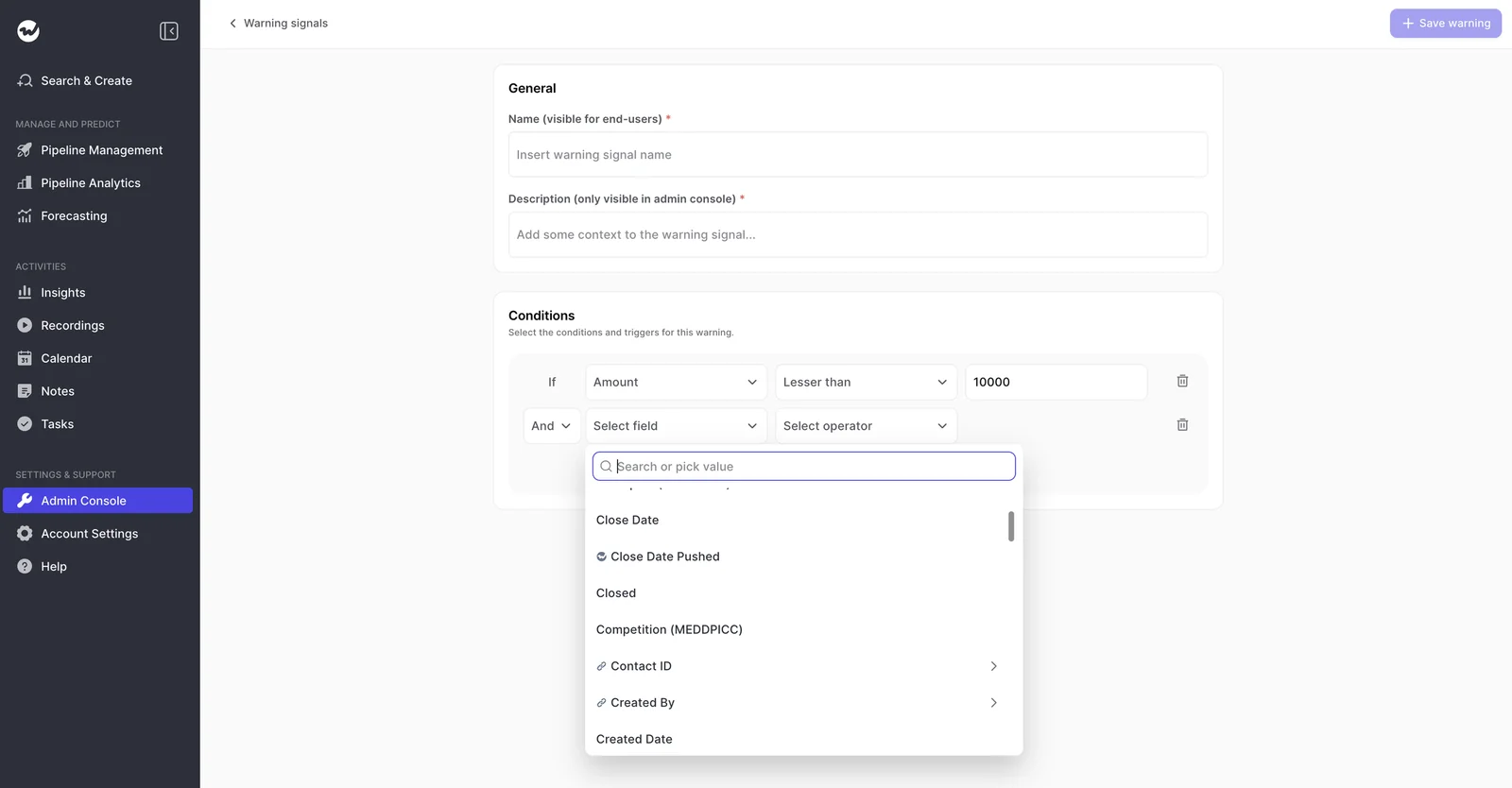
In the admin console, you can assign signals and set inactivity thresholds per team, and switch off the three default signals if you don't need them. That way, your 60-day team and your enterprise team each get a definition of "quiet" that fits their cycle.
Weflow also shows the flag where the forecast actually gets built. Reps see it on the deal board, in the record sidebar and on the Salesforce record, and again in the forecast submission screen while they pick which deals to commit.
So an unhealthy deal gets caught before it enters the forecast, not after the number is already wrong.
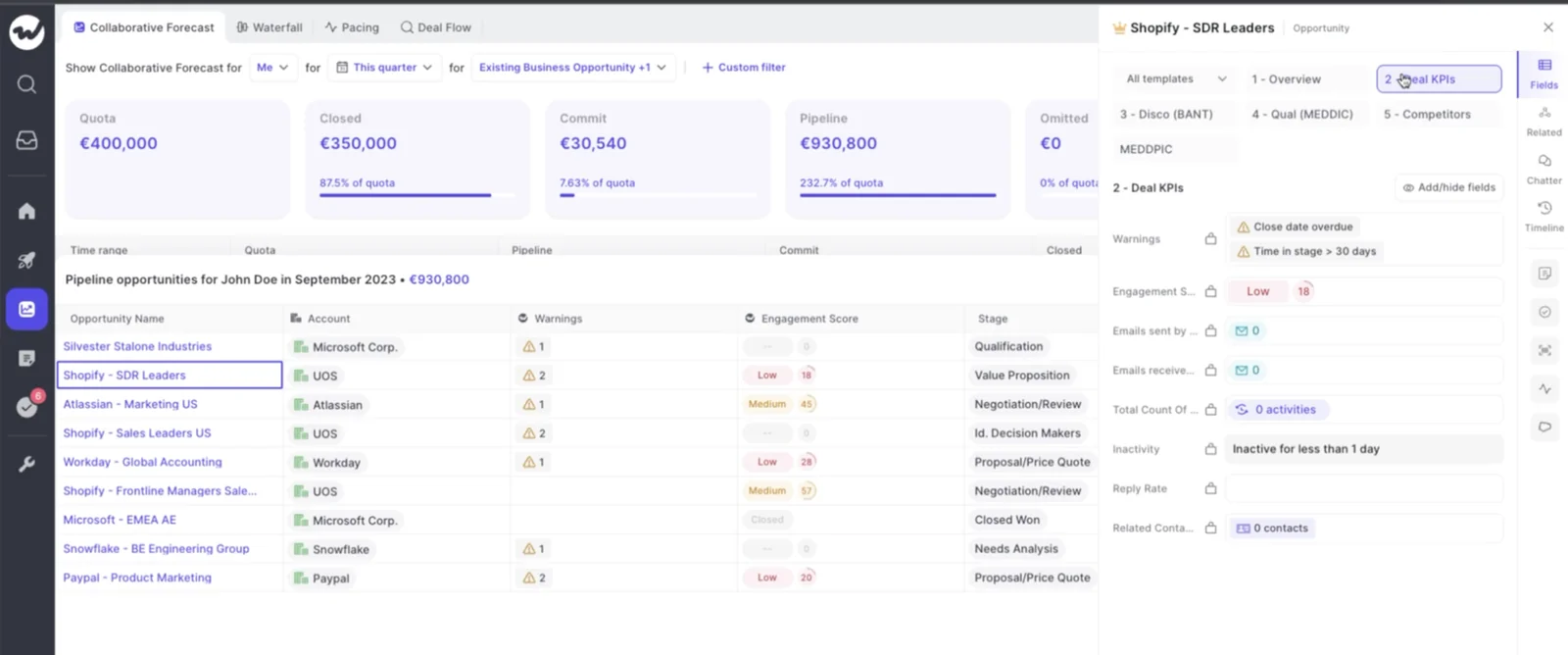
That visibility helped HolidayCheck cut its inactive opportunities by more than 60%. According to their sales operations lead, reps now walk into meetings already knowing what's overdue or inactive.
There's one limitation to know about: warnings are Weflow fields, not Salesforce fields, so they won't show up in Salesforce dashboards or BI reports unless you set up an agent that writes the assessment into a field you create.
How Weflow sends deal risk briefings to Slack and email
Weflow Agent Builder runs scheduled agents over your pipeline and delivers the result to Slack, Microsoft Teams chat, email, a PDF or a CSV table. Most managers start with a weekly risk scan that lands before the forecast call and names the deals that need attention.
To set one up, an admin picks the day, time and record filter, writes the prompt and test-runs it before it goes out. If you'd rather not start from scratch, there's a ready-made deal risk PDF template.
Our Slack app also posts when a recording and its summary are ready and when a forecast call is due.
Keep in mind that Weflow doesn't push each warning in real time. Since agents run on a schedule, a deal that trips a warning shows up on the board and in the forecast screen right away, and in Slack or email at the next scheduled run.
How Weflow shows the buying committee and scores each deal
Weflow creates Salesforce contacts for people it finds on email threads and calendar invites and attaches them to the opportunity, so single-threading reflects who's really involved.
The deal view shows every person on the deal with their engagement, alongside a deal-level AI summary across every meeting.
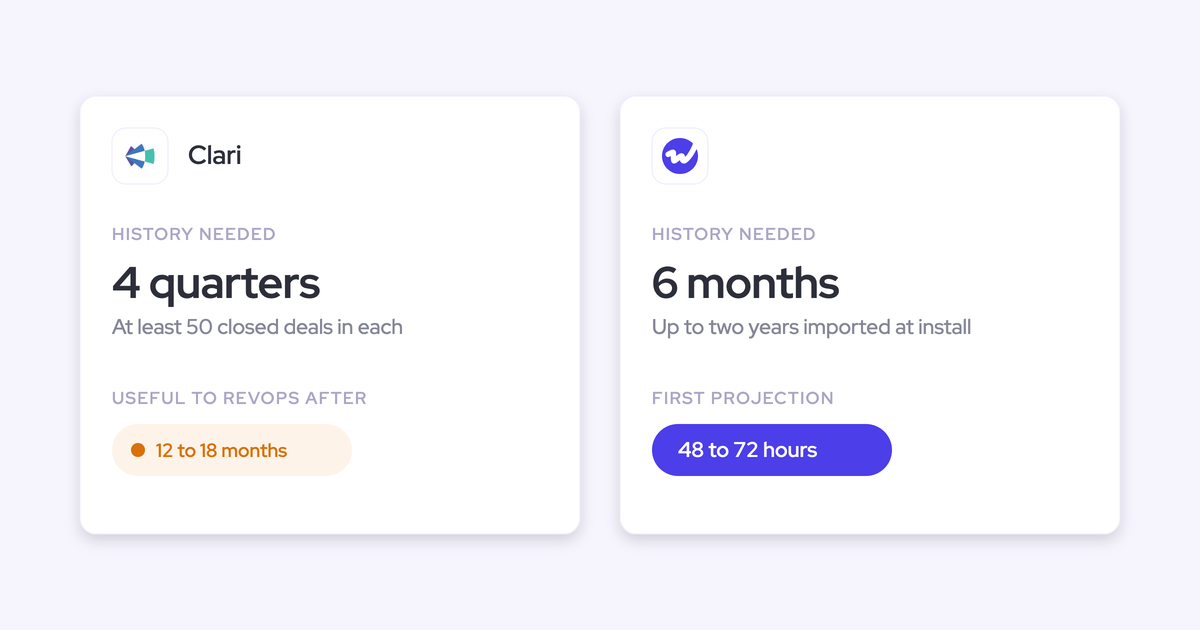
Weflow also scores every opportunity from 0 to 100 on how likely it is to close won. The model trains on your own closed deals, recalculates nightly and explains what's driving each score, though it needs about six months of closed history to be accurate.
What Weflow won't do is guess roles like champion or economic buyer. It shows you the engagement facts and leaves naming the roles to your team or your playbook.
How Weflow connects to your stack, AI assistants and BI tools
- Integrations: Salesforce, Gmail, Google Calendar, Outlook, Zoom, Microsoft Teams, Google Meet, Slack and the Outreach dialer. Weflow isn't an integration platform with a connector catalog.
- AI assistants: A read-only MCP connector gives Claude, ChatGPT and any MCP client your playbooks, call summaries, transcripts, forecast calls and pipeline metrics. An admin switches it on per workspace, with a separate toggle for full transcripts.
- Raw data: The REST API bulk-exports transcripts, metadata, scores and signals as JSON or CSV into warehouses and BI tools such as Tableau and Looker. There's no native Snowflake, Databricks or BigQuery connector, so warehouse loads go through the API.
What Weflow Deal Intelligence & Forecasting costs
Unlike the other four tools, Weflow publishes its prices. Every plan is billed annually on a 12-month term, with a 10-user minimum.
| Package | Price | What it gives you for deal warnings |
|---|---|---|
| Weflow Deal Intelligence & Forecasting | $39 per user per month | Warnings, deal signals and scoring, plus forecasting, so warnings appear in forecast submission |
| Weflow Revenue AI Business | $59 per user per month | Activity & Contact Capture, Conversation Intelligence and Deal Intelligence with warnings; no forecasting |
| Weflow Revenue AI Enterprise | $79 per user per month | Everything in Business plus forecasting, so warnings appear in forecast submission |
| Weflow Agent Builder | Per workspace: free tier with 25 actions a month, $299 for 500, $999 for 2,500 | Scheduled risk briefings to Slack, email or PDF |
Gong: Eight strong warnings read straight from your calls
Gong is a conversation intelligence platform that records and analyzes sales calls in its own cloud. Its AI Deal Monitor offers the best conversation-based warnings you can switch on with zero setup, and managers tend to get hooked on its deal board.
- Suits: A team that wants strong out-of-the-box warnings read from conversations and a deal board managers open every day.
- Stops at: Exactly eight warnings, all Gong-defined; you can't add your own.
- Quick specs: Supports Salesforce, HubSpot and Microsoft Dynamics; seats assigned per application; no published prices.
How Gong AI Deal Monitor flags at-risk deals
Several of Gong's eight AI Deal Monitor warnings read the conversation itself, which is genuinely useful. A warning like "pricing not mentioned" catches something no CRM field would ever show.
- No activity
- Ghosted
- Overdue
- Not enough contacts
- No power
- Pricing not mentioned
- Red flag
- Stalled in stage
You can switch each warning on or off and adjust how long it waits before triggering, but Gong decides what evidence sets each one off.
So if your sales motion has its own risk pattern, like a compliance step or a partner sign-off, there's no way to turn it into a Gong warning.
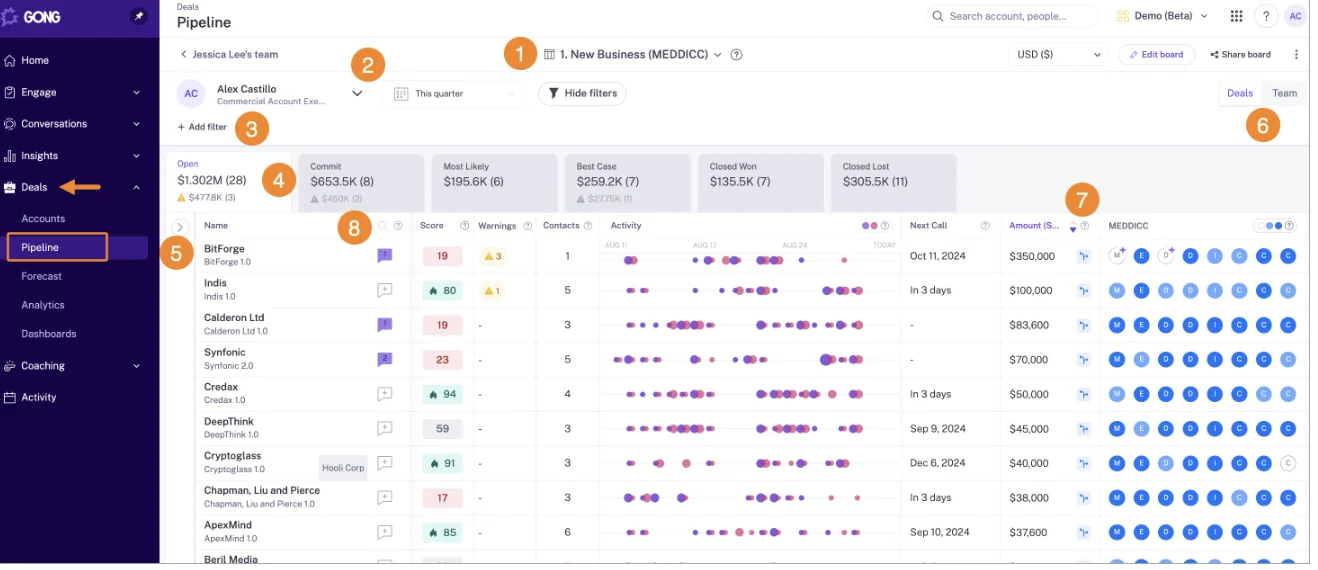
Gong shows warning counts per deal on its pipeline board, next to the deal score and methodology chips:
How Gong streams and automation rules send alerts
Gong streams collect every new call that matches your filters, such as an account, a tracker or words said, and notify the team by Slack or email when one arrives.
A tech admin can also set up automation rules that forward matching calls by webhook or Zapier, delete them or mark them private.
Deal boards also carry warning thresholds and send a digest email to subscribers, so managers mostly see warnings on the board itself or in that digest.
How Gong maps engaged contacts and scores deal likelihood
Gong's deal panel shows who's actively engaged on both sides of the deal and how active each person was over the last 21 days, and it recommends further contacts to engage.
The deal likelihood score reads more than 300 signals, trains on your own won and lost deals, and lists the positive and negative signals behind each score, so it's easy to see why a deal scored the way it did.
Just be careful how you read the number. It's a percentile rank against your other open deals, not a probability.
A deal scored 80 is more likely to close than 80% of your open deals, which isn't an 80% chance of closing. The score needs a Gong Forecast seat and at least 50 closed-won and 150 closed-lost deals from the last two years.
How Gong connects to your stack, AI assistants and warehouse
- Integrations: The Gong Collective lists about 450 integrations and partner solutions, Gong imports calls from about thirty dialers, and it records on eleven meeting platforms.
- AI assistants: The Gong MCP server has three tools, each working on one account, deal or contact at a time. It returns AI insights rather than transcripts, is read-only, and draws metered credits.
- Raw data: The API is capped at 3 calls a second and 10,000 a day. Warehouse delivery to Snowflake, Databricks, BigQuery or Redshift needs Data Cloud, a separate purchase of about $5,000 a year.
What Gong costs for deal warnings and deal scoring
Gong explains its pricing model but doesn't publish prices. A typical quote includes:
- Gong Foundation, a mandatory core licence, plus each application you need on top of it.
- Seats priced per application, so one person with deal functionality takes a Foundation seat and a Forecast seat.
- A platform fee that scales with the number of users.
- AI usage metered in credits, with 2,000 credits a year per paid core seat pooled across the company.
Chorus: Twelve ready-made risk alerts inside ZoomInfo
Chorus is ZoomInfo's conversation intelligence tool, sold as one feature inside the ZoomInfo data platform. Its Momentum Signals give you twelve useful risk alerts that need very little setup.
- Suits: A team already on ZoomInfo that mainly wants conversation intelligence with ready-made risk alerts.
- Stops at: Only half the alerts are adjustable, there's no likelihood-to-close score and no forecasting, and ZoomInfo's AI investment is going into its data graph rather than Chorus.
- Quick specs: Supports Salesforce, HubSpot and Microsoft Dynamics (cloud only); three packages; no published prices.
How Chorus Momentum Signals flags at-risk deals
The twelve alerts draw on activity, CRM data and conversations. Two of them stand out because they read the call itself: late-stage competitor mentions and negative buyer sentiment.
| Adjustable threshold | Fixed |
|---|---|
| No activity in the last 10 days | Late-stage competitor mentions |
| Stuck in stage for more than 10 days | Close date within 14 days with no pricing discussion |
| No engagement from the prospect in 7 days | Rep slow to respond to the buyer |
| Fewer than 2 active contacts in 10 days | Buyer slow to respond |
| Decision makers absent from a late-stage deal | No demo in the sales cycle |
| Single-threaded deal | Negative buyer sentiment |
When an alert fires, it shows up in the Deal Info column on the Chorus Deals page, right next to CRM fields and tracker counts:

How Chorus sends daily deal risk alerts by email
You can also build your own alerts on any tracker or keyword, filter them by rep, team, deal stage and deal amount, and get a daily email listing every call where it came up.
On top of that, Chorus sends fixed notifications like Deal Updates, an AI-curated list of deals to review twice a week.
Zapier and Slack integrations require the Chorus Enterprise package, so on lower packages, email is your only delivery channel.
How Chorus shows engaged contacts without a deal score
For each account or opportunity, Chorus lists every engaged contact with their last touch and their number of calls and emails. It enriches participants with ZoomInfo contact and org-chart data and recommends people in the buying decision you haven't engaged yet.
How Chorus connects to your stack and AI assistants
- Integrations: 19 web-conferencing providers, more than 30 dialers, Salesforce, HubSpot, Microsoft Dynamics, Clari, Gainsight, Slack and Zapier.
- AI assistants: Since July 2026, ZoomInfo's MCP server answers account questions by reasoning over Chorus calls, emails and transcripts, with cited answers. It ships as a first-party connector in Claude, ChatGPT and other clients, and needs a ZoomInfo license.
- Raw data: API access comes with the Chorus Enterprise package.
What Chorus costs and why ZoomInfo quotes it
ZoomInfo doesn't publish Chorus prices and sells it on custom plans across three packages: Chorus Basic, Revenue Intelligence and Enterprise.
ZoomInfo lists Momentum Insights, the Zoom app and API access among features that may be limited to the higher packages.
Aviso: Forecasting-led nudges for large enterprise teams
Aviso is an enterprise revenue platform led by AI forecasting. It lets your team create its own nudges.
- Suits: A large enterprise that wants a forecasting-led platform with a daily WinScore, a relationship map and nudges pushed to email, mobile and push notifications.
- Stops at: No public API or MCP access for outside assistants, custom-quoted licenses, and a rollout run by Aviso's implementation team.
- Quick specs: Runs on Salesforce, HubSpot, Dynamics, Oracle, SAP and Siebel; implementation-led rollout; agents billed per outcome.
How Aviso nudges flag at-risk deals
Aviso nudges warn about a stage not updated for a set time, a falling WinScore, commit deals at risk of not closing, single-threaded deals and accounts going quiet.
Other nudges flag pull-in and upside deals, coverage shortfalls, objection moments in emails and negative buyer sentiment on calls. And if none of those fit, teams can create their own.
How Aviso delivers nudges by email, mobile and Slack
Aviso delivers nudges as email digests, mobile notifications and push notifications. Admins also set Slack trigger rules on topics such as pricing or competitor mentions, and forecast reminders reach Slack or Microsoft Teams once Aviso's team connects them.
That's the most push-heavy delivery of the five, so if your team already tunes out alerts, be selective about which nudges you switch on.
How Aviso maps relationships and scores deals with WinScore
Aviso's relationship map shows everyone on both sides of a deal with an engagement score, a seniority level and their interactions over time, and whether key roles such as a CFO have been reached.
Champions come from CRM fields, and a buying-committee agent added in spring 2026 names decision-makers, champions and blockers from calls and emails.
WinScore is a daily probability that a deal closes this quarter, built from time in stage, stage order, deal age, close-date push-outs and the text of fields such as Next Step. Each score comes with the factors behind it.
How Aviso handles integrations, AI assistants and data exports
- Integrations: Aviso claims more than 200 connections across conferencing, telephony, engagement, support and marketing tools, mostly set up by handing credentials to Aviso's implementation team.
- AI assistants: Aviso has no MCP server for Claude, ChatGPT or other outside assistants. MCP runs only inside its own Agent Studio.
- Raw data: there's no public API or warehouse feed. Data leaves as spreadsheet and file downloads.
What Aviso costs, including per-outcome agent pricing
Aviso doesn't publish seat prices, so every deal is a custom proposal. There's no platform fee, and agent work is billed at $1 to $1.50 per outcome.
Clari and Salesloft: Admin-built Deal Gaps on the merged platform
Clari and Salesloft merged in December 2025, and Clari now sells under the Salesloft brand. So on the merged platform, deal warnings come from Salesloft Deals, through a feature called Deal Gaps, rather than from Clari itself.
- Suits: A team already running the Clari and Salesloft stack that wants admin-built rules alongside Clari's Inspect and forecast layer.
- Stops at: The engagement score reads only Salesloft-logged activity, Clari's own opportunity score is widely ignored, and acting on an insight needs Salesloft.
- Quick specs: Salesloft Deals and Forecast run only on Salesforce; Advanced and Elite packages with paid add-ons; no published seat prices.
How Salesloft Deal Gaps flag at-risk deals for Clari teams
Salesloft Deal Gaps are rules a team admin builds on any deal field, such as days in stage, a past close date, an empty next step or days since last activity, combined with any or all logic. That's real rule-building, and if you're already on the stack, it may be all you need.
Three gaps are on by default: last activity over 10 days on a new deal, no stakeholders on a new deal, and an empty next step.
You set how many gaps turn a deal yellow (needs attention) or red (at risk), and the counts show in the Pipeline Health bar, the pipeline view and a heat map. Only team admins can edit gaps.
How Clari and Salesloft turn deal risk into tasks and Plays
Automation and Plays run in Salesloft, and Clari pushes actions there too. A task icon on Clari's opportunity list creates a task in Salesloft Rhythm, and Salesloft's Slack integration posts to a channel when an admin's automation rule fires.
If you use Clari without Salesloft, you'll see the risk but have no way to turn it into an action.
How Clari and Salesloft map stakeholders and score deals
Clari's Relationships tab shows who's involved in each deal and how engaged they are. Salesloft's Auto Buying Group Capture adds email and meeting participants as stakeholders on the deal in Salesloft, though a rep still adds each one as a Salesforce opportunity contact role by hand.
Salesloft's Deal Engagement Score rates new business deals from 0 to 100 with the top three factors behind it, but it reads only activity logged in Salesloft.
Clari's own opportunity score, meanwhile, is widely ignored by the teams that have it. Once it's been wrong in front of a manager, it rarely gets trusted again.
How Clari and Salesloft connect to your stack and AI assistants
- Integrations: The unified data layer syncs with Salesforce, Microsoft Dynamics, Snowflake, Databricks, Gmail, DocuSign, ZoomInfo and LinkedIn.
- AI assistants: Three separate MCP servers. The Forecast server gives forecast numbers but no deal-level opportunity data, the Copilot server reaches call data only, and the Salesloft server is read-only, needs a paid add-on and no longer returns transcripts.
- Raw data: REST and export APIs, forecast history exports as CSV, and the data layer syncs to Snowflake and Databricks.
What Clari and Salesloft cost, and why there is no list price
Neither Clari nor Salesloft publishes seat prices, and both pricing pages lead to a Salesloft Talk to Sales booking.
Salesloft does share its structure, though: Advanced and Elite packages, with Forecasting, the AI agents and the Dialer as paid add-ons, and the MCP server included with the agent add-ons.
What deal risk warnings cost in each of the five tools
Weflow is the only one of the five that publishes seat prices. The other four quote every deal, and several charge for AI or agent usage on top.
| Tool | Published price | What you need for deal warnings | What costs extra |
|---|---|---|---|
| Weflow | Yes: $39, $59 or $79 per user per month | Weflow Deal Intelligence & Forecasting, or Weflow Revenue AI Business or Enterprise | Agent Builder above the free 25 actions a month |
| Gong | No | Foundation core licence plus applications; a Forecast seat for the likelihood score | Platform fee, AI credits beyond the pool, Data Cloud for warehouse delivery |
| Chorus | No | A Chorus package; Momentum features may be limited to higher packages | Enterprise package for API, Slack and Zapier |
| Aviso | No seat price | A custom-quoted Aviso licence | Agent work at $1 to $1.50 per outcome |
| Clari (Salesloft) | No | Salesloft Deals, included in the Advanced and Elite packages | Forecasting, agent add-ons (which carry MCP access), Dialer |
With Weflow, Ask AI, summaries and field updates are included in the seat price, and Agent Builder is the only part we meter.
That matters more than it might seem. Warnings only change behavior when every rep sees them, but when pricing grows with every AI run, teams start rationing exactly that access. A flat price lets adoption grow without the bill growing with it.
Which deal risk warning tool fits your team
For some teams, the best move is to stay where you are.
Pick by the deal risk you most need to catch
| If you mainly need… | Look at… |
|---|---|
| Conversation-native warnings with zero setup | Gong |
| Ready-made risk alerts inside a ZoomInfo contract | Chorus |
| Warnings that encode your own slippage patterns, show to reps and gate the forecast | Weflow |
| Heavy push delivery inside a forecasting-led enterprise platform | Aviso |
| Admin-built rules on a stack you already run | Clari and Salesloft Deal Gaps |
Pick by your CRM and the stack you already run
- Weflow and Salesloft Deals work only with Salesforce. If you're on HubSpot or Dynamics, look at Gong, Chorus or Aviso.
- If you already run Clari and Salesloft together, Deal Gaps may give you enough rule-building without a new vendor.
- If you're on ZoomInfo and mainly want conversation intelligence, Chorus comes from inside the contract you already have.
Pick by team size and how you buy software
- Aviso is built for large enterprises and rolls out through its implementation team.
- Weflow publishes its pricing, which suits mid-market teams that want to size a business case before a call.
- Gong, Chorus, Aviso and Clari quote every deal through sales.
Walk through the product yourself, no call required.
What changed in deal risk tooling for 2026
- December 2025: Clari and Salesloft merged: Clari now sells under the Salesloft brand, so you're evaluating one platform, and its deal warnings come from Salesloft Deals.
- May 2026: Gong introduced credit-based AI metering: AI cost now moves with usage, which matters if you want warnings and briefings in front of every rep.
- Spring 2026: Aviso added a buying-committee agent: It names decision-makers, champions and blockers from calls and emails.
- June 2026: Clari Copilot began replacing Salesloft Conversations: Existing Conversations customers move in a later phase, which affects the call data underneath any conversation-based risk signal.
- July 2026: ZoomInfo's MCP server began answering from Chorus conversations: Chorus customers can now ask an AI assistant account questions grounded in their calls.
- August 2026: Salesloft removed transcript retrieval from its MCP server: Assistants connected to Salesloft now get summaries rather than what was said.
How we compared these five deal risk tools
We assessed each tool on the same eight capabilities: deal risk warnings, rules-based alerts and workflows, buying committee mapping, AI deal scoring, integrations, access from AI assistants (MCP), raw data access outside the tool, and pricing.
Our sources were each vendor's public help documentation, pricing pages and release notes, plus our own documentation for Weflow, and we left out any tool we couldn't document across all eight.
FAQ: Deal risk warning tools
Which Weflow package includes deal warnings, and what does it cost?
All three Weflow packages include deal warnings: Weflow Deal Intelligence & Forecasting ($39 per user per month), Weflow Revenue AI Business ($59) and Weflow Revenue AI Enterprise ($79).
If you want warnings inside forecast submission, choose Deal Intelligence & Forecasting or Revenue AI Enterprise, since they include forecasting.
How long before deal warnings are useful, and why does the AI score need six months?
Warnings work from day one, since Weflow tracks push count, days in stage and days inactive automatically. The AI deal score takes longer because it needs about six months of closed deals to learn what separates wins from losses in your business.
Will a deal risk tool flood my team with emails and tasks?
It depends on the tool. Aviso pushes hardest, through email digests, mobile and push notifications. Chorus sends daily alert emails, and Gong sends deal board digests and stream notifications.
Weflow keeps flags in the views your team already uses, plus any scheduled briefings you choose to set up.
We already built stale-opportunity reports in Salesforce. Why buy a tool?
Native reports rely on Last Modified dates and whatever activity reps logged, so a neglected deal looks alive the moment someone edits it. Tracking days in stage and push count also means building custom fields and Flows that someone has to maintain.
Weflow computes all of this from captured emails and meetings, so reps can't game it by touching a field.
If we leave Gong, what replaces the deal board and our call history?
The Weflow deal board shows the last email, last meeting, next meeting, an activity timeline and warnings for each deal. We'll also migrate your Gong call history for free, with each call linked back to its Salesforce account.
How long it takes depends on Gong's API limits: about a week for around 7,000 calls, and two weeks or more for 20,000.
Who configures deal warning rules, the manager or RevOps?
In Weflow, an admin builds warnings in the admin console and assigns them per team, ideally with the sales leader involved, since every threshold reflects how your business works. Salesloft lets only team admins edit Deal Gaps.
In Gong you can switch warnings and tune timing but not define them, and Aviso lets teams create their own nudges.
What are Weflow's contract terms?
Weflow runs on a standard 12-month term, billed annually, with a 10-user minimum. You can also negotiate an early opt-out after three months.
Can a deal risk tool tell me whether the champion is real?
Not from digital signals alone. Weflow shows you the engagement facts, like who's replying, who's in meetings and how often, but it doesn't guess roles.
The real test happens in the deal review: will they take your call, and will they get you to the economic buyer?