How to Enforce a Shared Sales Qualified Opportunity Definition: Manager Review, RevOps Audit, Stage Gates or AI Scoring
Learn when manager review, RevOps audit, stage gates or AI scoring best enforce a shared SQO definition


You wrote the SQO definition, and every manager signed off on it. But when a rep clicks save, each region still decides for itself what "qualified" means.
That's why your cohort close rates keep swinging, and you can't tell whether the business changed or the definition did.
There are four ways to enforce it: manager review, a RevOps audit, stage gates and AI scoring.
Each one catches a different kind of breach, so the right choice depends on where your definition breaks: when the opportunity is created, when it moves between stages, or in what reps write in the fields.
For most regional teams, we recommend a lean stack:
- A written definition, exclusions included.
- Two or three hard gates on stage progression.
- AI evaluation of what's actually in the gated fields.
- A manager pressure test on the gap between what the rep says and what the data shows.
Below, we walk through each option, including a no-tool version that works for small teams. Then we show how Weflow checks qualification content and feeds it into the pipeline and forecast in Weflow Deal Intelligence & Forecasting, and where it falls short.
Why a written SQO definition doesn't hold in Salesforce
A written SQO definition doesn't enforce itself. It's applied by people who have a reason to bend it, inside a system that has no way to check it.
There are three structural reasons it drifts:
- The call is made at creation, by the person with the most to gain from saying yes: A rep under pipeline pressure decides whether the deal is qualified, and a thin pipeline means a tough one-on-one.
- By default, Salesforce doesn't enforce anything between stages: A rep can drag a deal from stage zero to closed won in one click, so the definition lives on a slide while the opportunity skips right past it.
- The evidence that proves qualification lives outside the fields a check can read: The budget signal is in an email, the champion came up on a call, and the compelling event is buried in a meeting note.
The first cause isn't a character flaw in your reps. Robert Gimbel saw it play out while scaling hiring at Camunda:
"Or you're bringing in new people, new AEs to the business, and they wanna create their pipeline, they wanna fill their pipe, and they rather take too much than too little, so you need to guide people in the way that you want the business to run."
The second cause shows up in your reports. When reps skip stages, stage history stays mostly empty, so time in stage, stage conversion and the weighted forecast are all visibly off. And a number everyone knows is wrong does more damage than a missing one.
That's why re-announcing the stage rules doesn't work: it targets behavior, but the causes are structural.
Manager review, RevOps audit, stage gates, AI: What each catches
Here's how the four compare. Each one checks something different, at a different moment, and fails in its own way.
| Manager review | RevOps audit | Stage gates | AI scoring | |
|---|---|---|---|---|
| What it actually checks | Whether the deal holds up under live questioning | Whether what's entered in Salesforce meets the written criteria | Whether a required field has a value before a stage change | Whether each criterion is established by the deal's emails, calls and fields |
| When it checks | In the weekly one-on-one or deal review | After creation, usually as a weekly batch | At the moment of the stage change | On a schedule, as new activity lands on the deal |
| Who it depends on | A manager who carries the same number as the rep | RevOps capacity, opportunity by opportunity | The admin who builds and maintains the rules | A written definition, exclusions included, and data the AI can reach |
| How it fails | Bias, plus two managers reaching two answers on the same deal | Lag, and a review queue that grows faster than headcount | Filler that clears the rule, deals parked early, late creation | Plausible but wrong values, and blind spots where evidence never reached a system |
| What it costs RevOps to run | Little to set up, plus time spent reconciling inconsistent calls | Hours per week that grow with every rep and region | Rule maintenance and broken integrations writing to the same object | Writing and tuning prompts, reviewing early output, and a license |
| Where it fits best | One or two managers who ask the same questions | RevOps can still see every new opportunity each week | Stage skipping and one-click moves | Filler and empty methodology fields at pipeline scale |
Manager review catches judgement calls but owns the pipeline number
Managers are the only enforcers with live judgement on the deal. They can hear the hesitation in a rep's answer and push on the part of the story that doesn't add up.
The catch is that the same manager carries the pipeline target the rep is filling. On top of that, every manager inspects deals with their own set of questions.
So two managers can look at the same deal and reach two different verdicts, and neither can defend theirs upward because there's no shared set of signals to argue from.
- Fits when: You have one or two managers who already ask the same questions, and the forecast is small enough to discuss deal by deal.
- Breaks when: You add regions, the managers' quota pressure rises, or you need to compare their pipelines.
A RevOps audit stays independent but can't keep pace
An independent RevOps check protects the close rate because the person doing it isn't carrying the number.
At Camunda, managers checked every new opportunity against the qualification criteria, and then RevOps checked it again against what was actually entered in the CRM.
That double check gave Gimbel conversion rates steady enough to build long-term forecasts on:
"I could rely on very consistent conversion or close rates for these opportunities. I knew if we opened a hundred opportunities, we would close a certain amount of them."
The good news is that this model works for small teams without any tool. All you need is a written definition, a weekly slot, and the authority to send an opportunity back.
The limit is simple math: a RevOps team of one to three can't read every new opportunity across many managers and regions. And because the audit runs after creation, a bad opportunity has already counted toward pipeline by the time anyone catches it.
- Fits when: RevOps can still review every new opportunity each week.
- Breaks when: Creation volume outgrows RevOps headcount, or the lag starts to distort the weekly forecast.
Validation rules stop stage skipping but accept filler
Validation rules are the only option that can hard-stop a bad stage move. Jeff Ignacio separates cosmetic process changes from real ones:
"What I mean by sales changes is you might change your stages, right? That's a cosmetic thing. You might put validation criteria in order to move from one stage to the next."
The problem is that a rule can only check that something was entered, not that it's true. So reps learn to satisfy it with filler.
Heavy gates also push reps to work around them. Some leave deals in an earlier stage to avoid the form, which makes the pipeline look less advanced than it is. Others create the opportunity late, so it never shows weeks of inactivity.
Philipp Stelzer, our CPO and co-founder, describes enforcement in Salesforce as a ladder:
- Required fields: Only for the few values that are universally necessary, such as the email address on a contact.
- Validation rules and field dependencies tied to a stage: For process compliance, such as blocking a move into procurement with no amount, no champion and no decision criteria.
- Automated warnings: To the rep or manager, wherever a hard block is too rigid.
His advice: start with two or three dependencies and stop once data quality is good enough. Every rule you add means more maintenance and can break integrations that write to the same object.
AI scoring checks field content, if the definition is written
AI scoring adds something no validation rule can: a judgement on whether the deal's evidence actually backs up a criterion, not just whether the field is filled.
But it only works if the definition is written out explicitly, including what doesn't count. Without exclusions, the AI fills in something plausible but wrong. Here are two examples from rollouts we've seen:
- A champion field kept naming the customer's own employee until the prompt was told to exclude internal people.
- A metrics field returned the company's headcount, which is a number but not a metric of value.
Neither is a model failure. In both cases, the team knew the rule but never wrote it down.
The AI can also only judge the data it can reach. If it reads call transcripts alone, it misses every deal worked over email.
- Fits when: The definition is written down and the AI reads the whole deal, emails and fields included.
- Breaks when: Qualification is tacit knowledge, or the AI only sees one call.
How to pick an enforcement mechanism by where qualification breaks
Start with the symptoms you see in Salesforce, figure out where the definition breaks, and pick the mechanism that catches it. Most teams find that two or three rows apply at once, which is why layering makes sense.
| Symptom you see in Salesforce | Where the definition breaks | Mechanism that catches it | What won't fix it |
|---|---|---|---|
| Cohort close rates swing quarter to quarter, and new AE pipeline converts worse | At creation: over-opening | An independent check on every new opportunity, by RevOps or an AI evaluation of the qualification evidence | Re-announcing the definition |
| Opportunities created days before they close won | At creation: late creation | Automatic activity capture, so activity accumulates without the rep logging it | A validation rule on creation |
| Stage history is empty and deals jump from stage zero to closed | At progression: stage skipping | A hard gate on the few transitions that matter | Renaming or renumbering stages |
| Deals sit in early stages longer than the conversations suggest | At progression: gate avoidance | Fewer gates, with gated fields filled from evidence | A heavier gate |
| Gated fields contain "TBD", "yes" or a pasted sentence | In field content: filler | AI evaluation of what the field says against the deal evidence | More validation rules |
| MEDDIC or SPICED fields are empty on most open deals | In field content: missing data | Fields written from conversations and emails | Another round of methodology training |
| Two managers give the same deal two verdicts | In review: inconsistent inspection | A shared written definition plus an evidence-based score as the review agenda | More frequent deal reviews |
From there, four factors decide how far you go:
- RevOps headcount: A team of one can audit a few dozen new opportunities a week, not a few hundred.
- Number of managers and regions: Every added manager is another interpretation of "qualified."
- Share of deals with recorded calls: If half your deals live in email, any check that only reads calls misses half the pipeline.
- Integrations writing to the opportunity object: Each one is something a new validation rule can break.
The lean SQO enforcement stack we recommend for regional teams
We recommend layering the mechanisms and keeping each one minimal. Each layer covers the weakness of the one before it:
- Written definition: Covers the tacit-knowledge gap every other layer depends on.
- Two or three hard gates: Cover stage skipping at the transitions that corrupt your numbers.
- AI evaluation of content: Covers the filler the gates let through.
- Manager pressure test on the gap: Covers what the data can't know, and keeps reps thinking.
Write the SQO definition down, exclusions included
Every other layer depends on this one. A gate, an auditor and an AI can only enforce what's on the page.
Write one per record type. New logo, renewal and expansion are different sales processes, so each needs its own entry and exit criteria.
Dan Jiao's model at Aircall shows how to split global from local without losing the standard:
- Global: The SQO definition, the commit definition, and the late-stage exit criteria, such as who has to be multithreaded and how the economic buyer and executive sponsor are engaged.
- Local: What the evidence looks like in each market. A critical event in Germany can look different from one in Australia, because of the time of year, the buying committee and procurement norms.
- Explicit everywhere: What doesn't count. Internal employees can't be champions, and headcount isn't a metric.
Where you can, define the exit criteria by what the buyer has done rather than what the rep reports doing:
"So, like, what does the buyer actually have to show and prove as evidence that you're actually in a late stage deal?"
Keep two or three hard gates on stage progression
Gate only the transitions where skipping does the most damage, and use warnings everywhere else. For most teams, that's entry into the SQO stage and into the late stages that feed commit.
The hard ceiling is what a rep will maintain by hand, and anything beyond that has to fill itself or go. Use this checklist to decide which transitions deserve a hard gate:
- Skipping this transition corrupts a number you report upward, such as stage conversion or commit.
- The condition can be checked as a fact, like a quote attached, rather than an opinion.
- A warning to the rep or manager wouldn't do the job.
- You know which integrations write to the opportunity object, and you've tested them against the rule.
- The gate doesn't push the rep's manual fields past about five.
Some teams also gate the very end of the funnel. At Aiven, reps can't close-win on their own: RevOps approves the win only once there's a valid payment method and three consecutive days of consumption.
Let AI judge what's actually in the gated fields
The gate checks that a field is filled, and the AI checks whether the deal evidence backs up what's in it. Together, they close the filler gap.
Bring the AI in with a human in the loop. Fields with one clear answer can write automatically from day one, while interpretive fields start in review and earn automation once you've seen the output hold up.
When you set your accuracy bar, compare it to the honest alternative: an empty field.
| Field | Start in | Why |
|---|---|---|
| Website, billing address | Automatic | There's one right answer, and it rarely changes |
| Next Step | Automatic | One call usually answers it clearly |
| Champion, Economic Buyer | Review | Interpretive, and the exclusions matter |
| Pain, Metrics, Decision Criteria | Review | Qualification builds up across the deal, and one call shouldn't erase it |
| Amount | Review | A single-value field always holds one number, so a wrong write replaces a right one |
| Stage | Review (suggest only) | A wrong move changes the forecast category hanging off it |
Use manager review to pressure test rep versus data
Once the score exists, the manager stops being the sole judge and becomes the pressure tester. The rep still answers the qualification questions, and the gap between their answers and the data becomes the deal review agenda.
This also addresses a common fear: that automation removes the thinking the methodology was meant to force. Julien Cerutti, who's rolling out SPICED across a 750-person sales org, puts the tension this way:
"The score automatically comes from conversations and activities logged in Salesforce, and your champion's a three or it's a two. But there is that deal inspection thing where there are questions, and I do want them to reflect."
— Julien Cerutti, VP of Global Revenue Strategy at Meltwater
Kelly Lewis describes what the frontline review looks like once both answers exist:
"You're looking for what is the system telling me, and then what is my rep telling me, and what is the disconnect? So that's where I can focus."
— Kelly Lewis, RevOps and sales leadership coach, co-host of The Revenue Insiders podcast
Run reviews this way, and two managers stop reaching two different verdicts, because they're both asking the rep to explain the same disconnect.
If you want the cadence and inspection practices that sit around this stack, our Free Guide: Deal Insights & Pipeline Management Best Practices picks up where this section ends.
How Weflow checks SQO criteria against deal evidence
Weflow is the Revenue AI Orchestration platform for sales, customer success, and RevOps teams. Built for Salesforce teams, it handles layer three of the stack (AI evaluation of field content) and gives layer four (the manager pressure test) its agenda.
Weflow AI Playbooks score the whole opportunity, not one call
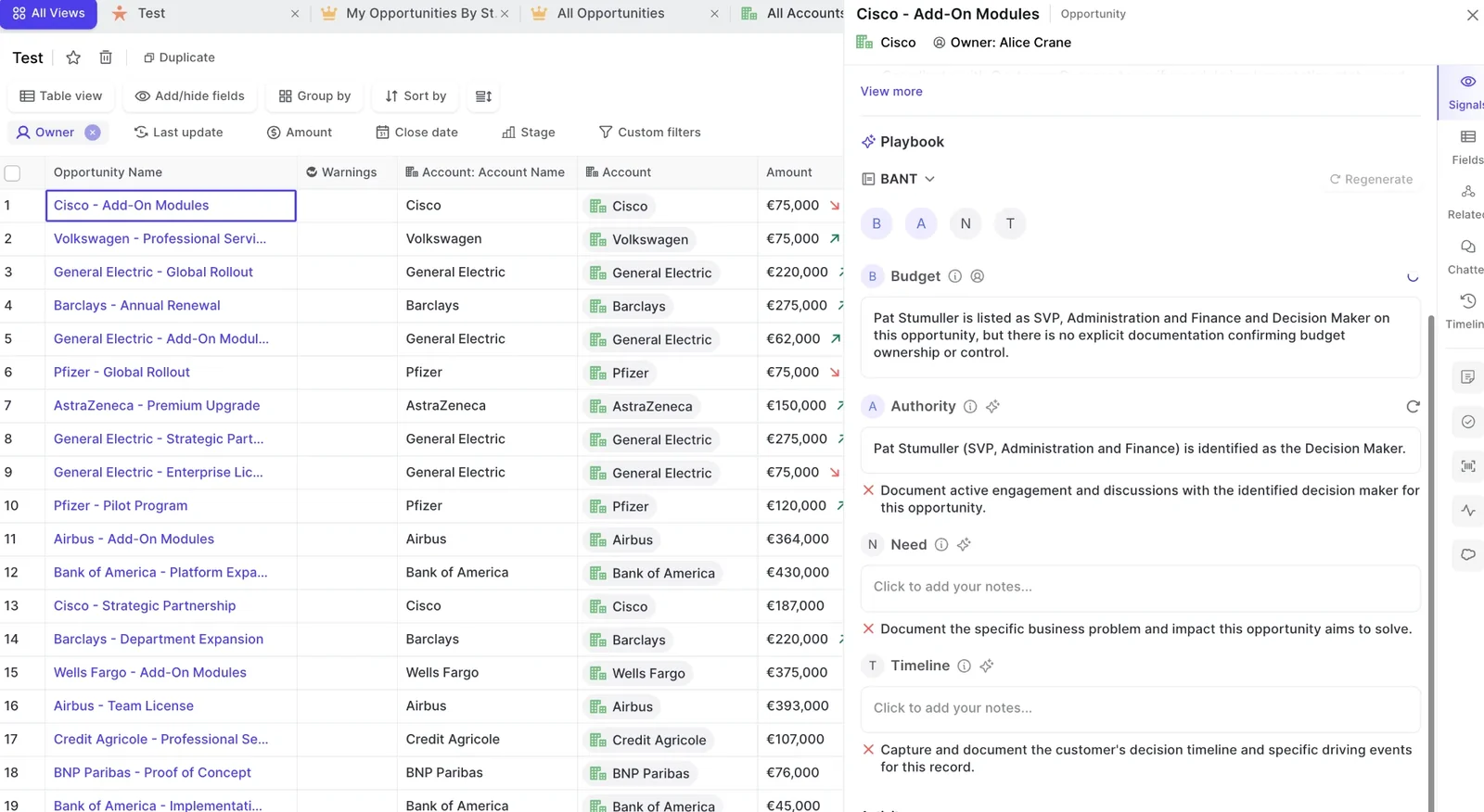
Weflow AI Playbooks score each opportunity against your methodology using every email, meeting, transcript and CRM field on the deal. That matters when half your deals have no recorded call.
Each playbook runs two algorithms. The first fills in every element of your methodology from the deal's evidence, and the second judges how well each element is actually established, including text a rep typed in by hand.
So if a rep fills a MEDDIC field with filler just to get past a validation rule, that element shows as not assessed rather than complete. That's exactly the gap stage gates leave open.
Each element shows one of three states:
- Fully established: Backed by the deal evidence.
- Partially established: With a note on what's missing, such as metrics named but not quantified.
- Never discussed: Which flags a gap like a deal forecast to close soon with no identified economic buyer.
Both algorithms rerun every two hours on any opportunity where something has changed, like an edit, a new activity or a new recording. Reps can override any element, and Weflow checks the override for plausibility against the deal.
Call scorecards work differently. A Weflow call scorecard judges one conversation on its own, so a discovery call can score low on economic buyer even when that was never its job. That's why deal-level qualification belongs to the playbook.
Weflow AI Field Updates fill stage-gate fields from the conversation
Weflow AI Field Updates can write the fields your validation rule gates on, so the gate is satisfied by what was actually said, not by a form filled in afterward.
They write picklists, numbers, dates and multi-selects as well as text. Before writing a picklist, Weflow reads the allowed values, so it never writes one the field would reject.
AI Field Updates can also write Stage itself, moving a deal when the exit criteria written into the prompt are met. You decide per field whether an update writes automatically or waits for someone to approve it.
For Stage, we recommend letting the AI suggest the move and having the rep confirm it. A wrong extraction here has real consequences, because the forecast category hangs off it.
Weflow data-quality scoring flags gaps before forecast submission
Weflow's data-quality scoring flags opportunities with missing required fields, stale close dates, missing next steps or incomplete MEDDICC data before they enter the forecast submission flow. It works as a quality gate on the forecast.
For a small RevOps team, that shrinks the audit backlog: you start with the flagged deals instead of reading every opportunity.
Each team and record type runs its own definition in Weflow
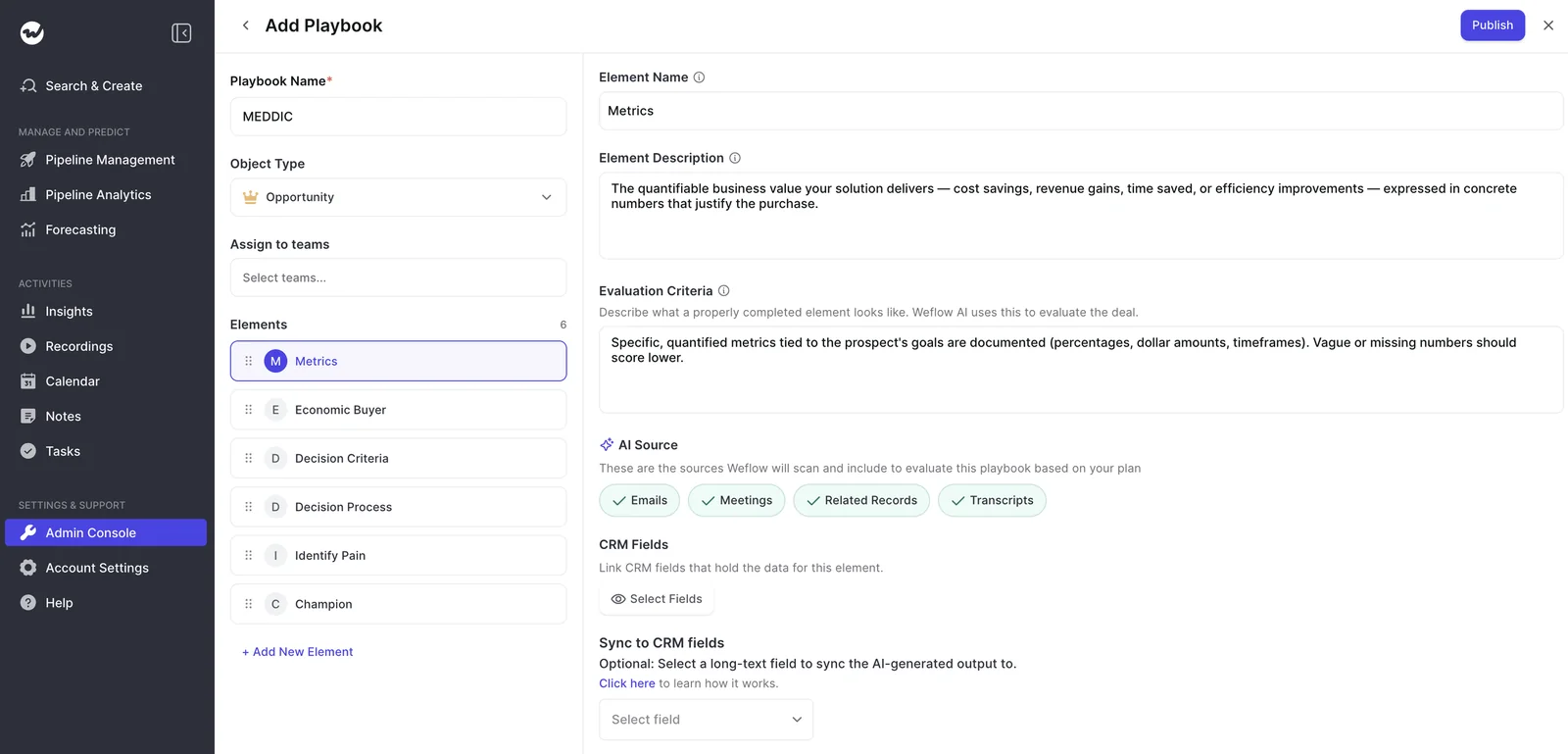
Weflow enforces your definition, not ours. You can start from around 30 methodology templates or map your own prompt to each element, so an in-house framework works exactly like MEDDIC or SPICED.
Playbooks are assigned per team, which lets one org run BANT on transactional deals and MEDDIC on enterprise. Each Salesforce record type keeps its own stage path, so new logo, renewal and expansion each get their own criteria.
That's how the global-plus-local split from the definition layer becomes configuration.
Product tour
Where Weflow falls short on SQO enforcement today
Here are the limits you're likely to hit as a RevOps leader. Most have a workaround, and two are reasons you might not need a tool at all.
- Field updates don't show which source produced a value: The comparison view shows the previous value next to the new one, but not whether it came from the call or a web search. To restrict a field to conversation data, write that restriction into its prompt.
- Per-call field updates overwrite rather than append: Review mode lets the rep see the current value and sync only what should change. A "leave unchanged if the call carries no new information" instruction stops an empty call from wiping the field. For cumulative fields, use a playbook, which holds the current best answer across the deal. Momentum can append with a timestamp instead, at the cost of a field that grows on every interaction.
- There's no single combined deal health score yet: For now, risk shows up through rule-based deal warnings and playbook scores, side by side.
- Weflow creates contact roles, but doesn't infer them: It writes one fixed role value per configuration, so naming someone as champion or economic buyer stays with the rep or the playbook's Champion element.
- No AI fixes an unwritten definition: If your SQO criteria aren't on paper yet, write them first, or a tool will only make the gaps visible faster.
- For a small team, you may not need a tool: Gimbel's manager-plus-RevOps double check works without one, as long as RevOps can see every new opportunity.
If you've ever watched AI get things wrong, the first limit is the one that matters most. Until values carry their source, keeping interpretive fields in review mode is how you stay in control.
FAQ: Enforcing a sales qualified opportunity definition
Who should own the SQO definition: RevOps, sales leadership or regions?
RevOps should govern the standard, and regional leaders should own what local evidence looks like. At Aircall, the commit definition and late-stage exit criteria are global, while each regional GM defines what a critical event looks like in their market.
RevOps business partners report to RevOps with a dotted line to the GM, so they reinforce the standard instead of drifting into local exceptions.
Should qualification start at stage one or after discovery?
Either works, as long as the choice is explicit and consistent. Some teams qualify at stage one, while others run discovery first and count from stage two.
Whichever you choose, date pipeline created from the qualified date, not the record's created date. Created date overstates new pipeline and breaks after a CRM migration.
Will validation rules block an AI tool writing through the integration user?
Yes, validation rules apply to API writes from a tool just as they do to a rep. Weflow respects validation rules, field dependencies and permissions, so a rule that blocks a rep also blocks an AI write that doesn't satisfy it.
Test writes against every object before rollout, because a failed automatic field update sends an error email that names neither the field nor the cause.
How long until the existing pipeline is scored, not just new deals?
Predefined AI Playbooks fill in automatically for opportunities created or changed after setup. For the pipeline that already exists, you select the older opportunities and run Generate AI Playbooks on them in bulk.
It's not part of the setup flow, so build it into your rollout plan.
Do Weflow qualification scores live in Salesforce or a separate scorecard?
Weflow AI Playbooks write their results back to Salesforce fields when write-back is on. So your deal review works from the methodology fields you already track, not a second version of the truth in another tool.
Which fields should get history tracking before changing stages?
Salesforce tracks history on up to 20 fields per object, and it only records from the day you switch it on. So turn it on for stage, amount, close date, forecast category and your key methodology fields before you change anything.
Otherwise, you lose the before-and-after view of the change you're making.
How do I roll out SQO enforcement without it feeling like an audit?
Lead with the fields written from the conversation, so reps get time back before you ask them for anything. Then ask for the few things only they know, like what they're selling, when it closes and how confident they are.