Weflow vs Spreadsheet Forecasting: The Three Things a Sheet Can't Do
Learn the three things Weflow does better than spreadsheet forecasting: roll-ups, history, accuracy.



When a RevOps team tells us they need a forecasting tool, the thing they're actually replacing is almost never another vendor. It's a spreadsheet.
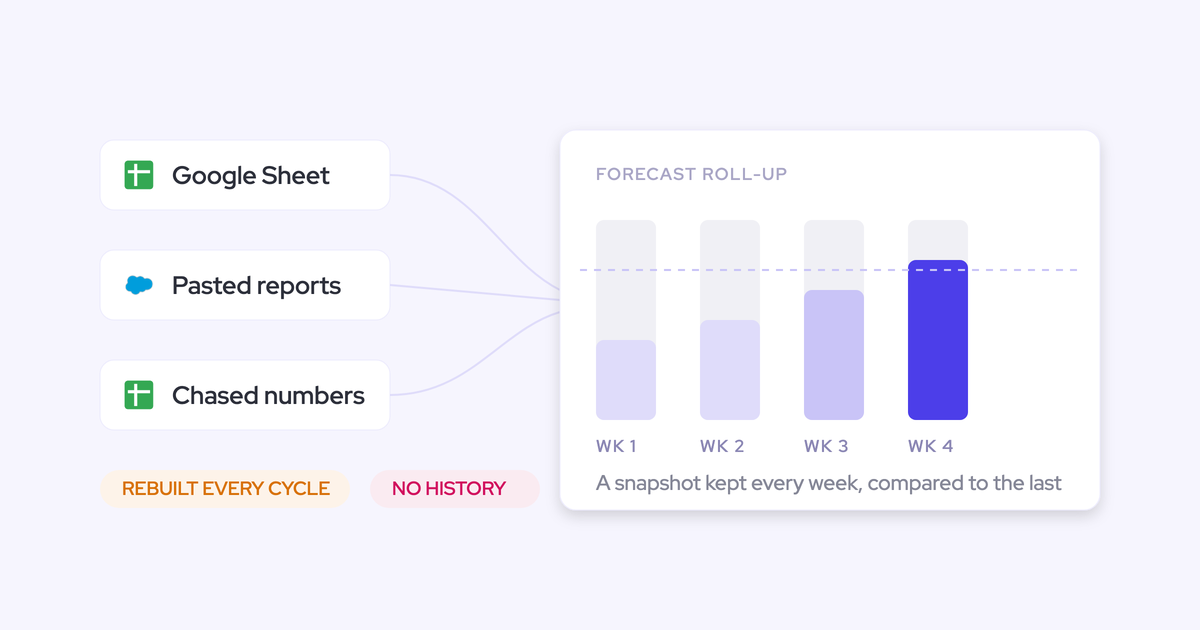
Salesforce reports get exported, pasted into Excel or Google Sheets, and rebuilt by hand every cycle, and the week goes into chasing managers for numbers that are stale by the time they land.
That spreadsheet isn't there because nobody thought about it. It's free, it bends to whatever the exec team asked for this quarter, it needs no procurement, and it's fully yours. Those are real advantages, and any article that opens with "spreadsheets are bad" has already lost the person who built one.
So this piece doesn't re-sell you the problem you already own out loud. It names the three things a forecast spreadsheet structurally cannot do no matter how well it's built, shows what replacing it with Weflow looks like when the forecast submission and roll-up assembles itself, and is honest about the cases where keeping the sheet is the right call.
Spreadsheet forecasting vs Weflow at a glance
The two diverge on structure, not polish. A better-built sheet is still a sheet.
| Dimension | Forecast spreadsheet | Weflow |
| Retained history | Each cycle overwrites the last unless someone archives a copy or screenshots it by hand | Opportunity snapshots taken every few hours, feeding a pipeline waterfall, pacing and quarter-over-quarter comparison |
| Rep submissions and roll-up | Reps email numbers or keep their own tabs; RevOps assembles the roll-up manually | Each rep submits a baseline and a best case tied to named opportunities; every version stored; rolls up to manager, VP and exec automatically |
| Deal inspection | Rows of deal names with no engagement, activity or next-step context behind them | Deal warnings, engagement score and activity history sit on the deal inside the forecast view and inside the submission screen |
| Forecast methods | One number, usually a weighted formula or a hand-typed commit | Weighted forecast, rep roll-up and AI projection running in parallel as a corridor |
| Accuracy measurement | No stored submissions, so no variance to measure | Every submission held against the final closed amount, per rep, per manager, per segment |
| Flexibility and ownership | Total. Any column, any logic, changed in five minutes by whoever owns the file | Forecast columns built from the org's own Salesforce fields; any opportunity currency field can be the foundation |
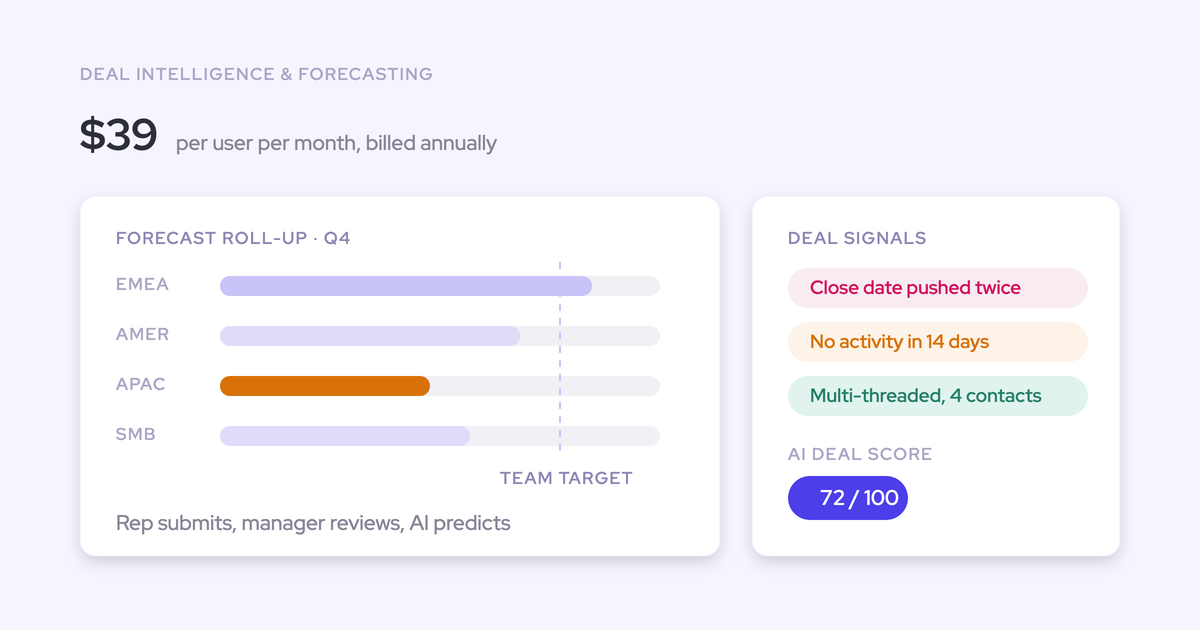
| Cost | No license. Real hours from the person who can least afford to spend them | Deal Intelligence & Forecasting at $39 per user per month billed annually, free view-only licenses (up to one per recording license), no implementation fee |
Why the sales forecast still lives in a spreadsheet
Because Salesforce's own forecasting doesn't do the job, and the spreadsheet is the cheapest place to build what's missing.
That's not a swipe at Salesforce. It's a description of what happens when a RevOps leader tries to run a real forecast cycle inside the CRM:
- No opportunity snapshots. Fields are overwritten, so "what did the pipeline look like three weeks ago" has no answer after the fact.
- Quota and pipeline don't sit in one place, so gap-to-target is a second report and a manual join.
- No pipeline waterfall, so when the number drops the only way to learn which deals slipped is to ask.
- Nothing stops a rep dragging a deal from first stage to closed won in one click, so stage history is patchy and the weighted math built on it is visibly wrong.
- Calculated and roll-up fields can't be history-tracked at all, which is often exactly the custom amount field a team forecasts on.
So the export happens. And once you're in a sheet you can build anything: the columns your CRO asked for on Tuesday, a churn best/middle/worst case, a renewals view indexed on renewal date instead of close date. That flexibility is why it survives every attempt to kill it.
It's also why the buyer is rarely choosing between two forecasting vendors. Named tools would fix a lot of this, but at $100 to $200 per user per month they don't get past a CFO who has already signed something, so the sheet stays by default.
The three things a forecast spreadsheet can't do
These three gaps are architectural. They don't close with better formulas, a cleaner tab structure or a more disciplined owner, which is why the manual effort never ends.
It keeps no history of what the forecast looked like
The sheet holds the current state. Every cycle overwrites the last one, so the questions that matter after a quarter goes sideways have no evidence behind them.
What did the forecast say three weeks ago. Which deals moved out. When did that amount get cut. How are we doing at day 35 compared with day 35 of the last three quarters.
Teams answer this by archiving copies of the file or taking screenshots, which works until nobody does it for two weeks. The serious version is standing up a warehouse and paying to snapshot opportunity data into it, which turns a management question into a data engineering project with a bill attached.
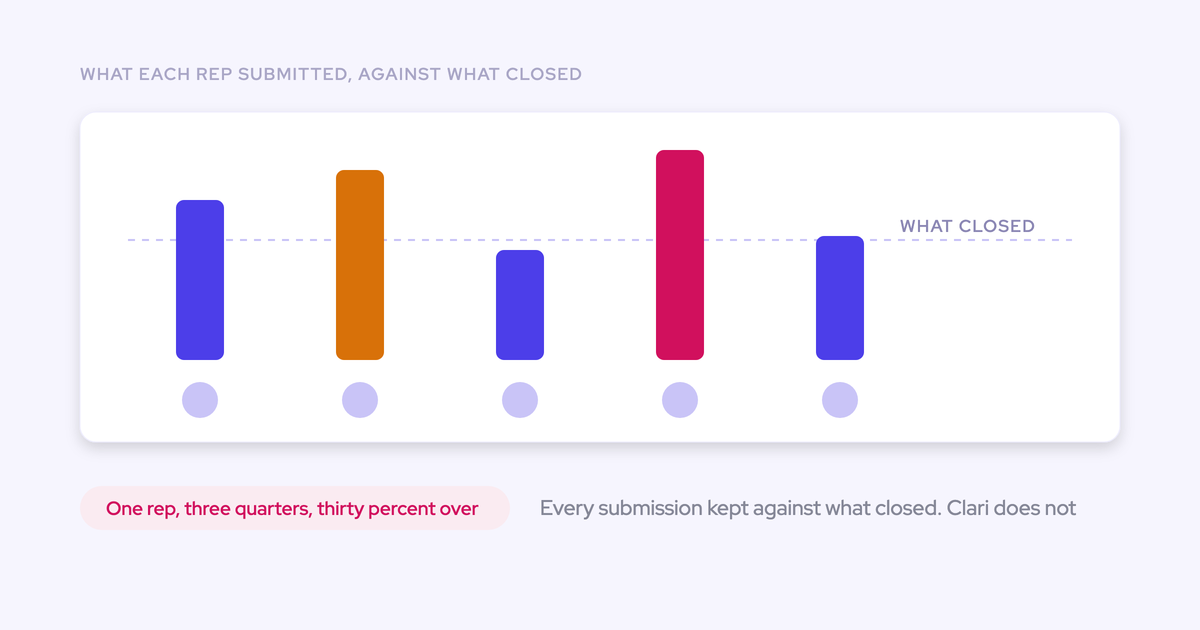
Everything downstream flows from this one gap. Without stored submissions there's no accuracy to measure, no trend to show a board, and no way to tell whether the rep who calls 120% every quarter has ever been right.
Ten reps means ten sheets that never roll up
Reps don't go into a shared spreadsheet and report their numbers. They keep their own tab, or they send a figure by email, or they drop it in a doc, and someone in RevOps stitches it together.
What comes out the other end is really a manager forecast with rep commentary attached. The number is only as fresh as the last person who replied, and nothing about it is comparable across regions or retained across quarters.
Then there's the Monday snapshot: someone takes a manual copy just to see what moved since last week. That's an hour of a senior person's time spent reproducing something a system should hold on its own.
It can't run deal-by-deal forecast calls at scale
With fifty reps each holding ten to fifty deals a quarter, a deal-by-deal spreadsheet forecast is too complex to run. So the forecast call becomes a round-robin of status updates instead of an inspection.
The room's too full, there's no time and no calm, and reps sit on mute doing other work until their name comes up. Nothing gets inspected, nobody gets coached, and the forecast is assembled from what people said out loud.
The reason is missing context, not missing discipline. A row in a sheet gives you a deal name, an amount and a close date. It doesn't tell you the deal's been silent for 21 days, has one contact on it, and has had its close date pushed twice, which is the information that would tell you it isn't closing.
Why an AI-built spreadsheet is the same trap
An AI coding assistant makes the rebuild cheap. It doesn't change what you've built.
We hear this on calls constantly now, and it's genuinely a real shift, not a gimmick:
My finance lead got really into Cursor vibe coding, and if you'll believe it, she hasn't built anything in a spreadsheet in three or four months.
— Eric Portugal Welsh, Head of RevOps at PlanetScale
Here's what the rebuild actually fixes: the layout, the formulas, the speed of producing this week's version. Real gains, and they arrive in an afternoon.
Here's what survives it. No snapshots, because nothing is capturing opportunity state on a schedule. No submissions from reps, because there's still nowhere standard for them to submit. No deal context, because the export carries fields, not engagement history.
And now there's a maintenance bill. The data model, the permissions, the hierarchy roll-up, the integrations and the snapshotting all have to keep working while you also run the business, and they're owned by the one person who was already the bottleneck.
The honest benchmark isn't whether you can build it. Of course you can. It's whether owning your build is cheaper than owning a product, over the two years where the org reorganizes twice and the forecast field changes three times.
How Weflow ends the manual forecast week
Weflow is the Revenue AI Orchestration platform for sales, customer success, and RevOps teams, built for teams that run on Salesforce. For forecasting specifically, it's structurally what the sheet is not: it reads live Salesforce data, retains history on its own, assembles the roll-up itself, and carries deal context into the call.
Each of the four things below answers one of the gaps above.
Opportunity snapshots replace the manual Monday snapshot
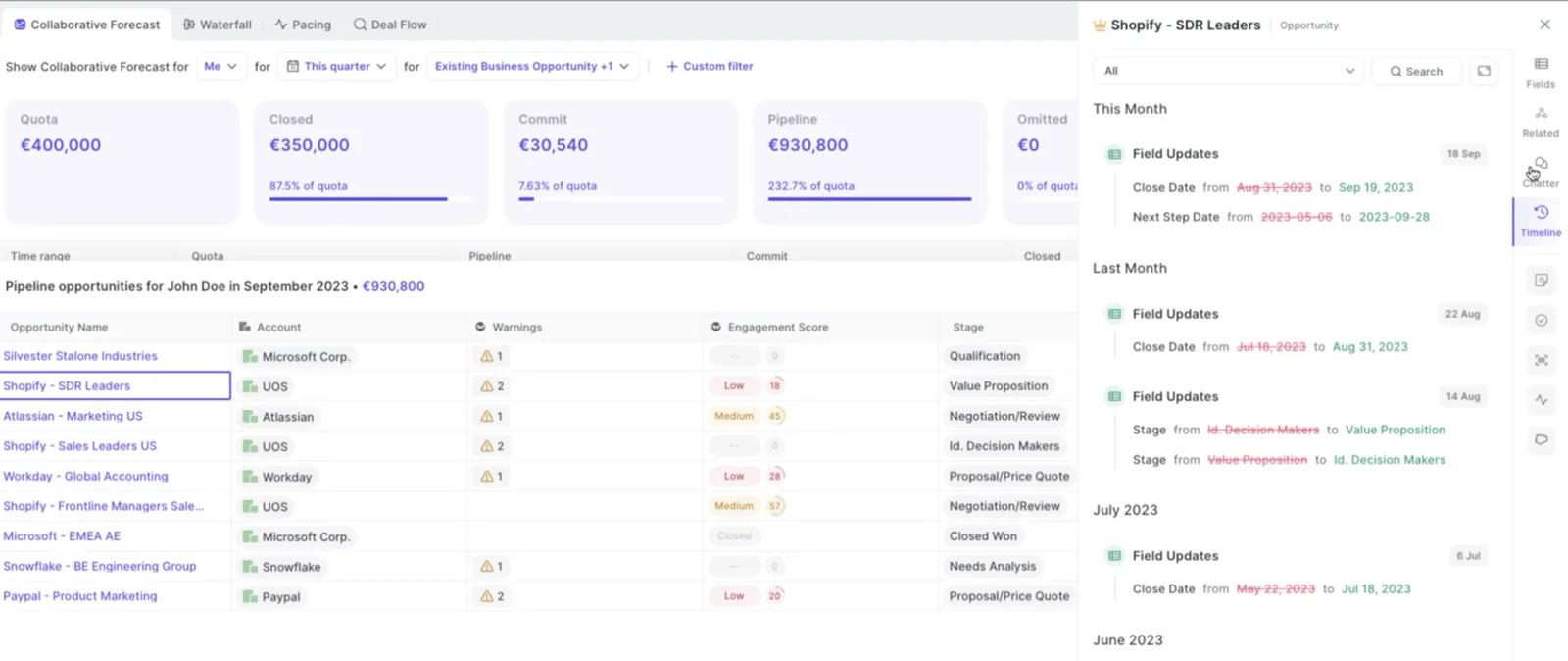
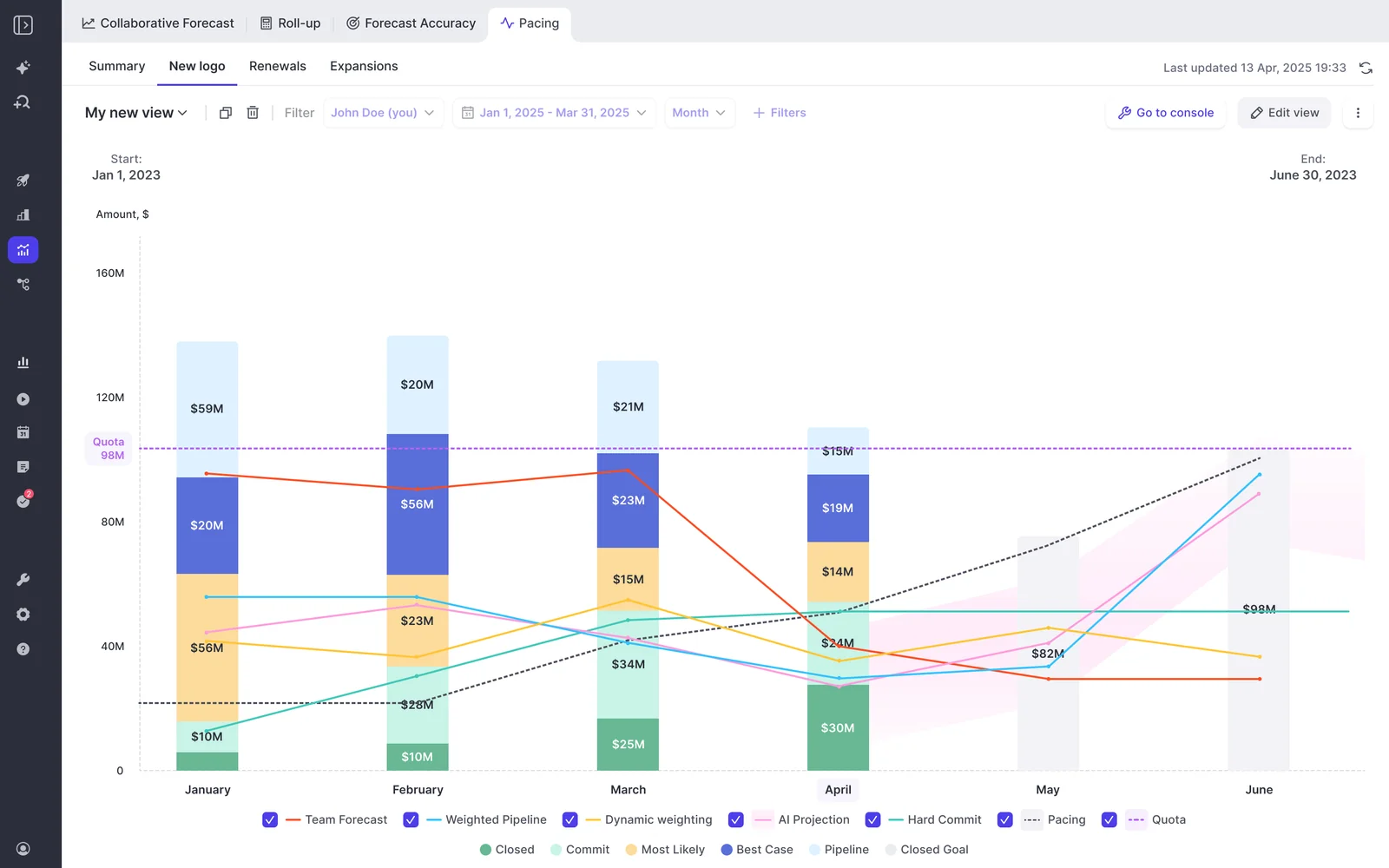
Weflow snapshots opportunity data every few hours and builds a pipeline waterfall, stage conversion rates, pacing and team benchmarks from that time series, out of the box.
The waterfall reconciles starting pipeline to ending pipeline through:
- Newly created deals and amounts increased
- Deals moved into the period and deals moved out
- Amounts decreased
- Deals won and deals lost
Every bucket drills through to the actual opportunities with whatever fields you care about, which is the difference between naming a problem and naming the deals causing it.
This is what answers why a quarter that opened with a strong number ends thin. Usually it's deals pushed out mid-quarter rather than deals lost, and a live pipeline report can't show you that because the evidence has already been overwritten.
Versioned rep submissions roll up the hierarchy automatically
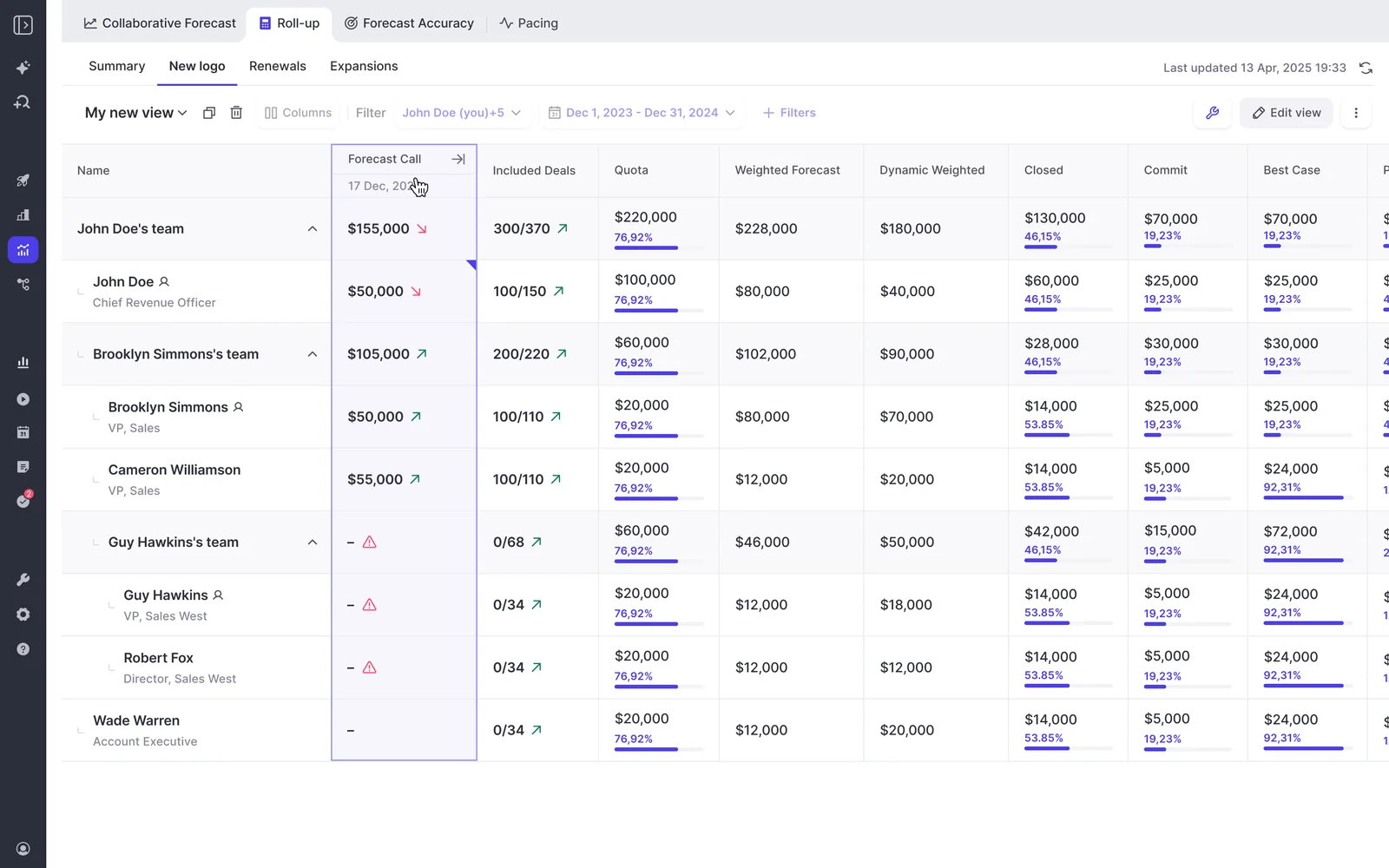
Each rep submits two numbers, a baseline and a best case, either as a total or by picking the specific opportunities behind each figure, with a free-text comment.
Two numbers rather than one separates what's very likely to close from what closes if things go well, and the gap between them is the coverage a manager coaches into.
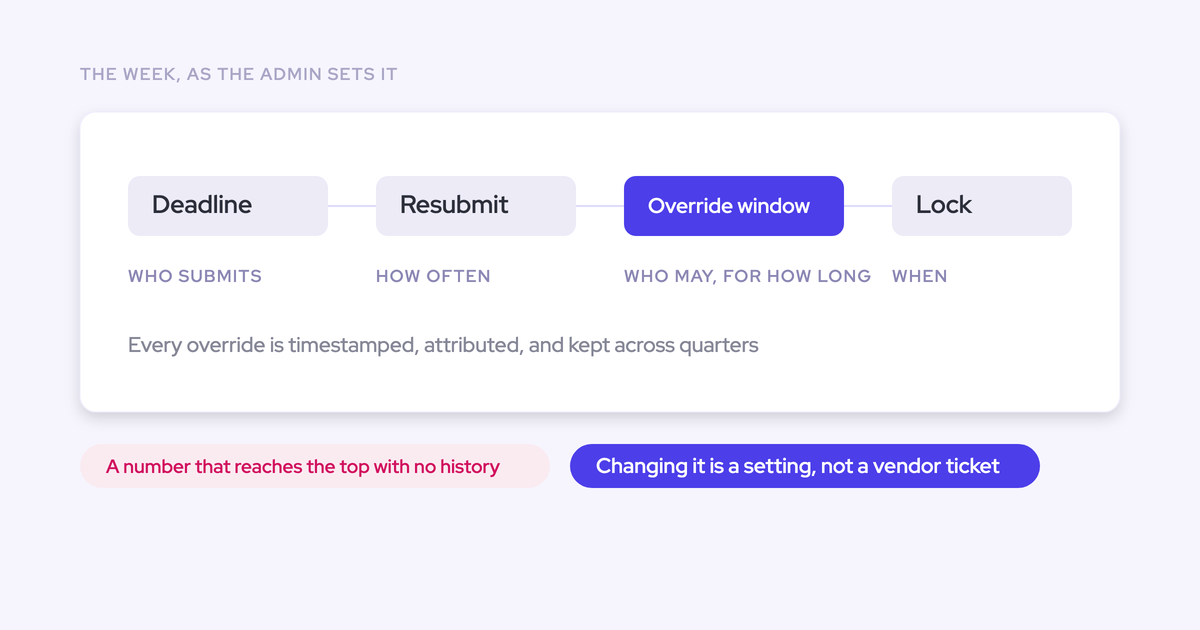
Every submission is versioned. A manager can override without erasing the rep's original, deadlines can lock the field, and a reminder email deep-links the rep straight into their submission so chasing stops being a job.
Because the number is tied to named opportunities rather than typed into a box, the forecast review runs deal by deal instead of arguing about a total. And the version history is what makes the call coachable: you can see whether a rep's number moved during the quarter or never moved at all.
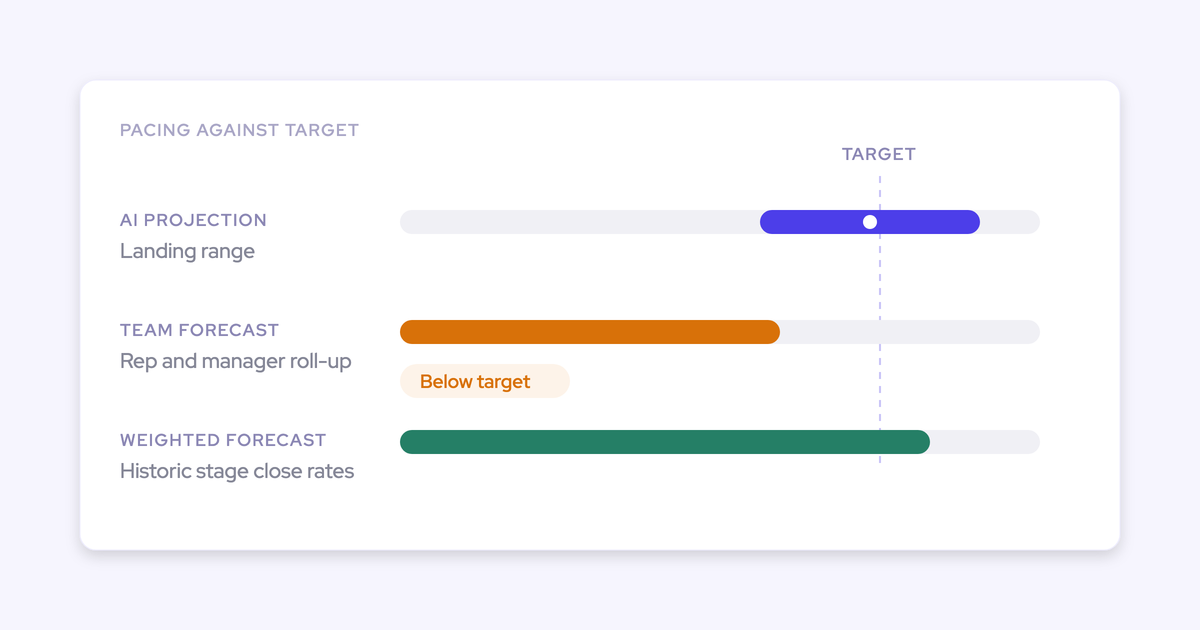
Three parallel forecasts produce a corridor, not one number
Most leaders already run three forecasts in their head and can't reconcile them. Weflow runs them side by side instead:
- Weighted forecast, derived from your own historic stage close rates rather than a probability someone set once and never revisited.
- Rep and manager roll-up, what the people closest to the deals actually believe.
- AI projection, built on more than fifty deal-level signals and up to two years of history, returning a landing range rather than a single number.
The AI projection isn't a stage probability in disguise. It reads deal behavior: seasonality, rep performance, conversion rates, communication cadence, whether a next meeting is booked, whether the deal is healthy against your methodology. A large deal that's being poorly worked gets projected down.
Where the three converge is your credible range. Where they diverge is the agenda for the forecast call, and it's a better agenda than "what's up with that deal, next."
Forecast accuracy becomes a measurable, coachable metric
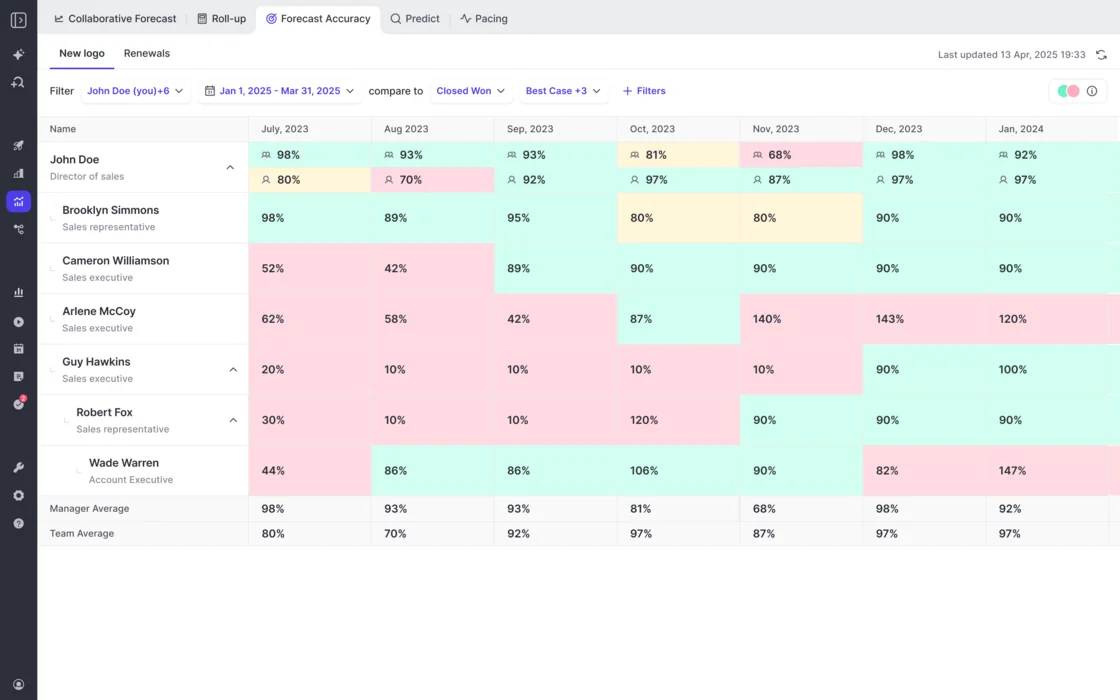
Weflow records every forecast submission against the final closed amount, which produces variance per rep, per manager and by segment across consecutive quarters.
You can't do this in a sheet, because both halves of the comparison have to be retained and a sheet keeps neither. It's the payoff of the snapshot architecture rather than a separate feature.
What changes in practice: the forecast conversation stops being a debate about who's optimistic and becomes a track record. A rep who has missed by thirty percent three quarters running shows up as a number a manager can act on.
With Weflow, we forecast within 7% by week 4 of the quarter.
— Tibor Stefán, Chief Revenue Officer, Zeotap
Week 4 is the part that matters there. Accuracy at quarter end is hindsight; accuracy at week 4 is a cadence working.
When keeping the spreadsheet is the right call
Three cases where we'd tell you to stay where you are, and they come up on our calls often enough to be worth stating before the money conversation.
- Your rule is that reps live in Salesforce and nowhere else. Forecast submissions, targets and roll-up data live in the Weflow application and are not surfaced inside Salesforce, even though everything else Weflow produces is written back into Salesforce objects. The weighted forecast and the AI projection still work for you, because both run off CRM data with no rep input. The roll-up motion doesn't, and you should know that before a demo rather than after.
- Your revenue is consumption-based. Weflow's forecasting fits booking-based models, where a contracted deal maps cleanly onto an opportunity roll-up. Usage that doesn't sit on the opportunity is a harder and weaker fit, and we'd rather say so.
- You don't have a forecast cadence yet. If there's no locked pipeline update day, no deal review and no submission chain, a tool automates nothing, because nothing is running. Do the manual pass first, in the sheet, and establish the baseline any tool has to beat.
If you don't run an operating cadence, the best tool in the world won't help you.
— Philipp Stelzer, Co-founder and CPO, Weflow
One more honest limit on timing: forecasting can't prove itself in a two-week trial. Capture and conversation intelligence can, because they produce visible output the day they're switched on. Forecasting only proves itself across enough cycles to compare predicted against actual, which is closer to three months.
What spreadsheet forecasting and Weflow actually cost
The sheet has never been free. It's free in license and expensive in the hours of the person whose time is worth the most, every single week, forever.
| Forecast spreadsheet | Weflow | |
| License | $0 | Deal Intelligence & Forecasting at $39 per user per month, billed annually, 10-user minimum |
| Leadership and viewer access | Free, but they're reading a static file | View-only licenses (up to one per recording license) at no additional cost |
| Implementation | Your own time, unbilled and unbudgeted | No implementation fee; Weflow runs onboarding itself |
| Ongoing labor | The export, the rebuild, the chase, the Monday snapshot, every cycle | Configuration when the business changes, not reconstruction |
| Cost of a change from the exec team | Rebuild the model | Edit the forecast columns, which read your own Salesforce fields |
If you already run Weflow Activity & Contact Capture and Conversation Intelligence, adding the forecasting layer is a step up the bundle rather than a new contract: Revenue AI Foundation is $49 per user per month, and Revenue AI Enterprise, which adds the full forecasting layer, is $79.
That's the packaging point that matters for a CFO conversation. A second six-figure forecasting contract at $100 to $200 per user per month is the thing that doesn't get approved, which is exactly why the spreadsheet is still there.
Moving from the spreadsheet to Weflow: what the switch involves
There's no data migration, because Weflow reads live Salesforce data. Nothing gets rebuilt out of your sheet. The work is configuration and cadence, in this order:
- Agree the cadence before anything is configured. Who submits, how often, at deal or manager level, against which quota and which budget. This is the part that takes real time, and it needs sales leadership in the room, not just RevOps.
- Run the technical setup. A 45 to 60 minute call with a Salesforce admin and a mail admin to connect the systems.
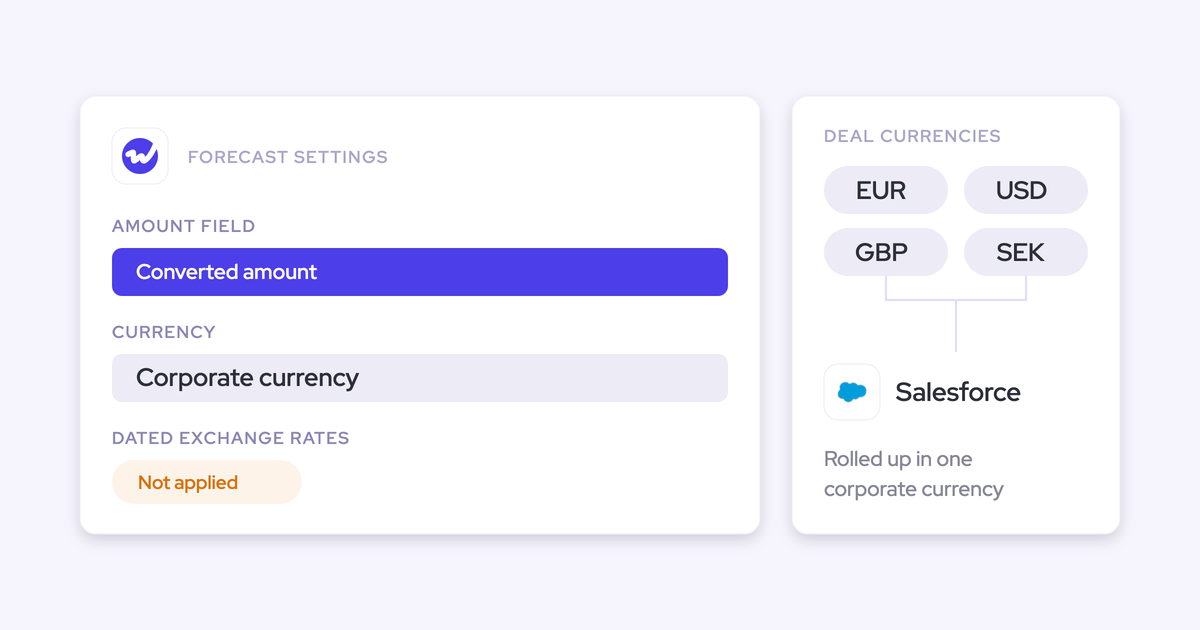
- Point a forecast setup at one amount field and one date field. Any opportunity currency field can be the foundation, not just standard Amount, and the date field can be a renewal or delivery date instead of close date. Custom columns come from Salesforce fields your team already controls.
- Add parallel setups for the motions that need them. New business, renewals and expansion each get their own amount field, date field, stages, cadence and targets, so a blended forecast doesn't hide the motion that's failing.
- Roll out by role. Separate leadership and rep training. Typical time to live is two to three weeks.
- Run it for a quarter before you judge it. For evaluations a two-week trial can't cover, Weflow offers a three-month paid pilot, contractually the first three months of a multi-year agreement with an opt-out at the end. Small bill, real exit.
Keep the spreadsheet or choose Weflow: how to decide
Keep the spreadsheet if:
- You have no forecast cadence yet, so there's nothing for a tool to automate. Build the cadence first, in the sheet.
- Your revenue is consumption-based and the number you forecast doesn't live on an opportunity.
- Your operating rule is that every rep interaction happens in Salesforce and nowhere else, which rules out the roll-up submission motion.
- You genuinely enjoy the flexibility more than you resent the manual week, and your team is small enough that ten sheets isn't ten sheets.
Choose Weflow if:
- You can't answer what the forecast looked like three weeks ago, and someone keeps asking.
- The roll-up is assembled by hand from rep emails and individual tabs, and the number is a week old on arrival.
- Your forecast call is a status round-robin because there's no deal context in the sheet to inspect.
- You want forecast accuracy measured per rep and per manager across quarters, which requires stored submissions you don't currently have.
- You're the bottleneck, and your most valuable hours go to data entry.
Walk through the product yourself, no call required.
FAQ: replacing spreadsheet forecasting
Does Weflow's forecast work if reps won't submit their numbers?
Partly, yes. The weighted forecast and the AI projection both run off CRM data with no rep input at all, so you get two of the three methods on day one. The roll-up needs submissions, and Weflow sends reminder emails that deep-link each rep straight into their own submission, with deadlines that can lock the field. Worth knowing the pattern: reps adopt capture and conversation intelligence, leaders adopt forecasting, so a forecasting rollout without leadership behind it stalls whatever the tool is.
Can renewals and expansion be forecast separately from new business?
Yes. Weflow runs several forecast setups in parallel, each with its own amount field, date field, stages, cadence, targets and forecast calls. A renewals forecast can be indexed on renewal date rather than close date, which is how most teams actually want to see it. This matters because a single blended forecast hides the motion that's failing, and renewals are usually the motion nobody ever set up.
Can I build my own forecast columns from Salesforce fields?
Yes. The Weflow forecast reads your org's own Salesforce fields, and any opportunity currency field can be the foundation rather than standard Amount. So when leadership changes what they want to see in the forecast, which they do, it's an edit to a view rather than a rebuild of a model or a ticket to a vendor's professional services team.
How does Weflow handle multiple currencies in the forecast?
Weflow forecasts read the standard Salesforce currency field and do not apply Salesforce dated exchange rates. If your team relies on dated conversion, point the forecast at your own converted amount field so the numbers stay on your conversion logic instead of a single standard rate. Multi-region teams should check this before configuring, because a single-rate conversion quietly misstates regional pipeline.
Does the Weflow roll-up apply stage probability weighting?
No. The roll-up sums the chosen amount field on the deals a rep selected, so five deals at twenty percent don't contribute one deal of value. Probability modeling lives in the separate weighted view and in the AI projection. If you think in probability terms inside the roll-up itself, make a weighted Salesforce field the foundation field, or treat the raw sum as the best case and use the baseline call for conviction.
How long until Weflow forecasting is live and proven?
Live is typically two to three weeks, with no implementation charge. Proven is a different question: forecasting only proves itself across enough cycles to compare what was called against what closed, which is closer to three months. That's the honest answer, and it's the reason the three-month paid pilot with an opt-out exists instead of a two-week trial.