How to replace a sales forecast spreadsheet with Weflow: Data, process, and rollout plan
Learn how to replace a sales forecast spreadsheet with Weflow: data model, process, and rollout plan


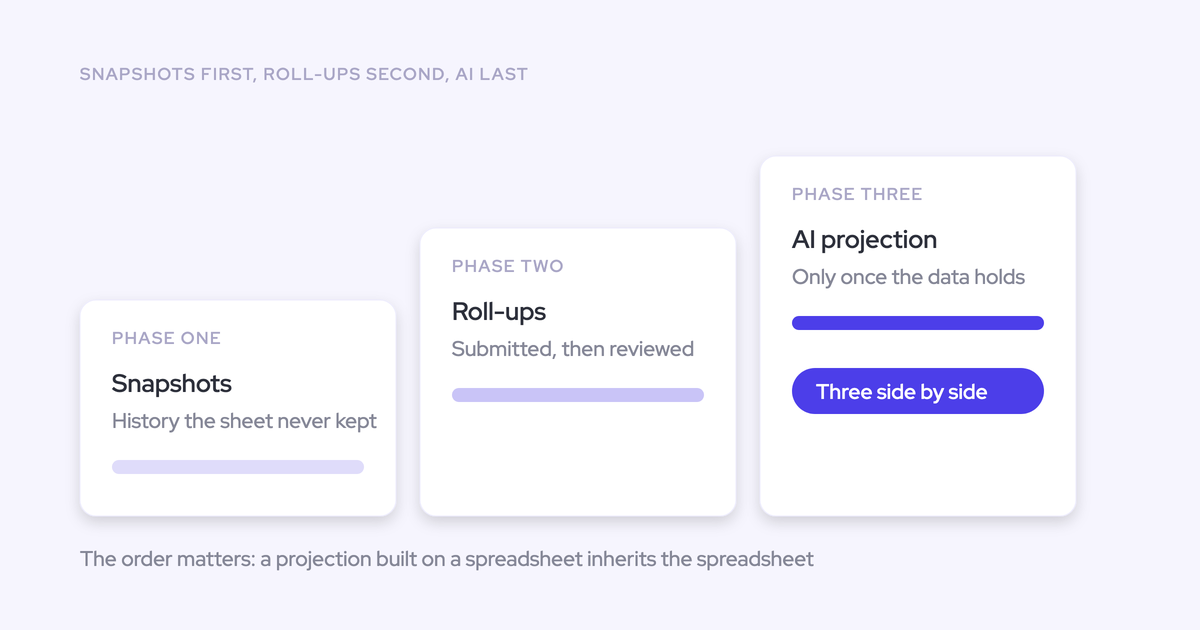

Replace the jobs your forecast spreadsheet performs, not the workbook itself. Start with pipeline history and a smaller set of approved inputs. Move submissions and roll-ups into Weflow, prove the weekly cadence, and retire the spreadsheet against fixed gates. Add weighted and AI forecasts after the operating process holds.
Your cutover has to protect this week’s number. The spreadsheet stays authoritative during a bounded validation window, with one owner for every difference and a date for the go/no-go decision.
You don’t need to reproduce every tab. You need to preserve the business logic leadership uses, keep the deals behind each number inspectable, and stop rebuilding the forecast by hand.
Weflow is the Revenue AI Orchestration platform for sales, customer success, and RevOps teams. It’s built for Salesforce teams. This rollout connects your weekly deal reviews to a versioned submission and management process, with an explicit boundary between Salesforce deal records and Weflow forecast records.
The Weflow replacement plan at a glance
The Weflow rollout has three phases, each with an exit gate. Configuration alone doesn’t earn a cutover.
| Phase | Spreadsheet job replaced | Deliverable | Proof required | Exit gate |
|---|---|---|---|---|
| 1. Establish history and simplify inputs | Exports, formula chains, manual pipeline snapshots | Approved input map and reconciled pipeline baseline | Known opportunities match across sources; snapshot collection works | RevOps and the Salesforce admin approve the baseline |
| 2. Move submissions and roll-ups | Rep files, emailed numbers, manager consolidation | One weekly submission and review cadence | Required roles submit, inspect, override, and roll up correctly | Leadership and finance approve the parallel-run results |
| 3. Cut over, measure, then add AI | Executive workbook and hand-built accuracy tracking | Authoritative Weflow forecast and dated measurement baseline | Reporting works without rebuilding the workbook | Archive the operating spreadsheet; introduce model comparisons when ready |
Where forecast data lives after cutover
Salesforce remains the source of truth for opportunities. Weflow stores forecast submissions, targets, and roll-ups in Weflow, not in Salesforce objects.
That distinction matters more than a general promise about CRM integration. A Salesforce report can read an opportunity change made through Weflow. It can’t read a rep’s Weflow submission from that opportunity.
| Data type | Operating system | Write path | Reporting route | Accountable owner |
|---|---|---|---|---|
| Opportunity fields | Salesforce | Opportunity edits in Weflow sync to Salesforce | Salesforce reporting and Weflow views | Salesforce admin and opportunity owner |
| Captured activity and structured call outcomes | Salesforce records | Weflow capture and field updates write to Salesforce | Salesforce reporting and Weflow insights | RevOps and the Salesforce admin |
| Rep and manager submissions, comments, and versions | Weflow | Users submit and revise in Weflow | Weflow; public API for downstream forecast reporting | Forecast participants and RevOps |
| Targets and forecast roll-ups | Weflow | Target configuration and submission roll-up | Weflow; validate required API fields for BI | Sales leadership and RevOps |
| Opportunity snapshots and movement analysis | Weflow analytics | Weflow snapshots opportunity data every few hours | Weflow pipeline analytics | RevOps |
| Historical spreadsheet submissions | Existing archive unless an import path is confirmed | Preserve original dated files | Historical archive | RevOps |
Don’t assume historical spreadsheet submissions can be imported or backfilled. Confirm that requirement before committing to a cutover date. Keep the old archive accessible without keeping the old submission process alive.
Is Weflow the right spreadsheet replacement?
Weflow fits a deal-based forecast built from Salesforce opportunities, with submissions and management judgment recorded in Weflow. It doesn’t replace every model that finance calls a forecast.
| Requirement | Weflow fit | Operating implication | Recommended path |
|---|---|---|---|
| Deal-based bookings forecast with rep and manager submissions | Supported | Run submissions and roll-ups in Weflow | Proceed to configuration and pilot |
| Separate new-business, expansion, and renewal motions | Supported | Define each motion’s scope, targets, and review ownership | Test separate and combined views |
| Every submission, target, and roll-up must reside in Salesforce | Doesn’t fit that policy | Weflow forecast records live outside Salesforce | Keep a Salesforce-resident submission process |
| Consumption forecasting | Not supported | Deal-based methods don’t model usage revenue | Keep a consumption forecasting system |
| FP&A, provisions, or revenue recognition | Outside Weflow’s scope | A bookings forecast remains an input to finance’s model | Agree on the handoff rather than retiring the finance model |
| Bespoke splits, date logic, or unusual management paths | Requires validation | General configurability doesn’t prove your exact requirement | Make the exception a pilot acceptance test |
If the board runs the business on recognized revenue, don’t promise that replacing the bookings workbook will retire the board model. Settle which spreadsheet you’re replacing.
What must be settled before configuring Weflow?
Agree on the operating decisions before turning them into Weflow settings. Otherwise, configuration becomes a weekly debate about what the forecast should mean.
- Scope: An inventory of spreadsheet jobs and downstream dependencies.
- Definitions: Approved categories, periods, motions, and inclusion rules.
- Ownership: Named submission, override, cutover, and rollback owners.
- Finance: A reconciliation agreement with tolerances and sign-off.
- Salesforce: An approved field map and access test plan.
Which spreadsheet jobs must survive the migration?
Preserve the business decisions the workbook supports. Treat tabs, formulas, and formatting as implementation details until someone proves they’re necessary.
Use this inventory as a working template. Replace each role with a named owner before the pilot.
| Spreadsheet component | Business job | Owner | Downstream dependency | Migration decision |
|---|---|---|---|---|
| Salesforce export tab | Supply current deal inputs | RevOps | Pipeline and forecast views | Replace with connected Salesforce data |
| Rep submission sheet | Record the rep’s forecast judgment | Rep | Manager review | Replace with Weflow submissions |
| Manager adjustment cell | Record an independent management call | Manager | Executive roll-up | Replace with an override and explanation |
| Weekly copied tab | Retain what changed | RevOps | Movement and accuracy reviews | Separate opportunity history from submission history |
| Board-output tab | Supply an approved forecast to reporting | Finance | Board pack or BI model | Replace the input route; retain necessary financial calculations |
Which forecast definitions will become standard?
Standardize what people submit before standardizing the screen. Weflow supports baseline and best-case submissions, but leadership still has to define what belongs in each.
Keep stage and forecast judgment distinct. Stage records progress through the sales process. A category records confidence about an outcome in the period, even when a stage mapping supplies its default.
| Term | Proposed operational meaning | Include | Exclude | Approver |
|---|---|---|---|---|
| Baseline | The total the business plans against | Deals the owner confidently expects in the period | Upside without a defensible closing path | CRO |
| Best case | The total if identified upside closes | Baseline plus credible upside | Unqualified pipeline | CRO |
| Commit category | Deals meeting the team’s commitment criteria | Evidence supporting a close in the period | Deals classified by optimism alone | Sales leadership |
| Pipeline | Open opportunities within the approved scope | Eligible opportunities by motion and period | Excluded record types and out-of-period deals | RevOps |
| Forecast period | The exact date window the number covers | Dates within the approved fiscal boundaries | Different date bases mixed into one comparison | Finance |
Write down whether best case includes baseline and whether each submitted total includes closed-won business. Those two ambiguities can invalidate an otherwise correct roll-up.
Who owns submissions, overrides, and cutover?
Give each forecast action one accountable owner. RevOps configures the process; sales leadership owns the judgment and the decision to use it.
| Action | Responsible | Accountable | Consulted |
|---|---|---|---|
| Update opportunity inputs and submit | Rep | Frontline manager | RevOps |
| Review and override | Manager | Sales leader | Rep |
| Configure deadlines and locking | RevOps | Forecast process owner | Sales leadership |
| Approve a reopen request | RevOps coordinates the correction | Designated forecast leader | Finance |
| Validate Salesforce access | Salesforce admin | Security or system owner | RevOps |
| Accept reconciliation | RevOps and finance analyst | Finance owner | CRO |
| Approve cutover or rollback | RevOps executes | CRO | Finance and Salesforce admin |
What will finance accept as reconciliation?
Finance should approve the comparison basis before the first parallel run. Matching totals means little if the systems use different amounts, dates, or currencies.
| Measure | Source | Comparison rule | Tolerance | Exception owner | Approver |
|---|---|---|---|---|---|
| Eligible pipeline | Salesforce opportunities | Same record IDs, filters, and comparison timestamp | No unexplained scope differences | RevOps | Salesforce admin |
| Deal value | Approved amount field | Same field and currency basis | Finance sets rounding and FX tolerance | Finance analyst | Finance owner |
| Submitted forecast | Dated submissions | Same participants, period, and included categories | No unexplained judgment differences | Sales manager | CRO |
| Actual bookings | Approved closed-won basis | Same fiscal window and treatment of adjustments | Finance approves any exceptions | Finance analyst | Finance owner |
| Revenue-model handoff | Accepted sales forecast | Document bookings-to-revenue adjustments separately | Model-specific | FP&A | Finance owner |
An explained timing difference isn’t the same as a configuration error. Log the cause, owner, and resolution rather than editing one total to resemble the other.
Which Salesforce fields and access will Weflow use?
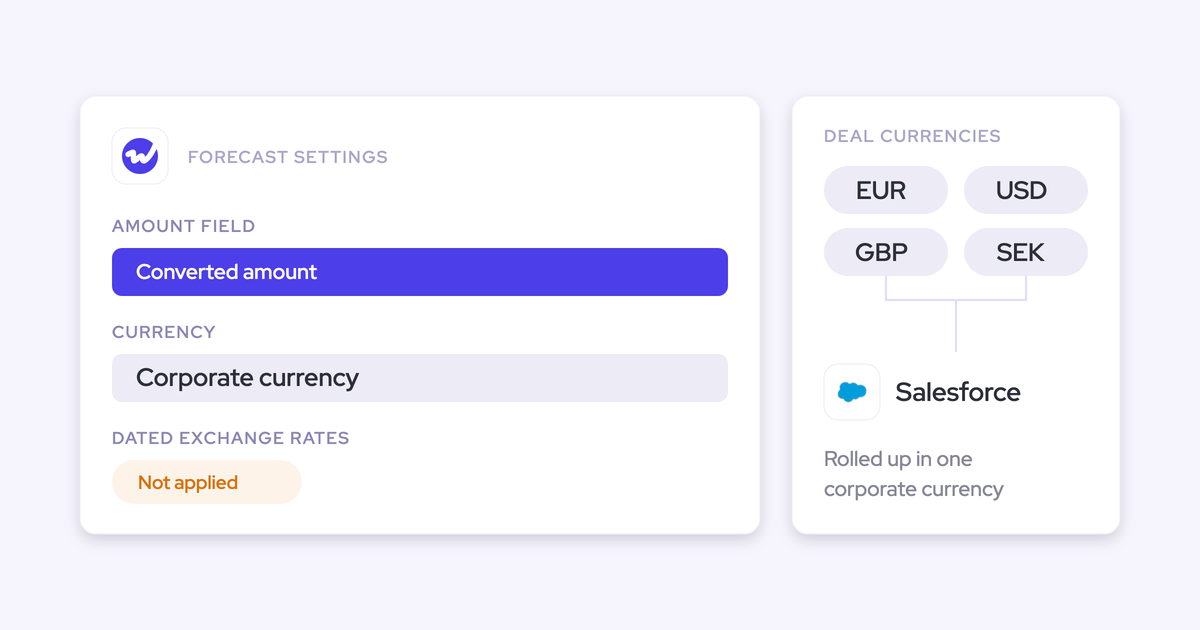
Weflow forecasting can use standard, custom, or formula fields and supports multiple currencies. Existing Salesforce forecasting configuration doesn’t automatically become the Weflow operating model.
- Forecast fields: Identify the amount, period-driving date, stage, category, owner, motion, and currency fields.
- Organizational structure: Document record types, fiscal boundaries, management paths, and target ownership.
- Permissions: Test permission sets, field-level security, role hierarchy, and any restrictions enforced only through the Salesforce interface.
- Validation: Include a formula-driven amount, a period-boundary deal, a renewal, a foreign-currency opportunity, and a restricted record.
If capture is part of the rollout, validate its permissions separately. Activity mapping needs Account and Opportunity access, not Contact access alone.
Phase 1: Establish history and simplify inputs
Finish Phase 1 with a small, explainable field map and a reconciled Weflow pipeline baseline. Keep the existing submission cadence running while you build that foundation.
Step 1: Classify spreadsheet fields and formulas
Classify every forecast input as keep, rebuild, replace, or retire. A formula survives because someone needs its result, not because it has existed for years.
Owner: RevOps, with the Salesforce admin. Input: The workbook inventory and downstream dependencies.
| Decision | Working example | Rationale | Owner and dependency | Approval required |
|---|---|---|---|---|
| Keep | An approved Salesforce amount field | It already expresses the metric the business forecasts | Finance; bookings reporting | Finance confirms the definition |
| Rebuild | A required calculation that reads a deprecated field | The business rule matters; its dependency is broken | Salesforce admin; forecast inputs | RevOps validates sample records |
| Replace | A formula summing emailed rep numbers | Weflow submissions and roll-ups perform that job | Sales leadership; weekly review | Managers accept the new workflow |
| Retire | An unused adjustment column | No current decision or report depends on it | Former column owner | Downstream owners confirm removal |
Output: An approved classification register. Validation: Every retained calculation has an owner who can explain its inputs and business purpose.
Step 2: Configure Weflow’s forecast inputs
Configure Weflow from the approved field map, then test the configuration on known opportunities before comparing totals.
Owner: RevOps and the Salesforce admin. Input: Approved fields and forecast definitions.
- Select the metric field the business forecasts.
- Set the period basis and validate fiscal boundaries.
- Separate eligible record types and revenue motions.
- Map stages to the agreed forecast categories.
- Validate currency treatment against finance’s comparison rules.
| Mapping worksheet | Example configuration decision | Acceptance test |
|---|---|---|
| Amount | Use the approved bookings field rather than a workbook-derived duplicate | The value matches the source opportunity |
| Period | Use the agreed closing-date basis | A boundary-date deal enters the expected period |
| Motion | Separate New Business and Renewal record types | Each opportunity appears in its intended forecast |
| Category | Apply the approved stage/category mapping | A known stage produces the expected category |
| Currency | Use the agreed reporting currency | Finance can explain the converted amount |
Output: A configuration worksheet someone other than the original builder can maintain. Don’t accept total-level parity until the record-level tests pass.
Step 3: Start Weflow opportunity snapshots
Start Weflow opportunity snapshots as early as your approved setup permits. Weflow snapshots opportunity data every few hours to support pipeline movement, pacing, and period comparisons.
Owner: RevOps. Input: The configured opportunity scope.
- Confirm snapshot collection is active for the intended scope.
- Record the first available snapshot date and time.
- Inspect a known opportunity’s captured values.
- Validate a subsequent legitimate field change against the captured history.
- Log missing records or fields with an owner and resolution date.
Working artifact: A history register with forecast scope, first available date, tested opportunity, observed change, and exception status.
Weflow’s opportunity timeline makes tracked field changes inspectable alongside the forecast. Use it to check the history behind a close-date or stage change.
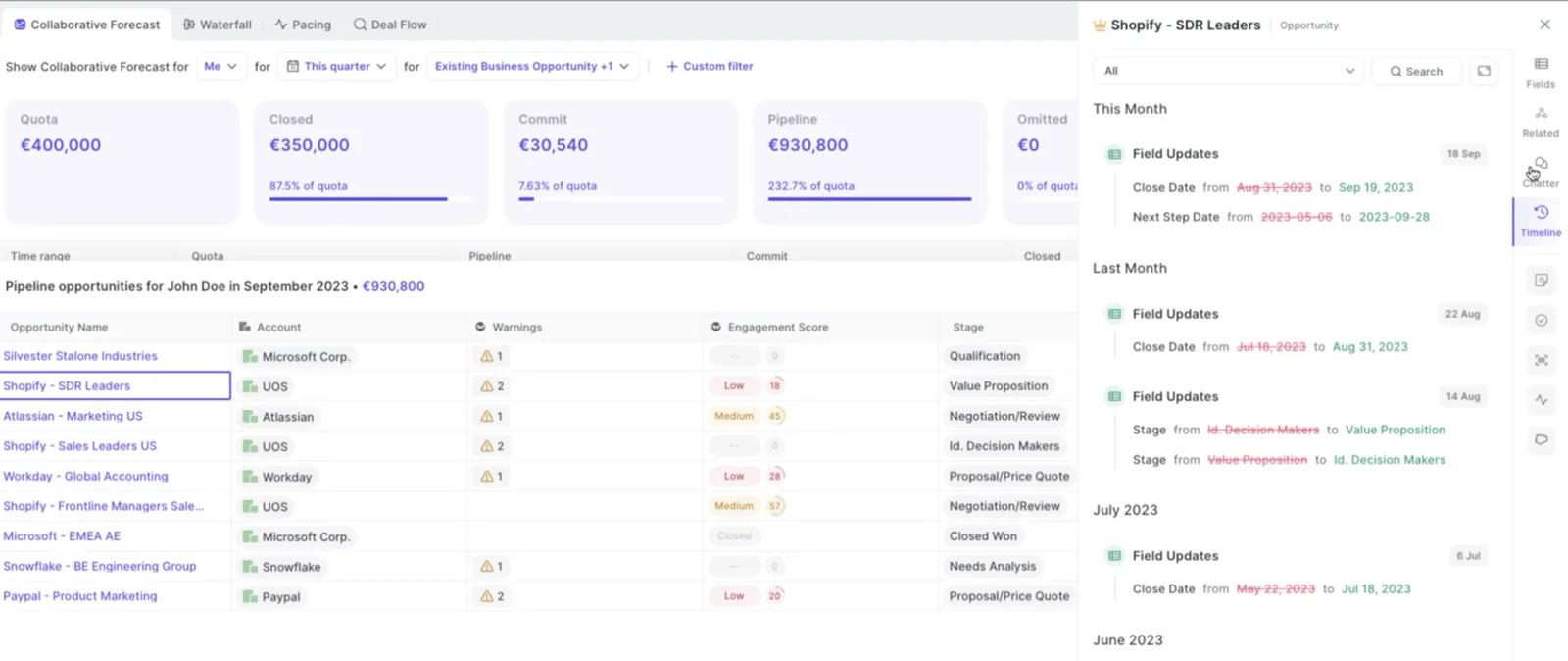
Validation: RevOps can identify the earliest usable history and explain a captured change. Historical activity backfill isn’t a substitute for historical opportunity snapshots or dated forecast submissions.
Step 4: Reconcile the first pipeline baseline
Reconcile Weflow, Salesforce, and the spreadsheet using the same opportunity scope and comparison time. Start with record membership, then inspect value differences.
Owner: RevOps, with finance reviewing the amount basis. Input: The configured forecast and current workbook baseline.
| Comparison | Rule | Variance to record | Likely cause to test | Action and owner |
|---|---|---|---|---|
| Weflow versus Salesforce | Same opportunity IDs and filters | Missing or additional records | Scope, permissions, or timing | Admin resolves or documents |
| Weflow versus workbook | Same metric and currency basis | Amount difference | Formula logic, FX, or stale export | RevOps and finance investigate |
| Period totals | Same date field and boundaries | Deals appearing in different periods | Date logic or changed close date | RevOps corrects the mapping or comparison |
Output: A signed baseline and exception log. Validation: Every material difference has an explanation and an approved disposition.
Phase 2: Move submissions and roll-ups into Weflow
Move the weekly forecast motion into Weflow with a pilot group that includes its management chain. Rep access alone won’t prove the executive roll-up.
Step 5: Configure each forecast motion
Configure distinct forecast motions separately where their owners, deal paths, or review decisions differ. Weflow supports separate deal-type targets and roll-up views alongside a combined view.
Owner: RevOps with sales and customer success leadership. Input: Approved motion definitions.
| Motion | Scope | Owner | Period and target | Submission | Destination |
|---|---|---|---|---|---|
| New business | Approved new-business opportunities | Sales leader | Quarter, broken down by month; approved target | Baseline and best case | Sales roll-up and combined view |
| Expansion | Approved expansion opportunities | Account-management leader | Agreed period; expansion target | Baseline and best case | Expansion roll-up and combined view |
| Renewal | Approved renewal opportunities | Customer success or renewal leader | Agreed renewal window; renewal target | Baseline and best case | Renewal roll-up and combined view |
Output: A motion matrix. Validation: Each deal enters the intended motion, and the combined view doesn’t double-count it.
An opportunity-based renewal forecast doesn’t automatically answer account-level logo churn. If one account has several renewal opportunities, test that reporting requirement separately.
Step 6: Build the Weflow roll-up hierarchy
Build and test the complete path from rep to executive. Weflow rolls submissions through manager, VP, and executive levels while retaining the deals behind deal-based submissions.
Owner: RevOps and sales leadership. Input: The approved management and target structure.
| Role | Parent | Forecast responsibility | Target ownership | Exception test |
|---|---|---|---|---|
| Rep | Frontline manager | Submit baseline and best case | Individual target | Transferred or unassigned opportunities |
| Manager | VP | Inspect submissions and make a management call | Team target | Manager also carries an individual quota |
| VP | CRO | Review teams and explain adjustments | Approved regional or business target | Multiple teams or product responsibilities |
| CRO | Executive reporting | Own the company forecast | Executive target | Combined growth and retention view |
Targets aren’t necessarily additive. Three managers carrying a million each can report to a leader carrying two and a half million because leadership deliberately overassigns quota.
Output: A tested hierarchy. Validation: Check targets and forecast values at every level, especially above the first-line manager. Don’t assume a correct first roll-up proves the whole chain.
Step 7: Set submission and override controls
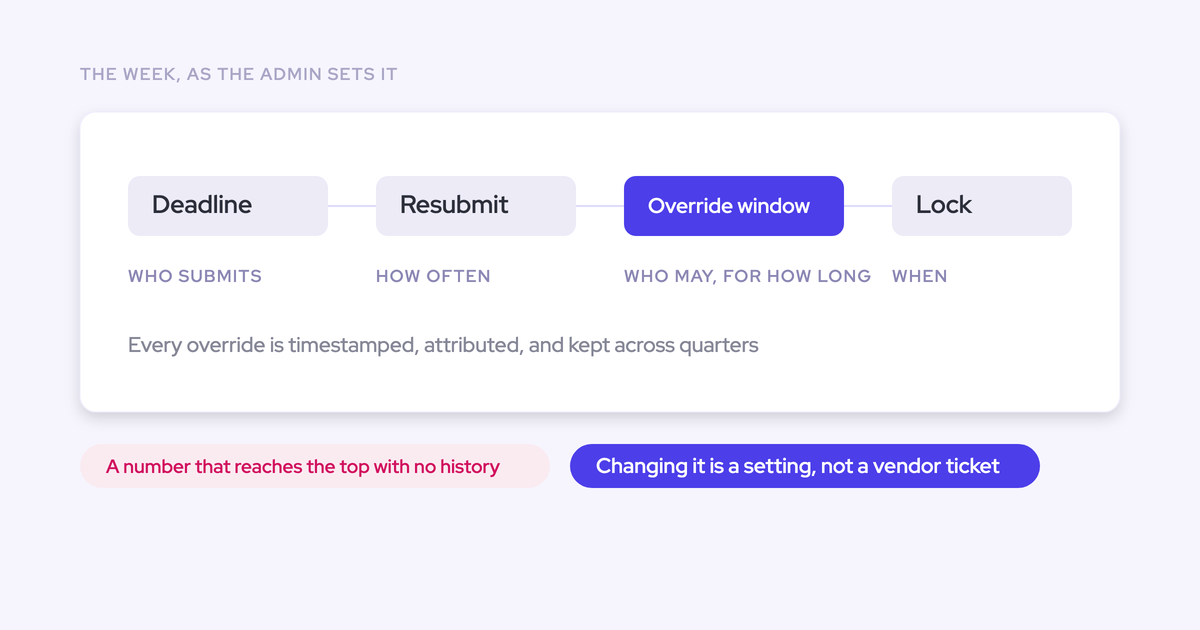
Configure submission deadlines, frequency, permissions, override windows, and locking before the pilot. Weflow versions every submission, so a revised call doesn’t erase the earlier judgment.
Owner: RevOps. Input: Leadership-approved decision rights.
| Role | Allowed action | Deadline | Override window | Reopen path | Lock condition |
|---|---|---|---|---|---|
| Rep | Submit totals or named opportunities with comments | Before manager consolidation | Approved resubmission window | Request through the manager | Rep deadline passes |
| Manager | Review and override submissions | Before executive review | Defined management review window | Request through the forecast owner | Management review closes |
| RevOps | Administer the agreed controls | Before each cycle opens | No independent sales judgment | Execute the approved correction process | Designated measurement point |
Output: A controls matrix. Validation: Test an allowed submission, a disallowed change, a manager override, and the agreed correction path after locking.
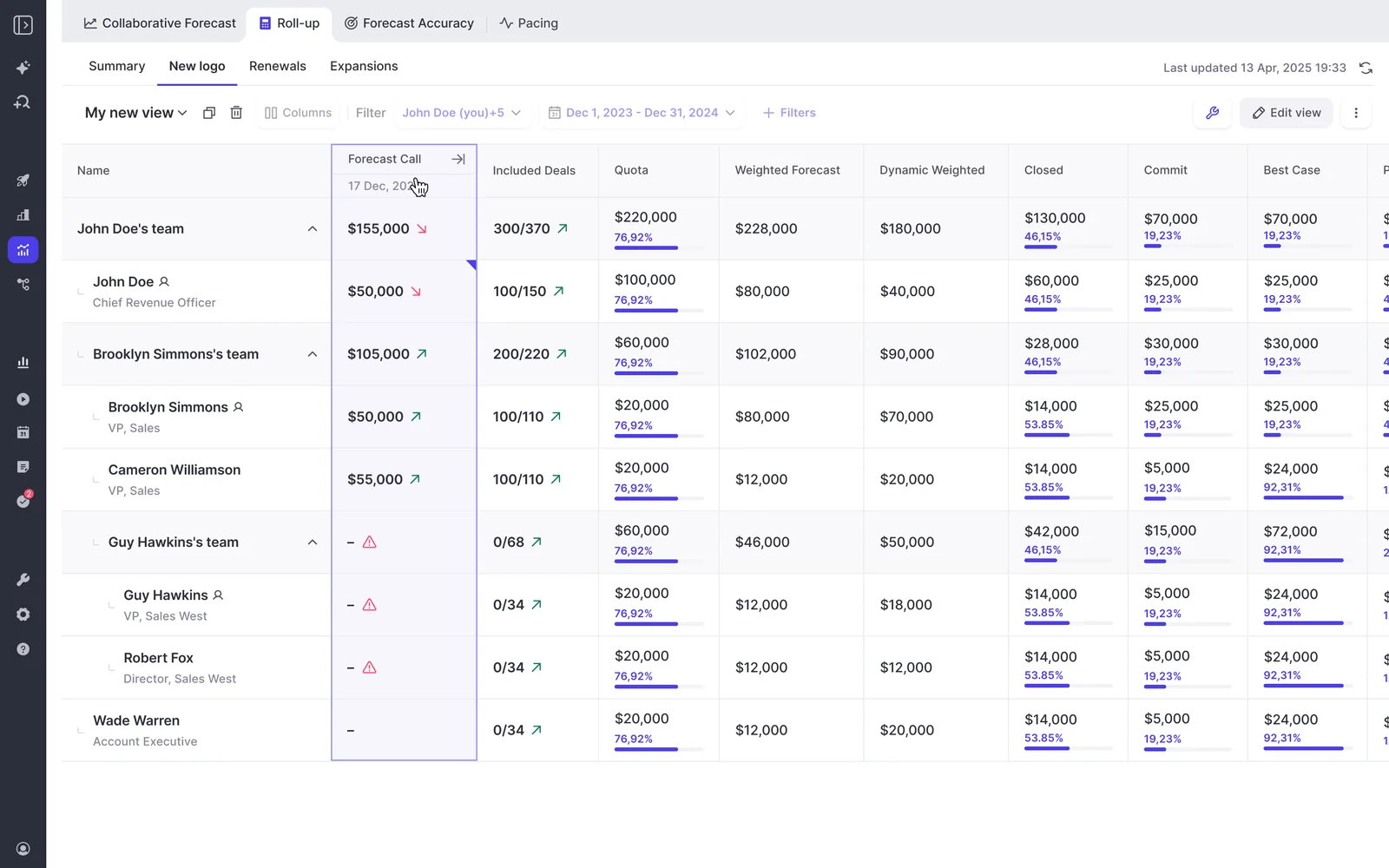
Weflow’s roll-up view retains forecast-call history beside included deals and targets. That gives managers a record of how the call moved.
Step 8: Train each role on forecast decisions
Train people on the decisions they own, not on every Weflow tab. Forecasting adoption depends on managers and executives using the new process to run the business.
Owner: RevOps and the forecast sponsor. Input: Configured pilot workflow.
| Role | Decision owned | Action practiced | Evidence reviewed | Readiness test |
|---|---|---|---|---|
| Rep | What closes in the period | Submit baseline, best case, and comments | Deal scope and closing path | Complete a submission without RevOps entering it |
| Manager | Whether to accept or adjust the rep’s call | Inspect deals and override | Activity, stage, next steps, and submission history | Explain an adjustment from evidence |
| RevOps | Whether the process ran correctly | Check scope, controls, and exceptions | Configuration and reconciliation logs | Diagnose a mismatch without rebuilding the workbook |
| Finance | Whether the output meets the agreed basis | Reconcile the accepted forecast | Metric definitions and adjustments | Use the output in its reporting process |
| Executive | Which forecast the business uses | Review the roll-up and challenge changes | Management calls and supporting deals | Run the review without requesting the old workbook |
Output: A readiness checklist with a support owner for each role. Record the training so later joiners don’t depend on the person who attended the original session.
Step 9: Pilot one weekly forecast cadence
Pilot the full weekly sequence with one manageable team and its leaders. Include finance in the review before expanding participation.
Owner: The frontline manager, with RevOps coordinating. Input: The approved baseline, hierarchy, and controls.
- Thursday, reps: Update pipeline inputs and resolve missing next steps or stale close dates. Send configuration issues to RevOps.
- Friday, managers: Review deals with the team. Test whether the evidence supports the proposed close period and forecast judgment.
- After deal review, reps: Submit baseline and best case with comments under the agreed deadline.
- Before the executive call, managers: Review the roll-up, make justified overrides, and escalate unresolved differences.
- Monday, managers, RevOps, and CRO: Review changes and material risks, then confirm the executive call.
- After the call, RevOps and finance: Validate the output, record issues, and assign corrections before the next cycle.
Working artifact: A cycle log with participant, submission status, override reason, unresolved issue, owner, and due date.
Validation: The pilot produces a usable management number on schedule. During the call, have one person lead the conversation while another checks the supporting deals.
Step 10: Run a fixed parallel validation window
Set the parallel run’s final cycle and decision date before it begins. The spreadsheet remains authoritative during validation; Weflow earns that role by passing the agreed tests.
Owner: RevOps. Input: Pilot results and finance’s reconciliation agreement.
| Cycle | Compared output | Variance and explanation | Action | Owner | Status |
|---|---|---|---|---|---|
| Opening cycle | Pipeline scope and rep submissions | Record IDs, values, and submission differences | Resolve configuration or timing issues | RevOps | Pass, fail, or approved exception |
| Validation cycles | Manager overrides and executive roll-up | Explain each management adjustment | Correct hierarchy or process gaps | Sales leadership | Pass, fail, or approved exception |
| Final scheduled cycle | Executive output and finance handoff | Record remaining material differences | Recommend cutover or a bounded extension | RevOps and finance | Go or no-go |
Output: A signed parallel-run scorecard. Validation: No unexplained material differences remain, and every required role completes the process.
Choose the number of cycles around the exceptions you must test. If you extend the window, name the failed gate, corrective owner, and new decision date. Don’t extend it because someone wants more comfort.
Phase 3: Cut over, measure, then add AI
Make Weflow authoritative only after the operating gates pass. Then measure dated submissions against outcomes before asking AI to influence the management call.
Step 11: Apply cutover and rollback gates
Use a written go/no-go checklist to retire the spreadsheet. A successful demo or a reconciled total isn’t enough.
Owner: RevOps prepares the decision; the CRO approves it with finance. Input: The final parallel-run scorecard.
| Criterion | Evidence | Owner | Approver | Rollback trigger |
|---|---|---|---|---|
| Pipeline inputs reconcile | Approved baseline and exception log | RevOps | Finance and admin | Unexplained material scope or amount difference |
| Required roles can participate | Access and readiness tests | Admin and RevOps | Forecast sponsor | Critical submitter or reviewer can’t complete the cycle |
| Hierarchy and controls work | End-to-end submission, override, and lock test | RevOps | Sales leadership | Incorrect executive roll-up or failed control |
| Finance accepts the handoff | Reporting test and sign-off | Finance analyst | Finance owner | Required reporting can’t use the output |
| Leadership accepts the new workflow | Executive review completed in Weflow | CRO | CRO | No agreed authoritative forecast |
Working artifact: Add decision date, evidence location, and go/no-go status to each gate.
Keep the last validated workbook and its refresh instructions available for an approved rollback. If a trigger fires, the CRO designates the temporary authoritative output, and RevOps communicates it before leadership receives competing numbers.
Step 12: Make Weflow the executive forecast
Switch the reporting route and the meeting workflow together. Weflow hasn’t replaced the spreadsheet if the CRO still asks RevOps to rebuild the workbook before every review.
Owner: CRO and RevOps. Input: Approved cutover decision.
- Announce the first cycle in which Weflow becomes authoritative.
- Run the executive review from the agreed Weflow view.
- Move the finance and BI handoff to the validated reporting route.
- Archive the operating workbook as read-only and stop collecting submissions there.
- Keep the rollback procedure available without maintaining a second live forecast.
| Audience | Cutover message | Owner |
|---|---|---|
| Reps and managers | Where to submit, the deadline, and the exception path | Sales leadership |
| Executives | Which Weflow output is authoritative and when it locks | CRO |
| Finance and BI | Which source to consume and how to handle adjustments | Finance owner |
| All forecast participants | Where the historical workbook lives and who can authorize rollback | RevOps |
Validation: Complete the executive cycle without refreshing the operating workbook.
Step 13: Lock submissions and measure accuracy
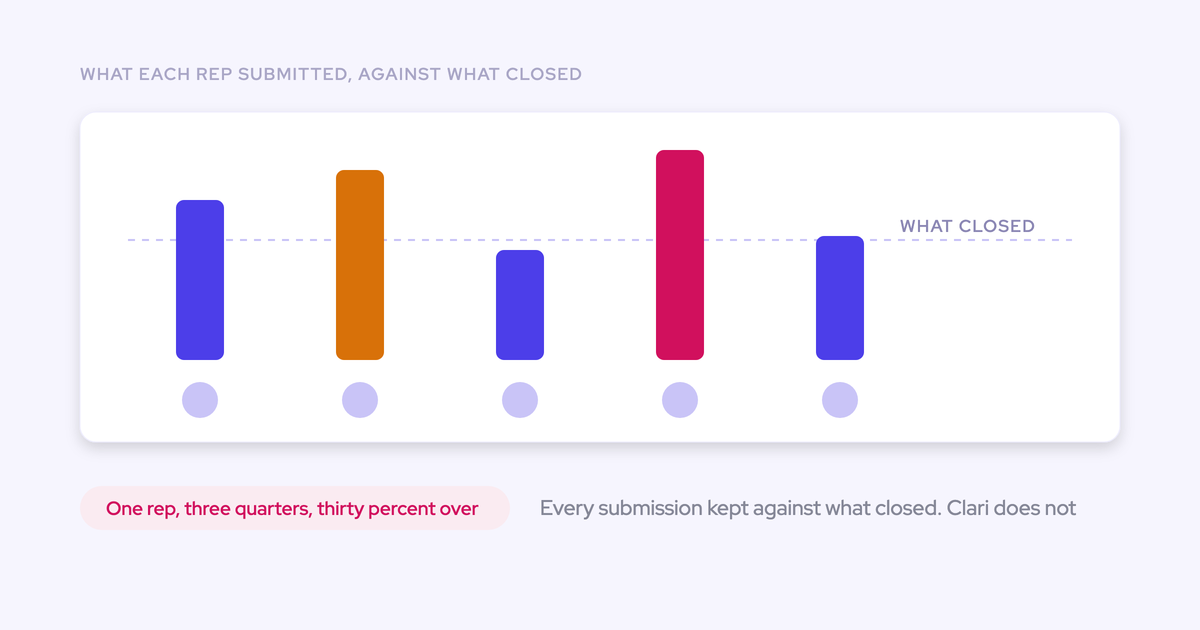
Measure forecast accuracy from a fixed, dated submission against the final closed amount. Weflow retains submissions and supports variance reporting by rep, manager, and segment.
Owner: RevOps, with finance approving the actuals basis. Input: Locked submissions and final outcomes.
| Metric-definition field | Decision to record |
|---|---|
| Forecast value | Baseline, best case, or another explicitly named submitted value |
| Measurement point | The same week and cutoff across comparable periods |
| Actual outcome | Approved closed-won amount, metric field, currency, and fiscal period |
| Variance convention | Define overforecast and underforecast direction |
| Percentage convention | Agree on the denominator and handling of zero actuals; verify the reporting calculation |
| Comparison groups | Rep, manager, team, motion, and period |
Use an early-quarter checkpoint, such as week three or four, consistently. A call made in the final days measures something different from a forecast made while the outcome remains uncertain.
Weflow’s Forecast Accuracy view compares submitted categories with closed-won outcomes across people and periods.
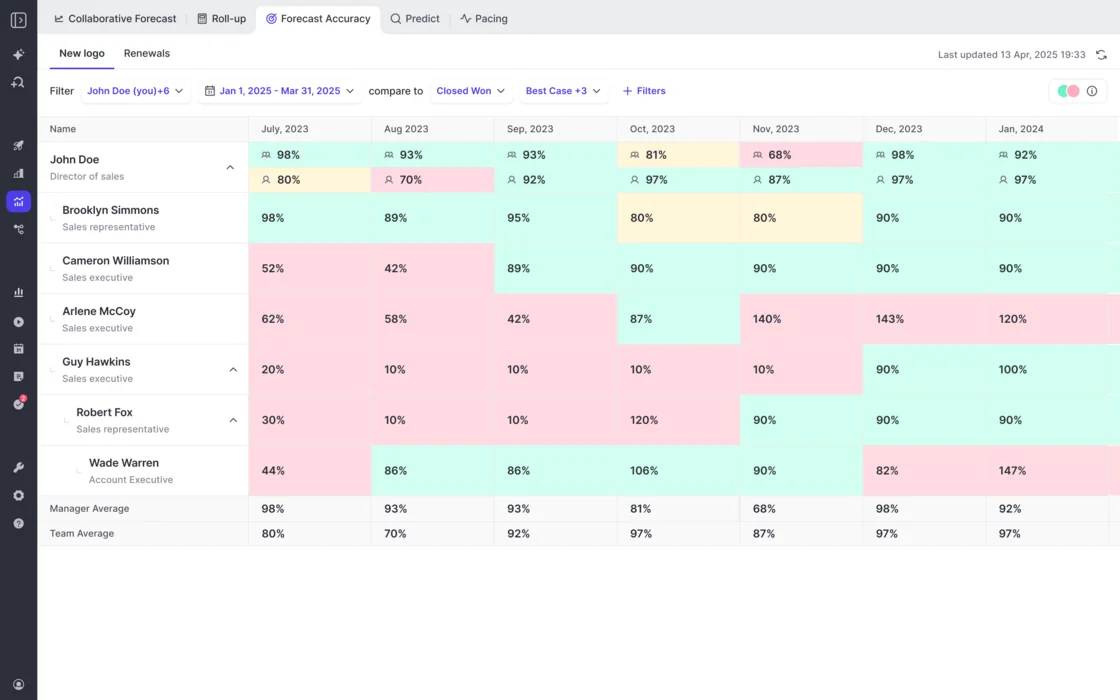
Working scorecard: Period, submission date, person or team, motion, submitted value, actual value, variance, explanation, and coaching action.
Zeotap reports forecasting within 7% by week four of the quarter with Weflow. That’s a customer outcome, not a rollout guarantee. Your first milestone is a consistent measurement baseline.
Step 14: Add weighted and AI forecasts
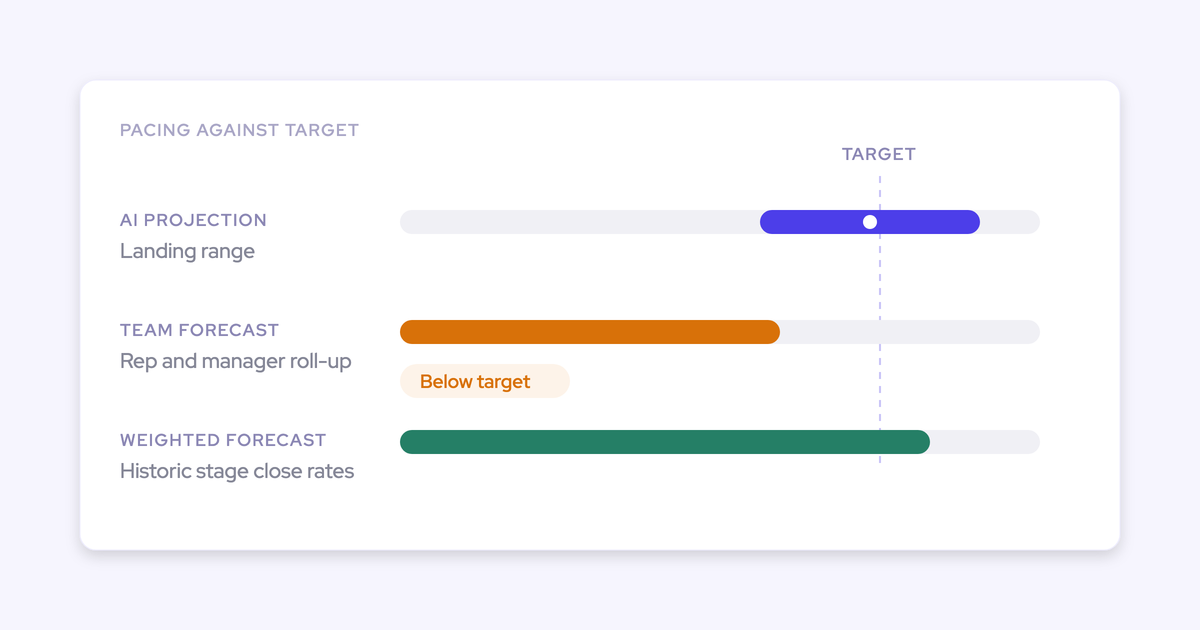
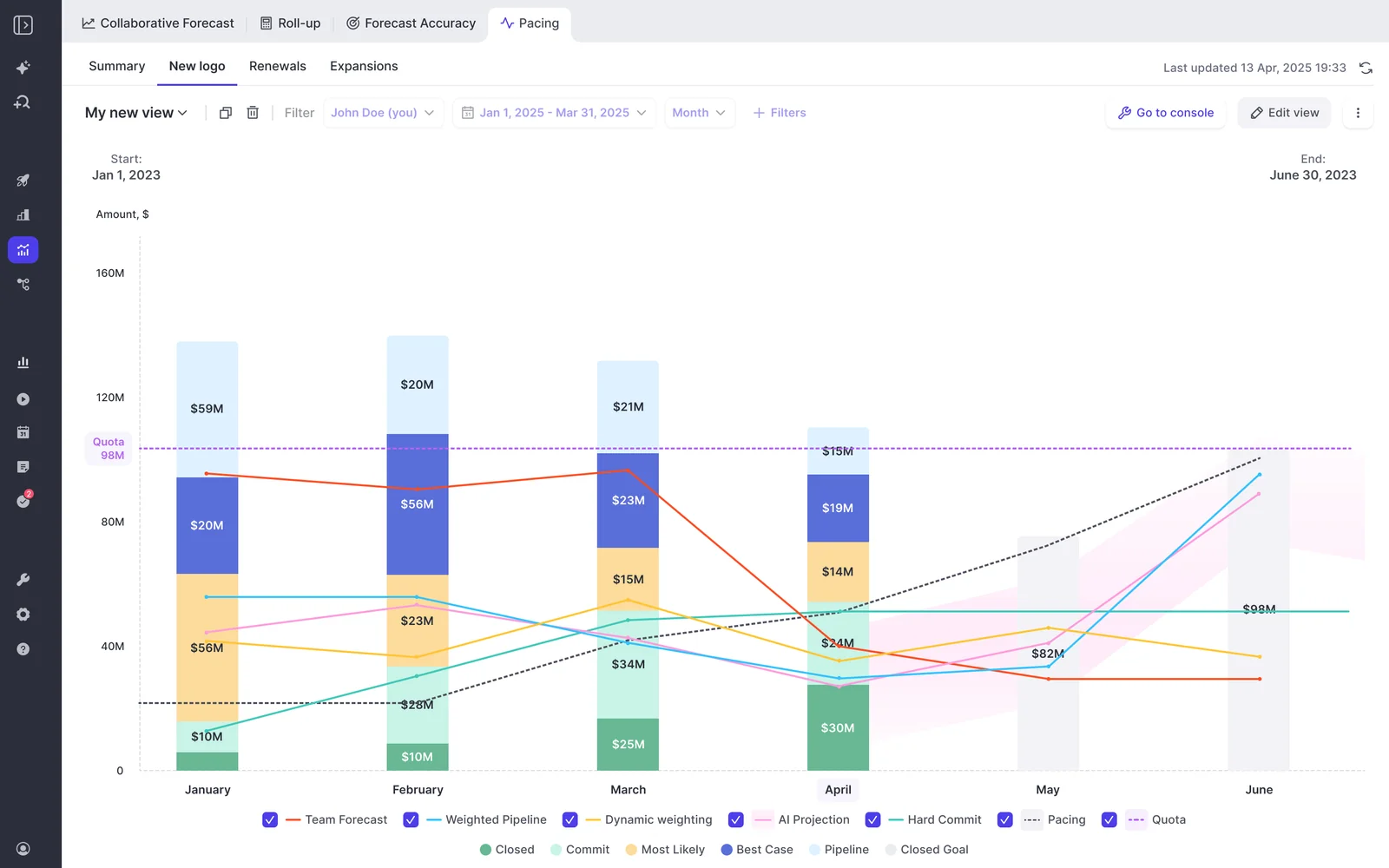
Add Weflow’s weighted forecast and AI projection once the submission process and underlying data are trustworthy. Use disagreement to direct inspection, not to create another unofficial executive number.
We learned this through our own product. Weflow’s early AI forecast was inaccurate before we had reliable activity and conversation capture underneath it. The model couldn’t judge stalled or slipping deals from missing context.
Owner: RevOps and sales leadership. Input: Stable submissions, usable history, and validated activity and conversation coverage.
| Weflow method | What it contributes | What to inspect when it disagrees |
|---|---|---|
| Team roll-up | Rep and manager judgment, including baseline and best case | Unsupported confidence, habitual optimism, or sandbagging |
| Dynamically weighted forecast | Expected outcome from historical stage close rates | Stage discipline, conversion history, and changes in deal mix |
| AI projection | A landing range using deal-level signals and available history | Missing engagement, weak qualification, timing risk, or thin data coverage |
Weflow’s pacing view shows forecast methods against quota, so leadership can compare them in one review.
- Check whether stage history reflects the actual sales process.
- Verify that activity maps to the right opportunities.
- Inspect missing call context and unexplained close-date movement.
- Identify the deals driving the gap between methods.
- Record whether the review changes a deal action, a management call, or neither.
Weflow’s AI projection can use up to two years of history. That isn’t a universal minimum-data requirement or a promise that all of your history is available. Confirm readiness against your own data.
Validation: The comparison produces specific deal decisions while the approved management forecast remains authoritative.
See how Weflow captures activity, updates Salesforce fields from calls, and rolls up your forecast. Book a 30-minute demo.
Common mistakes that preserve the spreadsheet
The spreadsheet survives when Weflow takes over the display but nobody changes the decisions, handoffs, or ownership underneath it.
Rebuilding every spreadsheet formula in Weflow
Require a business reason for every formula you retain. Configuration flexibility shouldn’t become permission to carry deprecated logic into Weflow.
| Warning sign | Corrective decision |
|---|---|
| The migration checklist mirrors every workbook column | Approve business jobs first, then choose the smallest input set |
| A calculation reads fields nobody maintains | Rebuild the required rule against an approved source or retire it |
| Only the original workbook owner can explain the number | Require a second operator to validate and maintain the field map |
Running parallel forecasts without a stop date
A parallel run needs a decision date and a failure policy. Otherwise, RevOps inherits permanent reconciliation work.
| Anti-pattern | Correction |
|---|---|
| Both systems remain equally authoritative | Name one authoritative output for each rollout stage |
| The team extends validation because confidence feels low | Name the failed test, corrective owner, and next decision date |
- Set the final validation cycle before starting.
- Define which differences block cutover.
- Give the CRO and finance an explicit go/no-go decision.
Adding AI before the forecast cadence stabilizes
Delay AI-led forecast decisions until you can distinguish missing data from genuine deal risk.
| Not ready | Ready |
|---|---|
| Reps submit at different points in the week | Comparable deadlines produce dated submissions |
| Stages reflect habit rather than exit criteria | Managers enforce consistent stage definitions |
| Low engagement may mean missing capture | RevOps has validated coverage and opportunity mapping |
| Leaders select whichever model feels reassuring | Leaders inspect discrepancies and retain accountability for the call |
Leaving finance outside the rollout
Bring finance into definition and pilot decisions. A forecast finance can’t use won’t replace the spreadsheet finance depends on.
| Anti-pattern by stage | Correction |
|---|---|
| Before setup: sales chooses the amount and period basis alone | Finance approves the metric, currency, and fiscal boundaries |
| During pilot: RevOps reconciles totals without finance | Finance owns the acceptance rules and adjustment treatment |
| At cutover: finance discovers the reporting route changed | Test the downstream handoff before approving go-live |
Training reps without aligning forecast leaders
Manager and executive behavior determines whether Weflow becomes the forecast system. Reps won’t maintain a new submission process if leadership keeps requesting the old files.
| Insufficient rollout behavior | Required leadership behavior |
|---|---|
| Reps learn where to enter a number | Managers agree on what the number means and how to challenge it |
| Managers receive a product tour | Managers practice inspecting deals and explaining overrides |
| Executives receive access | Executives run the review in Weflow and stop requesting the operating workbook |
Frequently asked questions
Commercial scope, reporting access, and permission exceptions can still block cutover. Settle these before fixing the final rollout date.
What does Weflow Deal Intelligence & Forecasting cost?
Weflow Deal Intelligence & Forecasting costs $39 per user per month, billed annually, with a 10-user minimum.
| Commercial item | Weflow terms |
|---|---|
| Standalone product | Weflow Deal Intelligence & Forecasting: $39 per user per month |
| Full bundle with forecasting | Revenue AI Enterprise: $79 per user per month |
| Revenue AI Enterprise scope | Weflow Activity & Contact Capture, Weflow Conversation Intelligence, and Weflow Deal Intelligence & Forecasting |
| Billing and minimum | Annual billing; 10 users minimum |
| Platform and implementation fees | No platform or implementation fees |
| Included AI access | Ask Weflow AI Pro and Agent Builder Free, with 25 agent actions per month |
| View-only access | Free view-only licenses (up to one per recording license) included |
Revenue AI Business costs $59 per user per month and includes deal intelligence, but not forecasting. Confirm each role’s required actions in the quote; view-only access doesn’t replace a participant’s submission needs.
Agent Builder has paid workspace tiers for usage beyond its free allowance. Don’t confuse that allowance with token-based pricing for the forecasting product.
Can Weflow Deal Intelligence & Forecasting run standalone?
Yes. Weflow sells Weflow Deal Intelligence & Forecasting standalone. The tradeoff is the quality of the activity and conversation data feeding deal inspection and AI projections.
- Standalone path: Use it when your existing setup already supplies trustworthy Salesforce inputs and sufficient deal context.
- Combined path: Pair forecasting with Weflow Activity & Contact Capture and Weflow Conversation Intelligence when missing activity and call outcomes cause the trust problem.
Buying forecasting alone doesn’t repair missing evidence. Test the data foundation independently from the submission mechanics.
Can Weflow forecasting be proven in two weeks?
No. A two-week evaluation can validate technical mechanics, but it can’t prove a durable forecasting cadence or quarter-level accuracy.
| Can validate | Cannot yet validate |
|---|---|
| Field mappings, scope, permissions, and initial snapshots | Historical comparisons for periods you haven’t captured |
| Submission, override, locking, and roll-up mechanics | Sustained manager and executive adoption |
| Activity capture and usable conversation outputs | Forecast accuracy against a future period’s final result |
Start with a process-alignment session that includes finance. Then choose a fixed pilot window with enough weekly cycles to test the required handoffs and exceptions. Measure accuracy after the relevant period closes.
Can technical setup begin during security review?
Yes, where your security team permits preparatory access. For activity capture, Weflow doesn’t read a mailbox until an admin enrolls the user in an activity capture configuration.
- Get approval for the preparatory setup steps.
- Install the required packages, connect the integration user, and add the workspace application without enrolling users in capture.
- Finish legal and security review before activating the approved data-processing scope.
- Enroll approved users and validate capture after authorization.
That enrollment boundary applies to mailbox capture. Don’t treat it as blanket approval for other Salesforce reads, recording, or AI processing.
Can BI tools access Weflow forecast submissions?
Yes. BI teams can retrieve Weflow forecast roll-up data through Weflow’s public API. Salesforce-only reporting won’t include submissions that live in Weflow.
Have the BI owner test the required submission values, periods, identifiers, and history before cutover. Confirm the available fields and extraction behavior rather than assuming every Weflow screen has an identical API response.
Keep the reporting ownership explicit: Salesforce supplies opportunity records; Weflow supplies the forecast layer; finance owns any financial adjustments.
Does Weflow inherit Salesforce permissions and hierarchy?
Weflow applies Salesforce permission sets, field-level security, and role hierarchy. It doesn’t inherit restrictions that exist only through Salesforce list views or Lightning component visibility.
| Salesforce control | Weflow behavior | Admin action |
|---|---|---|
| Permission sets and field-level security | Weflow applies these controls | Test allowed and restricted records and fields with representative users |
| Role hierarchy | Weflow reads the hierarchy | Validate visibility separately from the forecast roll-up configuration |
| List-view restrictions | Weflow doesn’t inherit interface-only restrictions | Create central views, assign them by team, and restrict user-created views where required |
| Lightning component visibility | Weflow doesn’t treat hidden components as permissions | Reproduce required segregation in Weflow and test access |
| View export controls | Weflow governs export through a feature flag | Configure and test export permissions explicitly |
Before approving cutover, sign in as a restricted user and test the records, fields, views, and exports they must not access. A correct admin view doesn’t prove a safe rollout.