

LinkedIn Social Selling: A Practical Guide for B2B Sales Teams
Learn how B2B sales teams use LinkedIn social selling to find prospects, build trust, and book meetings.



.png)

What is social selling on LinkedIn?
Social selling is the practice of using your LinkedIn presence to find, connect with, and nurture prospects—before you ever pick up the phone or send a cold email. You build credibility through your profile, content, and engagement so prospects come to you already familiar with your name.
The data backs this up. Sales professionals who use social selling are 51% more likely to reach quota. They outsell peers who skip social channels by 78%. And LinkedIn generates 80% of B2B social media leads—making it the dominant platform by a wide margin.
Social selling rests on four pillars: establishing your professional brand, finding the right prospects, engaging with relevant insights, and building trust over time. Every tactic in this guide maps back to one of those pillars.

Why LinkedIn dominates B2B social selling
LinkedIn has over one billion members globally, and it's the only major social platform built for professional networking. When someone opens LinkedIn, they're in work mode—thinking about business problems and evaluating solutions. That's the mindset you want prospects in when they see your name.
- 80% of B2B social media leads originate on LinkedIn.
- Decision-makers spend roughly six hours per week consuming LinkedIn content.
- Four out of five LinkedIn members drive business decisions at their organizations.
- 50% of B2B buyers use LinkedIn as a source when making purchasing decisions.
Twitter (X) skews toward media commentary. Facebook is personal. Instagram is visual-first. None concentrate B2B decision-makers the way LinkedIn does.
There's also a structural advantage: LinkedIn's search filters, Sales Navigator, and recommendation features are purpose-built for prospecting. No other platform lets you filter by job title, company size, industry, and seniority—then save those searches for ongoing lead generation.
How to build a LinkedIn social selling strategy: step by step
An effective LinkedIn social selling strategy rests on four pillars: establish your professional brand, find the right prospects, engage with insights that matter, and build relationships before you pitch. The sections below break each pillar into practical steps you can start executing today.
How to optimize your LinkedIn profile for social selling
Before a prospect accepts your connection request, they'll check your profile. If it reads like a resume, you'll lose them. It needs to communicate what you do for people like them.
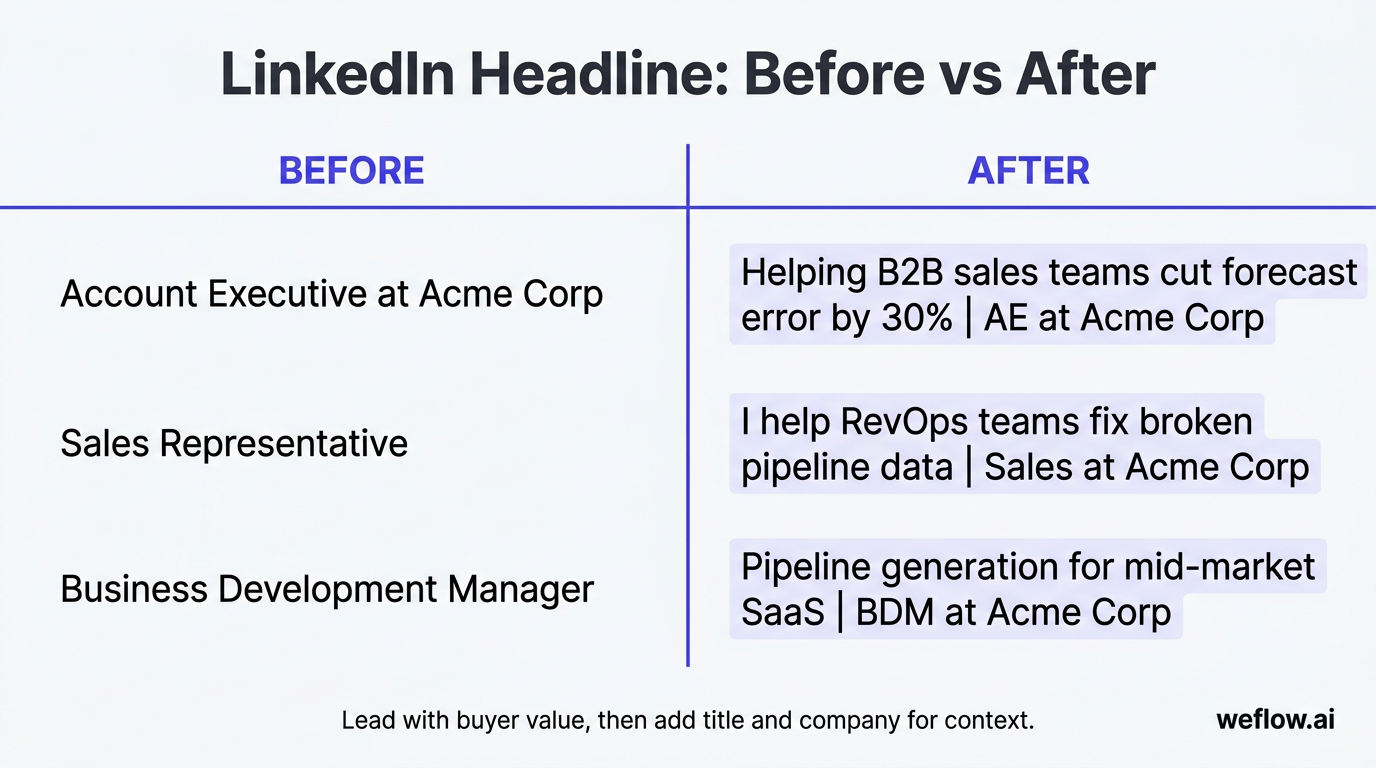
Headline: Default headlines (just your job title) waste the most valuable real estate on your profile.
| Before | After |
|---|---|
| Account Executive at Acme Corp | Helping B2B sales teams cut forecast error by 30% | AE at Acme Corp |
| Sales Representative | I help RevOps teams fix broken pipeline data | Sales at Acme Corp |
| Business Development Manager | Pipeline generation for mid-market SaaS | BDM at Acme Corp |
The pattern: lead with the value you deliver to your target buyer, then include your title and company for context.
Profile photo: Use a professional headshot with a clean background. Faces with clear eye contact get 14x more profile views than logos or distant shots.
Summary (About section): Write your summary for your buyer, not your recruiter. Open with the problem you solve, describe who you help, and include a proof point. Keep it under 300 words. Structure: the problem your buyers face, how you help solve it, a specific outcome, and a call to action ("Message me if you're dealing with X").
Banner image: Replace the default blue gradient with a branded banner. Free tools like Canva make this a five-minute task.
How to use LinkedIn search filters to find B2B prospects
Even without Sales Navigator, LinkedIn's built-in search lets you filter by people, companies, locations, industries, and keywords.
Basic search workflow:
- Start with a keyword search for your target persona (e.g., "Head of Revenue Operations")
- Filter by Connections—second-degree connections are your warm leads
- Filter by Locations to match your territory
- Filter by Current company or Industry to narrow further
- Filter by Company size if you sell to a specific segment
Saved searches: Once you've built a filter combination that matches your ICP, save it. LinkedIn will send you weekly email alerts when new people match your criteria. This turns a one-time search into an ongoing lead generation engine. You can save up to three searches on a free LinkedIn account and more with Premium or Sales Navigator.
Boolean search tips: LinkedIn supports Boolean operators in the search bar. Use them to get precise results:
- "Revenue Operations" AND "SaaS"—finds profiles containing both terms
- "VP Sales" OR "Head of Sales"—captures multiple title variations
- "RevOps" NOT "Junior"—excludes profiles with the term "Junior"
The key habit: spend 15 minutes every morning reviewing your saved search results and identifying two to three new prospects to engage with. Consistency compounds.
Find similar prospects using LinkedIn's recommendation features
After you visit a prospect's profile, LinkedIn surfaces a "People also viewed" or "Similar profiles" section. These recommendations are based on shared attributes—job title, industry, company size, and network overlap.
If you've found one Head of RevOps at a mid-market SaaS company, LinkedIn will surface 10 more with similar profiles. Make it a habit: every time you visit a prospect's profile, scan the recommendations and open ICP matches in new tabs.
LinkedIn also shows "People you may know" suggestions on your home feed, weighted by your recent activity. Check it weekly and connect with relevant suggestions.
Mine your existing clients' networks for warm leads
Second-degree connections—people connected to your existing clients—are the warmest leads on LinkedIn because you have a mutual connection who can vouch for you.
How to find them:
- Go to a current client's LinkedIn profile
- Click their connections count to browse their network
- Filter by job title, company, or location to find prospects who match your ICP
- Note the mutual connection for your outreach message
When you reach out, mention the mutual contact by name: "I work with [Client Name] on [specific initiative]—noticed you're tackling similar challenges at [Company]." You can also ask clients directly for introductions—this converts at a much higher rate than cold outreach.
How to use LinkedIn Sales Navigator for social selling
Sales Navigator adds advanced search filters, lead recommendations, real-time alerts, and CRM integration that free LinkedIn can't match. Here's a practical workflow:
| Step | Action | Why it matters |
|---|---|---|
| 1. Build a lead list | Use advanced filters (job title, company size, geography, seniority, years in role) to create a targeted list of 50-100 prospects | Precision targeting reduces wasted outreach |
| 2. Save leads | Save individual prospects and their companies to your lead lists | Sales Navigator tracks job changes, posts, and company news for saved leads |
| 3. Set alerts | Enable notifications for saved leads—job changes, content posts, company updates | Gives you timely reasons to reach out ("Congrats on the new role") |
| 4. Engage before outreach | Like and comment on saved leads' posts for two to three weeks before sending a connection request | Builds name familiarity so your request isn't cold |
| 5. Use InMail strategically | Send InMail only after engaging—reference their content or a mutual connection | Personalized InMail response rates are 3x higher than generic messages |
| 6. Sync with CRM | Use Sales Navigator's CRM sync to log leads and activities back to Salesforce | Keeps your prospecting data in one place—no duplicate entry |
Sales Navigator's "Spotlight" filters are particularly useful—filter for prospects who've changed jobs in the last 90 days, posted recently, or share a connection with you.
Use LinkedIn groups to build prospect relationships
Active LinkedIn Groups are concentrated communities of professionals with shared interests. For social selling, they serve two purposes: finding prospects who care about specific topics and positioning yourself as someone worth listening to.
How to find the right groups:
- Search for groups related to your buyers' roles and challenges (e.g., "Salesforce Admin Group," "Revenue Operations Network," "B2B Sales Leaders")
- Check member counts—groups with 1,000 to 50,000 members tend to have more genuine discussion than mega-groups
- Look at recent activity—if the last post is from three months ago, skip it
How to engage effectively:
- Answer questions with specific, practical advice—not links to your product
- Share original insights or data points that add to the conversation
- Comment on other members' posts to build visibility
- Post your own discussion topics once you've established a presence (after two to four weeks of participating)
The rule: contribute 10 times before you promote once. Your goal is to become a recognized name so that when you send a connection request to a fellow group member, they already know who you are.
How to research prospects before your first LinkedIn message
Five minutes of research makes your outreach specific and relevant—the two qualities that separate accepted requests from the "Ignore" pile.
What to look for:
| Data point | Where to find it | How to use it in outreach |
|---|---|---|
| Recent posts or articles | Activity tab on their profile | Reference a specific post: "Your take on pipeline coverage ratios was spot on" |
| Job change | Experience section or Sales Navigator alert | "Congrats on the new role at [Company]—the first 90 days are always a good time to evaluate the tech stack" |
| Shared connections | Mutual connections section | Mention the mutual contact by name for credibility |
| Company news | Company page, recent funding announcements, press | "Saw [Company] just closed a Series C—scaling the sales org usually means revisiting CRM workflows" |
| Groups and interests | Interests section on their profile | Reference shared group membership or a topic they follow |
| Endorsements and skills | Skills section | Tells you their focus area—use it to tailor your value prop |
The minimum: read their last three posts and check for any mutual connections. That alone gives you enough material to write a message that doesn't sound mass-produced.
Write personalized LinkedIn connection requests that get accepted
LinkedIn caps connection request notes at 300 characters. That's roughly two to three sentences. Every word has to earn its place.
The structure that works:
- Context: Why you're reaching out (one sentence)
- Relevance: What connects you—shared interest, mutual connection, their content (one sentence)
- Low-pressure ask: What you'd like to happen next (one sentence)
Example: "Hi [Name], I saw your post on forecasting accuracy—we're solving a similar problem for RevOps teams at mid-market SaaS companies. Would love to connect and share notes."
What to avoid:
- Pitching your product in the connection request (save it for after they accept)
- Generic messages like "I'd love to add you to my network"
- Long paragraphs—you only have 300 characters
- Copying and pasting the same message to every prospect
Acceptance rates for personalized connection requests typically run 30-40%, compared to under 15% for generic requests. The five minutes you spend on research and personalization is the highest-ROI activity in your social selling workflow.
How to create LinkedIn content that drives social selling
Posting content builds familiarity with prospects who see your name in their feed and gives you credibility when you reach out. A prospect who's seen three of your posts is far more likely to accept a connection request than one who's never heard of you.
The content mix:
- Original insights (40%): Observations from your work—buyer behavior patterns, problems you've helped solve. A five-sentence post with one sharp insight outperforms a 2,000-word article with no point of view.
- Curated content with commentary (30%): Share industry reports or data and add your own take. Don't just reshare—explain why it matters. "This Gartner report confirms what I'm seeing: teams that centralize data in Salesforce forecast 20% more accurately."
- Engagement posts (30%): Questions, polls, or contrarian takes that invite discussion. "Hot take: most pipeline reviews are a waste of time because the data is wrong before the meeting starts. Agree or disagree?"
Posting frequency: Three to five times per week. Consistency matters more than volume—the algorithm rewards regular activity.
The 4-1-1 rule: For every six pieces of content, share four curated pieces from others, one soft promotion (a case study or insight tied to your work), and one direct ask or offer.
Timing and format tips:
- Text-only and single-image posts tend to get the most reach
- Lead with a strong hook in the first three to five lines (before the "see more" fold)
- Tuesday through Thursday mornings (7-9 AM in your audience's time zone) perform well for B2B content
Warm outreach: how to engage prospects before you pitch
Going straight from connection request to sales pitch kills the relationship before it starts. Warm outreach means building familiarity and trust before you ever mention your product.
The two-to-three-week engagement cadence:
| Week | Action | Goal |
|---|---|---|
| Week 1 | Like two to three of the prospect's posts. Leave one thoughtful comment (not "Great post!" but a specific reaction or question). | Get your name in front of them without any ask |
| Week 2 | Comment on another post or share one of their articles with your own commentary. If they comment on your content, reply. | Build recognition—they start noticing your name |
| Week 3 | Send a personalized connection request referencing your previous engagement ("Enjoyed your take on pipeline coverage last week—would love to connect"). | Convert passive engagement into a direct connection |
After they accept:
- Send a thank-you message—no pitch. Just "Thanks for connecting. I follow your content on [topic] and it resonates with what I'm seeing in [your domain]."
- Continue engaging with their content for another week or two.
- Transition to a conversation naturally: "You mentioned [specific challenge] in your last post. I've been working on that exact problem with a few teams—happy to share what's working if you're interested."
This approach converts at two to three times the rate of cold outreach because the prospect already knows your name and hasn't been pitched.
Key principle: Give before you ask. Every interaction before the pitch should deliver value. By the time you suggest a conversation, the prospect should feel like they're talking to a peer, not a salesperson.
Common LinkedIn social selling mistakes to avoid
Avoid these, and you're already ahead of 90% of salespeople on LinkedIn.
Pitch-slapping: Sending a product pitch immediately after someone accepts your connection request. The fix: wait at least two weeks of engagement before any sales-related message.
Generic connection requests: "I'd like to add you to my professional network" signals zero effort. Every request should include a specific reason for connecting.
Inconsistency: Posting three times in one week then disappearing for a month kills your momentum. Block 20 minutes each morning for LinkedIn activity—commenting, posting, and prospecting.
Automating too aggressively: Automated connection requests, mass InMails, and bot-generated comments are obvious to recipients and against LinkedIn's terms of service. LinkedIn detects automation and will restrict your account.
Talking about yourself instead of your buyer: If more than half your posts are about your product or achievements, you're broadcasting—not social selling. Aim for 80% buyer-focused content.
Ignoring engagement: When someone comments on your post, respond within 24 hours. The algorithm rewards active conversations.
How to track and improve your LinkedIn Social Selling Index (SSI) score
LinkedIn's Social Selling Index (SSI) scores your social selling activity on a 0-100 scale across four components, each worth up to 25 points. It's free for every LinkedIn user—no Sales Navigator required.
Check your score at linkedin.com/sales/ssi.
| SSI component | What it measures | How to improve it |
|---|---|---|
| Establish your professional brand | Profile completeness, content publishing, engagement on your posts | Complete all profile sections, post two to three times per week, write long-form articles |
| Find the right people | Search activity, profile views, use of search filters and Sales Navigator | Use advanced search daily, save searches, view 10+ prospect profiles per day |
| Engage with insights | Content sharing, commenting on others' posts, participation in conversations | Comment on five to 10 posts per day, share curated content with your own take, join group discussions |
| Build relationships | Connection acceptance rate, InMail response rate, network growth with senior decision-makers | Send personalized connection requests, follow up within 24 hours, connect with decision-makers (not just peers) |
What's a good SSI score? The average LinkedIn user scores around 30-40. Active social sellers typically score 50-70. Top performers—those who make social selling a daily discipline—score 70 or above. Aim for 70+ and track your score weekly to identify which component needs attention.

Why SSI matters: Sales professionals with SSI scores above 70 generate 45% more opportunities and are 51% more likely to hit quota. The score is a proxy for the behaviors that drive those outcomes.
Practical tip: Focus on the daily habits—posting, commenting, searching, and connecting—and the score will follow. Check SSI weekly as a diagnostic: if one component drops, you know where to focus.
Frequently asked questions
What is social selling on LinkedIn?
Social selling is using your LinkedIn presence—profile, content, and engagement—to find, connect with, and build relationships with potential buyers. You build familiarity and trust so prospects are receptive when you start a sales conversation.
How do I start social selling on LinkedIn?
Optimize your profile to speak to your target buyer, identify 50 prospects using LinkedIn's search filters, and spend 20 minutes daily engaging with their content. After two to three weeks of consistent engagement, begin sending personalized connection requests.
What is a good LinkedIn SSI score?
A score of 70+ puts you in the top tier. The average user scores 30-40, and active social sellers land between 50-70. Check your score free at linkedin.com/sales/ssi. Focus on all four components rather than maxing out just one.
Does social selling actually work for B2B sales?
Yes. Social sellers are 51% more likely to reach quota, 78% outsell peers who skip social channels, and LinkedIn generates 80% of B2B social media leads. The caveat: social selling complements your existing sales process—it warms prospects and builds pipeline, but you still need strong discovery, demos, and deal management to close.
How often should I post on LinkedIn for social selling?
Three to five times per week. Consistency matters more than volume—a steady rhythm of three posts per week outperforms sporadic bursts followed by weeks of silence.
Do I need LinkedIn Sales Navigator for social selling?
No. Free LinkedIn gives you basic search filters, saved searches (up to three), and the ability to post and engage. Sales Navigator adds advanced filters, lead recommendations, real-time alerts, and InMail credits. Worth the investment at scale, but not required to start.
How long does it take to see results from LinkedIn social selling?
Expect three to six months of consistent effort before social selling generates measurable pipeline. Month one: profile and habits. Months two to three: audience recognition and connections. Months four to six: inbound interest, higher response rates, and LinkedIn-sourced deals entering your pipeline. Results compound over time.
What are the biggest social selling mistakes on LinkedIn?
Pitch-slapping (pitching immediately after connecting), generic connection requests, inconsistent activity, and aggressive automation. The common thread: treating LinkedIn as a broadcast channel instead of a relationship-building platform.
-p-1600.png)

.png)
-p-1600.png)
-p-1600.png)
-p-1600.png)
